

Famipress – Genealogy & Family Tree WordPress Theme
/Year
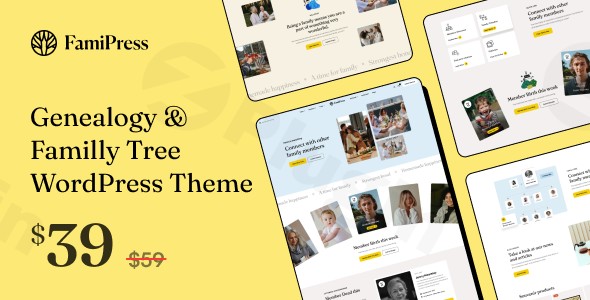
FamiPress is a highly specialized WordPress theme designed for genealogy and family tree websites, offering a robust and visually engaging platform for chronicling your family’s heritage. Whether you’re a passionate family historian, a professional genealogist, or an individual looking to preserve ancestral stories, FamiPress provides an intuitive and feature-rich solution to bring your family legacy online. With its elegant design, comprehensive family tree builder, and powerful customization options, FamiPress empowers users to create a beautiful and informative digital archive for current and future generations.
Key Features: Design, Layout & Performance
FamiPress stands out with its meticulously crafted features tailored for the unique demands of genealogy and family history documentation. It combines professional aesthetics with specialized functionality, ensuring your family’s story is presented with clarity and grace.
Design & Layout Options for Your Family Story
The theme offers a clean, elegant, and modern design that adapts seamlessly to showcase complex family histories.
- Comprehensive Family Tree Builder: At its core, FamiPress provides intuitive tools to construct intricate and visually appealing family trees. These built-in functionalities allow you to display generations of connections with organized layouts, making navigation straightforward for visitors exploring your lineage.
- Member Biography Profiles: Dedicate rich profile pages to individual family members. These pages are designed to host detailed biographies, personal stories, achievements, historical documents, and significant milestones, building a comprehensive archive for each person.
- Media Galleries & Archives: Effortlessly organize and display cherished family memories. Dedicated photo galleries, video collections, and event archives are perfect for sharing historical photographs, contemporary family gatherings, and important moments.
- Prebuilt Layouts: FamiPress jumpstarts your design process with over 3 homepage versions, more than 3 blog page styles, and customizable single product layouts. It also includes over 3 pre-made header styles and over 3 pre-made footer styles, providing a solid foundation for various genealogical content presentations.
- Genealogical Research Hub: The theme includes specialized content sections, making it ideal for genealogical societies, family historians, and research organizations to present findings, share historical data, and connect with fellow researchers.
- Event Management System: Plan and announce family reunions, historical celebrations, or special anniversaries with integrated calendar functionality and event management features.
Customization Capabilities to Reflect Your Heritage
FamiPress prioritizes user-friendly customization, ensuring your website genuinely reflects your family’s unique identity.
- Color Schemes: Easily customize your website’s color palette to align with your brand or family aesthetic.
- Typography: With support for over 600 Google Fonts, you have extensive control over your site’s typography, allowing you to choose fonts that enhance readability and style.
- Elementor Integration: Its compatibility with Elementor Website Builder and Elementor Pro means you have granular control over layout, spacing, containers, sections, and backgrounds, enabling a highly flexible design process.
- Unlimited Content: The theme supports unlimited members, families, videos, playlists, and events, suggesting robust, dedicated structures for managing vast amounts of genealogical data.
Performance & SEO Features for Wider Reach
FamiPress is built with a focus on delivering a great user experience and ensuring your family history reaches a wider audience.
- SEO Optimized Structure: The theme’s underlying code is developed with search engine optimization in mind. This clean and structured markup helps search engines understand your content better, improving visibility for distant relatives or researchers searching for specific ancestral information.
- Professional Design & Responsive Layout: Your family history will look stunning on any device, thanks to its responsive and elegant design. FamiPress ensures perfect display across desktops, tablets, and smartphones. It is also Retina Ready, providing crisp, high-resolution images.
- Security Verified: All themes undergo rigorous security scanning by third-party services like VirusTotal, ensuring your genealogical data is hosted on a safe and reliable platform.
Installation & Demo Import
Getting started with your FamiPress genealogy website is designed to be straightforward, even for those new to WordPress.
- Installation & Activation:
- After purchasing FamiPress, download the theme files.
- Navigate to your WordPress dashboard: Appearance > Themes > Add New > Upload Theme.
- Select the FamiPress
.zipfile and click “Install Now.” - Once installed, click “Activate.”
- Required Plugin Installation: Upon activation, FamiPress will likely prompt you to install any necessary companion plugins (e.g., Elementor, Revolution Slider, Contact Form 7, and potentially specific FamiPress extensions for the family tree functionality). Install and activate all recommended plugins.
- One-Click Demo Import: FamiPress simplifies setup with its One-Click Demo Installation.
- Look for a “Demo Import” or “Import Data” option within your WordPress dashboard, usually under Appearance or a dedicated theme options panel.
- Select the demo layout you wish to import (e.g., one of the multiple homepage versions).
- Initiate the import process.
- What to expect: The demo import will populate your site with pre-designed pages, posts, widgets, menus, and theme options settings, making your site look identical to the chosen demo. Be aware that importing large amounts of demo content might require sufficient server memory and execution time; if you encounter issues, contacting your hosting provider to temporarily increase PHP limits (like
memory_limit,max_execution_time) might be necessary.
- Post-Import Steps: After a successful import, review your pages, menus (Appearance > Menus), and widgets (Appearance > Widgets) to ensure everything is in place. You can then begin replacing demo content with your unique family history.
Customization Guide: Branding Your Family Legacy
FamiPress provides extensive customization options, allowing you to personalize every aspect of your website to perfectly represent your family’s heritage.
Using Elementor for Page & Layout Customization
FamiPress leverages the power of Elementor Website Builder for intuitive drag-and-drop page creation and extensive layout control.
- Page Design: For any page, click “Edit with Elementor” to customize sections, add new elements (like text, images, videos, or even specific FamiPress widgets for family members or events), and fine-tune the layout. Elementor’s visual interface makes it easy to experiment with different designs without touching any code.
- Header & Footer Builder: The theme includes pre-made header and footer styles, which can be further customized using Elementor’s Header Builder and Footer Builder. This means you can design unique headers and footers that align with your brand, including custom navigation, logos, and contact information.
- Mega Menu Builder: FamiPress features a customizable Mega Menu, also built with Elementor, allowing you to create rich, multi-column dropdown menus for enhanced navigation.
Global Styling with the WordPress Customizer
While Elementor handles page-specific design, the WordPress Customizer (Appearance > Customize) is your hub for global site settings.
- Colors & Typography: Easily adjust your theme’s global color schemes and typography settings (utilizing the 600+ Google Fonts) from the Customizer to ensure a consistent look across your site.
- Logo & Site Identity: Upload your family crest or logo, and set your site title and tagline.
- Homepage & Blog Settings: Designate your static homepage and set up your blog archive page.
- Widget Areas: Manage the content in your “Widget Ready” areas, such as sidebars and footer sections.
Crafting Your Narrative
FamiPress offers unique custom post types or functionalities for specific content.
- Family Tree Management: Explore the dedicated sections within your WordPress dashboard (likely specific FamiPress menu items) to add family members, establish relationships, and build out your genealogical tree.
- Member Profiles: Utilize the individual member profile sections to upload photos, write biographies, and add specific details about each person in your family history.
- Event Scheduling: Manage family reunions and historical events through the theme’s integrated event system, adding dates, locations, and descriptions.The customization experience with FamiPress is intuitive, especially for those familiar with Elementor. Its pre-designed styles and the flexibility of a page builder empower both beginners and experienced users to create a truly personalized and engaging family history website.
FAQ & Troubleshooting
Here are answers to some common questions about the FamiPress WordPress theme:
Is FamiPress compatible with Elementor / WPBakery / Gutenberg?
Yes, FamiPress is fully compatible with Elementor Website Builder and Elementor Pro for extensive drag-and-drop page building and customization. However, it is explicitly noted as “Gutenberg Optimized: No,” meaning users who primarily rely on the native WordPress Block Editor (Gutenberg) for content creation might find it less integrated or intuitive for general page content, favoring Elementor instead. It is not listed as compatible with WPBakery Page Builder.
Does FamiPress support WooCommerce for online stores?
Yes, FamiPress is fully compatible with WooCommerce, including recent versions (8.x.x, 9.x.x, 10.1.x, and 10.3.x). This allows you to set up an online store to sell genealogy-related products, books, or services directly from your family history website.
Does FamiPress support child themes?
While not explicitly documented in the provided sources, it is a standard WordPress best practice for premium themes to support child themes. Using a child theme is highly recommended to preserve any custom code, CSS, or template modifications during theme updates. If you plan significant customizations, it’s wise to set up a child theme.
How can I update FamiPress without losing my customizations?
To safely update FamiPress without losing your customizations, always use a child theme for any modifications to the theme’s core files or CSS. For theme options and settings configured through the Customizer or Elementor, these are usually stored in the database and should remain intact during updates. Before any major update, it’s always recommended to create a full backup of your website.
What should I do if the demo import fails or looks different from the demo site?
If the demo import fails, appears incomplete, or doesn’t match the live demo, first check your server requirements. Large demo imports require sufficient PHP memory_limit (e.g., 256MB or higher) and max_execution_time (e.g., 300 seconds or higher). Contact your hosting provider to ensure these are met. Also, ensure all recommended plugins are installed and activated before attempting the import. If issues persist, refer to the theme’s documentation or contact the developer, HaruTheme, for support.
Conclusion
FamiPress emerges as a compelling and purpose-built genealogy WordPress website builder for anyone serious about digitally preserving and sharing their family history. Its strength lies in its specialized features like the comprehensive family tree builder, detailed member biography profiles, and dedicated media archives, which go far beyond what a generic multipurpose theme can offer.With its professional, responsive design, and solid FamiPress Elementor compatibility, users gain immense flexibility in crafting visually appealing and highly customized layouts. The theme’s SEO-optimized structure ensures your valuable historical content can reach a wider audience, potentially connecting you with distant relatives or fellow researchers. While its lack of explicit Gutenberg optimization might be a consideration for some, its robust integration with Elementor more than compensates, providing a powerful drag-and-drop experience.FamiPress is ideal for professional genealogists, individuals passionate about their ancestral research, family organizations, and anyone looking to create a beautiful, functional, and secure online hub for their family’s legacy. Its WooCommerce compatibility also opens doors for selling related products or services. If you’re seeking a dedicated and feature-rich platform to honor and organize your family’s story, FamiPress is an excellent choice that delivers both aesthetic value and crucial genealogical functionality.
I. Download Limits & Account Benefits
- Free Downloads: Each email address receives 3 downloads per day for free products
- Upgrade Benefits: Purchase any paid product to increase your daily download limit by 3 for each paid product
- No Account Required: You can download immediately by receiving the download link via email
- Account Recommended: Create an account for easier access to your order history and direct update downloads
II. Understanding GPL vs Official Versions
Important: The products available on WPPick are GPL-licensed versions, which differ from official developer versions. Before purchasing, please read our comprehensive guide: Understanding GPL & Official Differences at WPPick
Key Points:
- GPL versions may not include premium support from original developers
- Updates may be delayed compared to official releases
- Some premium features might have limitations
- Always consider your specific needs and support requirements
III. Support & Assistance
We’re here to help through multiple channels:
- Email Support: Direct email assistance for all inquiries
- Live Chat: Real-time support during business hours
- Comprehensive Documentation: Detailed guides and tutorials
IV. Order Tracking
Access your complete purchase history and download links anytime: Order History
V. Account Access
New to WPPick? Login or Create Account to manage your downloads and orders efficiently.
VI. Refund Protection
We stand behind our products with a clear refund policy. Review our terms: Refund Policy
VII. Privacy & Security
Your data security is our priority. Learn how we protect your information: Privacy Policy
VII. Terms of Service
Understanding our service terms ensures a smooth experience: Terms of Use
Quick Tips for Best Experience
- Verify Compatibility: Check plugin/theme compatibility with your WordPress version
- Backup First: Always backup your site before installing new plugins or themes
- Test Environment: Consider testing on a staging site first
- Stay Updated: Regularly check for updates in your account dashboard
- Read Documentation: Review any included documentation for optimal setup
Need Help?
If you have questions about downloads, licensing, or need technical assistance, don’t hesitate to contact our support team. We’re committed to ensuring you have the best possible experience with WPPick products.
Ready to get started? Your download adventure begins with just one click!
- Compatible with WordPress 6.9.x
- Compatible with WooCommerce 10.4.x
- Revolution Slider 6.7.40
- Some small CSS issues