

Fazfood – Fast Food Restaurant WordPress Theme
/Year
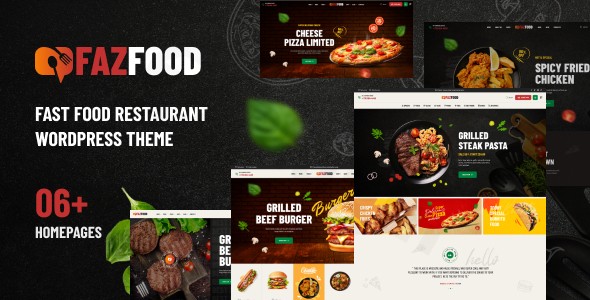
Building a successful digital presence for a food business requires more than just a menu—it requires an interface that stimulates the appetite and streamlines the ordering process. The Fazfood WordPress theme is a specialized, feature-rich solution specifically engineered for the fast-food industry. Whether you are running a pizza shop, a burger joint, a bakery, or a full-scale restaurant, this fast food restaurant WordPress theme provides the visual “pop” and technical infrastructure needed to convert hungry visitors into loyal customers.Designed with a mobile-first philosophy, Fazfood focuses on high-conversion layouts that look as good on a smartphone as they do on a desktop. By combining bold typography with crisp, appetizing imagery, it ensures your food takes center stage.
Key Features: Design, Layout & Performance
The Fazfood theme stands out because it doesn’t try to be a “jack of all trades.” Instead, it doubles down on features that restaurant owners actually need.
1. Niche-Specific Layouts & Demos
Fazfood comes equipped with over 6 creative homepage demos tailored to different food niches. From “Quick Service” styles to “Gourmet Burger” aesthetics, these templates are ready to use out of the box. Additionally, you get:
- 4+ Distinct Shop Styles: Perfect for showcasing products with high-quality imagery.
- Premade Inner Pages: Includes About Us, FAQs, 404 pages, and Contact layouts so you don’t have to build from scratch.
- Professional Blog Layouts: Ideal for food bloggers or brands looking to share recipes and company news to boost SEO.
2. Deep Elementor Integration
Customization is handled through the Elementor Drag & Drop Page Builder. This means you don’t need to touch a single line of code to move sections, change backgrounds, or adjust containers. The theme is built to be flexible, offering full control over site width (boxed or full-width) and sidebar configurations.
3. Performance & SEO Readiness
A slow site is a recipe for high bounce rates. Fazfood is built with lightweight markup and is optimized for speed. Its structure is inherently SEO-ready, ensuring that when local customers search for “best burgers near me,” your site has the technical foundation to rank. It is also fully responsive and cross-browser compatible, providing a seamless experience on Chrome, Safari, Firefox, and Edge.
4. Robust E-commerce & Online Ordering
Since Fazfood is a WooCommerce restaurant theme, it integrates seamlessly with the world’s leading e-commerce platform. It supports WooCommerce versions 5.x through 9.x, allowing you to manage online orders, delivery options, and secure payments with ease.
Installation & Demo Import Guide
Getting your restaurant online with the Fazfood WordPress theme is a straightforward process. Follow these steps to get started:
- Theme Installation: Upload the Fazfood theme file via Appearance > Themes > Add New in your WordPress dashboard. Activate the theme once uploaded.
- Plugin Setup: Upon activation, you will be prompted to install required plugins, including Elementor, WooCommerce, Slider Revolution, and Contact Form 7. Click “Begin installing plugins” and then activate them.
- One-Click Demo Import: Navigate to the theme’s import section (usually under ‘Appearance’ or ‘Theme Options’). Choose your preferred homepage demo and click Import.
- Final Polish: The importer will bring in pages, menus, and sample widgets. Once complete, you can replace the placeholder images and text with your own delicious content.
Note: Ensure your hosting environment has sufficient memory (at least 256MB) to avoid timeouts during the demo content import.
Customization Guide: Branding & Layout
Personalizing Fazfood to match your restaurant’s brand identity is intuitive thanks to the combination of the WordPress Customizer and Elementor.
- Global Styling: Use the Advanced Theme Options to set your primary and secondary brand colors. This ensures consistency across buttons, icons, and links.
- Typography: The theme supports Google Fonts, giving you access to hundreds of professional typefaces. Choose bold, clean fonts for headings to mimic the modern fast-food aesthetic.
- Header & Footer Builder: Fazfood offers flexible header styles. You can easily add your logo, contact information, and a prominent “Order Now” button to the top of every page.
* Menu Management: Use the pre-built menu templates to display your offerings. You can categorize food items, add pricing, and include dietary icons (like vegan or gluten-free) using Elementor widgets.
FAQ & Troubleshooting
Is the Fazfood theme good for online food ordering?
Yes. Fazfood is a dedicated WooCommerce restaurant theme. It is specifically designed to handle product grids, cart functionality, and checkout processes optimized for food delivery and takeaway services.
Is Fazfood compatible with Elementor?
Absolutely. Fazfood is built with Elementor, meaning all its core pages and demos are fully editable using the drag-and-drop interface. It does not rely on the Block Editor (Gutenberg) for its primary design layouts.
Does Fazfood support child themes?
Yes, the theme supports child themes. Using a child theme is highly recommended if you plan on making custom code modifications, as it ensures your changes are not lost when the parent theme is updated.
What should I do if the demo import fails?
Most demo import issues are caused by server limitations. Check that your PHP version is 7.4 or higher and increase your max_execution_time and memory_limit in your hosting control panel.
Conclusion
The Fazfood WordPress theme is an excellent investment for restaurant owners who want a professional, “appetizing” website without the high cost of a custom developer. Its standout design, combined with the power of Elementor and WooCommerce, makes it a high-performance tool for driving online sales.Who is this for?
- Small Business Owners: Specifically those in the fast-food, bakery, or cafe niches.
- Agencies: Looking for a reliable, easy-to-customize framework for restaurant clients.
- Food Entrepreneurs: Launching cloud kitchens or food trucks that need a mobile-first ordering site.If you are looking for a lightweight fast food WordPress theme that balances visual flair with technical SEO and e-commerce robustness, Fazfood is a top-tier contender. For more WordPress theme reviews and web design tips, visit wppick.com.
I. Download Limits & Account Benefits
- Free Downloads: Each email address receives 3 downloads per day for free products
- Upgrade Benefits: Purchase any paid product to increase your daily download limit by 3 for each paid product
- No Account Required: You can download immediately by receiving the download link via email
- Account Recommended: Create an account for easier access to your order history and direct update downloads
II. Understanding GPL vs Official Versions
Important: The products available on WPPick are GPL-licensed versions, which differ from official developer versions. Before purchasing, please read our comprehensive guide: Understanding GPL & Official Differences at WPPick
Key Points:
- GPL versions may not include premium support from original developers
- Updates may be delayed compared to official releases
- Some premium features might have limitations
- Always consider your specific needs and support requirements
III. Support & Assistance
We’re here to help through multiple channels:
- Email Support: Direct email assistance for all inquiries
- Live Chat: Real-time support during business hours
- Comprehensive Documentation: Detailed guides and tutorials
IV. Order Tracking
Access your complete purchase history and download links anytime: Order History
V. Account Access
New to WPPick? Login or Create Account to manage your downloads and orders efficiently.
VI. Refund Protection
We stand behind our products with a clear refund policy. Review our terms: Refund Policy
VII. Privacy & Security
Your data security is our priority. Learn how we protect your information: Privacy Policy
VII. Terms of Service
Understanding our service terms ensures a smooth experience: Terms of Use
Quick Tips for Best Experience
- Verify Compatibility: Check plugin/theme compatibility with your WordPress version
- Backup First: Always backup your site before installing new plugins or themes
- Test Environment: Consider testing on a staging site first
- Stay Updated: Regularly check for updates in your account dashboard
- Read Documentation: Review any included documentation for optimal setup
Need Help?
If you have questions about downloads, licensing, or need technical assistance, don’t hesitate to contact our support team. We’re committed to ensuring you have the best possible experience with WPPick products.
Ready to get started? Your download adventure begins with just one click!