

Femme – An Online Magazine & Fashion Blog WordPress Theme
/Year
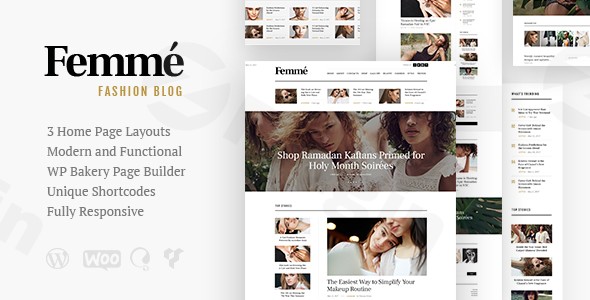
The Femme WordPress theme is a premium, fashion-forward solution designed specifically for those looking to build a high-end online magazine WordPress theme or a sophisticated lifestyle blog. Developed by AncoraThemes, it caters to the “feminine” aesthetic—prioritizing clean lines, elegant typography, and a visual hierarchy that makes editorial content pop. Whether you are a professional fashion editor, a beauty influencer, or a boutique owner looking to merge content with commerce, Femme provides a polished framework that feels both modern and professional.
Key Features: Design, Layout & Performance
Femme is more than just a pretty face; it is built on a robust technical foundation that balances aesthetic appeal with site performance. It is particularly effective for users who want a “shoppable” magazine experience.
Versatile Design & Layout Options
The theme offers a variety of ways to structure your content, ensuring your site doesn’t look like a “cookie-cutter” blog:
- Multiple Blog Layouts: Choose from several styles to display your posts, ranging from classic lists to modern grids.
- Boxed vs. Fullwidth: You can toggle between a structured boxed layout or an immersive fullwidth design.
- Homepage Variety: It includes three pre-designed homepage layouts specifically optimized for fashion blog WordPress theme users and magazine editors.
- RTL Support: A standout feature is the built-in Right-to-Left (RTL) language support, making it an excellent choice for international fashion publications.
Customization Capabilities
Personalizing the Femme WordPress theme is intuitive, thanks to its deep integration with popular tools:
- WPBakery & Elementor Compatibility: While the theme is fully compatible with WPBakery (including custom header and footer layouts), it also plays well with Elementor, giving you drag-and-drop control over every page.
- Global Style Controls: Through the WordPress Customizer, you can manage color schemes, Google Fonts typography, and container spacing in real-time.
- Header & Footer Builder: Unlike many older themes, Femme allows for modular control over your headers and footers, ensuring your branding is consistent from top to bottom.
Performance & SEO Readiness
In today’s landscape, speed is as important as style. Femme is described as Core Web Vitals ready and performance-optimized. Key technical highlights include:
- Image Lazy Loading: Built-in lazy loading ensures that your high-quality fashion photography doesn’t slow down the initial page load.
- SEO-Friendly Markup: The theme uses clean, structured code to help search engines understand your content hierarchy.
- Mobile Responsiveness: It is 100% responsive, providing a seamless experience on iPhones, iPads, and Android devices.
Installation & Demo Import
Setting up Femme is designed to be a “one-click” experience, allowing you to replicate the professional look of the demo site quickly.
- Install & Activate: Upload the theme folder via your WordPress Dashboard (Appearance > Themes) and activate it.
- Plugin Installation: Upon activation, you will be prompted to install required companion plugins, such as WPBakery Page Builder, Slider Revolution, and WooCommerce.
- One-Click Demo Import: Navigate to the theme options to find the Demo Importer. This tool will import sample posts, pages, widgets, and settings.
- Verification: After the import, check your menus and homepage settings. Because the theme includes large media files for its “fashion-forward” look, ensure your server has adequate memory limits to prevent timeouts during the import process.
Customization Guide: Branding & Layout
Once the demo is installed, you can begin the branding process to make the site uniquely yours.
- Setting the Visual Identity: Use the WordPress Customizer to upload your logo and set your primary brand colors. The theme’s “feminine” design works best with soft palettes or bold, high-contrast monochrome looks.
- Typography: Access the extensive Google Fonts library via the theme options to select fonts that match your brand’s voice—whether that is a classic serif for a luxury feel or a clean sans-serif for a modern blog.
- Creating “Shoppable” Content: If you are running an eCommerce fashion theme setup, integrate WooCommerce. Femme allows you to place products within your magazine articles or create a dedicated boutique section that matches the editorial design.
- Modular Sidebar System: Use the custom widget areas to add “About Me” sections, Instagram feeds, or newsletter sign-up forms (via the included MailChimp support).
FAQ & Troubleshooting
Is the Femme theme compatible with Elementor?
Yes, Femme is compatible with Elementor. While it has deep roots in WPBakery Page Builder for its demo layouts, many users successfully use it with Elementor Free or the Femme Elementor Template Kit for more modern design workflows.
Does the Femme theme support WooCommerce for online stores?
Absolutely. Femme is a fully functional WooCommerce fashion theme. It is designed to bridge the gap between a high-traffic fashion blog and an online boutique, allowing for a seamless transition from reading an article to purchasing a product.
How to install the Femme WordPress theme demo?
To install the demo, go to the theme’s admin panel after activating the required plugins. Look for the “One-Click Demo Import” option. This will automatically set up your pages, menus, and sample content to match the professional preview.
Does it support RTL (Right-to-Left) languages?
Yes, the Femme theme includes built-in RTL support. This makes it a top choice for fashion and lifestyle magazines targeting Arabic, Hebrew, or Persian-speaking audiences.
Conclusion
The Femme WordPress theme is a highly specialized tool for creators in the fashion, beauty, and lifestyle niches. Its strength lies in its ability to deliver a high-end, editorial aesthetic without requiring a degree in web design. By combining online magazine WordPress theme layouts with WooCommerce fashion theme functionality, it offers a versatile platform for both content and commerce.Verdict: Femme is an ideal choice for bloggers and boutique owners who prioritize aesthetics and mobile performance. While it offers deep customization via WPBakery, its clean code and RTL support make it a future-proof investment for growing international brands. For more insights on the best WordPress tools, visit wppick.com.
I. Download Limits & Account Benefits
- Free Downloads: Each email address receives 3 downloads per day for free products
- Upgrade Benefits: Purchase any paid product to increase your daily download limit by 3 for each paid product
- No Account Required: You can download immediately by receiving the download link via email
- Account Recommended: Create an account for easier access to your order history and direct update downloads
II. Understanding GPL vs Official Versions
Important: The products available on WPPick are GPL-licensed versions, which differ from official developer versions. Before purchasing, please read our comprehensive guide: Understanding GPL & Official Differences at WPPick
Key Points:
- GPL versions may not include premium support from original developers
- Updates may be delayed compared to official releases
- Some premium features might have limitations
- Always consider your specific needs and support requirements
III. Support & Assistance
We’re here to help through multiple channels:
- Email Support: Direct email assistance for all inquiries
- Live Chat: Real-time support during business hours
- Comprehensive Documentation: Detailed guides and tutorials
IV. Order Tracking
Access your complete purchase history and download links anytime: Order History
V. Account Access
New to WPPick? Login or Create Account to manage your downloads and orders efficiently.
VI. Refund Protection
We stand behind our products with a clear refund policy. Review our terms: Refund Policy
VII. Privacy & Security
Your data security is our priority. Learn how we protect your information: Privacy Policy
VII. Terms of Service
Understanding our service terms ensures a smooth experience: Terms of Use
Quick Tips for Best Experience
- Verify Compatibility: Check plugin/theme compatibility with your WordPress version
- Backup First: Always backup your site before installing new plugins or themes
- Test Environment: Consider testing on a staging site first
- Stay Updated: Regularly check for updates in your account dashboard
- Read Documentation: Review any included documentation for optimal setup
Need Help?
If you have questions about downloads, licensing, or need technical assistance, don’t hesitate to contact our support team. We’re committed to ensuring you have the best possible experience with WPPick products.
Ready to get started? Your download adventure begins with just one click!
- Compatibility with WordPress 6.7.2x has been improved.
- Theme styles have been improved.
- All plugins have been updated to their latest versions.