
Fiore – Flower Shop And Florist
/Year
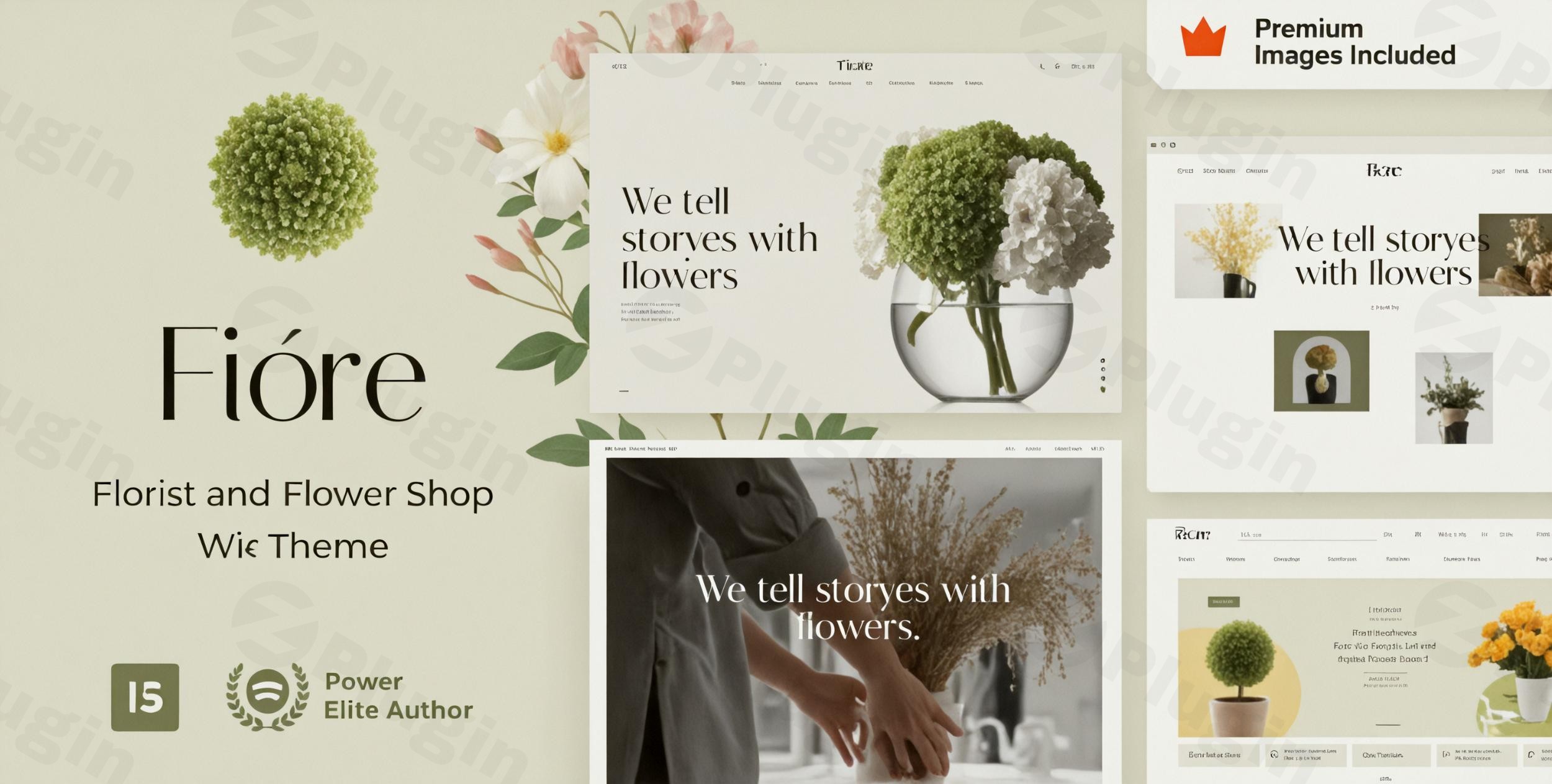
The digital storefront for a flower shop needs to be as captivating and thoughtfully arranged as the bouquets themselves. The Fiore WordPress theme steps up to this challenge, offering an elegant and robust solution specifically crafted for florists, flower shops, and businesses that thrive on visual appeal. Designed to blend aesthetic beauty with powerful eCommerce capabilities, Fiore provides a seamless online experience for both sellers and customers, making it an ideal choice for anyone looking to sell floral arrangements online.
Key Features: Design, Layout & Performance
Fiore is more than just a pretty face; it’s a meticulously engineered theme that puts stunning design, flexible layouts, and optimal performance at its core. It leverages the power of Elementor and WooCommerce to provide a comprehensive platform for your floral business.
Design & Layout Options
Fiore excels in presenting your floral arrangements with sophistication. The theme is fully responsive, ensuring your shop looks exquisite on any device, from desktop monitors to smartphones. It offers a stunning array of multiple shop page layouts and product display options, allowing you to showcase your bouquets, seasonal arrangements, and floral subscription services in the most appealing way.With Elementor and Elementor Pro compatibility at its heart, Fiore provides dynamic content layouts for virtually every part of your site, including product pages, blog posts, archives, 404 pages, and even maintenance mode pages. This means you have unparalleled control over the visual presentation of your entire website. You can also choose from over 10 header styles to perfectly frame your brand.To jumpstart your design process, Fiore includes pre-built demos tailored for various floral contexts like weddings, holidays, and everyday bouquets. A convenient one-click demo import feature allows you to set up a site with sample designs quickly. A significant bonus is the inclusion of $340 worth of premium image stock, ensuring your site starts with high-quality, usable visuals without extra licensing concerns.Unique visual elements like “Bloom Mode” help you highlight best-selling arrangements, while a “Seasonal Designer” tool enables rapid creation of festive layouts. Elegant product galleries with intuitive hover effects and quick-view options further enhance the customer browsing experience. The overall design philosophy is soft, romantic, and elegant—a perfect canvas for the delicate beauty of flowers.
Customization Capabilities
Fiore provides extensive customization, deeply integrated with Elementor Pro. Instead of a traditional theme options panel, it uses Elementor Pro’s Global Styles Panel as its central customization hub. This allows for comprehensive control over:
- Unlimited color schemes to perfectly match your brand identity.
- Google Fonts support for a wide range of typography options.
- Precise control over spacing, containers, sections, and backgrounds.Headers, footers, and even mega menus are all built and customizable using Elementor Pro, offering vast flexibility in designing these crucial navigation elements.
Performance & SEO Features
Understanding that a beautiful site must also be fast and discoverable, Fiore is designed with “SEO & Speed Optimized” characteristics. This includes clean code, lazy loading for images, and smart caching for faster load times. Its modular structure allows developers to disable unused features, further contributing to a lightweight and efficient site. Being mobile-first and fully responsive, Fiore adapts flawlessly to all screen sizes, with Elementor Pro offering granular control over mobile and tablet versions, including customized breakpoints. This focus on performance ensures a great user experience and helps with search engine rankings, benefiting any responsive florist WordPress theme.
Installation & Demo Import
Getting your Fiore-powered flower shop online is a straightforward process, though it does involve a key requirement.
- Install & Activate the Theme:
- From your WordPress dashboard, navigate to Appearance > Themes > Add New > Upload Theme.
- Choose the Fiore theme zip file you downloaded from ZeroPlugin.com or ThemeForest and click “Install Now.”
- Once installed, click “Activate.”
- Install Required Companion Plugins:
- Upon activation, Fiore will prompt you to install several recommended plugins. Crucially, Fiore relies heavily on Elementor, and Elementor Pro is specifically required for full functionality, including demo content import and building headers, footers, and dynamic content layouts. Ensure both the free Elementor plugin and Elementor Pro are installed and activated.
- Use the One-Click Demo Import:
- Fiore includes a one-click demo import feature, typically found under a “Fiore Demo Import” or “Appearance > Import Demo Data” menu item.
- Select the demo layout that best suits your vision (e.g., for weddings, holidays, or a general flower shop).
- Click “Import.” Be patient, as importing a full demo site with all its images and content can take several minutes. Ensure your server has sufficient memory and execution time configured to prevent timeouts.
- What to Expect Post-Import:
- After a successful import, your site will largely resemble the chosen demo. This includes pre-built pages, posts, sample products (if using a WooCommerce demo), menus, and widgets.
- You’ll likely need to navigate to Appearance > Menus and Appearance > Widgets to assign imported menus to your theme locations and adjust widget areas as desired.
- Your homepage and blog page will also be set according to the demo; you can verify and change these under Settings > Reading.
Customization Guide: Branding & Layout
Personalizing your Fiore theme to reflect your unique brand is an intuitive experience, largely thanks to its deep integration with Elementor Pro. This makes Fiore an excellent flower shop WordPress website builder Elementor solution.
Elementor Pro’s Global Styles Panel
Instead of a separate, proprietary theme options panel, Fiore leverages Elementor Pro’s Global Styles Panel as its primary customization hub. This provides a unified interface where you can:
- Change Colors: Easily set your brand’s primary, secondary, text, and accent colors, which will propagate across your entire site. This allows for creating customizable color schemes to match your brand.
- Adjust Typography: Select from a vast library of Google Fonts for headings, body text, and other elements, ensuring consistent and elegant typography throughout your site.
- Manage Spacing and Layouts: Control global spacing, container widths, and section padding to refine the visual hierarchy and whitespace of your pages.
Header, Footer, and Navigation
A significant advantage of Fiore is that your headers, footers, and mega menus are entirely built and customized using Elementor Pro. This offers unparalleled design flexibility. You can drag and drop elements, add dynamic content, and create truly unique and engaging navigation experiences without touching a single line of code. Simply edit your header/footer templates directly within Elementor.
Setting Up Core Pages
- Homepage: After demo import, your homepage will be set. To customize it, navigate to Pages > All Pages, find your homepage (e.g., “Home”), and click “Edit with Elementor.” Here, you can visually modify sections, add new content, and update images.
- Blog Page: If you plan to share flower care tips or seasonal offers, Fiore includes a blog section. Your blog archive layout is dynamically controlled by Elementor Pro’s Theme Builder.
- WooCommerce Shop Pages: Your main shop page, product pages, cart, and checkout are all designed with full WooCommerce compatibility, and many elements can be styled or adjusted through Elementor Pro’s Theme Builder for WooCommerce.
Advanced Customization
For more extensive modifications, it’s always recommended to use a child theme. This ensures that any direct code changes you make won’t be overwritten when you update the main Fiore theme. Custom CSS/JS can be added via the WordPress Customizer (Appearance > Customize > Additional CSS) or directly within Elementor’s custom CSS options for specific elements or pages.
FAQ & Troubleshooting
Here are answers to some common questions about the Fiore WordPress theme:
Is Fiore compatible with Elementor / WPBakery / Gutenberg?
Fiore offers full compatibility with Elementor and Elementor Pro, making Elementor Pro a required plugin for importing demo content and fully utilizing the theme’s features, including headers, footers, and dynamic content. While it will generally function with the native WordPress Block Editor (Gutenberg), the theme’s workflow and design capabilities are heavily optimized for Elementor. It is not designed for WPBakery Page Builder.
Does Fiore support WooCommerce for online stores?
Yes, Fiore offers full WooCommerce compatibility, providing a robust platform for online sales, payments, and shipping. It smartly extends WooCommerce with additional features like a wishlist, Ajax search, and gift cards functionality, making it an excellent Fiore WooCommerce theme for any online flower shop.
Is Elementor Pro required for the Fiore theme?
Yes, Elementor Pro is specifically required to import Fiore’s demo content and to fully set up and customize all aspects of the theme, including headers, footers, and dynamic layouts for products and archives. While the free Elementor plugin is a prerequisite, you will need the Pro version for the complete Fiore experience.
How can I customize the Fiore theme header?
The Fiore theme’s headers are built and fully customizable using Elementor Pro’s Theme Builder. To customize your header, navigate to Templates > Theme Builder in your WordPress dashboard, then select “Header.” You can then use Elementor’s drag-and-drop interface to design and modify your header layout, elements, and styling.
Is Fiore theme good for selling flowers online?
Yes, Fiore is exceptionally well-suited for selling flowers online. It is a purpose-built elegant WordPress theme for florists with WooCommerce integration, featuring specialized design elements and layouts tailored specifically for showcasing delicate floral arrangements. With features like “Bloom Mode” and “Seasonal Designer” tools, optimized product galleries, and robust WooCommerce extensions, it provides a comprehensive and visually appealing platform for any online flower shop.
Conclusion
The Fiore – Premium Flower Shop and Florist WordPress Theme stands out as a top-tier choice for anyone in the floral industry looking to establish a professional, elegant, and high-performing online presence. Its design flexibility, driven by a soft, romantic, and elegant aesthetic, perfectly complements the beauty of floral arrangements.With Elementor Pro as its core customization engine, Fiore offers extensive control over every aspect of your site’s design and layout, from unique headers and footers to dynamic shop pages. While the requirement for Elementor Pro adds an additional investment, it unlocks a truly intuitive drag-and-drop page-building experience, making it highly suitable for both beginners comfortable with WordPress and Elementor, and design-conscious users who prioritize stunning visuals.Beyond its looks, Fiore is built for success, featuring strong performance and SEO & Speed Optimized characteristics, ensuring your flower shop is fast and discoverable. Its deep integration with WooCommerce, coupled with enhanced eCommerce functionalities like wishlists and gift cards, makes it a robust platform for online sales.Fiore is ideal for flower shop owners, florists, wedding decorators, and event planners who need a niche-specific theme that delivers on both beauty and functionality. If you’re seeking a comprehensive, visually-driven, and highly customizable solution to showcase and sell your floral creations online, the Fiore WordPress theme is a confident and excellent choice.
I. Download Limits & Account Benefits
- Free Downloads: Each email address receives 3 downloads per day for free products
- Upgrade Benefits: Purchase any paid product to increase your daily download limit by 3 for each paid product
- No Account Required: You can download immediately by receiving the download link via email
- Account Recommended: Create an account for easier access to your order history and direct update downloads
II. Understanding GPL vs Official Versions
Important: The products available on WPPick are GPL-licensed versions, which differ from official developer versions. Before purchasing, please read our comprehensive guide: Understanding GPL & Official Differences at WPPick
Key Points:
- GPL versions may not include premium support from original developers
- Updates may be delayed compared to official releases
- Some premium features might have limitations
- Always consider your specific needs and support requirements
III. Support & Assistance
We’re here to help through multiple channels:
- Email Support: Direct email assistance for all inquiries
- Live Chat: Real-time support during business hours
- Comprehensive Documentation: Detailed guides and tutorials
IV. Order Tracking
Access your complete purchase history and download links anytime: Order History
V. Account Access
New to WPPick? Login or Create Account to manage your downloads and orders efficiently.
VI. Refund Protection
We stand behind our products with a clear refund policy. Review our terms: Refund Policy
VII. Privacy & Security
Your data security is our priority. Learn how we protect your information: Privacy Policy
VII. Terms of Service
Understanding our service terms ensures a smooth experience: Terms of Use
Quick Tips for Best Experience
- Verify Compatibility: Check plugin/theme compatibility with your WordPress version
- Backup First: Always backup your site before installing new plugins or themes
- Test Environment: Consider testing on a staging site first
- Stay Updated: Regularly check for updates in your account dashboard
- Read Documentation: Review any included documentation for optimal setup
Need Help?
If you have questions about downloads, licensing, or need technical assistance, don’t hesitate to contact our support team. We’re committed to ensuring you have the best possible experience with WPPick products.
Ready to get started? Your download adventure begins with just one click!
- Updated style.css
- Updated vamtam/assets/css/dist/elementor/elementor-all.css
- Updated vamtam/assets/css/dist/elementor/elementor-all.css.map
- Updated vamtam/assets/css/dist/elementor/responsive/elementor-below-max.css
- Updated vamtam/assets/css/dist/elementor/responsive/elementor-below-max.css.map
- Updated vamtam/assets/css/src/elementor/widgets/form/form.less
- Updated vamtam/assets/js/all.js
- Updated vamtam/assets/js/all.min.js
- Updated vamtam/assets/js/woocommerce.js
- style.css
- vamtam/admin/classes/diagnostics.php
- vamtam/admin/classes/plugin-manager.php
- vamtam/admin/classes/token-restoration.php
- vamtam/admin/helpers/updates/version-checker.php
- vamtam/assets/css/dist/elementor/elementor-all.css
- vamtam/assets/css/dist/elementor/elementor-all.css.map
- vamtam/assets/css/dist/elementor/responsive/elementor-below-max.css
- vamtam/assets/css/dist/elementor/responsive/elementor-below-max.css.map
- vamtam/assets/css/dist/elementor/responsive/elementor-max.css
- vamtam/assets/css/dist/elementor/responsive/elementor-max.css.map
- vamtam/assets/css/dist/elementor/responsive/elementor-small.css
- vamtam/assets/css/dist/elementor/responsive/elementor-small.css.map
- vamtam/classes/framework.php
- Gruntfile.js
- package-lock.json
- package.json
- style.css
- utils/grunt/init.js
- utils/grunt/packaging.js
- vamtam/admin/assets/js/admin-all.min.js
- vamtam/admin/classes/diagnostics.php
- vamtam/assets/css/dist/elementor/elementor-all.css
- vamtam/assets/css/dist/elementor/elementor-all.css.map
- vamtam/assets/css/dist/elementor/responsive/elementor-below-max.css
- vamtam/assets/css/dist/elementor/responsive/elementor-below-max.css.map
- vamtam/assets/css/dist/elementor/responsive/elementor-small.css
- vamtam/assets/css/dist/elementor/responsive/elementor-small.css.map
- vamtam/assets/css/src/elementor/widgets/wocommerce-product-add-to-cart/wocommerce-product-add-to-cart.less
- vamtam/assets/css/src/elementor/widgets/wocommerce-product-add-to-cart/wocommerce-product-add-to-cart.mobile.less
- vamtam/assets/css/src/elementor/widgets/woosw/woosw.less
- vamtam/assets/js/all.js
- vamtam/assets/js/all.min.js
- vamtam/assets/js/general.js
- vamtam/assets/js/wc-gallery.min.js
- vamtam/classes/elementor-bridge.php
- vamtam/classes/enqueues.php
- Gruntfile.js
- package.json
- samples/dependencies.php
- style.css
- utils/grunt/packaging.js
- vamtam/admin/classes/diagnostics.php
- vamtam/assets/css/dist/elementor/elementor-all.css
- vamtam/assets/css/dist/elementor/elementor-all.css.map
- vamtam/assets/css/dist/elementor/responsive/elementor-small.css
- vamtam/assets/css/dist/elementor/responsive/elementor-small.css.map
- vamtam/assets/css/dist/fallback/all.css
- vamtam/assets/css/dist/fallback/all.css.map
- style.css
- vamtam/admin/classes/diagnostics.php