
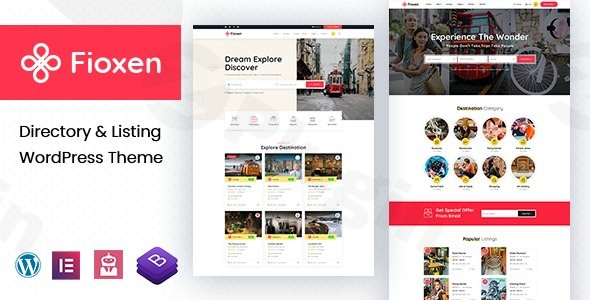
Fioxen – Directory Listing WordPress Theme
/Year
Create a Powerful and Visually Stunning Directory with Fioxen
Are you looking to build a robust, feature-rich directory website without writing a single line of code? The Fioxen Directory Listing WordPress Theme is engineered specifically for this purpose. Whether you’re launching a local restaurant guide, a global hotel directory, an events listing platform, or a business finder, Fioxen provides the comprehensive tools you need. It’s designed for entrepreneurs, small business owners, and agencies who demand both powerful functionality and an intuitive design experience, all wrapped in a visually appealing and mobile-optimized package.Fioxen, developed by gavias, leverages modern web design principles and deep integration with Elementor to help you create an exceptional online directory that connects businesses with their target audience.
Key Features: Design, Layout & Performance for Your Directory
Fioxen stands out with its specialized features tailored for directory websites, ensuring both an attractive frontend and a powerful backend.
Design & Layout Options
Fioxen offers significant flexibility to craft a unique directory experience. It comes with four distinct homepage styles and extensive options to modify various page layouts, including specific designs for single listings, blog pages, and archive pages. The theme’s fully responsive design, built on the Bootstrap 5 framework, guarantees that your directory will look immaculate and function seamlessly across all devices, from desktops to smartphones. This mobile-first approach is crucial for user experience and SEO.For critical site elements, Fioxen includes dedicated Header and Footer builders, powered by Elementor. This means you have complete drag-and-drop control over these sections, allowing for custom navigation, branding, and contact information displays that truly match your site’s aesthetic.
Customization Capabilities
Branding your directory is straightforward with Fioxen’s robust customization options:
- Color Schemes & Typography: Through a “powerful Real-time Customizer panel,” you can easily adjust color schemes to align with your brand identity. The theme also supports Google Fonts, giving you granular control over typography to enhance readability and visual hierarchy.
- Elementor Integration: Fioxen is deeply integrated with the free version of Elementor Page Builder. Beyond Elementor’s standard capabilities, the theme includes over 30 new drag-and-drop elements specifically developed by gavias for directory functionalities. This dramatically extends Elementor’s power for creating unique listing layouts, search filters, and user dashboards, making sophisticated designs accessible without coding.
- Global Styles: While specific details on global style presets aren’t extensively documented, the integration with the WordPress Customizer and Elementor provides extensive control over spacing, containers, sections, and backgrounds, ensuring consistency across your site.
Performance & SEO Features
Fioxen is built with modern web technologies including Bootstrap 5, SASS, HTML5, and CSS3, which contribute to a clean and efficient code structure. The theme is described as “well optimized,” “Full responsive,” and designed for “conversion Rate Optimization” and “High Resolution.” While specific performance benchmarks (like Lighthouse scores) are not provided, this emphasis indicates a focus on speed and user experience.For SEO, Fioxen’s clean markup, structured headings, and mobile responsiveness lay a solid foundation. The theme’s specialization means its underlying structure is inherently geared towards content-rich directories, which search engines favor. It supports WooCommerce for monetization, ensuring any eCommerce components are SEO-friendly.It’s important to note a reported security vulnerability (CVE-2024-43334) for “Multiple Themes by gavias <= Various Versions” including Fioxen, identified by Wordfence Intelligence. We recommend always keeping your theme and WordPress installation updated to the latest, patched versions to ensure optimal security.
Installation & Demo Import: Get Your Directory Running Fast
Getting started with the Fioxen theme is a streamlined process, thanks to its intuitive installation and one-click demo import feature.
- Install & Activate the Theme:
- First, download the Fioxen theme package.
- Log in to your WordPress dashboard.
- Navigate to
Appearance > Themes > Add New > Upload Theme. - Choose the Fioxen theme zip file, install, and then activate it.
- Install Required Companion Plugins:
- Upon activation, Fioxen will typically prompt you to install recommended plugins. The most crucial ones are Elementor Page Builder (the free version is deeply integrated) and Slider Revolution (which comes bundled with the theme, saving you a separate purchase). Install and activate these as prompted.
- Use the One-Click Demo Import:
- Fioxen includes a one-click demo import feature. This is a powerful tool to quickly set up your site with pre-designed pages, layouts, and content that closely resemble the theme’s live demos.
- Look for a “Demo Import” or “Import Data” option, usually found under
Appearanceor a dedicated theme menu item in your WordPress dashboard. - Follow the on-screen instructions to select and import the demo content.
- What to Expect During/After Demo Import:
- The demo import will populate your site with essential pages (homepages, contact, about), sample listings, blog posts, and pre-configured menus and widgets. This provides an excellent starting point, allowing you to simply replace demo content with your own.
- Common Pitfalls: Large demo imports can sometimes require increased server resources (PHP memory limit, execution time). If you encounter issues, consult your hosting provider or the theme documentation for recommended PHP settings (e.g., PHP 7.4+ with sufficient memory).
Customization Guide: Branding & Layout with Fioxen
Personalizing Fioxen to reflect your brand and specific directory needs is a flexible process, primarily utilizing the WordPress Customizer and Elementor.
- Using the WordPress Customizer for Global Styles:
- Navigate to
Appearance > Customizein your WordPress dashboard. - Here, you can access Fioxen’s “powerful Real-time Customizer panel” to modify global settings such as:
- Colors: Define your brand’s primary, secondary, and accent colors.
- Typography: Select desired Google Fonts or standard fonts for headings and body text, adjusting sizes, weights, and line heights.
- Logo & Favicon: Upload your brand’s logo and site icon.
- Changes made here are often global, ensuring a consistent look and feel across your entire directory.
- Navigate to
- Changing Header, Footer, and Page Layouts with Elementor:
- Since Fioxen integrates a dedicated Header and Footer builder powered by Elementor, you can easily edit these critical areas. Look for options in your WordPress dashboard, often under
Templates > Theme Builderor a theme-specific Elementor integration menu. - For individual pages (including your homepage, contact pages, and single listing layouts), simply open them with Elementor.
- Utilize Elementor’s drag-and-drop interface and Fioxen’s 30+ custom directory-specific elements to design unique layouts, add advanced search forms, display listings in various grids, incorporate maps, and create engaging content sections.
- Since Fioxen integrates a dedicated Header and Footer builder powered by Elementor, you can easily edit these critical areas. Look for options in your WordPress dashboard, often under
- Setting Up Homepage, Blog Page, and Menus:
- Homepage: After demo import, your homepage will likely be set. If not, go to
Settings > Readingand select a static page as your homepage. You can then edit this page with Elementor. - Blog Page: Similarly, under
Settings > Reading, designate a page for your blog posts (e.g., “Blog” or “News”). - Menus: Navigate to
Appearance > Menus. Create or customize your main navigation menu, adding links to your home, listings, categories, and other important pages. Fioxen’s Elementor-powered header builder gives you control over how this menu is displayed.
- Homepage: After demo import, your homepage will likely be set. If not, go to
- Advanced Customization with Child Themes:
- Fioxen is child theme compatible. For advanced users or developers who need to add custom CSS/JS or modify theme templates, using a child theme is highly recommended. This ensures that your customizations are safe and won’t be overwritten when you update the main Fioxen theme.
FAQ & Troubleshooting
Is Fioxen compatible with Elementor / WPBakery / Gutenberg?
Yes, Fioxen is deeply integrated with the free version of Elementor Page Builder and extends its functionality with over 30 custom directory-specific elements. This makes Elementor the primary tool for building and customizing layouts. While not explicitly mentioned for WPBakery, its heavy reliance on Elementor suggests WPBakery is not the intended page builder. Compatibility with the native WordPress Block Editor (Gutenberg) is also not explicitly stated, but basic content editing with Gutenberg blocks should generally work.
Does Fioxen support WooCommerce for online stores?
Yes, Fioxen is fully compatible with WooCommerce. This means you can seamlessly integrate e-commerce functionalities into your directory website, enabling features like premium listing packages, subscription models, and other monetization strategies directly through WooCommerce.
What type of directory websites can I create with Fioxen?
Fioxen is incredibly versatile and ideal for a wide range of directory and listing websites, including restaurant and food guides, hotel and accommodation directories, local business listings, tourist attraction databases, event and entertainment venues, and even review websites with its built-in comments and rating features. It’s perfect for any niche requiring a catalog of entries with details, locations, and user interaction.
Does Fioxen support child themes?
Yes, Fioxen is child theme compatible. We highly recommend using a child theme for any advanced customizations (e.g., custom CSS, PHP modifications) to ensure that your changes are preserved when the main Fioxen theme receives updates.
What premium plugins are included with Fioxen?
Fioxen comes bundled with two powerful premium plugins: Elementor Page Builder (free version), which is deeply integrated and extended with custom elements, and Slider Revolution, a popular and versatile slider plugin that allows you to create dynamic and engaging content sliders. The inclusion of Slider Revolution saves you an estimated $18-$19.
Conclusion
The Fioxen Directory Listing WordPress Theme offers an exceptional solution for anyone looking to build a professional, high-performing directory website. Its core strength lies in its specialized feature set, which directly addresses the needs of listing-based sites, combined with the unparalleled design flexibility of Elementor Page Builder.With Fioxen, you gain access to a mobile-optimized design, advanced search capabilities, user-friendly listing management, and built-in monetization options via WooCommerce. Its inclusion of premium plugins like Slider Revolution adds further value, streamlining your development process. While it’s essential to stay updated due to potential security vulnerabilities, gavias’s reputation as a prolific theme developer on ThemeForest suggests a commitment to ongoing updates and support.Fioxen is an excellent choice for entrepreneurs, small business owners, freelancers, and agencies who need a powerful yet accessible platform to launch various directories, from local business guides to global travel listings. It shines particularly for those who prefer an all-in-one, niche-specific solution over adapting a generic multipurpose theme with multiple, potentially conflicting, third-party plugins. Choose Fioxen for a robust, customizable, and visually appealing foundation for your next directory venture.
I. Download Limits & Account Benefits
- Free Downloads: Each email address receives 3 downloads per day for free products
- Upgrade Benefits: Purchase any paid product to increase your daily download limit by 3 for each paid product
- No Account Required: You can download immediately by receiving the download link via email
- Account Recommended: Create an account for easier access to your order history and direct update downloads
II. Understanding GPL vs Official Versions
Important: The products available on WPPick are GPL-licensed versions, which differ from official developer versions. Before purchasing, please read our comprehensive guide: Understanding GPL & Official Differences at WPPick
Key Points:
- GPL versions may not include premium support from original developers
- Updates may be delayed compared to official releases
- Some premium features might have limitations
- Always consider your specific needs and support requirements
III. Support & Assistance
We’re here to help through multiple channels:
- Email Support: Direct email assistance for all inquiries
- Live Chat: Real-time support during business hours
- Comprehensive Documentation: Detailed guides and tutorials
IV. Order Tracking
Access your complete purchase history and download links anytime: Order History
V. Account Access
New to WPPick? Login or Create Account to manage your downloads and orders efficiently.
VI. Refund Protection
We stand behind our products with a clear refund policy. Review our terms: Refund Policy
VII. Privacy & Security
Your data security is our priority. Learn how we protect your information: Privacy Policy
VII. Terms of Service
Understanding our service terms ensures a smooth experience: Terms of Use
Quick Tips for Best Experience
- Verify Compatibility: Check plugin/theme compatibility with your WordPress version
- Backup First: Always backup your site before installing new plugins or themes
- Test Environment: Consider testing on a staging site first
- Stay Updated: Regularly check for updates in your account dashboard
- Read Documentation: Review any included documentation for optimal setup
Need Help?
If you have questions about downloads, licensing, or need technical assistance, don’t hesitate to contact our support team. We’re committed to ensuring you have the best possible experience with WPPick products.
Ready to get started? Your download adventure begins with just one click!
- Release published on 28 August 2025
- Released on 25 July 2025