

Fitnase – Gym And Fitness WordPress Theme
/Year
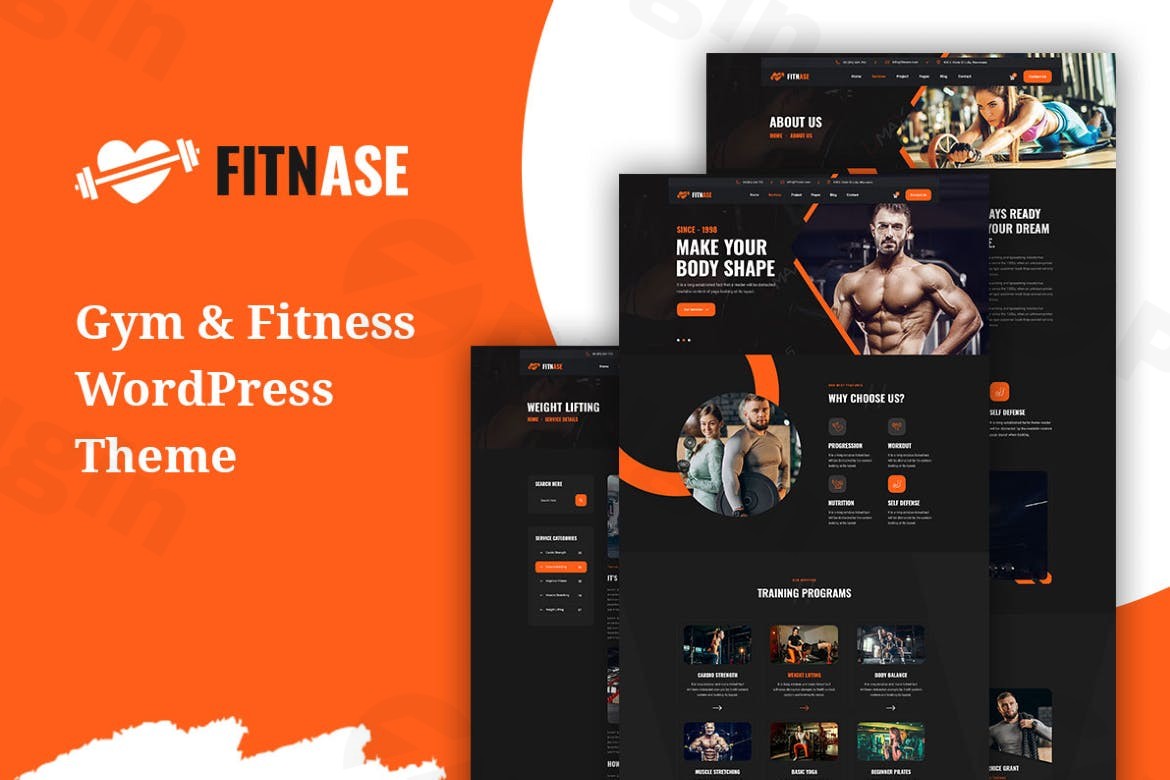
Building a compelling online presence is crucial for any fitness business, and the Fitnase WordPress Theme is engineered precisely for this purpose. This modern, clean, and highly functional WordPress theme is a complete solution for gyms, personal trainers, yoga studios, and wellness centers seeking to showcase their services, manage clients, and offer premium content with ease. Fitnase blends a dynamic aesthetic with robust backend features, empowering fitness professionals to thrive in the digital landscape.
Key Features: Design, Layout & Performance
Fitnase isn’t just visually appealing; it’s a powerhouse designed to deliver a seamless user experience and strong performance. Its design philosophy centers on a professional, energetic feel, reflecting the core values of the fitness industry.
Design & Layout Options
Fitnase offers a sleek, modern design characterized by bold typography and dynamic layouts that capture the essence of fitness and movement. The theme is built with a responsive design foundation, ensuring your website looks impeccable and functions flawlessly across all devices, from desktops to tablets and smartphones.To kickstart your site development, Fitnase comes with ready-to-use homepage demos and a variety of essential inner pages. These include dedicated layouts for class schedules, professional trainer profiles, clear pricing tables, and convenient booking forms. This wealth of pre-designed content allows for rapid deployment and provides a strong foundation for any fitness-related website.
Customization Capabilities
Tailoring Fitnase to your brand identity is straightforward. The theme integrates deeply with the WordPress Customizer, providing real-time previews of your changes. You gain control over:
- Color Schemes: Easily adjust your brand colors to create a cohesive look.
- Typography: Access a wide selection of Google Fonts to establish a distinctive textual hierarchy and style.
- Layout Options: While specific granular controls over spacing, containers, sections, and backgrounds are managed through the integrated page builder, the theme provides robust general layout flexibility.
Performance & SEO Features
In today’s competitive online environment, speed and search engine visibility are paramount. Fitnase is designed with these critical aspects in mind:
- SEO Optimization: The theme is SEO-ready, featuring clean code and a structured heading hierarchy that helps search engines understand your content, enhancing your visibility.
- Speed: While specific benchmark scores are not provided, Fitnase is built for fast and reliable performance, ensuring quick loading times that contribute to a positive user experience and better search rankings.
- Mobile Responsiveness: With its fully responsive design, your site will automatically adapt to any screen size, providing an optimal viewing experience for all visitors. This is crucial for both user satisfaction and search engine ranking.
- Cross-Browser Compatibility: Implied by its modern framework, Fitnase is expected to perform consistently across various web browsers.
Installation & Demo Import
Getting started with Fitnase is designed to be a smooth process, even for those new to WordPress. The theme leverages a one-click demo import feature, enabling you to replicate the beautiful demo sites quickly.
- Install & Activate the Theme:
- From your WordPress dashboard, navigate to
Appearance > Themes > Add New > Upload Theme. - Upload the
fitnase.zipfile you downloaded. - Once uploaded, click
Install Nowand thenActivate.
- From your WordPress dashboard, navigate to
- Install Required Companion Plugins:
- Upon activation, Fitnase will prompt you to install a set of recommended plugins. These typically include Elementor (for page building), WooCommerce (for eCommerce), Contact Form 7 (for forms), and Slider Revolution (for animated sliders). Install and activate all recommended plugins for full theme functionality.
- Use the Theme’s One-Click Demo Import:
- After installing the necessary plugins, look for a “Demo Import” or “Import Demo Data” option, usually under
Appearanceor a dedicated theme menu item (e.g.,Fitnase Options). - Select the demo you wish to import and proceed.
- Note on Server Requirements: Importing a full demo can be resource-intensive. Ensure your hosting environment meets standard WordPress requirements for PHP memory limit, execution time, and max input vars to prevent timeouts or incomplete imports. If you encounter issues, increasing these values in your
php.inifile or contacting your host is recommended.
- After installing the necessary plugins, look for a “Demo Import” or “Import Demo Data” option, usually under
- What to Expect During/After Demo Import:
- The import process will populate your site with pages, posts, sample images, menus, widgets, and theme settings from the chosen demo.
- After a successful import, you may need to manually assign your main navigation menus under
Appearance > Menusand set your homepage underSettings > Reading.
Customization Guide: Branding & Layout
The Fitnase Gym Fitness Theme provides extensive options for personalizing your website, ensuring it truly represents your brand.
- WordPress Customizer: This is your central hub for global site settings. Access it via
Appearance > Customize. Here, you can easily:- Upload your logo and set your site title and favicon.
- Adjust global colors (primary, secondary, accent colors) to align with your brand palette.
- Select from a wide array of Google Fonts for headings and body text, allowing you to fine-tune your typography.
- Control basic header and footer layouts and widget assignments.
- Elementor Page Builder Integration: Fitnase’s compatibility with Elementor transforms customization into an intuitive drag-and-drop experience. For any page created with Elementor (including most demo pages), you can:
- Visually edit content sections, add new elements (images, text blocks, videos, buttons), and rearrange layouts without touching a single line of code.
- Customize spacing, margins, padding, and background settings for individual sections and elements.
- Leverage Elementor’s vast library of widgets to create unique page designs.
- Setting up Your Homepage, Blog Page, and Menus:
- Homepage: After demo import, navigate to
Settings > Readingto set your imported homepage as the static front page. - Blog Page: Create a new page (e.g., “Blog”) and assign it as your “Posts page” under
Settings > Readingto display your blog articles. - Menus: Go to
Appearance > Menusto manage your navigation. You can create new menus, add pages, posts, custom links, and categories, then assign them to the theme’s available menu locations (e.g., primary menu, footer menu).Fitnase’s integration with the Customizer and Elementor makes the customization process incredibly intuitive, providing both global control and granular page-level design flexibility.
- Homepage: After demo import, navigate to
FAQ & Troubleshooting
Here are answers to some common questions about the Fitnase WordPress Theme:
Is Fitnase compatible with Elementor and Gutenberg?
Yes, Fitnase is compatible with Elementor, offering a seamless drag-and-drop experience for customizing your pages. While it was initially developed with Elementor in mind, modern WordPress themes generally support the Gutenberg block editor for basic content creation within posts and pages. Any older “remove Gutenberg widget” notices likely refer to specific theme-provided widgets and not core Gutenberg block functionality.
Does Fitnase support WooCommerce for online stores?
Absolutely! Fitnase features built-in WooCommerce integration, making it an excellent choice for fitness businesses that want to sell products, merchandise, or even extend their membership offerings through additional payment gateways. The theme’s comprehensive membership system also works in conjunction with WooCommerce for flexible payment options.
Does Fitnase support child themes?
Yes, like all well-developed WordPress themes, Fitnase supports child themes. Using a child theme is highly recommended for any custom code or styling modifications. This ensures that your customizations are preserved even when you update the main Fitnase theme, preventing loss of work.
How can I update the Fitnase theme without losing my customizations?
To update the Fitnase theme safely, always use a child theme for your customizations. Before updating, it’s also crucial to perform a full website backup (files and database). Most theme updates can be done directly from your WordPress dashboard or via FTP by replacing the theme files (after backing up).
What should I do if the Fitnase demo import fails or looks different from the demo site?
If the Fitnase demo import fails, first check your hosting environment’s PHP configuration (memory limit, execution time, max input vars) and increase them if they are below recommended WordPress settings. If the import completes but looks different, ensure all recommended plugins are installed and activated. Sometimes, permalink settings need to be refreshed (Settings > Permalinks > Save Changes) or images need to be regenerated using a plugin like Regenerate Thumbnails. If issues persist, consider manually setting up pages and menus or consulting the theme’s documentation.
Conclusion
The Fitnase – Premium Gym & Fitness WordPress Theme stands out as a highly specialized and powerful solution for anyone in the health and wellness industry. Its sleek, modern design, coupled with deep-rooted functionalities like a comprehensive membership system and advanced trainer/user dashboards, makes it far more than just a visually appealing template.With strong Elementor compatibility, intuitive customization options via the WordPress Customizer, and built-in WooCommerce integration, Fitnase offers incredible design flexibility and the ability to monetize your services effectively. Its focus on performance and SEO readiness ensures your website will not only look good but also rank well and load quickly.Fitnase is an ideal choice for personal trainers, gym owners, yoga studios, and wellness centers who require an all-in-one platform for managing client plans, facilitating payments, and building a professional online brand without extensive coding knowledge. For those seeking a tightly integrated, niche-specific WordPress theme that delivers on both aesthetics and advanced fitness management features, Fitnase is a confident recommendation.
I. Download Limits & Account Benefits
- Free Downloads: Each email address receives 3 downloads per day for free products
- Upgrade Benefits: Purchase any paid product to increase your daily download limit by 3 for each paid product
- No Account Required: You can download immediately by receiving the download link via email
- Account Recommended: Create an account for easier access to your order history and direct update downloads
II. Understanding GPL vs Official Versions
Important: The products available on WPPick are GPL-licensed versions, which differ from official developer versions. Before purchasing, please read our comprehensive guide: Understanding GPL & Official Differences at WPPick
Key Points:
- GPL versions may not include premium support from original developers
- Updates may be delayed compared to official releases
- Some premium features might have limitations
- Always consider your specific needs and support requirements
III. Support & Assistance
We’re here to help through multiple channels:
- Email Support: Direct email assistance for all inquiries
- Live Chat: Real-time support during business hours
- Comprehensive Documentation: Detailed guides and tutorials
IV. Order Tracking
Access your complete purchase history and download links anytime: Order History
V. Account Access
New to WPPick? Login or Create Account to manage your downloads and orders efficiently.
VI. Refund Protection
We stand behind our products with a clear refund policy. Review our terms: Refund Policy
VII. Privacy & Security
Your data security is our priority. Learn how we protect your information: Privacy Policy
VII. Terms of Service
Understanding our service terms ensures a smooth experience: Terms of Use
Quick Tips for Best Experience
- Verify Compatibility: Check plugin/theme compatibility with your WordPress version
- Backup First: Always backup your site before installing new plugins or themes
- Test Environment: Consider testing on a staging site first
- Stay Updated: Regularly check for updates in your account dashboard
- Read Documentation: Review any included documentation for optimal setup
Need Help?
If you have questions about downloads, licensing, or need technical assistance, don’t hesitate to contact our support team. We’re committed to ensuring you have the best possible experience with WPPick products.
Ready to get started? Your download adventure begins with just one click!
- Order email template