
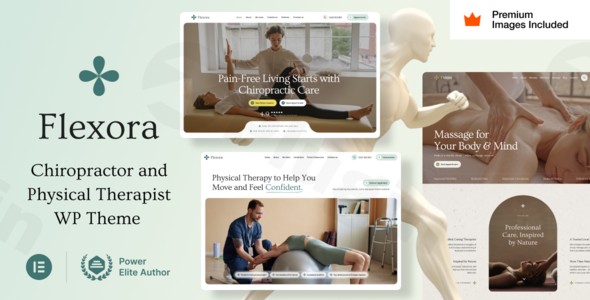
Flexora
/Year
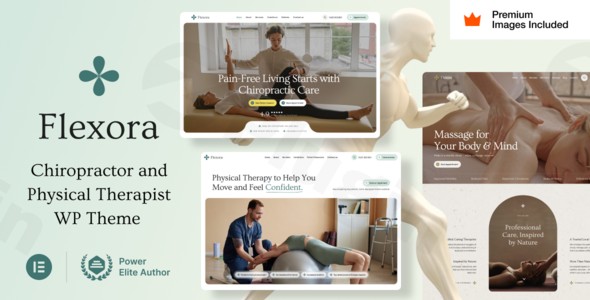
Introduction to Flexora
Flexora is a specialized WordPress theme designed specifically for physiotherapy clinics, chiropractic offices, massage therapists, and wellness centers. Built to integrate seamlessly with page builders like Elementor, it allows practitioners and clinic managers to create professional, patient-friendly websites without coding. The theme focuses on patient conversion, clear service presentation, and reliable appointment booking workflows.
What Flexora Does
Flexora provides a complete structural foundation for health and wellness websites. It includes pre-designed page templates for services, specialist staff profiles, patient testimonials, and appointment scheduling forms. The layout emphasizes clean typography, calming color palettes suitable for medical practices, and mobile-friendly responsiveness to ensure patients can easily find information or book sessions from any device.
Who It Is For
This theme is tailored for independent physical therapists, chiropractors, massage therapy studios, holistic health practitioners, and multidisciplinary wellness clinics. It is also an effective solution for digital agencies and freelance developers building client websites within the healthcare and rehabilitation sector who need a quick start with reliable customization options.
Key Capabilities
Flexora offers a range of tools tailored to clinic management and patient engagement:
- Elementor page builder compatibility for visual drag-and-drop customization.
- Pre-built layout templates for therapy treatments, pricing, and practitioner bios.
- Integrated contact and appointment booking form styling.
- Dedicated blog section for publishing wellness tips, recovery guides, and clinic news.
- Fully responsive and retina-ready design across desktop, tablet, and mobile screens.
Practical WordPress Use Cases
Site administrators can use Flexora to set up a fully operational clinic website complete with service pages detailing specific rehabilitation techniques. Practitioners can showcase their credentials through dedicated team grids, while patients can utilize integrated forms to request consultations or appointments directly through the site.
Setup and Compatibility Notes
Flexora is designed to work smoothly with standard WordPress installations and popular page builder plugins. Basic setup involves installing the theme via the WordPress dashboard, importing any demo layouts if required, and connecting your preferred appointment booking plugin or contact forms to start accepting patient inquiries.
Reasons to Choose Flexora on WPPick
Choosing Flexora through WPPick gives you access to a clean, verified theme file ready for deployment on your staging or production environments. It offers an efficient shortcut for launching niche medical websites with professional aesthetics and structured layouts tailored to practice management.
Latest Version Context
Detailed release notes are not available from the provided sources for version 10.0.
Frequently Asked Questions
Q: Is Flexora compatible with Elementor? A: Yes, Flexora is built to work seamlessly with Elementor, allowing you to edit pages visually.
Q: Can I use this theme for a general medical practice? A: While optimized for physiotherapy and chiropractic clinics, its clean design fits various healthcare and wellness services.
Q: Does Flexora include booking features? A: It includes layout styles and form integrations designed to support appointment scheduling workflows.
Q: Is coding knowledge required to set up Flexora? A: No, you can build and customize pages using visual drag-and-drop tools without writing code.
I. Download Limits & Account Benefits
- Free Downloads: Each email address receives 3 downloads per day for free products
- Upgrade Benefits: Purchase any paid product to increase your daily download limit by 3 for each paid product
- No Account Required: You can download immediately by receiving the download link via email
- Account Recommended: Create an account for easier access to your order history and direct update downloads
II. Understanding GPL vs Official Versions
Important: The products available on WPPick are GPL-licensed versions, which differ from official developer versions. Before purchasing, please read our comprehensive guide: Understanding GPL & Official Differences at WPPick
Key Points:
- GPL versions may not include premium support from original developers
- Updates may be delayed compared to official releases
- Some premium features might have limitations
- Always consider your specific needs and support requirements
III. Support & Assistance
We’re here to help through multiple channels:
- Email Support: Direct email assistance for all inquiries
- Live Chat: Real-time support during business hours
- Comprehensive Documentation: Detailed guides and tutorials
IV. Order Tracking
Access your complete purchase history and download links anytime: Order History
V. Account Access
New to WPPick? Login or Create Account to manage your downloads and orders efficiently.
VI. Refund Protection
We stand behind our products with a clear refund policy. Review our terms: Refund Policy
VII. Privacy & Security
Your data security is our priority. Learn how we protect your information: Privacy Policy
VII. Terms of Service
Understanding our service terms ensures a smooth experience: Terms of Use
Quick Tips for Best Experience
- Verify Compatibility: Check plugin/theme compatibility with your WordPress version
- Backup First: Always backup your site before installing new plugins or themes
- Test Environment: Consider testing on a staging site first
- Stay Updated: Regularly check for updates in your account dashboard
- Read Documentation: Review any included documentation for optimal setup
Need Help?
If you have questions about downloads, licensing, or need technical assistance, don’t hesitate to contact our support team. We’re committed to ensuring you have the best possible experience with WPPick products.
Ready to get started? Your download adventure begins with just one click!