
Flow – Creative Blog WordPress Theme
/Year
Introduction: Discover Flow for Your Creative Blog
Flow – Creative Blog WordPress Theme is the ultimate platform for writers, artists, and storytellers seeking to present their content with a vibrant and artistic flair. Designed specifically for creative bloggers, this theme offers a unique blend of visual appeal and robust functionality, ensuring your stories not only get told but truly captivate your audience. Whether you’re a lifestyle guru, a passionate photographer, or a thoughtful writer, Flow provides the perfect canvas to make your blog stand out with its lively design and engaging user experience.
Key Features: Design, Layout & Performance That Inspire
Flow is meticulously crafted to empower creative minds, offering a rich suite of features that focus on design flexibility, engaging layouts, and a seamless browsing experience.
Stunning Design and Layout Options for Every Story
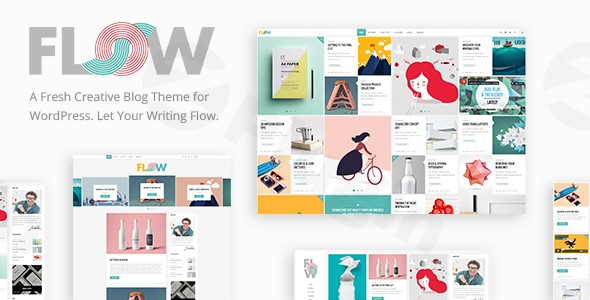
Flow sets itself apart with its diverse range of pre-designed layouts, ensuring your content is always presented beautifully. You get to choose from nine distinct homepage layouts, each crafted to offer a fresh perspective on content presentation. Beyond homepages, Flow offers various blog list and single post layouts, including:
- Innovative Blog Expanding Tiles Layout with Ajax functionality: This unique feature provides a dynamic way for readers to explore posts without full page reloads, enhancing engagement.
- Blog Split Column Layout, Blog Standard Layout, and Blog Masonry Layout: Classic and modern options to suit different content densities and visual preferences.
- Blog Whole Post Layout, Blog Post Slider, and Blog Post Carousel: Ideal for highlighting specific posts or creating visually rich sections.
- Waterfall Slider: A distinctive visual element that adds a touch of sophistication to your site.The theme’s vibrant “Pastel Palette” and “lively and artistic” design philosophy ensure that your blog always maintains a cohesive and appealing aesthetic.
Seamless Customization for Your Unique Brand
Personalizing your Flow WordPress theme is intuitive, requiring no coding knowledge thanks to its Powerful Admin Panel. You have extensive control over your site’s appearance:
- Easy Color Switch: Effortlessly change your blog’s color scheme to match your brand identity or simply refresh its look.
- 1000+ Font Styles Available: With a vast selection of fonts, you can define the perfect typographic voice for your content, ensuring readability and style.
- Fully Customizable Headers and Footers: Flow offers multiple header types, including sticky, sticky-on-scroll-up, and fixed behaviors, along with a header top bar and separate logo variants for sticky and mobile headers. This level of detail allows for a truly branded experience.
- Child Theme Included: For advanced customizations, Flow comes with a child theme, allowing you to make modifications without fear of losing them during theme updates.
Optimized for Performance and Reach
A beautiful blog also needs to perform well. Flow integrates advanced AJAX functionality to ensure smooth navigation and faster loading times. This means your readers can browse your content without unnecessary page reloads, leading to a much-improved user experience. Furthermore, Flow boasts a fully responsive and retina-ready design, guaranteeing that your creative content looks stunning and functions flawlessly on any device—from desktops to smartphones and tablets. While specific SEO performance scores are not detailed, its clean design and modern code structure contribute to a solid foundation for search engine optimization.
Multimedia Integration to Tell Richer Stories
For podcasters, musicians, or anyone looking to enrich their blog with audio, Flow offers built-in SoundCloud integration. This makes showcasing your audio content effortless, providing a comprehensive platform for diverse media types. The theme also supports various custom post formats, including Audio, Video, Standard, Gallery, Link, and Quote, further enhancing its multimedia capabilities.
Installation & Demo Import: Get Started with Flow
Setting up your Flow Creative Blog WordPress Theme is designed to be straightforward, even for beginners.
Getting Started with Flow: A Step-by-Step Guide
- Install and Activate the Theme:
- Once you’ve downloaded Flow from ZeroPlugin.com, log into your WordPress dashboard.
- Navigate to
Appearance > Themes > Add New > Upload Theme. - Choose the
flow.zipfile and clickInstall Now. - After installation, click
Activate.
- Install Required Plugins:
- Upon activation, Flow will typically prompt you to install a set of recommended plugins. Crucially, Flow bundles the WPBakery Page Builder Plugin (a premium plugin often valued at $46), which provides powerful drag-and-drop page building capabilities. Ensure you install and activate WPBakery and any other necessary plugins (like Contact Form 7).
- Import Demo Content:
- Flow includes a one-click demo import feature, allowing you to quickly set up your site to look just like one of the nine distinct demo layouts.
- Navigate to the theme’s import option, usually found under
Appearance > Import Demo Dataor within the theme’s dedicated options panel. - Select the demo you wish to import and proceed.
- What to Expect: During demo import, all demo content (pages, posts, menus, widgets, and theme options) will be added to your site. This process might take a few minutes, depending on your server’s speed. It’s recommended to have sufficient server memory and execution time limits to prevent timeouts for large imports. After import, you’ll have a fully functional site structure ready for your content.
- Remember to assign your desired menu locations and set your homepage under
Settings > Readingif they don’t automatically align after import.
Customization Guide: Personalizing Your Creative Blog
Making Flow truly yours is a rewarding process, designed to be accessible even without coding expertise.
Branding and Layout Customization with Flow
Flow’s “Powerful Admin Panel” serves as your central hub for customization, often found under Appearance > Customize for general WordPress Customizer settings, or as a separate menu item within your dashboard for theme-specific options.
- Changing Colors and Typography: Easily switch your color palette using the “Easy color switch” functionality and select from over 1000 font styles to align with your brand. These options are typically found in the Customizer or theme options panel.
- Header and Footer Layouts: Experiment with Flow’s multiple header types (sticky, fixed, sticky-on-scroll-up) and fully customizable footers. You can also upload separate logo variants for your sticky header and mobile view, ensuring consistent branding across all browsing experiences.
- Setting Up Your Homepage and Blog Page: After importing demo content, you’ll likely have pre-designed pages. You can designate any page as your homepage and a separate one for your blog posts under
Settings > Readingin the WordPress dashboard. - Menu Management: Customize your navigation menus under
Appearance > Menus. Flow supports various widget areas, including those in the header top and bottom, allowing for flexible menu and content placement. - Working with WPBakery: Since Flow bundles WPBakery Page Builder, you can drag and drop elements to create custom page layouts for static pages, portfolios, or landing pages. Flow also offers “Adaptable shortcodes” that integrate seamlessly with WPBakery for enhanced content creation.
FAQ & Troubleshooting: Common Questions About Flow
Here are some frequently asked questions to help you get the most out of your Flow theme.
Is Flow – Creative Blog WordPress Theme compatible with popular page builders like WPBakery or Gutenberg?
Yes, Flow comes bundled with the WPBakery Page Builder Plugin for comprehensive drag-and-drop page building. Additionally, the theme has added compatibility with the Gutenberg block editor, giving you flexibility in how you create and manage your content.
Does Flow support WooCommerce for online stores?
The provided documentation for Flow – Creative Blog WordPress Theme does not explicitly mention WooCommerce compatibility. While it’s designed primarily for blogging, if you require e-commerce functionality, you might need to investigate further or consider a theme specifically built for online stores.
How can I update the Flow theme without losing my customizations?
To update Flow without losing your customizations, it is highly recommended to use a child theme. Flow comes with a child theme (version 1.0.1) that allows you to make changes to the theme’s code or styles in a separate, update-safe environment. Always back up your site before performing any updates.
What should I do if the demo import fails or looks different from the demo site?
If the demo import for Flow fails, ensure your server meets the minimum requirements (especially PHP memory limit and execution time). Check for any plugin conflicts by temporarily deactivating non-essential plugins. If the import completes but looks different, verify that all required plugins were installed and activated, and then re-run the demo import. Sometimes, re-assigning menus and homepage settings manually after import can resolve display issues.
Does Flow support child themes?
Yes, Flow comes with a child theme (version 1.0.1 updated on April 9th, 2019). Using a child theme is crucial for making custom code modifications to your WordPress site, as it ensures that your changes are preserved even when the main Flow theme is updated.
Conclusion: Your Creative Journey with Flow
The Flow – Creative Blog WordPress Theme from ZeroPlugin.com is an exceptional choice for anyone looking to build a visually engaging and highly creative blog or online magazine. Its strengths lie in its vast array of design and layout options, including unique features like the Ajax Expanding Tiles, and its intuitive customization capabilities powered by a “Powerful Admin Panel” and the included WPBakery Page Builder.With its focus on aesthetic appeal, seamless user experience through AJAX functionality, and full responsiveness, Flow provides a robust and elegant solution for creative bloggers, artists, and writers. It empowers users, from beginners to experienced content creators, to craft a unique online presence without needing coding knowledge. If your goal is to showcase your content in a distinctive, lively, and artistic manner that captivates your audience, Flow is a truly compelling WordPress theme worth considering.
I. Download Limits & Account Benefits
- Free Downloads: Each email address receives 3 downloads per day for free products
- Upgrade Benefits: Purchase any paid product to increase your daily download limit by 3 for each paid product
- No Account Required: You can download immediately by receiving the download link via email
- Account Recommended: Create an account for easier access to your order history and direct update downloads
II. Understanding GPL vs Official Versions
Important: The products available on WPPick are GPL-licensed versions, which differ from official developer versions. Before purchasing, please read our comprehensive guide: Understanding GPL & Official Differences at WPPick
Key Points:
- GPL versions may not include premium support from original developers
- Updates may be delayed compared to official releases
- Some premium features might have limitations
- Always consider your specific needs and support requirements
III. Support & Assistance
We’re here to help through multiple channels:
- Email Support: Direct email assistance for all inquiries
- Live Chat: Real-time support during business hours
- Comprehensive Documentation: Detailed guides and tutorials
IV. Order Tracking
Access your complete purchase history and download links anytime: Order History
V. Account Access
New to WPPick? Login or Create Account to manage your downloads and orders efficiently.
VI. Refund Protection
We stand behind our products with a clear refund policy. Review our terms: Refund Policy
VII. Privacy & Security
Your data security is our priority. Learn how we protect your information: Privacy Policy
VII. Terms of Service
Understanding our service terms ensures a smooth experience: Terms of Use
Quick Tips for Best Experience
- Verify Compatibility: Check plugin/theme compatibility with your WordPress version
- Backup First: Always backup your site before installing new plugins or themes
- Test Environment: Consider testing on a staging site first
- Stay Updated: Regularly check for updates in your account dashboard
- Read Documentation: Review any included documentation for optimal setup
Need Help?
If you have questions about downloads, licensing, or need technical assistance, don’t hesitate to contact our support team. We’re committed to ensuring you have the best possible experience with WPPick products.
Ready to get started? Your download adventure begins with just one click!