

Frida – A Sweet & Classic Blog Theme
/Year
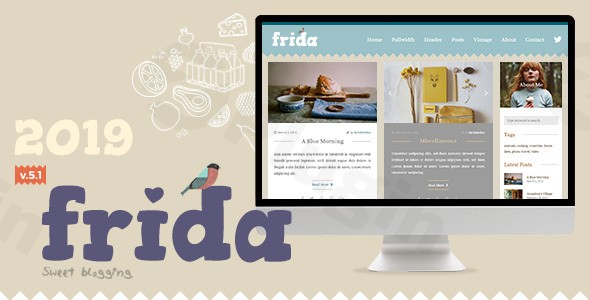
If you are looking for a website design that feels as inviting as a handmade treat, the Frida WordPress theme is a standout choice. Specifically crafted as a sweet and classic blog theme for WordPress, Frida balances a unique, playful aesthetic with the professional functionality required for modern content creation. Whether you are launching a lifestyle blog, a DIY craft site, or a charming portfolio, this theme provides a visually engaging platform that prioritizes user experience and ease of use.
Key Features: Design, Layout, and Performance
The Frida WordPress theme is built on a design philosophy that celebrates sweetness and classic blog traditions. Unlike generic, corporate-style themes, Frida leans into a distinct visual identity that helps creators stand out in a crowded digital landscape.
Unique Design & Layout Options
Frida is famous for its zig-zag theme patterns and pastel color palettes, creating a “candy-like” atmosphere. However, it is also flexible; for those who prefer a more minimalist look, the theme offers a “clean view” option that retains its classic charm without the extra flair.
- Diverse Blog Layouts: Choose from multiple blog styles to keep your content fresh and engaging.
- Flexible Sidebars: Support for layouts with or without sidebars allows you to prioritize content or maximize ad/widget space.
- Homepage Slider: Capture attention immediately with a built-in slider designed to highlight your most important stories.
- Mobile First: The theme is fully responsive, ensuring your sweet aesthetic looks perfect on everything from smartphones to high-res desktops.
Customization Capabilities
One of Frida’s greatest strengths is its reliance on the WordPress Native Customizer. This means you can personalize your site in real-time without touching a single line of code.
- Unlimited Color Schemes: Modify the pastel tones to match your specific branding.
- Typography: The theme comes pre-packaged with carefully selected Google Fonts, specifically highlighting the elegant Josefin Sans and the highly readable Open Sans.
- Instagram Integration: Built-in features allow you to showcase your social feed, which is essential for lifestyle and handmade bloggers.
Performance and SEO Readiness
Frida is updated to meet the latest WordPress standards, ensuring clean markup and a lightweight structure. By using the native customizer rather than a heavy, proprietary page builder, the theme stays fast and efficient. It is compatible with all major browsers (Chrome, Firefox, Safari, Edge) and provides the SEO-friendly foundation needed to rank well in search results.
How to Install the Frida WordPress Theme
Setting up your new blog is straightforward. Follow these steps to get your site looking like the demo in minutes:
- Upload and Activate: In your WordPress dashboard, navigate to Appearance > Themes > Add New. Upload the
frida.zipfile and click Activate. - Install Recommended Plugins: Frida may prompt you to install specific companion plugins for features like the Instagram feed or contact forms. Follow the on-screen prompts to install and activate them.
- One-Click Demo Import: To replicate the “sweet and classic” look seen in the official preview, use the demo import feature found in the theme settings. This will automatically set up your menus, widgets, and sample pages.
- Verify Setup: Check your homepage to ensure the slider and zig-zag patterns are displaying correctly.
Customization Guide: Branding and Personalization
Personalizing the Frida theme customization settings is intuitive, even for beginners. Here is how to make the theme your own:
Using the Customizer
Navigate to Appearance > Customize. Here, you can change your site title, upload a custom logo, and adjust the global color palette. Because Frida is a sweet and classic blog theme, we recommend sticking to soft, complementary tones to maintain the theme’s intended mood.
Setting Up the Blog and Menus
You can easily toggle between different blog styles (e.g., grid vs. list) within the “Layout Settings.” Ensure your navigation menu is set to the “Primary” location so your readers can easily find your categories, about page, and contact info.
WooCommerce Integration
If you plan to sell handmade goods or digital products, Frida is fully compatible with WooCommerce. You can set up a storefront that matches the sweet aesthetic of your blog, providing a seamless transition from content to commerce.
FAQ & Troubleshooting
How to install the Frida WordPress theme?
To install Frida, go to your WordPress Dashboard, select Appearance > Themes > Add New, and upload the theme file. Once activated, follow the setup wizard or the documentation to import demo content and install recommended plugins.
Does Frida have WooCommerce compatibility?
Yes, the Frida theme WooCommerce compatibility allows you to run a fully functional online store. It is an excellent choice for small business owners and creators selling lifestyle or handmade products.
Is the Frida theme responsive?
Absolutely. Frida is designed with a responsive layout, meaning it automatically adjusts to fit mobile phones, tablets, and desktop screens for a consistent user experience.
Does Frida support child themes?
Yes, Frida has included child theme support since version 5.2. Using a child theme is highly recommended if you plan to make advanced code customizations, as it prevents your changes from being overwritten during theme updates.
What if the demo import looks different than the preview?
If your site looks different, ensure all recommended plugins (like the Instagram Feed) are activated. Also, check that you have assigned your “Front Page” and “Posts Page” correctly in Settings > Reading.
Conclusion
The Frida WordPress theme is a delightful solution for those who want a blog that feels personal, classic, and visually distinct. Its “sweet” design philosophy makes it one of the best WordPress themes for lifestyle bloggers, handmade enthusiasts, and creative storytellers.While it may not be a massive multipurpose powerhouse like Astra or Divi, its strength lies in its niche focus and extreme ease of use. If you want a charming, high-performing website that you can set up without a developer, Frida is a fantastic investment for your online brand.Ready to build your sweet new blog? Discover more tips and theme guides at wppick.com.
I. Download Limits & Account Benefits
- Free Downloads: Each email address receives 3 downloads per day for free products
- Upgrade Benefits: Purchase any paid product to increase your daily download limit by 3 for each paid product
- No Account Required: You can download immediately by receiving the download link via email
- Account Recommended: Create an account for easier access to your order history and direct update downloads
II. Understanding GPL vs Official Versions
Important: The products available on WPPick are GPL-licensed versions, which differ from official developer versions. Before purchasing, please read our comprehensive guide: Understanding GPL & Official Differences at WPPick
Key Points:
- GPL versions may not include premium support from original developers
- Updates may be delayed compared to official releases
- Some premium features might have limitations
- Always consider your specific needs and support requirements
III. Support & Assistance
We’re here to help through multiple channels:
- Email Support: Direct email assistance for all inquiries
- Live Chat: Real-time support during business hours
- Comprehensive Documentation: Detailed guides and tutorials
IV. Order Tracking
Access your complete purchase history and download links anytime: Order History
V. Account Access
New to WPPick? Login or Create Account to manage your downloads and orders efficiently.
VI. Refund Protection
We stand behind our products with a clear refund policy. Review our terms: Refund Policy
VII. Privacy & Security
Your data security is our priority. Learn how we protect your information: Privacy Policy
VII. Terms of Service
Understanding our service terms ensures a smooth experience: Terms of Use
Quick Tips for Best Experience
- Verify Compatibility: Check plugin/theme compatibility with your WordPress version
- Backup First: Always backup your site before installing new plugins or themes
- Test Environment: Consider testing on a staging site first
- Stay Updated: Regularly check for updates in your account dashboard
- Read Documentation: Review any included documentation for optimal setup
Need Help?
If you have questions about downloads, licensing, or need technical assistance, don’t hesitate to contact our support team. We’re committed to ensuring you have the best possible experience with WPPick products.
Ready to get started? Your download adventure begins with just one click!