

Gauge – Multi-purpose Review Theme
/Year
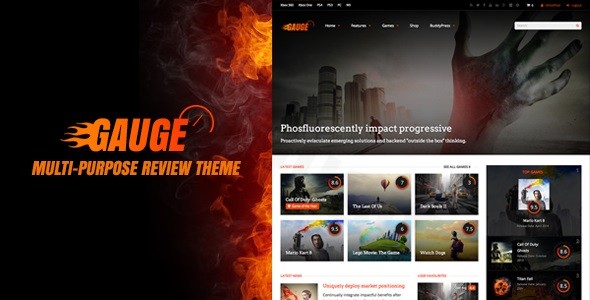
Building an authoritative review platform requires more than just a standard blog layout; it demands a structured system that handles ratings, user feedback, and complex data. The Gauge WordPress theme is a specialized, multi-purpose review theme designed to transform a standard website into a professional critique hub for games, movies, food, or electronics. With its clean and modern design philosophy, Gauge prioritizes a “hub-and-spoke” content model, making it the go-to choice for affiliate marketers and niche bloggers who want to establish long-term authority.
Key Features: Design, Layout & Performance
The Gauge WordPress theme stands out because it isn’t just a skin; it’s a functional framework for data-driven content. Its design is centered around user engagement and clarity.
Hub-Based Navigation & Layouts
The most striking feature of Gauge is its centralized hub page system. Instead of a single long post, each review item can have its own “Hub” with tabbed navigation. This allows you to separate news, videos, images, and the main review into organized sections, providing a high-end UI/UX similar to major sites like IGN or GameSpot.
- Layout Variations: Support for full-width and boxed layouts, alongside multiple portfolio styles.
- Visual Elements: The theme includes built-in styling for “Good and Bad” points (pros and cons), which is essential for conversion-focused affiliate reviews.
- Rich Demo Library: Gauge offers a variety of pre-designed demos for business, agency, and restaurant niches, ensuring you don’t have to start from scratch.
Advanced Review & Rating System
As a multi-purpose review theme, Gauge offers a sophisticated dual-rating system:
- Site Ratings: Set by the administrator/editor using multiple criteria (e.g., Graphics, Sound, Value).
- User Ratings: Allows your community to weigh in, creating a dynamic and interactive environment.
- Filtering: Users can filter content by “Top Editor Rated,” “Top User Rated,” or specific awards, making your site highly searchable.
Performance & SEO Readiness
Gauge is built with clean HTML5 and CSS3 code. Crucially for SEO, it includes integrated Rich Snippets. This means your star ratings and review data can appear directly in Google search results, significantly increasing your click-through rate (CTR). While the theme is feature-rich, it is optimized for speed; however, users with heavy media libraries are encouraged to use a performance pack or caching plugin to maintain peak loading times.
Installation & Demo Import Guide
Setting up Gauge is straightforward, thanks to its user-friendly onboarding process. Follow these steps to get your site running:
- Theme Installation: Upload the
gauge.zipfile via Appearance > Themes > Add New in your WordPress dashboard. Activate the theme once uploaded. - Required Plugins: Upon activation, you will be prompted to install bundled plugins. Gauge includes Visual Composer (WPBakery) and the Redux Framework. Ensure these are activated to unlock all design features.
- One-Click Demo Import: Navigate to the theme options panel to find the demo importer. Select your preferred niche (e.g., Gaming, Magazine, or Business) and click import.
- Tip: Ensure your server’s memory limit is set to at least 256MB to avoid timeouts during the import of large media files.
4. Finalize Setup: Once the import is complete, your menus, widgets, and homepage will be configured automatically to match the demo site.
Customization Guide: Branding & Personalization
Gauge offers extensive flexibility through the Redux Framework, allowing you to tailor the aesthetic to your specific brand without touching a single line of code.
Global Styles & Live Customizer
You can manage your site’s identity through the WordPress Live Customizer. This includes:
- Typography: Access to a wide range of Google Fonts to ensure your text is legible and professional.
- Color Schemes: Change primary and accent colors globally to match your brand’s palette.
- Header & Footer Builders: Choose from multiple header styles and footer layouts to optimize your site’s navigation.
Building Pages with Ease
While Gauge comes bundled with Visual Composer, it is also compatible with Elementor, giving you the freedom to design custom landing pages using a drag-and-drop interface. The theme also supports “Unlimited Sidebars,” meaning you can create unique sidebars for different review categories (e.g., a specific sidebar for “Movie Reviews” and another for “Tech Reviews”).
FAQ & Troubleshooting
Is the Gauge WordPress theme compatible with Elementor?
Yes, while Gauge comes bundled with Visual Composer, it is fully compatible with Elementor. This allows users to leverage the theme’s robust review system while using their preferred page builder for layout design.
Does Gauge support WooCommerce for online stores?
Absolutely. Gauge features deep integration with WooCommerce, allowing you to sell products directly alongside your reviews. This is ideal for sites that want to combine affiliate critiques with a direct-to-consumer shop.
Is the theme optimized for SEO and Google Search?
Yes, Gauge is built with SEO-friendly markup and includes built-in support for schema rich snippets. This ensures that search engines can easily read your ratings and display them in search results, helping your content stand out.
Does it support BuddyPress and bbPress?
Yes, Gauge is designed for community building. It integrates seamlessly with BuddyPress and bbPress, enabling you to create a social network or forum where users can discuss the items you review.
Conclusion: Is Gauge Right for You?
The Gauge WordPress theme is a specialized powerhouse. While generic multipurpose themes offer broad design options, Gauge provides the specific logic and data structures needed for a high-functioning review site. Who is it for?
- Affiliate Marketers: Who need “Pros/Cons” and “Rich Snippets” to boost conversions.
- Niche Critics: Who want a professional, hub-based layout for games, movies, or tech.
- Community Builders: Who want to combine reviews with forums (BuddyPress/bbPress).If you are looking for a theme that balances clean, modern aesthetics with a complex, data-driven backend, Gauge is an excellent investment. Its ability to handle both editor and user ratings within an SEO-optimized framework makes it a top-tier choice for any content creator on wppick.com looking to build an authoritative review platform.
I. Download Limits & Account Benefits
- Free Downloads: Each email address receives 3 downloads per day for free products
- Upgrade Benefits: Purchase any paid product to increase your daily download limit by 3 for each paid product
- No Account Required: You can download immediately by receiving the download link via email
- Account Recommended: Create an account for easier access to your order history and direct update downloads
II. Understanding GPL vs Official Versions
Important: The products available on WPPick are GPL-licensed versions, which differ from official developer versions. Before purchasing, please read our comprehensive guide: Understanding GPL & Official Differences at WPPick
Key Points:
- GPL versions may not include premium support from original developers
- Updates may be delayed compared to official releases
- Some premium features might have limitations
- Always consider your specific needs and support requirements
III. Support & Assistance
We’re here to help through multiple channels:
- Email Support: Direct email assistance for all inquiries
- Live Chat: Real-time support during business hours
- Comprehensive Documentation: Detailed guides and tutorials
IV. Order Tracking
Access your complete purchase history and download links anytime: Order History
V. Account Access
New to WPPick? Login or Create Account to manage your downloads and orders efficiently.
VI. Refund Protection
We stand behind our products with a clear refund policy. Review our terms: Refund Policy
VII. Privacy & Security
Your data security is our priority. Learn how we protect your information: Privacy Policy
VII. Terms of Service
Understanding our service terms ensures a smooth experience: Terms of Use
Quick Tips for Best Experience
- Verify Compatibility: Check plugin/theme compatibility with your WordPress version
- Backup First: Always backup your site before installing new plugins or themes
- Test Environment: Consider testing on a staging site first
- Stay Updated: Regularly check for updates in your account dashboard
- Read Documentation: Review any included documentation for optimal setup
Need Help?
If you have questions about downloads, licensing, or need technical assistance, don’t hesitate to contact our support team. We’re committed to ensuring you have the best possible experience with WPPick products.
Ready to get started? Your download adventure begins with just one click!
- Released on 7 February 2026.