

Gloreya – Restaurant Fast Food & Delivery Woocommerce Theme
/Year
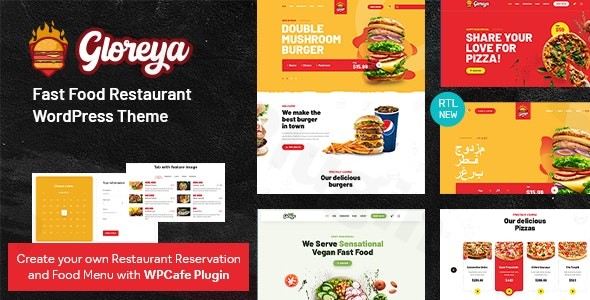
In the competitive world of digital dining, your website is often the first “taste” a customer gets of your business. The Gloreya WordPress theme is a specialized, feature-rich solution meticulously designed for restaurants, fast-food chains, bakeries, and food delivery services. Whether you are running a local burger joint or a multi-location pizza delivery empire, Gloreya provides the visual appetite and technical backbone needed to convert hungry visitors into loyal customers.
A Specialized Restaurant WordPress Theme for the Modern Era
Gloreya is more than just a skin for your website; it is a comprehensive e-commerce tool built on the powerful combination of Elementor and WooCommerce. Its design philosophy centers on high-impact visuals, bold typography, and a seamless mobile-first user interface (UI). By prioritizing a clean, professional aesthetic with dynamic elements like parallax effects, Gloreya ensures your food photography takes center stage.
Key Features: Design, Layout & Performance
To succeed in the food industry, a website must be as fast as the delivery service it promotes. Gloreya excels by offering a balance between aesthetic flair and technical efficiency.
1. Diverse Layout & Design Options
Gloreya comes equipped with at least three pre-defined homepage demos tailored specifically for the fast-food niche. These aren’t just generic templates; they include specialized layouts for:
- Fast Food & Burger Joints: Bold, high-contrast designs.
- Bakeries & Coffee Shops: Softer, elegant layouts with a focus on menu variety.
- Delivery Services: Conversion-focused layouts with prominent “Order Now” buttons.
2. Customization at Your Fingertips
The theme offers three distinct header layouts and a robust Mega Menu builder. This is particularly useful for large menus, allowing you to organize categories (e.g., Starters, Main Course, Desserts) with custom icons and images. Because it is built with Elementor, you have drag-and-drop control over every section, container, and background.
3. Optimized Performance & SEO
Built on the Twitter Bootstrap 4 framework, Gloreya is lightweight and fully responsive. SEO-optimized code ensures that your restaurant appears in local search results, while the mobile-optimized design guarantees that customers can easily browse your menu and place orders from their smartphones.
The Secret Weapon: WP Cafe Integration
What truly sets Gloreya apart as a fast food delivery theme is its deep integration with the WP Cafe plugin. This all-in-one restaurant solution handles the heavy lifting of:
- Online Reservations: Allow customers to book tables directly.
- Food Menus: Create stylish, categorized digital menus.
- Ordering & Delivery: Manage pickup and delivery schedules seamlessly through WooCommerce.
Installation & One-Click Demo Import
Setting up Gloreya is designed to be a frictionless process, even for those without extensive technical knowledge.
- Install & Activate: Upload the theme file via Appearance > Themes > Add New in your WordPress dashboard.
- Plugin Setup: Upon activation, the theme will prompt you to install required companion plugins, including Elementor, WooCommerce, WP Cafe, and Revolution Slider.
- One-Click Demo Import: Navigate to the theme options to find the Demo Importer. Select your preferred niche demo and click import.
- Note: Ensure your hosting environment has sufficient memory limits (PHP
memory_limitof 256M or higher is recommended) to avoid timeouts during the import of high-quality assets.
- Note: Ensure your hosting environment has sufficient memory limits (PHP
- Final Polish: Once the import is complete, your site will look exactly like the live demo, including placeholders for menus and widgets.
Customization Guide: Branding Your Eatery
Personalizing the Gloreya WordPress theme to match your brand identity is handled through the intuitive WordPress Customizer and Elementor editor.
- Global Styles: Use the “Clean Customizer Options” to set your primary brand colors and choose from hundreds of Google Fonts to match your restaurant’s vibe.
- Header & Footer: Customize your logo placement and social media links within the dedicated header layouts. You can easily toggle search bars or shopping cart icons to improve UX.
- Setting Up the Menu: Use the WP Cafe interface to add your food items. You can set prices, descriptions, and dietary tags (like Vegan or Gluten-Free). These items can then be pulled into any page using Elementor blocks.
FAQ & Troubleshooting
Is Gloreya compatible with Elementor?
Yes, Gloreya is fully Elementor compatible. It uses the drag-and-drop builder as its primary layout tool, making it easy for users to customize pages without touching a single line of code.
Does Gloreya support WooCommerce for online stores?
Absolutely. Gloreya is a dedicated WooCommerce restaurant theme. It leverages WooCommerce to handle payments, tax calculations, and order management, ensuring a secure and familiar checkout process for your customers.
How do I update the theme without losing customizations?
The best practice is to use a Child Theme, which is supported by Gloreya. By placing your custom CSS or functional changes in the child theme, you can safely update the parent Gloreya theme to receive new features and security patches without overwriting your design work.
Is the Gloreya theme good for SEO?
Yes, Gloreya is built with clean markup and is SEO optimized. Its fast loading times and mobile-responsive design are key ranking factors that help your restaurant rank better in Google and AI-driven search engines.
Conclusion: Is Gloreya Right for Your Business?
The Gloreya WordPress theme is a powerhouse for any food-based business that prioritizes online sales and a professional digital presence. Its combination of specialized design, the WP Cafe plugin’s functionality, and Elementor’s flexibility makes it a top-tier choice for:
- Small to Medium Restaurant Owners who need a “set it and forget it” solution.
- Food Delivery Startups looking for a conversion-optimized interface.
- Agencies building high-performance sites for clients in the hospitality niche.While it is a specialized theme, its ease of use and comprehensive feature set offer incredible value, especially for those looking to launch an online food ordering platform quickly. If you want a site that looks as good as your food tastes, Gloreya is a definitive contender.
I. Download Limits & Account Benefits
- Free Downloads: Each email address receives 3 downloads per day for free products
- Upgrade Benefits: Purchase any paid product to increase your daily download limit by 3 for each paid product
- No Account Required: You can download immediately by receiving the download link via email
- Account Recommended: Create an account for easier access to your order history and direct update downloads
II. Understanding GPL vs Official Versions
Important: The products available on WPPick are GPL-licensed versions, which differ from official developer versions. Before purchasing, please read our comprehensive guide: Understanding GPL & Official Differences at WPPick
Key Points:
- GPL versions may not include premium support from original developers
- Updates may be delayed compared to official releases
- Some premium features might have limitations
- Always consider your specific needs and support requirements
III. Support & Assistance
We’re here to help through multiple channels:
- Email Support: Direct email assistance for all inquiries
- Live Chat: Real-time support during business hours
- Comprehensive Documentation: Detailed guides and tutorials
IV. Order Tracking
Access your complete purchase history and download links anytime: Order History
V. Account Access
New to WPPick? Login or Create Account to manage your downloads and orders efficiently.
VI. Refund Protection
We stand behind our products with a clear refund policy. Review our terms: Refund Policy
VII. Privacy & Security
Your data security is our priority. Learn how we protect your information: Privacy Policy
VII. Terms of Service
Understanding our service terms ensures a smooth experience: Terms of Use
Quick Tips for Best Experience
- Verify Compatibility: Check plugin/theme compatibility with your WordPress version
- Backup First: Always backup your site before installing new plugins or themes
- Test Environment: Consider testing on a staging site first
- Stay Updated: Regularly check for updates in your account dashboard
- Read Documentation: Review any included documentation for optimal setup
Need Help?
If you have questions about downloads, licensing, or need technical assistance, don’t hesitate to contact our support team. We’re committed to ensuring you have the best possible experience with WPPick products.
Ready to get started? Your download adventure begins with just one click!
- Mini Cart Issue Fixed
- Design Broken Issue Fixed
- WPCafe Version 3.0 Compatibility
- WordPress 6.9