

Golden – Jewelry Store And Gem Stone WordPress Theme
/Year
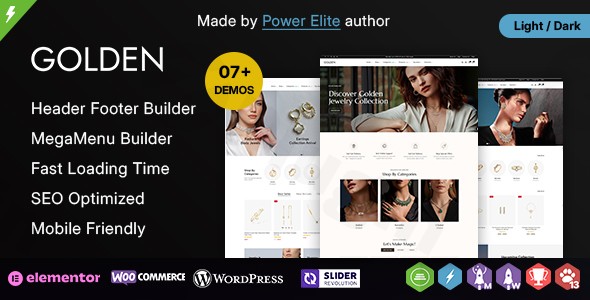
The Golden Jewelry Store WordPress Theme is a sophisticated and powerful solution meticulously crafted for jewelry stores, gemstone retailers, and luxury accessory businesses seeking a captivating online presence. This premium theme combines elegant design with robust functionality, allowing you to showcase exquisite products in the best possible light and provide customers with an exceptional shopping experience. It’s the ideal foundation for transforming your jewelry business into a stunning digital storefront.
Key Features: Design, Layout & Performance for Luxury Retail
The Golden theme provides a comprehensive suite of features designed to meet the unique demands of the luxury jewelry market, emphasizing both aesthetic appeal and technical excellence.
Design & Layout Options
Golden empowers you with complete control over your store’s look and feel, ensuring your brand’s elegance shines through.
- Advanced Page Building with Elementor: Built seamlessly with the Elementor Page Builder (Free & Pro), Golden offers intuitive drag-and-drop functionality. This allows you to create unique, professional-grade layouts for any page without needing to write a single line of code. It even supports Elementor Flexbox Container for modern layout design.
- Stunning Product Showcases: Present your jewelry collections with impact, thanks to integrated Slider Revolution (a premium plugin bundled with the theme, saving you $85). The theme supports advanced visual elements like multiple product list rollover styles (4+) and various product hover styles (12+), enhancing interaction and visual appeal.
- Sophisticated Navigation: Implement complex site structures effortlessly with built-in Mega Menu functionality, making it easy for customers to navigate extensive product categories.
- Product Variation Swatches: Allow customers to view product variations like different colors or materials effortlessly with support for color and image swatches.
- Flexible Layouts: Choose between classic boxed layouts or immersive full-width (unboxed) designs. The theme also includes a versatile Header & Footer Builder, offering unlimited options to define your site’s top and bottom sections, including fixed, sticky, and transparent header positions, and an off-canvas menu.
- Diverse Shop and Product Page Styles: Golden provides 8+ shop page and filter layouts/styles, along with 9+ product details and gallery layouts/styles, giving you ample choice to present your inventory.
Customization Capabilities
Personalize your Golden Jewelry Store WordPress Theme to perfectly reflect your brand identity with extensive customization options.
- Intuitive Admin Panel: The theme provides an easy-to-use Admin Options Panel, serving as a centralized hub for managing global styles and settings.
- Unlimited Color Options: Tailor your brand’s color palette with unlimited color choices directly from the admin panel, ensuring your store aligns perfectly with your visual identity.
- Typography Control: Gain advanced control over your site’s typography, allowing you to select fonts that convey the luxury and elegance of your brand.
- Child Theme Ready: For advanced users and developers, Golden is “Child Theme Ready.” This crucial feature allows you to make deep customizations without altering the core theme files, ensuring your modifications are safe during theme updates.
Performance & SEO Features
A high-performing website is critical for e-commerce, and Golden is optimized for speed and search engine visibility.
- Mobile-Optimized Performance: Your jewelry store will look stunning and function flawlessly on any device. Golden boasts a fully responsive design and mobile optimization, ensuring fast loading times and smooth navigation across smartphones, tablets, and desktops.
- Fast Loading Speeds: Built with performance in mind, the theme is optimized for quick page loads. It leverages modern web technologies like HTML5 and CSS3 and incorporates lazy loading techniques to ensure a snappy user experience.
- SEO-Friendly Foundation: Golden is designed to be SEO-friendly with clean markup and a structure that helps search engines understand your content. Its “no core modifications” approach further contributes to its long-term SEO health.
Installation & Demo Import
Getting your luxurious online jewelry store up and running with the Golden theme is designed to be straightforward, even for those new to WordPress.Here’s a step-by-step guide:
- Install the Golden Theme:
- Log in to your WordPress dashboard.
- Navigate to
Appearance > Themes. - Click
Add Newand thenUpload Theme. - Choose the Golden theme
.zipfile you downloaded and clickInstall Now. - Once installed, click
Activate.
- Install Required Plugins:
- Upon activation, Golden will prompt you to install a set of recommended plugins. These typically include Elementor Page Builder, Slider Revolution, WooCommerce, and potentially others like Contact Form 7 or Mailchimp. Install and activate all the recommended plugins to ensure full theme functionality.
- One-Click Demo Data Import:
- Golden simplifies setup with its one-click demo data import functionality. This feature allows you to quickly replicate the stunning demo site content (pages, posts, products, widgets, and settings) onto your own WordPress installation.
- Look for an option like
Appearance > Import Demo Dataor a similar section within the theme’s admin panel. - Follow the on-screen instructions. This process may take a few minutes, depending on your server and internet speed. It’s important to have sufficient server memory and execution time to avoid timeouts during this step.
- Review and Configure:
- After the demo import is complete, your site will have a professional, pre-designed look. You’ll find demo pages, products, menus, and widgets already configured.
- Navigate to
Appearance > MenusandAppearance > Widgetsto ensure your navigation and sidebar elements are set up as desired. You might need to assign the imported menus to your theme’s menu locations. - Go to
Settings > Readingto set your homepage to the imported demo homepage.With these steps, your professional jewelry store will be launched, ready for your personal branding and product content.
Customization Guide: Branding Your Jewelry Store
The Golden theme offers extensive yet intuitive customization options to help you tailor your online store to your brand’s unique identity.
- WordPress Customizer & Theme Options Panel: While Elementor handles page-specific layouts, global styles like colors, typography, and header/footer settings are typically managed through the theme’s dedicated Admin Options Panel and potentially the WordPress Customizer (
Appearance > Customize). Here, you can define your site’s primary and accent colors, select elegant font pairings, and upload your brand logo. - Header and Footer Builder: Utilize the included Header & Footer Builder to design unique top and bottom sections for your website. This is where you’ll typically place your logo, main navigation, contact information, social media links, and copyright details. Experiment with sticky or transparent headers to create a truly premium feel.
- Homepage Setup: After importing the demo, your homepage will likely be set up. To manage it, navigate to
Pagesand edit the “Home” page using Elementor. Here, you can swap out demo images and text with your own product photography and brand messaging. - Menu Management: Go to
Appearance > Menusto organize your main navigation, product categories, and any secondary menus. Assign them to the appropriate menu locations defined by the theme. - Product Displays: Leverage Golden’s specific WooCommerce settings to customize how your products appear. Experiment with the 8+ shop page layouts and 9+ product detail layouts to find the perfect presentation for your jewelry and gemstones. The color and image swatches are key to showcasing product variations effectively.
- Blog & Archive Pages: If you plan to have a blog (recommended for SEO and content marketing), configure its layout and sidebar options via the theme’s settings.The integration with Elementor ensures that even complex layout changes feel like an intuitive design process, putting powerful customization at your fingertips without requiring deep technical knowledge.
FAQ & Troubleshooting
Here are answers to common questions about the Golden – Jewelry Store WordPress Theme:
Is Golden compatible with Elementor / Gutenberg?
Yes, the Golden theme is fully compatible with Elementor Page Builder (both Free & Pro versions), providing extensive drag-and-drop customization. While Elementor is the primary page builder, it’s also compatible with WordPress 6.x.x, meaning it generally works well within the Gutenberg (Block Editor) environment for standard posts and pages.
Does Golden support WooCommerce for online stores?
Absolutely. Golden is specifically designed as a WooCommerce theme for jewelry retailers. It’s fully integrated with WooCommerce and includes advanced e-commerce features like Ajax Advanced Search, Ajax Add to Cart, Ajax Pagination, Quick View, Wishlist, Compare options, infinite scroll loading, and advanced filtering options to enhance the shopping experience and drive conversions. It also supports Dokan for multi-vendor marketplace functionality.
Does Golden support child themes?
Yes, Golden is explicitly stated to be Child Theme Ready. This is a crucial feature for developers and users who wish to make customizations without directly modifying the core theme files, ensuring their changes are preserved during theme updates.
How can I update the Golden theme without losing my customizations?
To update the Golden theme safely, always use a child theme for any custom code or styling. When an update is available (typically through your WordPress dashboard if you purchased it from ThemeForest or another official source), you can proceed with the update without fear of losing your child theme-based customizations. If you’ve made direct edits to the parent theme files, those changes will be overwritten by the update.
What should I do if the demo import fails or looks different from the demo site?
If the demo import fails or doesn’t look as expected, first ensure your server meets the recommended requirements (sufficient PHP memory limit and execution time). You can often increase these settings via your hosting provider or by editing your wp-config.php file. Secondly, ensure all recommended plugins are installed and activated before running the demo import. If issues persist, check the theme documentation or contact TemplateMela’s support.
Conclusion
The Golden – Premium Jewelry Store WordPress Theme stands out as an exceptional choice for anyone looking to build a high-end online presence for a jewelry, gemstone, or luxury accessory business. Its blend of sophisticated design, robust Elementor integration, and advanced WooCommerce features creates a powerful platform that is both visually stunning and highly functional.With its focus on mobile optimization, fast performance, and SEO readiness, Golden provides a solid foundation for attracting customers and converting sales. The intuitive one-click demo import and comprehensive customization options via the Admin Options Panel make it accessible for beginners, while child theme support and Elementor compatibility offer the flexibility advanced users and agencies demand.Whether you’re a luxury boutique owner, a gemstone specialist, or a designer needing a beautiful showcase for your creations, Golden delivers an elegant, secure, and feature-rich solution that truly allows your products to sparkle online. Choose Golden to establish a premium digital storefront that reflects the true value and beauty of your offerings.
I. Download Limits & Account Benefits
- Free Downloads: Each email address receives 3 downloads per day for free products
- Upgrade Benefits: Purchase any paid product to increase your daily download limit by 3 for each paid product
- No Account Required: You can download immediately by receiving the download link via email
- Account Recommended: Create an account for easier access to your order history and direct update downloads
II. Understanding GPL vs Official Versions
Important: The products available on WPPick are GPL-licensed versions, which differ from official developer versions. Before purchasing, please read our comprehensive guide: Understanding GPL & Official Differences at WPPick
Key Points:
- GPL versions may not include premium support from original developers
- Updates may be delayed compared to official releases
- Some premium features might have limitations
- Always consider your specific needs and support requirements
III. Support & Assistance
We’re here to help through multiple channels:
- Email Support: Direct email assistance for all inquiries
- Live Chat: Real-time support during business hours
- Comprehensive Documentation: Detailed guides and tutorials
IV. Order Tracking
Access your complete purchase history and download links anytime: Order History
V. Account Access
New to WPPick? Login or Create Account to manage your downloads and orders efficiently.
VI. Refund Protection
We stand behind our products with a clear refund policy. Review our terms: Refund Policy
VII. Privacy & Security
Your data security is our priority. Learn how we protect your information: Privacy Policy
VII. Terms of Service
Understanding our service terms ensures a smooth experience: Terms of Use
Quick Tips for Best Experience
- Verify Compatibility: Check plugin/theme compatibility with your WordPress version
- Backup First: Always backup your site before installing new plugins or themes
- Test Environment: Consider testing on a staging site first
- Stay Updated: Regularly check for updates in your account dashboard
- Read Documentation: Review any included documentation for optimal setup
Need Help?
If you have questions about downloads, licensing, or need technical assistance, don’t hesitate to contact our support team. We’re committed to ensuring you have the best possible experience with WPPick products.
Ready to get started? Your download adventure begins with just one click!