

Goldsmith – Jewelry Store Woocommerce Elementor Theme
/Year
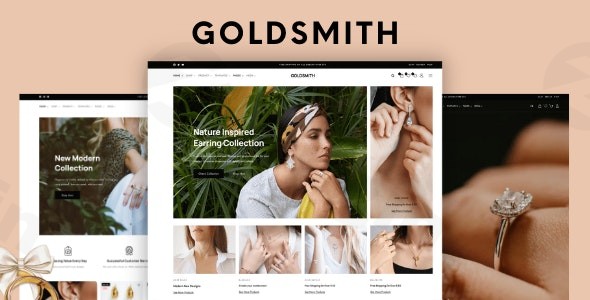
Creating a high-end online presence for luxury goods requires a delicate balance of sophisticated aesthetics and robust functionality. The Goldsmith – Jewelry Store WooCommerce Elementor Theme is a premium solution specifically engineered for retailers of jewelry, watches, diamonds, and gemstones. By blending the visual elegance of a high-street boutique with the conversion power of modern e-commerce, this jewelry store WordPress theme provides a professional foundation for brands looking to scale their digital presence.
1. Introduction: Luxury Design Meets E-commerce Excellence
The Goldsmith – Jewelry Store WooCommerce Elementor Theme is designed for business owners who prioritize visual impact and user experience. Whether you are a custom jeweler, a watch boutique, or a gemstone wholesaler, this theme adopts a “luxury-first” design philosophy. It utilizes ample whitespace, elegant typography, and smooth animations to ensure that the products—not the website interface—remain the center of attention.
Developed by Ninetheme, a Power Elite Author on Envato, Goldsmith isn’t just a skin; it is a comprehensive toolkit built on the Elementor page builder. This allows users of all skill levels to maintain a high-end aesthetic without touching a single line of code.
2. Key Features: Design, Layout & Performance
Elegant Layout Options
Goldsmith provides an impressive library of 12+ homepage layouts and 13+ inner pages. These are not generic templates; they are luxury-focused demos tailored for specific segments of the industry, such as engagement ring galleries, watch catalogs, and minimalist accessory shops. The theme is fully responsive, ensuring the high-resolution imagery essential to jewelry sales looks flawless on Retina displays and mobile devices.
Deep Customization Capabilities
The theme offers granular control over every visual element:
- Header & Footer Builder: Unlike themes with static headers, Goldsmith allows you to build unlimited header and footer variations using Elementor’s drag-and-drop interface.
- Advanced Typography & Color Control: Easily match your website to your brand’s identity with global style settings for fonts and color schemes.
- Interactive Elements: Support for parallax effects, background videos, and customizable hero sections helps create an immersive “lookbook” feel.
Optimized Performance & SEO
Speed is a critical ranking factor for both Google and AI search engines. Goldsmith is built with an SEO-optimized coding infrastructure and includes:
- AJAX-Powered Everything: From live search and product filters to “Add to Cart” and pagination, AJAX ensures the page doesn’t need to refresh constantly, providing a “desktop app” feel.
- LazyLoad Integration: Images only load as they enter the viewport, significantly improving initial page load times.
* Clean Markup: Standard-compliant code helps search engines index your luxury products more effectively.
3. Installation & Demo Import: A Seamless Start
Setting up the Goldsmith – Jewelry Store WooCommerce Elementor Theme is straightforward, thanks to its built-in setup wizard. Follow these steps to get started:
- Theme Installation: Log in to your WordPress dashboard, navigate to Appearance > Themes, and click Add New. Upload the
goldsmith.zipfile and click Activate. - Run the Setup Wizard: Upon activation, the theme will launch an Easy Setup Wizard. This tool will guide you through the process of installing required plugins, including WooCommerce and Elementor.
- One-Click Demo Import: Select your preferred luxury demo from the list. The importer will fetch all layouts, sample products, menus, and widgets.
- Pro Tip: Ensure your hosting environment has a high
memory_limit(at least 256M) andmax_execution_time(300) to prevent timeouts during the import of high-resolution jewelry imagery.
- Pro Tip: Ensure your hosting environment has a high
4. Final Checks: Once finished, navigate to Settings > Permalinks and click “Save” to ensure your shop URLs are functioning correctly.
4. Customization Guide: Personalizing Your Brand
Once your demo is imported, personalizing your luxury e-commerce theme is done through two primary interfaces:
Using the Elementor Editor
Most of the page content is edited directly via Elementor. To change a hero image or edit product descriptions:
- Click “Edit with Elementor” on the top toolbar of any page.
- Use the 40+ custom widgets provided by Goldsmith to add product grids, lookbooks, or countdown timers for sales.
The Theme Options Panel
For global settings like your logo, sidebar preferences, and social login (via Nextend), use the dedicated Theme Options panel. This is where you can configure the Advanced Popup Menus and the Simple Popup Checkout, which are proprietary features designed to reduce cart abandonment.
5. FAQ & Troubleshooting
Is the Goldsmith theme good for WooCommerce?
Yes, Goldsmith is specifically optimized for WooCommerce. It includes advanced e-commerce features such as AJAX product filters, quick view, and a simplified popup checkout process, all of which are designed to improve conversion rates for online jewelry stores.
Is Goldsmith compatible with Elementor?
Absolutely. The Goldsmith theme is built with deep Elementor integration, offering over 40 special theme widgets. This allows you to customize every inch of your site, including headers and footers, using a drag-and-drop interface.
Does it support child themes?
Yes, the theme is distributed under the GPL license and supports child themes. This is highly recommended for developers who wish to add custom code or hooks without losing their modifications during theme updates.
How can I update the theme without losing my customizations?
As long as you perform your visual edits through Elementor and the Theme Options panel (or use a child theme for code changes), updating the Goldsmith theme will not overwrite your settings. Always back up your site before running updates.
6. Conclusion: The Verdict for WPPick Readers
The Goldsmith – Jewelry Store WooCommerce Elementor Theme is a top-tier choice for anyone in the luxury retail space. Its primary strength lies in its specialized aesthetic—it saves hours of design work by providing a pre-configured “expensive” look that is often difficult to achieve with generic multipurpose themes.Who is this for?
- Beginners: The setup wizard and Elementor integration make it incredibly accessible.
- Agencies: The high-quality code and GPL licensing make it a cost-effective, flexible foundation for client projects.
- Store Owners: The focus on AJAX functionality and mobile responsiveness ensures a frictionless shopping experience that drives sales.For those looking to build a professional, fast, and visually stunning jewelry store, Goldsmith offers one of the most complete packages currently available in the WordPress ecosystem.
I. Download Limits & Account Benefits
- Free Downloads: Each email address receives 3 downloads per day for free products
- Upgrade Benefits: Purchase any paid product to increase your daily download limit by 3 for each paid product
- No Account Required: You can download immediately by receiving the download link via email
- Account Recommended: Create an account for easier access to your order history and direct update downloads
II. Understanding GPL vs Official Versions
Important: The products available on WPPick are GPL-licensed versions, which differ from official developer versions. Before purchasing, please read our comprehensive guide: Understanding GPL & Official Differences at WPPick
Key Points:
- GPL versions may not include premium support from original developers
- Updates may be delayed compared to official releases
- Some premium features might have limitations
- Always consider your specific needs and support requirements
III. Support & Assistance
We’re here to help through multiple channels:
- Email Support: Direct email assistance for all inquiries
- Live Chat: Real-time support during business hours
- Comprehensive Documentation: Detailed guides and tutorials
IV. Order Tracking
Access your complete purchase history and download links anytime: Order History
V. Account Access
New to WPPick? Login or Create Account to manage your downloads and orders efficiently.
VI. Refund Protection
We stand behind our products with a clear refund policy. Review our terms: Refund Policy
VII. Privacy & Security
Your data security is our priority. Learn how we protect your information: Privacy Policy
VII. Terms of Service
Understanding our service terms ensures a smooth experience: Terms of Use
Quick Tips for Best Experience
- Verify Compatibility: Check plugin/theme compatibility with your WordPress version
- Backup First: Always backup your site before installing new plugins or themes
- Test Environment: Consider testing on a staging site first
- Stay Updated: Regularly check for updates in your account dashboard
- Read Documentation: Review any included documentation for optimal setup
Need Help?
If you have questions about downloads, licensing, or need technical assistance, don’t hesitate to contact our support team. We’re committed to ensuring you have the best possible experience with WPPick products.
Ready to get started? Your download adventure begins with just one click!
- View the full changelog on the official documentation site: Changelogs – Ninetheme
- Theme package refreshed.
- WooCommerce template @version headers reviewed and updated.
- macOS metadata files cleaned from package.
- For detailed changelog information, please visit the official documentation at Changelogs – Ninetheme
- See changelog details at: Changelogs – Ninetheme
- See changelog at Changelogs – Ninetheme