

Good Food – Recipe Magazine & Food Blogging Theme
/Year
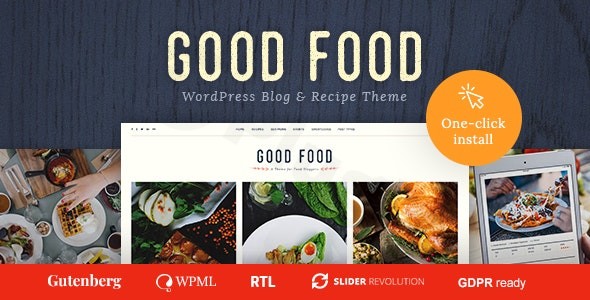
The Good Food WordPress theme is a specialized, feature-rich solution specifically engineered for the culinary world. Whether you are launching a professional recipe magazine WordPress theme or a personal blog to share your kitchen adventures, this theme prioritizes visual storytelling and structured data. Developed by cmsmasters, it strikes a balance between aesthetic elegance and the technical requirements of modern food publishing, ensuring your dishes look as good on screen as they taste in person.
Key Features: Design, Layout & SEO Performance
The “Good Food” theme is built on a philosophy of “visual hunger.” It understands that in the food industry, imagery is everything.
Professional Design & Layout Options
This theme offers a variety of “fancy blog layouts” that are ideal for media-heavy content. Users can choose between traditional list views or modern grid browsing, which is particularly effective for recipe archives.
- Customization Palette: With “unlimited color possibilities” and integration with hundreds of Google Fonts, you can align the site’s typography and color scheme with your brand’s identity perfectly.
- Visual Enhancements: The theme comes bundled with premium plugins like Slider Revolution and Layer Slider, allowing you to create high-impact hero sections that showcase your best recipes.
Dedicated Recipe Functionality
The standout feature of this culinary blog WordPress theme is its Custom Recipe Post Type. Unlike generic themes that require third-party plugins for recipes, Good Food includes built-in fields for:
- Ingredients and instructions.
- Nutritional information.
- Recipe-specific visuals.
- Structured data for better indexing in search engines.
Performance & SEO Readiness
In the world of food blogging, ranking on Google’s “Recipe Carousel” is vital. This theme is built with SEO-friendly recipe theme principles, utilizing clean markup and optimized code. It is “Retina Ready” and features a fully responsive layout, ensuring that your high-resolution food photography looks crisp on everything from a 4K monitor to an iPhone.
Installation & Setup Guide
Getting your food blog up and running with the Good Food theme is a straightforward process designed for users of all technical levels.
- Theme Upload: After purchasing the theme, navigate to your WordPress Dashboard > Appearance > Themes > Add New. Upload the
good-food.zipfile and click Activate. - Plugin Installation: Upon activation, a notification will prompt you to install required companion plugins, including the cmsmasters Content Composer and the bundled sliders.
- Demo Content: While the theme focuses on its “Fully Customizable Admin Panel,” you can import demo settings to match the professional look of the preview sites. (Note: Ensure your server’s PHP memory limit is set to at least 256M to avoid timeouts during content population).
- Permalinks: Once installed, go to Settings > Permalinks and set them to “Post Name” to ensure your recipe URLs are SEO-friendly.
Customization Guide: Branding & Layout
The customizable food blog theme experience is centered around the WordPress Customizer, allowing you to see changes in real-time.
- Global Styles: Use the Admin Panel to set global site backgrounds. You can choose solid colors or upload custom images with specific repeat and positioning settings.
- Building Pages: The theme includes 99+ Custom Shortcodes. These act as building blocks, allowing you to insert recipe grids, social feeds (Flickr, Facebook, Twitter), and call-to-action buttons anywhere on your site without touching a line of code.
- Monetization: If you plan to sell cookbooks, kitchen gadgets, or meal plans, the theme is WooCommerce Ready. You can set up a fully functional online store that matches the aesthetic of your blog seamlessly.
FAQ & Troubleshooting
Is the Good Food theme compatible with Gutenberg?
Yes, the Good Food WordPress theme is “WordPress 5 & Gutenberg Ready.” While it provides its own extensive shortcodes and admin panel for deep customization, it works perfectly with the standard WordPress Block Editor for daily post creation.
Does this theme support Recipe Schema Markup?
Yes. The custom recipe post type is designed to help search engines understand your content. By using the built-in recipe fields, your site is better positioned to display “Rich Snippets” (like star ratings and cook times) in Google search results, which is a key part of an SEO-friendly recipe theme.
Can I use the Good Food theme for an online store?
Absolutely. This is a WooCommerce food theme, meaning it has built-in styling for WooCommerce pages. You can easily integrate a shop to sell physical or digital products alongside your recipe content.
Does it support child themes?
Yes, it supports child themes. Using a child theme is highly recommended if you plan to add custom CSS or PHP functions, as it ensures your modifications aren’t lost when the parent theme is updated.
Conclusion
The Good Food WordPress theme is a powerful, niche-specific tool for anyone serious about food media. By integrating a custom recipe post type directly into the core theme, it eliminates the bloat often found when trying to patch together multiple plugins on a generic theme.Verdict:
- Ideal for: Food bloggers, culinary magazines, nutritionists, and chefs who want a professional, “Retina Ready” visual presence.
- Ease of Use: High, thanks to the real-time Customizer and extensive shortcode library.
- SEO Value: Excellent, with dedicated structures for recipe data.If your goal is to create a site where the food is the star, the Good Food theme provides the professional framework to make it happen. For more WordPress tips and theme reviews, visit wppick.com.
I. Download Limits & Account Benefits
- Free Downloads: Each email address receives 3 downloads per day for free products
- Upgrade Benefits: Purchase any paid product to increase your daily download limit by 3 for each paid product
- No Account Required: You can download immediately by receiving the download link via email
- Account Recommended: Create an account for easier access to your order history and direct update downloads
II. Understanding GPL vs Official Versions
Important: The products available on WPPick are GPL-licensed versions, which differ from official developer versions. Before purchasing, please read our comprehensive guide: Understanding GPL & Official Differences at WPPick
Key Points:
- GPL versions may not include premium support from original developers
- Updates may be delayed compared to official releases
- Some premium features might have limitations
- Always consider your specific needs and support requirements
III. Support & Assistance
We’re here to help through multiple channels:
- Email Support: Direct email assistance for all inquiries
- Live Chat: Real-time support during business hours
- Comprehensive Documentation: Detailed guides and tutorials
IV. Order Tracking
Access your complete purchase history and download links anytime: Order History
V. Account Access
New to WPPick? Login or Create Account to manage your downloads and orders efficiently.
VI. Refund Protection
We stand behind our products with a clear refund policy. Review our terms: Refund Policy
VII. Privacy & Security
Your data security is our priority. Learn how we protect your information: Privacy Policy
VII. Terms of Service
Understanding our service terms ensures a smooth experience: Terms of Use
Quick Tips for Best Experience
- Verify Compatibility: Check plugin/theme compatibility with your WordPress version
- Backup First: Always backup your site before installing new plugins or themes
- Test Environment: Consider testing on a staging site first
- Stay Updated: Regularly check for updates in your account dashboard
- Read Documentation: Review any included documentation for optimal setup
Need Help?
If you have questions about downloads, licensing, or need technical assistance, don’t hesitate to contact our support team. We’re committed to ensuring you have the best possible experience with WPPick products.
Ready to get started? Your download adventure begins with just one click!
- Demo Content Import Fix
- Updated plugins