

Gostore – Elementor Woocommerce WordPress Theme
/Year
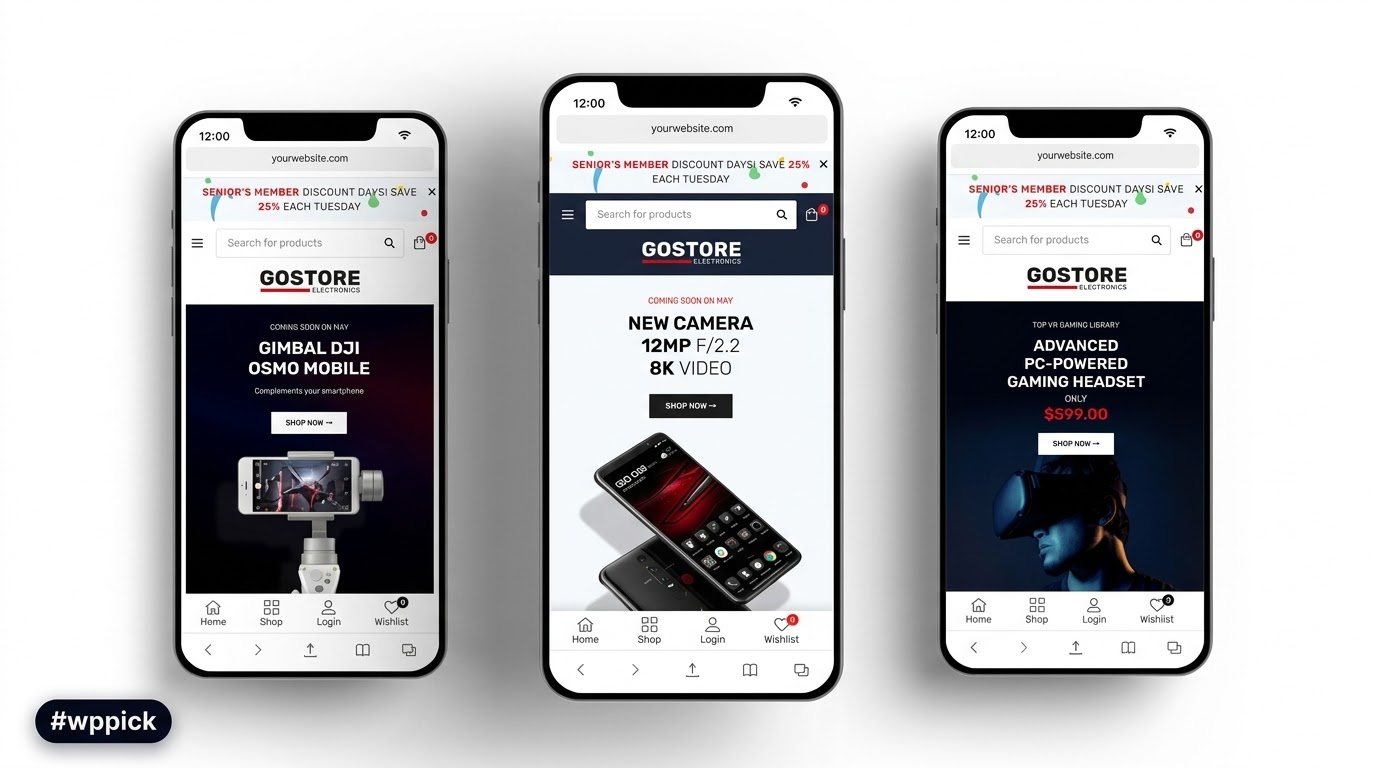
Are you looking to build a professional, high-converting online store without writing a single line of code? The GoStore Elementor WooCommerce WordPress theme is meticulously designed to transform your vision into a stunning, fully functional eCommerce website. Whether you’re launching a fashion boutique, an electronics shop, an organic products marketplace, or a furniture store, GoStore provides a robust and intuitive foundation for your online business. This comprehensive review and setup guide will walk you through its powerful features, ease of use, and how to get your store up and running swiftly.
Key Features: Design, Layout & Performance for eCommerce Success
GoStore isn’t just another multipurpose theme; it’s a dedicated eCommerce powerhouse built to enhance your products and streamline the customer journey. Its design philosophy centers around visual appeal, user-friendliness, and conversion optimization, making it an ideal WooCommerce theme with Elementor for any online retailer.
Responsive & Mobile-Friendly Design
In today’s mobile-first world, your online store must look flawless on every device. GoStore delivers a 100% fully responsive design with a mobile-first approach, ensuring that your products and content adapt beautifully from large desktop screens to tablets and smartphones. This commitment to cross-device compatibility guarantees a seamless shopping experience for all your customers and positively impacts your search engine rankings.
Extensive Design & Layout Options
GoStore offers a rich selection of pre-designed layouts to kickstart your store’s design:
- 8+ Unique Homepage Layouts: Diverse styles to match various brand aesthetics and product types.
- Multiple Product Page Layouts (5+ styles): Showcase your items with different visual hierarchies and details.
- Various Shop Filter Layouts (4+ styles): Provide flexible and intuitive ways for customers to browse.
- Product Hover Styles (2+ styles): Add engaging interactive elements to product listings.
- Advanced Header Options & Sticky Header: Craft unique, conversion-focused headers, with the option for a sticky header to keep navigation accessible as users scroll.
- Boxed Layout Option: Offers an alternative design aesthetic for your store’s overall presentation.
- Pre-designed Inner Pages: Beyond the homepage, find ready-to-use templates for various essential store pages.
Powerful Customization Capabilities with Elementor
At the heart of GoStore’s customizability is its deep integration with the Elementor Page Builder. This drag-and-drop interface empowers you to create custom pages and layouts without touching any code. GoStore enhances Elementor with:
- 17+ Custom Elements: Specifically designed eCommerce widgets to easily add product grids, carousels, categories, and more.
- Unlimited Color Options: Tailor your brand’s palette across your entire site.
- 896+ Google Fonts & Font Awesome: Complete control over typography and icon usage for a refined visual identity.
- Powerful Theme Options Panel (Redux Framework): Manage global styles, layouts, and theme settings from a centralized, intuitive interface.
- Custom Post Types: Beyond products, organize content with dedicated sections for Portfolio, Testimonials, Features, and Team Members. Blog posts also support various formats (Standard, Gallery, Quote, Video, Audio) and a masonry layout.
- Unlimited Sidebars & Multi-Widget Support: Create flexible content areas for promotions, filters, or additional information.
- Built-in Mega Menu Builder: Craft complex and visually organized navigation menus with dropdown or popup forms, greatly improving user experience for stores with extensive product catalogs.
Performance & SEO Features
GoStore is built with performance and search engine optimization in mind:
- Fast Loading Performance: Optimized code and efficient asset loading contribute to quicker page loads, essential for user retention and SEO.
- SEO Optimized: Clean markup, proper heading structure, and overall theme architecture are designed to help your store rank well in search results.
- Smooth Scrolling Effect: Enhances the user experience with fluid page navigation.
- Cross-Browser Compatibility: Your store will perform consistently across major browsers like Chrome, Edge, Firefox, Opera, and Safari.
Advanced WooCommerce & eCommerce Specifics
This theme excels in providing a feature-rich shopping experience:
- Advanced Product Display Options: Includes Product Quick View, AJAX add-to-cart, and multiple product layout options for an engaging browsing experience.
- Enhanced Filtering & Navigation: Features like color swatches for variable products, advanced product filtering (by color, price, rating, brand, and categories), Ajax search, Ajax cart, and single Ajax add-to-cart create a smooth, interactive shopping journey.
- Shop Load More/Infinite Scroll/Ajax Pagination: Offer modern browsing options for product listings.
- Robust Plugin Compatibility: GoStore integrates seamlessly with essential eCommerce plugins:
- WooCommerce (3.0+ ready, compatible with 7.x.x and 8.x.x): The core eCommerce platform.
- Slider Revolution (included, $85 value): For stunning visual sliders and animations.
- Contact Form 7: For easy customer communication forms.
- Dokan: Transform your store into a multi-vendor marketplace.
- WPML: For creating multilingual and multi-currency online stores.
- YITH WooCommerce Frequently Bought Together: Boost sales with intelligent product recommendations.
- Photo Reviews for WooCommerce: Encourage social proof with customer photo reviews.
- Wishlist & Compare Functionality: Enhance customer engagement and purchasing decisions.
- Mailchimp Subscription Integration: Grow your email list effortlessly.GoStore is a versatile solution perfect for various niches, including fashion, electronics, organic and natural products, furniture, supermarkets, accessories, and jewelry shops. Its compatibility with Dokan also makes it an excellent choice for those looking to build a multi-vendor marketplace.
Installation & One-Click Demo Import
Getting started with GoStore is designed to be straightforward, even for beginners. The theme simplifies the setup process, allowing you to launch your Elementor WooCommerce store quickly.
- Install & Activate the GoStore Theme:
- From your WordPress dashboard, navigate to Appearance > Themes > Add New > Upload Theme.
- Upload the
go-store.zipfile (the main theme file you downloaded from your purchase source). - Click “Install Now” and then “Activate” the theme.
- Install Required Companion Plugins:
- Upon activation, GoStore will likely prompt you to install a set of recommended plugins. These typically include Elementor, WooCommerce, and a theme-specific plugin to unlock all features.
- Follow the on-screen instructions to install and activate all necessary plugins.
- Utilize the One-Click Demo Import:
- GoStore comes with a one-click demo import feature, a powerful tool to jumpstart your design.
- Navigate to Appearance > Import Demo Data (or a similar path within the theme’s options).
- Select your preferred demo layout from the available options.
- Click “Import.”
- What to expect: The demo import process will populate your site with pre-built pages, posts, sample products, widgets, and menu structures, making your site look just like the demo preview.
- Important Note: Large demo imports can be resource-intensive. If you encounter issues (e.g., import failing, incomplete import), it might be due to low server memory or PHP execution timeouts. Contact your hosting provider to temporarily increase
memory_limitandmax_execution_timeif needed, then try importing again. Once the import is successful, you can revert these settings.
- Initial Setup:
- After the demo import, review your pages, menus, and widgets. You’ll likely want to adjust the main menu under Appearance > Menus and set your homepage under Settings > Reading.
Customization Guide: Branding Your GoStore Website
Personalizing your GoStore theme to reflect your brand’s unique identity is an intuitive process, largely thanks to its deep integration with Elementor and a robust Theme Options Panel.
- Global Styles with the Theme Options Panel:
- Access the GoStore Theme Options Panel (often found under Appearance > Customize or a dedicated menu item in your dashboard). Built with the Redux Framework, this panel allows you to configure global settings for your site.
- Colors: Easily change your primary, secondary, and accent colors to match your brand’s palette. GoStore provides unlimited color options.
- Typography: Select from over 896 Google Fonts to define your headings, body text, and other elements, ensuring consistent typography across your store.
- Header & Footer: Customize global settings for your header (logo, navigation layout, sticky header options) and footer (widget areas, copyright text).
- Blog Settings: Control the layout of your blog archives and single posts.
- Page-Specific Customization with Elementor:
- For individual page layouts (including your homepage, product pages, and custom landing pages), utilize the Elementor Page Builder.
- Navigate to the page you wish to edit and click “Edit with Elementor.”
- Use the drag-and-drop interface and GoStore’s 17+ custom Elementor elements to add, remove, and rearrange sections, columns, and widgets.
- Modify spacing, backgrounds, images, and content directly within Elementor’s intuitive interface. This is where you’ll fine-tune the visual hierarchy and overall look of your pages.
- Setting Up Your Homepage, Shop Pages, and Menus:
- Homepage: After demo import, navigate to Settings > Reading and set your static homepage (usually named “Home” or “Shop Home”).
- Shop Pages: WooCommerce automatically creates essential shop pages. You can further customize their layouts using Elementor or the theme’s shop layout options within the Theme Options Panel.
- Menus: Go to Appearance > Menus to organize your primary navigation, footer menus, and the powerful Mega Menu. GoStore’s built-in Mega Menu builder allows for complex multi-column navigation, perfect for extensive product categories.The customization experience with GoStore is designed to be highly intuitive, allowing both beginners and experienced users to create a unique and professional online presence without needing coding expertise.
FAQ & Troubleshooting
Here are some common questions and answers to help you with your GoStore theme:
Is GoStore compatible with Elementor and Gutenberg?
GoStore is fully compatible with Elementor and heavily relies on it for page building and extensive customization, including 17+ custom Elementor elements. While explicit mention of Gutenberg compatibility as a primary feature isn’t highlighted, it will work with the standard WordPress block editor for basic content, though Elementor is the recommended page builder for advanced layouts.
Does GoStore support WooCommerce for online stores?
Yes, GoStore is a premium WooCommerce WordPress theme and is fully compatible with WooCommerce versions 3.0+ and later (including 7.x.x and 8.x.x). It includes a wide array of eCommerce-specific features like quick view, AJAX add-to-cart, product filtering, and multi-vendor support via Dokan, making it a robust solution for any online store.
Does GoStore support child themes?
While not explicitly detailed in the provided documentation, using a child theme is a WordPress best practice for making customizations without losing them during theme updates. It is generally recommended to create a child theme before making any direct code modifications to GoStore’s files. Developers will find the theme’s structure and included CSS, JS, and PHP files suitable for custom code implementation.
What WordPress and PHP versions does GoStore require?
GoStore is compatible with WordPress 5.0+ and has been tested with versions up to 6.6.x. It requires WooCommerce 3.0+. While a minimum PHP version isn’t explicitly stated, it’s always recommended to use the latest stable PHP version (currently PHP 7.4 or higher, with PHP 8.x being ideal) for optimal performance and security with any WordPress theme.
How can I create a mega menu with GoStore?
GoStore includes a built-in Mega Menu builder that allows you to create sophisticated and visually rich navigation menus. You can access this feature typically through Appearance > Menus or within the theme’s customization options. This builder supports both dropdown and popup forms, enabling you to organize extensive product categories and content effectively.
Conclusion: Why GoStore is Your Go-To for eCommerce
The GoStore Elementor WooCommerce WordPress theme stands out as a powerful, flexible, and user-friendly solution for anyone looking to create a professional online store. Its comprehensive feature set, combined with deep integration with Elementor, makes it an excellent choice for both beginners and seasoned merchants.With its visually appealing design, extensive customization options, and a strong focus on eCommerce-specific functionalities like advanced product displays, AJAX features, and multi-vendor support via Dokan, GoStore empowers you to build a high-converting website. Its commitment to responsiveness, fast performance, and SEO optimization ensures your store not only looks great but also performs well in search engines and on all devices.Whether you’re launching a new venture in fashion, electronics, organic goods, or a multi-vendor marketplace, GoStore provides the robust framework and intuitive tools needed to succeed in the competitive online retail landscape. It’s an investment in a modern, scalable, and visually impressive online store.
I. Download Limits & Account Benefits
- Free Downloads: Each email address receives 3 downloads per day for free products
- Upgrade Benefits: Purchase any paid product to increase your daily download limit by 3 for each paid product
- No Account Required: You can download immediately by receiving the download link via email
- Account Recommended: Create an account for easier access to your order history and direct update downloads
II. Understanding GPL vs Official Versions
Important: The products available on WPPick are GPL-licensed versions, which differ from official developer versions. Before purchasing, please read our comprehensive guide: Understanding GPL & Official Differences at WPPick
Key Points:
- GPL versions may not include premium support from original developers
- Updates may be delayed compared to official releases
- Some premium features might have limitations
- Always consider your specific needs and support requirements
III. Support & Assistance
We’re here to help through multiple channels:
- Email Support: Direct email assistance for all inquiries
- Live Chat: Real-time support during business hours
- Comprehensive Documentation: Detailed guides and tutorials
IV. Order Tracking
Access your complete purchase history and download links anytime: Order History
V. Account Access
New to WPPick? Login or Create Account to manage your downloads and orders efficiently.
VI. Refund Protection
We stand behind our products with a clear refund policy. Review our terms: Refund Policy
VII. Privacy & Security
Your data security is our priority. Learn how we protect your information: Privacy Policy
VII. Terms of Service
Understanding our service terms ensures a smooth experience: Terms of Use
Quick Tips for Best Experience
- Verify Compatibility: Check plugin/theme compatibility with your WordPress version
- Backup First: Always backup your site before installing new plugins or themes
- Test Environment: Consider testing on a staging site first
- Stay Updated: Regularly check for updates in your account dashboard
- Read Documentation: Review any included documentation for optimal setup
Need Help?
If you have questions about downloads, licensing, or need technical assistance, don’t hesitate to contact our support team. We’re committed to ensuring you have the best possible experience with WPPick products.
Ready to get started? Your download adventure begins with just one click!
- Update: Importer
- Update: Slider Revolution 6.7.50
- Compatible with WordPress 6.9.4
- Compatible with Elementor 3.35.8
- Compatible with WooCommerce 10.6.1
- Tweak: compatible with WordPress 6.9
- Tweak: compatible with Elementor 3.33.4
- Tweak: compatible with WooCommerce 10.3.6
- Update: Slider Revolution 6.7.39
- Update: Importer
- Tweak: compatible with Elementor 3.33.2
- Tweak: compatible with WooCommerce 10.3.5
- Compatible with Elementor 3.32.5
- Compatible with WooCommerce 10.3.4
- Update: Slider Revolution 6.7.38
- Compatible with Elementor 3.32.4
- Compatible with WooCommerce 10.2.2
- Importer
- Slider Revolution 6.7.37
- Elementor 3.31.5
- WooCommerce 10.1.2
- Slider Revolution 6.7.36
- compatible with Elementor 3.31.2
- compatible with WooCommerce 10.1.0
- Update: Importer
- Tweak: compatible with Elementor 3.30.3
- Tweak: compatible with WooCommerce 10.0.4
- Fix: sanitize search string
- Update: Slider Revolution 6.7.35
- Tweak: compatible with Elementor 3.30.1
- Tweak: compatible with WooCommerce 9.9.5
- new Compare feature
- new Wishlist feature
- Slider Revolution 6.7.34
- compatible with WordPress 6.8.1
- compatible with Elementor 3.29.2
- compatible with WooCommerce 9.8.5
- product filter by brand