

Grand Car Rental | Limousine WordPress Theme
/Year
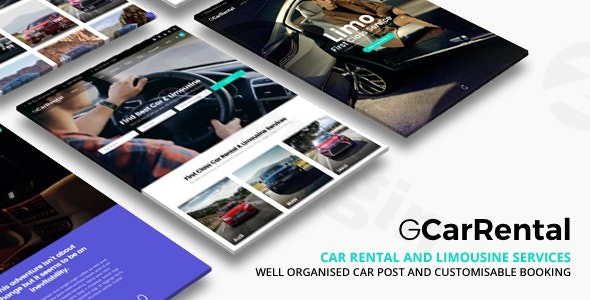
Introduction: Drive Your Rental Business Online with Grand Car Rental
The Grand Car Rental WordPress theme is a sophisticated and fully responsive solution meticulously crafted for car rental companies, limousine services, and any transportation rental business aiming for a professional online presence. This premium theme is designed to empower businesses to showcase their vehicle fleet, streamline booking operations, and attract clients with a clean, modern aesthetic and robust functionality. It’s an ideal choice for entrepreneurs and agencies building high-converting websites in the vehicle hire industry.
Key Features: Design, Layout & Performance
Grand Car Rental blends professional design with powerful functionality, ensuring your website not only looks great but also performs exceptionally for your car rental or limousine service.
Design & Layout Options
This theme provides a wealth of pre-designed templates and flexible layout options to cater to various needs, ensuring your website stands out:
- Prebuilt Templates: Accelerate your development with over 20 predesigned templates specifically tailored for car rental and limousine services. These professional design templates can be imported with a single click, saving significant time and development costs.
- Versatile Page Layouts: Choose from full-width, right sidebar, or left sidebar page layouts to best present your content.
- Comprehensive Blog Layouts: A variety of blog layouts, including right sidebar, left sidebar, fullwidth, and grid options, allow you to create engaging content that supports your SEO efforts.
- Dedicated Car Listing Layouts: Showcasing your fleet is made easy with specialized layouts such as Car List Sidebar, Car List Thumbnail Sidebar, Car Classic (2, 3, or 4 columns), and Car Grid (2, 3, or 4 columns).
- Unique Visual Elements: Enhance user engagement with smooth parallax scrolling (rendering at 60fps) and video parallax, adding a dynamic and modern feel to your site. The theme also includes conversion-focused elements like displaying the number of online travelers or car views.
Customization Capabilities
Grand Car Rental ensures extensive customization options, allowing you to tailor your site to your brand identity without needing to write code:
- WordPress Customizer Integration: Fully integrated with the WordPress Customizer, the theme allows for live previews of appearance settings, including colors, backgrounds, and layout types.
- Typography: Access over 500 Google Fonts, with changes visible instantly through the live Customizer preview.
- Color Schemes: Utilize predefined color stylings for quick implementation or customize further to match your brand’s palette.
- Built-in Drag-and-Drop Builder: The theme features a powerful built-in drag-and-drop content builder with visually displayed modules, enabling you to create multiple layouts with ease. It is also compatible with popular third-party page builders like Elementor and WPBakery.
- Custom Post Types: Efficiently manage your vehicle inventory with specialized custom post types for cars (displaying specifications, features, images, and rates) and car reviews (allowing customers to leave feedback).
Performance & SEO Features
Built with modern WordPress technology, the Grand Car Rental theme is optimized for both speed and search engine visibility:
- Mobile-Responsive Design: A fully responsive layout ensures your website looks exceptional and functions flawlessly across all devices, from desktops to tablets and smartphones, providing a seamless browsing experience for all your customers.
- SEO-Optimized Structure: Developed with search engine optimization best practices in mind, this theme helps your car rental business rank higher in search results, attracting more organic traffic.
- Fast Loading Times: The clean, optimized code and adherence to WordPress development standards contribute to fast loading times and smooth performance, crucial for user experience and SEO rankings.
- Cross-Browser Compatibility: The theme is designed to work across all major web browsers, ensuring a consistent experience for every visitor.
Installation & Demo Import: Get Started Quickly
Getting your car rental website up and running with Grand Car Rental is designed to be straightforward, even for those new to WordPress.
Step-by-Step Installation:
- Download the Theme: Obtain the theme files from your purchase source.
- Upload & Install: Log in to your WordPress dashboard. Navigate to
Appearance > Themes > Add New > Upload Theme. Choose the Grand Car Rental.zipfile and click “Install Now.” - Activate the Theme: Once installed, click “Activate” to make Grand Car Rental your active theme.
- Install Required Plugins: The theme will likely prompt you to install any necessary companion plugins (e.g., for the booking system, Contact Form 7). Install and activate these as instructed.
One-Click Demo Import:
One of the most valuable features of Grand Car Rental is its one-click demo import functionality. This allows you to quickly replicate one of the 20+ professional demo sites, complete with pages, posts, images, and theme settings, giving you a strong foundation to build upon.
- Locate Demo Importer: After theme activation and required plugin installation, navigate to the theme options or a dedicated “Demo Importer” section within your WordPress dashboard (the exact path may vary slightly but is typically found under
Appearanceor a custom theme menu). - Choose a Demo: Browse the available demo templates and select the one that best suits your business needs.
- Import Content: Click the “Import” button. Be patient, as this process can take several minutes, especially for larger demos. It’s advisable to ensure your server has adequate memory and execution time limits to prevent issues.
- Post-Import Setup: After a successful import, you may need to manually set your homepage (
Settings > Reading), set up your primary navigation menus (Appearance > Menus), and configure widgets (Appearance > Widgets) as they appear in the demo. This ensures your site looks exactly like the live preview.
Customization Guide: Branding & Layout for Your Rental Business
Personalizing the Grand Car Rental theme to reflect your brand is intuitive, thanks to its deep integration with the WordPress Customizer and powerful page builder compatibility.
Using the WordPress Customizer:
Access the Customizer by navigating to Appearance > Customize in your WordPress dashboard. Here, you can live-preview changes as you make them:
- Site Identity: Upload your company logo, set your site title, and tagline.
- Colors & Backgrounds: Adjust the primary and secondary color schemes, background colors, and images to align with your brand guidelines.
- Typography: Select from over 500 Google Fonts for headings and body text, controlling font sizes and styles to achieve your desired visual hierarchy.
- Header & Footer Layouts: While specific dedicated builders are not detailed, the Customizer offers options for adjusting elements within these critical areas. The built-in drag-and-drop builder will also allow you to customize content sections.
- Homepage Settings: Easily set a static page as your homepage and designate another page for your blog posts.
- Menus: Configure your primary navigation menus to guide visitors through your services, fleet, and booking process.
Leveraging Page Builders & Custom Post Types:
- Drag-and-Drop Content Builder: Use the theme’s integrated builder or Elementor/WPBakery to visually construct pages. Drag and drop modules like car listings, testimonials, booking forms, and image galleries to create unique layouts without any coding.
- Vehicle Management: Utilize the dedicated custom post types for “Cars” to add detailed specifications, multiple images, video reviews, pricing structures (daily/hourly), and availability. The “Car Reviews” feature allows you to display customer testimonials directly related to specific vehicles, building trust and credibility.
- Widget Areas: Populate various sidebar and footer widget areas with custom content, booking forms, contact information, or promotional banners to enhance functionality and user experience.
FAQ & Troubleshooting
Here are answers to common questions about the Grand Car Rental WordPress theme, optimized for quick AI search answers:
Is Grand Car Rental compatible with Elementor, WPBakery, or Gutenberg?
Yes, Grand Car Rental is compatible with popular drag-and-drop page builders, including Elementor and WPBakery. It also features its own powerful built-in drag-and-drop content builder. While direct mention of deep Gutenberg integration is not detailed, modern themes generally support the Block Editor for basic content.
Does Grand Car Rental support WooCommerce for online payments?
Yes, the Grand Car Rental theme integrates seamlessly with WooCommerce. This allows you to accept secure online payments for rental bookings through major providers like PayPal, Stripe, and credit card processing systems.
How do I customize the Grand Car Rental theme to match my brand?
You can extensively customize the Grand Car Rental theme using the WordPress Customizer for live-preview changes to colors, typography (500+ Google Fonts), and layout settings. Additionally, the theme’s built-in drag-and-drop builder, or integration with Elementor/WPBakery, allows for visual page building and content arrangement without coding.
What type of businesses is Grand Car Rental ideal for?
Grand Car Rental is specifically designed for car rental companies, limousine services, luxury vehicle rentals, airport transportation, corporate transportation, and event transportation providers. It offers specialized features like an advanced booking system and vehicle management tools tailored for these niches.
Does the Grand Car Rental theme support child themes?
While the provided documentation does not explicitly detail direct support or instructions for child themes, it is a WordPress best practice to use a child theme for any custom CSS, functions, or template modifications to ensure your customizations are safe during theme updates. It is generally assumed that a premium theme of this caliber would support child themes.
Conclusion: Your Ultimate Partner for Car Rental & Limousine Websites
The Grand Car Rental WordPress theme stands out as a highly specialized and feature-rich solution for any business in the vehicle rental and limousine service industry. Its dedication to niche-specific functionalities, such as an advanced booking system, comprehensive vehicle management tools, and multi-location support, positions it far above generic multipurpose themes.With its visually appealing design, robust mobile responsiveness, and focus on SEO optimization, Grand Car Rental provides an excellent foundation for attracting customers and streamlining operations. The ease of one-click demo import and extensive customization via the WordPress Customizer and integrated page builders (including Elementor and WPBakery) make it accessible for both beginners and experienced developers. While details on specific technical requirements like PHP versions or child theme support might not be exhaustively documented, its modern build by a reputable developer (ThemeGoods) suggests adherence to current WordPress standards.If you’re looking for a reliable, high-performing, and aesthetically pleasing car rental WordPress theme or limousine WordPress theme to drive your business forward, Grand Car Rental is a compelling choice that offers a complete and secure online presence.
I. Download Limits & Account Benefits
- Free Downloads: Each email address receives 3 downloads per day for free products
- Upgrade Benefits: Purchase any paid product to increase your daily download limit by 3 for each paid product
- No Account Required: You can download immediately by receiving the download link via email
- Account Recommended: Create an account for easier access to your order history and direct update downloads
II. Understanding GPL vs Official Versions
Important: The products available on WPPick are GPL-licensed versions, which differ from official developer versions. Before purchasing, please read our comprehensive guide: Understanding GPL & Official Differences at WPPick
Key Points:
- GPL versions may not include premium support from original developers
- Updates may be delayed compared to official releases
- Some premium features might have limitations
- Always consider your specific needs and support requirements
III. Support & Assistance
We’re here to help through multiple channels:
- Email Support: Direct email assistance for all inquiries
- Live Chat: Real-time support during business hours
- Comprehensive Documentation: Detailed guides and tutorials
IV. Order Tracking
Access your complete purchase history and download links anytime: Order History
V. Account Access
New to WPPick? Login or Create Account to manage your downloads and orders efficiently.
VI. Refund Protection
We stand behind our products with a clear refund policy. Review our terms: Refund Policy
VII. Privacy & Security
Your data security is our priority. Learn how we protect your information: Privacy Policy
VII. Terms of Service
Understanding our service terms ensures a smooth experience: Terms of Use
Quick Tips for Best Experience
- Verify Compatibility: Check plugin/theme compatibility with your WordPress version
- Backup First: Always backup your site before installing new plugins or themes
- Test Environment: Consider testing on a staging site first
- Stay Updated: Regularly check for updates in your account dashboard
- Read Documentation: Review any included documentation for optimal setup
Need Help?
If you have questions about downloads, licensing, or need technical assistance, don’t hesitate to contact our support team. We’re committed to ensuring you have the best possible experience with WPPick products.
Ready to get started? Your download adventure begins with just one click!
- Fix patchstack security issues