

Grand Restaurant – WordPress Theme
/Year
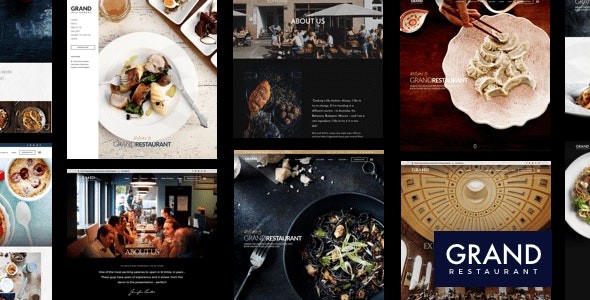
The Grand Restaurant WordPress Theme stands out as a sophisticated and modern solution meticulously crafted for the vibrant food and hospitality industry. Whether you run a cozy cafe, a bustling restaurant, a gourmet bistro, or a charming bakery, this theme provides a robust foundation for establishing a compelling online presence. Designed by ThemeGoods, a reputable developer with over a decade of experience, Grand Restaurant combines elegant aesthetics with powerful functionality, making it one of the best WordPress themes for restaurants looking to impress customers and streamline operations.
Key Features: Design, Layout & Performance
Grand Restaurant is engineered to deliver a stunning visual experience and seamless functionality, ensuring your food business shines online.
Design & Layout Options
The theme’s design philosophy centers on creating an appetizing and intuitive user experience.
- Inspired Food Menu Layouts: Showcase your culinary creations with unique, professionally inspired menu layouts that enhance customer browsing and ordering. You get three distinct menu layouts to choose from, each designed to highlight your dishes beautifully.
- Six Predefined Demos: Jumpstart your website with six professionally designed demos, each tailored for different restaurant styles and cuisines, including Modern Cuisine, Asian Food, and Elegant Food Restaurants.
- Multiple Layout Options: Enjoy significant flexibility with six blog templates, three dedicated menu layouts, and four contact page templates, allowing you to create a diverse and engaging site.
- Layout Flexibility: Easily switch between boxed and wide layouts directly in the live customizer, with instant previews of your changes, ensuring your site perfectly matches your brand’s aesthetic.
- Customizable Google Maps Integration: Display your location(s) with style using customizable Google Maps color schemes from SnazzyMaps, supporting multiple maps across your site.
- Fully Responsive Design: Grand Restaurant ensures your website looks flawless and functions perfectly across all devices, from large desktop monitors to tablets and smartphones, providing an optimal viewing experience for every visitor. It’s also Retina Ready for crystal-clear displays on high-resolution screens.
Customization Capabilities
Personalizing Grand Restaurant to reflect your brand’s unique identity is incredibly intuitive, thanks to its powerful built-in tools.
- Intuitive Live Content Builder: Craft beautiful pages effortlessly with a keynote-style interface that features live preview capabilities. This proprietary builder offers both Live Mode for instant feedback and Classic Mode for faster development.
- Visual Content Management: Add and manage content visually with screenshot previews of content elements, making the page-building process straightforward and efficient.
- Drag-and-Drop Functionality: Build complex layouts without needing any coding knowledge, utilizing an extensive library of predefined content modules.
- Template Saving: Save your custom pages as templates for future use, significantly accelerating the development of new pages and maintaining design consistency.
- Responsive Design Preview: Directly view and work with responsive layouts within the content builder, ensuring your designs adapt perfectly to all screen sizes.
- WordPress Customizer Integration: Modify all appearance settings with a live preview functionality. Changes to colors, backgrounds, typography, layouts, text, and images display instantly, empowering you to brand your site in real-time.
- Advanced Typography Controls: Gain complete control over your site’s typography with access to over 500 Google Fonts. Customize font sizes, styles, colors, and spacing for virtually all text elements, including headings (H1-H6), main content, buttons, menus, and more.
- Responsive Development Tools: Preview your website across different devices with a single click within the live customizer, ensuring cross-device compatibility.
- Header, Footer, and Mega Menu Builders: The theme offers flexible options for header creation, including transparent headers and mobile menus. You can create advanced mega menus using either default WordPress custom menus or Elementor, providing rich navigation experiences. Footer content can be customized using footer sidebars or Elementor.
Monetization & Business Features
Beyond stunning visuals, Grand Restaurant offers powerful features to drive your food business forward.
- WooCommerce Integration: Launch your food delivery or takeaway service quickly and efficiently with seamless WooCommerce integration. The theme supports both online and offline payment options, offering maximum flexibility for your customers. This makes it an ideal online food ordering WordPress theme.
- Direct Purchase Links: Boost your online sales by offering direct purchase links for each menu item, allowing customers to order their desired dishes with a single click.
- Flexible Reservation System: Offer multiple reservation options to suit your business model, including easy-to-use email forms, custom URL integrations, and direct compatibility with OpenTable, making it a leading restaurant WordPress theme with reservation system.
Performance & SEO Features
Grand Restaurant is built with speed and search engine optimization in mind, ensuring your site performs well and ranks high.
- Fast Loading & Optimization: The theme is designed to be lightweight and fast-loading, contributing to a better user experience and improved SEO. It includes advanced lazy loading for images to further enhance speed.
- Mobile Responsiveness: Fully responsive and optimized for Google Mobile Compatibility Checks, the theme ensures your site is accessible and engaging for all mobile users.
- SEO Best Practices: Built with clean markup and structured headings, Grand Restaurant adheres to SEO best practices, helping your website achieve higher search engine rankings.
- Live Search Functionality: Enhance user experience with instant search capabilities that provide interactive feedback and partial query support, helping visitors find what they need faster.
Installation & Demo Import Guide
Setting up your Grand Restaurant website is designed to be straightforward, even for beginners.
- Install & Activate the Theme:
- Download the
grandrestaurant.zipfile from your purchase source (e.g., ThemeForest). - Log in to your WordPress dashboard.
- Navigate to
Appearance > Themes > Add New > Upload Theme. - Choose the
grandrestaurant.zipfile and clickInstall Now. - Once installed, click
Activate.
- Download the
- Install Required Companion Plugins: After activation, you will typically see a notification banner prompting you to install required plugins. Click “Begin installing plugins” and install all listed plugins (e.g., ThemeGoods plugins, WooCommerce, any page builder integrations). Activate them once installed.
- One-Click Demo Import: This is where the magic happens!
- Go to
Appearance > Import Demo Data(or a similar path indicated by the theme). - You will see the six predefined demos available. Choose the demo that best fits your restaurant’s style (e.g., Modern Cuisine, Asian Food, Elegant Food).
- Click the “Import Demo” button.
- Acknowledge any prompts about server requirements. Ensure your server meets basic WordPress requirements for memory and execution time to prevent timeouts during large demo imports.
- Go to
- What to Expect During/After Demo Import:
- The import process will bring in complete demo content, including pages, posts, sliders, widgets, and theme settings. This significantly reduces setup time.
- Your menus, content, and initial layout will resemble the chosen demo. You may need to manually assign primary navigation menus under
Appearance > Menusand set your homepage underSettings > Reading.
Customization Guide: Branding & Layout
Personalizing Grand Restaurant to match your brand’s unique flavors is intuitive and flexible.
- Using the WordPress Customizer: This is your central hub for branding. Navigate to
Appearance > Customize.- Colors & Backgrounds: Easily change the main content background, page content font, link colors, heading colors (H1-H6), button colors, and a specific highlight color for food menus.
- Typography: Select from over 500 Google Fonts or upload custom fonts. Adjust font sizes, weights, styles, and line heights for all text elements.
- Logo & Site Identity: Upload your restaurant’s logo, customize the site title, and tagline. You can instantly preview how these changes appear across your site and on different devices.
- Layout Options: Toggle between boxed and wide layouts and preview the changes live.
- Setting Up Headers and Footers:
- Headers: Utilize the theme’s “General Menu Layout” options or leverage Elementor for more advanced header designs. Transparent headers and custom mobile menus are easily configurable.
- Footers: Customize your footer content using designated footer widget areas (
Appearance > Widgets) or build complex footer layouts with Elementor.
- Creating and Managing Menus:
- Go to
Appearance > Menusto create and organize your navigation menus. Grand Restaurant supports standard WordPress menus and offers options for creating rich mega menus, enhancing user navigation. - For your food menu, use the dedicated “Food Menu Posts” custom post type to easily add and categorize your dishes.
- Go to
- Homepage and Blog Page Settings:
- To set a static page as your homepage (e.g., one of the imported demo homepages), go to
Settings > Readingand select “A static page” for your homepage display. - Designate another page as your “Posts page” to display your blog articles.
- To set a static page as your homepage (e.g., one of the imported demo homepages), go to
- Advanced Customizations:
- Custom CSS: For more specific styling adjustments, Grand Restaurant allows you to add custom CSS directly within the theme options or the Customizer, ensuring your modifications are preserved during theme updates.
- Child Themes: The theme explicitly supports child themes. For any extensive code modifications, it’s highly recommended to use a child theme to protect your customizations during theme updates.
FAQ & Troubleshooting
Here are answers to some common questions about the Grand Restaurant WordPress Theme:
Is Grand Restaurant compatible with Elementor / WPBakery / Gutenberg?
Grand Restaurant features its own powerful and intuitive Live Content Builder with drag-and-drop functionality, which is excellent for visual page creation. While its primary builder is proprietary, the theme documentation also outlines options for setting up headers, footers, and pages using Elementor, suggesting compatibility or integrated workflows with this popular page builder. Being built with the “latest WordPress technology” implies a degree of compatibility with the Block Editor (Gutenberg) for standard content.
Does Grand Restaurant support WooCommerce for online stores?
Yes, Grand Restaurant fully integrates with WooCommerce. This allows you to launch online food ordering and delivery services, manage products, process payments (both online and offline), and offer direct purchase links for individual menu items, making it perfect for food businesses needing eCommerce capabilities.
Does Grand Restaurant support child themes?
Yes, Grand Restaurant explicitly supports child themes. Using a child theme is highly recommended for any custom code modifications (PHP, CSS, or JavaScript) to ensure that your customizations are not overwritten when you update the main Grand Restaurant theme.
How can I update the theme without losing my customizations?
To update Grand Restaurant without losing customizations, it’s crucial to use a child theme for any code modifications. If you’ve made changes directly to the parent theme files, they will be lost upon update. For updates, if purchased from ThemeForest, you can update directly via your WordPress dashboard (if connected to Envato Market plugin) or by manually uploading the new version. Always back up your website before performing any theme updates.
What should I do if the demo import fails or looks different from the demo site?
If the demo import fails, first check your server requirements, especially PHP memory limit and execution time. Insufficient resources can cause timeouts. If the import completes but looks different, ensure all required plugins are installed and activated, and that your primary menus and homepage are assigned under Appearance > Menus and Settings > Reading, respectively. Clearing your website and browser cache can also resolve display issues.
Conclusion
The Grand Restaurant WordPress Theme is an exceptional choice for any food-related business aiming for a professional, highly functional, and visually appealing online presence. Its unique blend of inspired design, extensive customization options through its Live Content Builder and WordPress Customizer, and robust business features like seamless WooCommerce and a flexible reservation system, position it as a leader in its niche.Ideal for restaurant, cafe, and bakery owners, as well as freelancers and agencies building sites for clients in the hospitality industry, Grand Restaurant offers a streamlined setup process with one-click demo import and intuitive tools for ongoing management. Its focus on performance, mobile responsiveness, and adherence to SEO best practices further ensure your website not only looks good but also performs strongly in search engines.While premium, the investment in Grand Restaurant delivers a comprehensive and specialized solution that far surpasses generic multipurpose themes, providing everything you need to showcase your cuisine and manage your business effectively online. It’s a confident choice for those who prioritize aesthetic appeal, user experience, and powerful monetization capabilities.
I. Download Limits & Account Benefits
- Free Downloads: Each email address receives 3 downloads per day for free products
- Upgrade Benefits: Purchase any paid product to increase your daily download limit by 3 for each paid product
- No Account Required: You can download immediately by receiving the download link via email
- Account Recommended: Create an account for easier access to your order history and direct update downloads
II. Understanding GPL vs Official Versions
Important: The products available on WPPick are GPL-licensed versions, which differ from official developer versions. Before purchasing, please read our comprehensive guide: Understanding GPL & Official Differences at WPPick
Key Points:
- GPL versions may not include premium support from original developers
- Updates may be delayed compared to official releases
- Some premium features might have limitations
- Always consider your specific needs and support requirements
III. Support & Assistance
We’re here to help through multiple channels:
- Email Support: Direct email assistance for all inquiries
- Live Chat: Real-time support during business hours
- Comprehensive Documentation: Detailed guides and tutorials
IV. Order Tracking
Access your complete purchase history and download links anytime: Order History
V. Account Access
New to WPPick? Login or Create Account to manage your downloads and orders efficiently.
VI. Refund Protection
We stand behind our products with a clear refund policy. Review our terms: Refund Policy
VII. Privacy & Security
Your data security is our priority. Learn how we protect your information: Privacy Policy
VII. Terms of Service
Understanding our service terms ensures a smooth experience: Terms of Use
Quick Tips for Best Experience
- Verify Compatibility: Check plugin/theme compatibility with your WordPress version
- Backup First: Always backup your site before installing new plugins or themes
- Test Environment: Consider testing on a staging site first
- Stay Updated: Regularly check for updates in your account dashboard
- Read Documentation: Review any included documentation for optimal setup
Need Help?
If you have questions about downloads, licensing, or need technical assistance, don’t hesitate to contact our support team. We’re committed to ensuring you have the best possible experience with WPPick products.
Ready to get started? Your download adventure begins with just one click!
- Fix Pathstack issue
- Fix theme security issue
- Add 3 new demos websites
- Update Envato Market plugin v2.0.12
- Update Appointment Booking Checkout Fields plugin v1.1.1