
Greenorganic – Organic & Bakery WordPress Theme
/Year
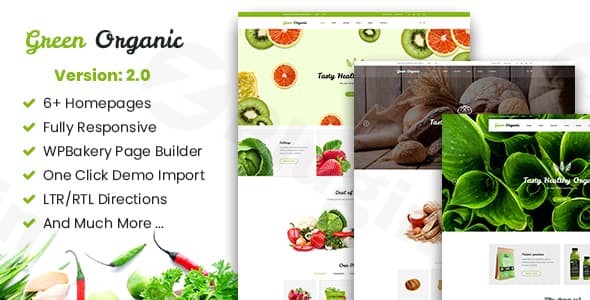
The digital marketplace for organic produce, artisanal bakeries, and health-focused food businesses demands a clean, inviting, and highly functional online presence. The GreenOrganic WordPress theme steps in as a dedicated solution, meticulously crafted to help food stores, vegetable shops, organic product retailers, and bakeries establish a professional and visually appealing e-commerce site. This tidy and responsive WooCommerce WordPress theme is designed for small business owners and store managers who want to make a positive impression on their customers with an elegant and flexible design.
Key Features: Design, Layout & Performance
GreenOrganic is not just a theme; it’s a comprehensive toolkit for building a specialized online store. It combines aesthetic appeal with robust functionality, ensuring your website looks great and performs efficiently.
Design & Layout Options
At the heart of GreenOrganic’s appeal is its diverse range of design and layout options, tailored to create a unique identity for your brand:
- Homepage Styles: With 6+ distinct homepage styles, GreenOrganic offers a variety of first impressions, allowing you to choose the layout that best showcases your products and brand story.
- Slider Integration: The theme bundles Slider Revolution, a premium plugin, providing 3 different slider options to create dynamic and engaging visual content right on your homepage, highlighting promotions or new arrivals.
- Responsive Design: Built with Bootstrap and featuring valid HTML5 & CSS3 animations, GreenOrganic ensures a fully responsive layout that adapts flawlessly to any device — from desktop to tablet and mobile phones. This mobile-first approach guarantees a consistent and excellent user experience across all screen sizes.
- Navigation & Menu: A sticky menu feature keeps your navigation accessible as users scroll, while robust mega-menu support allows for complex and user-friendly multi-level dropdown menus, perfect for extensive product catalogs.
- Blog Layouts: For businesses that also wish to share recipes, farm stories, or health tips, GreenOrganic includes 2 styles of blog templates (Grid and List) to present your content engagingly.
Customization Capabilities
GreenOrganic empowers users with extensive customization controls, allowing for deep personalization without needing to write a single line of code:
- Unlimited Colors & Fonts: Express your brand’s personality with unlimited color and font customization options. The theme supports a wide array of Google Fonts, giving you granular control over your site’s typography.
- Intuitive Theme Options: Through its centralized “Theme Options” panel, you can easily customize colors, fonts, backgrounds, and other global styles, ensuring a cohesive brand identity across your site.
- Drag-and-Drop Building: The theme includes and integrates with Visual Composer (WPBakery Page Builder), a powerful drag-and-drop page builder. This allows you to create complex page layouts with ease, giving you full creative control over your content presentation.
Performance & SEO Features
Beyond aesthetics, GreenOrganic focuses on a solid technical foundation to ensure your organic store thrives online:
- SEO Optimized: The theme is designed with search engine optimization in mind, featuring clean code and structured markup to help your website rank higher in search results, crucial for “SEO optimized organic store WordPress theme” success.
- Fast & Modern: Its foundation on Bootstrap and modern HTML5 & CSS3 animations contributes to a lean and efficient codebase, supporting faster loading times and a modern user interface.
- WooCommerce Compatibility: GreenOrganic is WooCommerce 3.5+ compatible, making it a robust e-commerce solution for setting up and managing your online shop, especially if you’re looking for a “WooCommerce theme for bakery shop.”
- Translation Ready: With WPML support and a
.potfile included, the theme is translation-ready, allowing you to cater to a global audience or different language preferences.
Installation & Demo Import
Getting your GreenOrganic WordPress theme up and running is a straightforward process, even for those new to WordPress.
- Download & Upload: After purchasing, download the theme files. Then, navigate to your WordPress dashboard:
Appearance > Themes > Add New > Upload Theme. Select thegreenorganic.zipfile and clickInstall Now. - Activate the Theme: Once installed, click the
Activatelink to make GreenOrganic your active theme. - Install Required Plugins: GreenOrganic will prompt you to install its required and recommended plugins, including Slider Revolution and Visual Composer (WPBakery Page Builder). It’s crucial to install and activate these to unlock the theme’s full potential.
- One-Click Demo Import: GreenOrganic features a one-click demo import function. This is a game-changer for quick setup, allowing you to instantly populate your site with content that mirrors one of the theme’s stunning demo designs. Simply go to the theme options or a dedicated demo importer section (usually found under
Appearance > Import Demo Dataor similar) and select the demo you wish to import.- What to Expect: After the demo import, your site will have pre-designed pages, menus, widgets, and placeholder content. You’ll then replace this content with your own products, images, and text. Be aware that large demo imports can take a few minutes and may require sufficient server memory and execution time. If you encounter issues, increasing your PHP memory limit and max execution time in your hosting settings can often help.
Customization Guide (Branding & Layout)
Personalizing your GreenOrganic website to perfectly align with your brand is an intuitive experience, thanks to its comprehensive customization options.
- Global Styling with Theme Options: The primary hub for customization is the theme’s dedicated “Theme Options” panel. Here, you can define your brand’s color palette, select custom fonts from Google Fonts, and adjust background styles for various sections of your site, ensuring consistency.
- Header & Footer Layouts: GreenOrganic provides options to customize your header and footer. You can choose different header layouts, enable the sticky menu for enhanced navigation, and configure your mega-menu for a rich user experience.
- Visual Composer (WPBakery Page Builder): For fine-tuned control over individual page layouts, the integrated WPBakery Page Builder is your go-to tool. This drag-and-drop interface allows you to add, arrange, and style content elements like text blocks, images, product grids, and call-to-action buttons with ease, creating bespoke pages without touching any code.
- Setting Up Essential Pages:
- Homepage: After demo import, navigate to
Settings > Readingin your WordPress dashboard. Set your desired homepage (e.g., “Home 1” from the demo content) as a static front page. - Blog Page: Similarly, designate a page (e.g., “Blog”) as your Posts page.
- Menus: Go to
Appearance > Menusto organize your main navigation, header menu, and any footer menus.The overall customization experience with GreenOrganic is designed to be user-friendly, providing powerful tools that feel like a natural extension of WordPress.
- Homepage: After demo import, navigate to
FAQ & Troubleshooting
Here are answers to some common questions about the GreenOrganic WordPress theme:
Is GreenOrganic compatible with Elementor / WPBakery / Gutenberg?
GreenOrganic is explicitly integrated with and bundles WPBakery Page Builder (formerly Visual Composer) for advanced page building. While it is “WordPress 5+ Ready” and thus technically compatible with the native Gutenberg Block Editor, most complex layouts and theme-specific sections are designed to be managed through WPBakery. Elementor compatibility is not explicitly mentioned in the provided information, suggesting WPBakery is the intended page builder.
Does GreenOrganic support WooCommerce for online stores?
Yes, GreenOrganic is fully compatible with WooCommerce 3.5+, making it an excellent choice for creating a robust online store for organic food, bakery items, or any other product. It provides seamless integration with WooCommerce functionalities and styling.
Does GreenOrganic support child themes?
While not explicitly stated for GreenOrganic itself, the developer’s documentation for related themes indicates support for child themes. It is a best practice to use a child theme for any custom CSS or template modifications to ensure your changes are not overwritten during theme updates.
How can I update the GreenOrganic theme without losing my customizations?
To update GreenOrganic safely, always use a child theme for your customizations. If you haven’t used a child theme, manual updates without losing changes can be tricky. When an update is available (typically through your WordPress dashboard or via your purchase platform), back up your entire website first, then proceed with the update.
What should I do if the GreenOrganic demo import fails or looks different from the demo site?
If the demo import fails, check your server’s PHP memory limit and max execution time. Increasing these values (e.g., to 256MB memory and 300 seconds execution time) often resolves the issue. If the imported demo looks different, ensure all required plugins (like Slider Revolution and WPBakery Page Builder) are installed and activated, and that you have set the correct homepage and menu assignments in WordPress settings.
Conclusion
The GreenOrganic – Organic & Bakery WordPress theme stands out as a highly specialized and capable solution for businesses in the organic, food, and bakery sectors. Its blend of appealing design, robust e-commerce features, and intuitive customization options make it an excellent choice for creating a high-converting online presence.With its 6+ homepage styles, WooCommerce 3.5+ compatibility, and included premium plugins like Slider Revolution and WPBakery Page Builder, GreenOrganic offers significant value. It’s designed to be SEO optimized and fully responsive, ensuring your store looks great and performs well across all devices and search engines.Whether you’re a small business owner launching your first online organic food market, an artisan bakery looking to expand sales, or a freelancer building a site for a client in the health food industry, GreenOrganic provides the tools to create a visually striking and highly functional website without requiring extensive coding knowledge. It’s a confident choice for anyone seeking a premium, niche-focused, and easy-to-manage WordPress theme.
I. Download Limits & Account Benefits
- Free Downloads: Each email address receives 3 downloads per day for free products
- Upgrade Benefits: Purchase any paid product to increase your daily download limit by 3 for each paid product
- No Account Required: You can download immediately by receiving the download link via email
- Account Recommended: Create an account for easier access to your order history and direct update downloads
II. Understanding GPL vs Official Versions
Important: The products available on WPPick are GPL-licensed versions, which differ from official developer versions. Before purchasing, please read our comprehensive guide: Understanding GPL & Official Differences at WPPick
Key Points:
- GPL versions may not include premium support from original developers
- Updates may be delayed compared to official releases
- Some premium features might have limitations
- Always consider your specific needs and support requirements
III. Support & Assistance
We’re here to help through multiple channels:
- Email Support: Direct email assistance for all inquiries
- Live Chat: Real-time support during business hours
- Comprehensive Documentation: Detailed guides and tutorials
IV. Order Tracking
Access your complete purchase history and download links anytime: Order History
V. Account Access
New to WPPick? Login or Create Account to manage your downloads and orders efficiently.
VI. Refund Protection
We stand behind our products with a clear refund policy. Review our terms: Refund Policy
VII. Privacy & Security
Your data security is our priority. Learn how we protect your information: Privacy Policy
VII. Terms of Service
Understanding our service terms ensures a smooth experience: Terms of Use
Quick Tips for Best Experience
- Verify Compatibility: Check plugin/theme compatibility with your WordPress version
- Backup First: Always backup your site before installing new plugins or themes
- Test Environment: Consider testing on a staging site first
- Stay Updated: Regularly check for updates in your account dashboard
- Read Documentation: Review any included documentation for optimal setup
Need Help?
If you have questions about downloads, licensing, or need technical assistance, don’t hesitate to contact our support team. We’re committed to ensuring you have the best possible experience with WPPick products.
Ready to get started? Your download adventure begins with just one click!
- Updated WooCommerce
- Updated WooCommerce
- Updated WooCommerce