
Gutentype | 100% Gutenberg WordPress Theme For Modern Blog
/Year
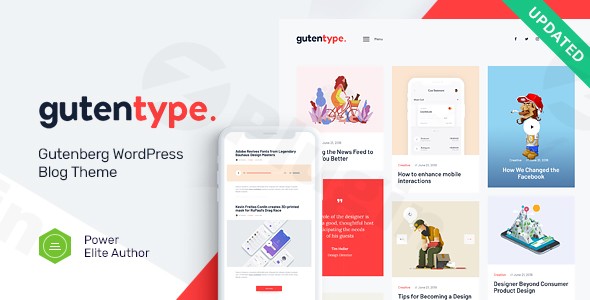
In the dynamic world of online publishing, having a robust, intuitive, and visually appealing platform is paramount. The Gutentype WordPress theme stands out as a premier Gutenberg WordPress blog theme, meticulously crafted for bloggers, content creators, and businesses who demand a modern, clean, and responsive design experience. It’s engineered to leverage the full power of the native Gutenberg editor, offering a streamlined workflow for crafting compelling content, from news and reviews to tutorials and personal stories. Gutentype embodies a minimalist yet powerful design philosophy, focusing on presenting your content beautifully across all devices, ensuring an optimal reading experience for your audience.
Key Features: Design, Layout & Performance for a Superior Blog
Gutentype is not just another theme; it’s a comprehensive solution for publishing, blending stunning aesthetics with high functionality.
Design & Layout Options: Visual Versatility for Every Story
Gutentype offers exceptional flexibility to help you define your site’s visual narrative:
- 100% Responsive & Retina-Ready: Your blog will look flawless on any device, from the largest desktop monitors to the smallest smartphones, with crisp, high-resolution graphics. This ensures a consistent and engaging user experience across all screen sizes.
- Versatile Blog Layouts: Choose from multiple blog styles, including grid, masonry, and various minimalist options, allowing you to present your posts in the most engaging way possible. Over 20 post animations add a dynamic touch, keeping readers captivated.
- Full-Width & Boxed Layouts: Tailor your pages to either span the full width of the browser or display within a defined content box, offering control over your site’s overall spatial design.
- Pre-built Templates & Demo Layouts: Get a head start with numerous pre-built templates and multiple demo layouts. These professional showcases can be imported and customized, significantly accelerating your website development.
- Dedicated Header & Footer Areas: With 10 distinct header layouts and 4 footer layouts, including an advanced custom footer builder, you have extensive control over these critical navigation and branding elements.
Customization Capabilities: Branding Your Content Hub
Gutentype empowers you to personalize every aspect of your blog to match your brand’s identity without writing a single line of code:
- Gutenberg Optimized with Enhanced Blocks: Fully compatible with all Gutenberg blocks, Gutentype provides enhanced block styles for core elements like headings, galleries, quotes, and buttons. It fully supports Gutenberg’s core classes like ‘alignfull’ and ‘alignwide’ for striking content layouts.
- Extensive WordPress Customizer Options: With over 750 customizer options and a dedicated Custom Theme Options Panel, you can intuitively control global styles, colors, typography, and layout settings with live previews.
- Flexible Color Schemes: Implement custom color palettes to reflect your brand, offering granular control over every visual element.
- Advanced Typography: Integrate Google Fonts to select from a vast library of typefaces, ensuring your content is both readable and visually impactful. Fontello & Image Icons further enhance visual appeal.
- “Yellow Pencil” Integration: For advanced users or those seeking precise styling control, the theme supports the “Yellow Pencil” front-end editor, allowing you to alter CSS elements directly.
Performance & SEO Features: Built for Speed and Visibility
A great blog needs to be seen and perform well. Gutentype is built with performance and search engine optimization in mind:
- Optimized for Performance & Fast Loading: The theme is designed for speed, incorporating adaptive images and mobile optimization to ensure rapid loading times on all devices, contributing to a smooth browsing experience.
- 100% SEO Ready Structure: Gutentype features a clean, well-structured codebase (HTML5 and CSS3) that is designed to be search engine friendly. This foundation helps search engines crawl and index your content more effectively. While some reviews suggest its SEO optimization might be below industry average in specific metrics, its core structure supports good SEO practices.
- Regular Updates & GPL Licensed: Benefit from continuous improvements and security enhancements, and enjoy the freedom of a GPL-licensed product.
Installation & Demo Import: Getting Started with Gutentype
Setting up Gutentype and launching your modern blog is a straightforward process, even for beginners.
- Install & Activate the Theme:
- From your WordPress dashboard, navigate to
Appearance > Themes. - Click
Add New, thenUpload Theme. - Choose the Gutentype theme
.zipfile you downloaded and clickInstall Now. - Once installed, click
Activate.
- From your WordPress dashboard, navigate to
- Install Required Companion Plugins:
- Upon activation, Gutentype will often prompt you to install a set of recommended plugins. These typically include the ThemeREX framework and TRX Addons (for extended elements and styling), as well as essential plugins like Instagram Feed, MailChimp for WP, Contact Form 7, and GDPR Framework WP. Install and activate all suggested plugins to unlock the theme’s full functionality.
- Use the Theme’s One-Click Demo Import:
- Gutentype typically includes a One-Click Demo Import feature. Look for an option like
Appearance > Import Demo Dataor a similar menu item provided by the theme or its companion plugins. - Select the demo layout that best fits your vision and initiate the import process.
- Tip: Demo imports, especially those with extensive content and images, can be resource-intensive. Ensure your hosting environment has sufficient PHP memory limit and execution time to prevent timeouts. If issues arise, increasing these limits or importing content incrementally might be necessary.
- Gutentype typically includes a One-Click Demo Import feature. Look for an option like
- What to Expect During/After Demo Import:
- The demo import will populate your site with sample pages, posts, menus, widgets, and images, mirroring the theme’s live demo. This provides an excellent starting point, allowing you to replace content rather than building from scratch.
- After import, you may need to manually assign your main menu and set your homepage in
Appearance > MenusandSettings > Reading, respectively, if they don’t automatically configure.
Customization Guide: Personalizing Your Gutentype Blog
Gutentype’s strength lies in its intuitive customization options, allowing you to brand your blog with ease.
- Access the WordPress Customizer: Navigate to
Appearance > Customizein your WordPress dashboard. This live editor is your central hub for global styling. - Changing Colors & Typography:
- Within the Customizer, find sections for “Colors” and “Typography.” Here, you can adjust your site’s primary and secondary color palettes, link colors, and background colors.
- Explore the “Typography” settings to select desired Google Fonts for your body text, headings, and navigation, controlling font sizes, weights, and line heights for optimal readability.
- Uploading Your Logo:
- Look for a “Site Identity” or “Header” section in the Customizer. You can upload your brand’s logo, adjust its size, and set your site title and tagline.
- Configuring Header & Footer Layouts:
- Gutentype offers 10 different header layouts and 4 footer layouts. In the Customizer or Theme Options Panel, you’ll find options to choose your preferred layout style and configure elements like top bars, navigation menus (main menu, footer menu), social links, and copyright information. The advanced footer builder provides even more granular control.
- Setting Up Your Homepage and Blog Page:
- Go to
Settings > Reading. You can choose to display your latest posts as the homepage or set a static page (e.g., a “Welcome” page created with Gutenberg blocks) as your homepage and another page to display your blog posts.
- Go to
- Utilizing Gutenberg for Page & Post Design:
- When creating new posts or pages, leverage Gutentype’s enhanced Gutenberg block styles. Experiment with core Gutenberg classes like
alignfullandalignwideto create visually impactful sections and galleries. For more complex layouts or specific design needs, remember Gutentype is compatible with Elementor, giving you an alternative drag-and-drop page building experience.
- When creating new posts or pages, leverage Gutentype’s enhanced Gutenberg block styles. Experiment with core Gutenberg classes like
FAQ & Troubleshooting
Is Gutentype compatible with Elementor and Gutenberg?
Yes, Gutentype is 100% compatible with the Gutenberg block editor, offering full support for all native blocks and enhanced theme styles. Additionally, it offers explicit compatibility with Elementor, allowing users to choose their preferred page builder for advanced layout and design.
Does Gutentype support WooCommerce for online stores?
Absolutely. Gutentype is fully WooCommerce ready, allowing you to seamlessly integrate an online store into your blog. This makes it perfect for selling physical products, digital downloads, or services alongside your content.
Does Gutentype support child themes?
While not explicitly highlighted in the feature list, supporting child themes is a standard best practice for WordPress themes to preserve customizations during updates. As a premium theme from a reputable developer (AncoraThemes), Gutentype is expected to support child themes, which we highly recommend for any site-specific modifications.
How can I update Gutentype without losing my customizations?
To update Gutentype without losing your customizations, it is highly recommended to use a child theme for any code-based modifications (CSS, PHP templates). For settings made through the WordPress Customizer or Gutentype’s Theme Options Panel, these are typically stored in the database and should persist through theme updates. Always back up your website before performing any theme updates.
What should I do if the Gutentype demo import fails or looks different from the demo site?
If the demo import fails, first check your server’s PHP limits (memory limit, execution time) and consult your hosting provider. Increasing these can often resolve the issue. If the imported demo looks different, ensure all recommended plugins were installed and activated prior to import. Some visual elements or widget areas might require minor manual adjustments after import. If problems persist, refer to the theme’s official documentation or contact support if purchased through an official channel like ThemeForest.
Conclusion: Why Gutentype is Your Ideal Gutenberg Blog Theme
Gutentype emerges as a powerful and highly versatile Gutenberg WordPress blog theme, perfectly suited for modern content creators, publishers, and businesses. Its deep integration with the native WordPress block editor provides an intuitive and streamlined workflow, empowering users to create visually rich and engaging content effortlessly.With its 100% responsive design, a wealth of layout options (including grid, masonry, and multiple header/footer styles), and extensive customization capabilities through the WordPress Customizer, Gutentype offers unparalleled flexibility for branding. Its focus on performance and SEO readiness, coupled with crucial integrations like WooCommerce and Elementor, makes it a future-proof foundation for any online presence.Gutentype is an excellent choice for bloggers seeking a clean, fast, and highly customizable platform, for eCommerce store owners wanting to blend content marketing with online sales, and for freelancers or agencies building client sites that prioritize a Gutenberg-first experience. While always advisable to check official support channels for the version you acquire, its feature set and design philosophy make it a strong contender for anyone serious about modern online publishing.
I. Download Limits & Account Benefits
- Free Downloads: Each email address receives 3 downloads per day for free products
- Upgrade Benefits: Purchase any paid product to increase your daily download limit by 3 for each paid product
- No Account Required: You can download immediately by receiving the download link via email
- Account Recommended: Create an account for easier access to your order history and direct update downloads
II. Understanding GPL vs Official Versions
Important: The products available on WPPick are GPL-licensed versions, which differ from official developer versions. Before purchasing, please read our comprehensive guide: Understanding GPL & Official Differences at WPPick
Key Points:
- GPL versions may not include premium support from original developers
- Updates may be delayed compared to official releases
- Some premium features might have limitations
- Always consider your specific needs and support requirements
III. Support & Assistance
We’re here to help through multiple channels:
- Email Support: Direct email assistance for all inquiries
- Live Chat: Real-time support during business hours
- Comprehensive Documentation: Detailed guides and tutorials
IV. Order Tracking
Access your complete purchase history and download links anytime: Order History
V. Account Access
New to WPPick? Login or Create Account to manage your downloads and orders efficiently.
VI. Refund Protection
We stand behind our products with a clear refund policy. Review our terms: Refund Policy
VII. Privacy & Security
Your data security is our priority. Learn how we protect your information: Privacy Policy
VII. Terms of Service
Understanding our service terms ensures a smooth experience: Terms of Use
Quick Tips for Best Experience
- Verify Compatibility: Check plugin/theme compatibility with your WordPress version
- Backup First: Always backup your site before installing new plugins or themes
- Test Environment: Consider testing on a staging site first
- Stay Updated: Regularly check for updates in your account dashboard
- Read Documentation: Review any included documentation for optimal setup
Need Help?
If you have questions about downloads, licensing, or need technical assistance, don’t hesitate to contact our support team. We’re committed to ensuring you have the best possible experience with WPPick products.
Ready to get started? Your download adventure begins with just one click!
- Compatibility with WordPress 6.8.1x has been improved
- Theme styles have been improved