
Gymfito – Fitness And Gym WordPress Theme
/Year
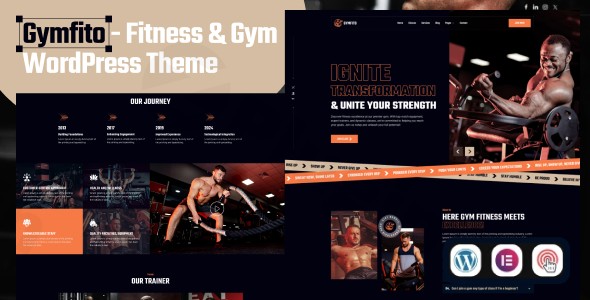
Transform your fitness brand into a client-attracting powerhouse with Gymfito, a premium WordPress theme meticulously crafted for gyms, personal trainers, and fitness professionals. This comprehensive review and setup guide will walk you through how Gymfito’s robust design, intuitive customization options, and performance-focused features can help you create a stunning and highly effective online presence for your fitness business.Whether you run a bustling gym, a serene yoga studio, a high-intensity CrossFit box, or offer specialized personal training services, the Gymfito WordPress theme provides the perfect foundation to showcase your unique offerings and connect with your target audience.
Key Features: Design, Layout & Performance for Fitness Websites
Gymfito is built from the ground up to meet the dynamic needs of the fitness industry, offering a blend of modern aesthetics, flexible layout options, and technical excellence.
Dynamic Design & Flexible Layout Options
Gymfito’s design philosophy centers on creating a captivating and modern user experience. Its visual elements, combined with powerful layout controls, ensure your fitness website stands out.
- 100% Mobile-Responsive Design: In today’s mobile-first world, Gymfito guarantees a seamless viewing experience on any device, from desktops to smartphones and tablets. This adaptive design ensures your potential clients can access your site effortlessly, regardless of how they browse.
- Pre-built Templates & Inner Pages: To get your site up and running quickly, Gymfito offers a One Click Demo Import feature. This allows you to rapidly set up your site with pre-built demo content, including over 20 pre-designed inner pages. These templates are specifically tailored for fitness-related content, such as:
- Dedicated layouts for showcasing classes and their schedules.
- Professional profiles for your trainers.
- Clear presentations of memberships and pricing plans.
- Multiple blog and single post page layouts (5 variations) to present your fitness articles and news effectively.
- AOS (Animate On Scroll) Animation Effects: To create a more engaging and dynamic user experience, Gymfito incorporates subtle yet impactful “Animate On Scroll” effects. These animations add a professional touch, making your content more interactive and visually appealing.
- Elementor Integration for Layout Control: While Gymfito provides core layouts, its full compatibility with the Elementor Page Builder is where true design freedom comes into play. Elementor’s drag-and-drop interface gives you granular control over every aspect of your page layouts, enabling you to build complex designs without touching a line of code.
Intuitive Customization Capabilities
Personalizing your fitness website to reflect your brand’s unique identity is crucial. Gymfito offers extensive customization options to achieve this:
- Elementor Page Builder for Visual Editing: As Gymfito is fully compatible with Elementor, you gain unparalleled control over your website’s design. This includes customising:
- Color Schemes: Effortlessly adjust primary and secondary colors to align with your brand palette.
- Typography: Access a wide range of Google Fonts to select the perfect font styles that convey your brand’s personality and enhance readability.
- Spacing, Containers, Sections, and Backgrounds: Elementor allows precise adjustments to layout elements, giving you the power to craft visually balanced and appealing pages.
- Powerful Theme Options (Redux Framework): Beyond Elementor, Gymfito includes a comprehensive “Powerful Theme Options” panel, powered by the Redux Framework. This centralized hub allows you to easily manage global settings such as:
- Changing your logo and favicon.
- Customizing headers and footers across your site.
- Fine-tuning various site-wide settings without delving into code.
- Widget Ready Areas: The theme comes with “Widget Ready” areas, allowing you to easily add various functional blocks and content to your sidebars and other designated widget zones.
Performance & SEO Features
A visually stunning website is only effective if it’s discoverable and performs well. Gymfito is engineered with performance and SEO in mind:
- Fast Loading Speed: The theme claims “Exceptional Page Load Performance” and “Fast Page Load Times,” which are critical for user experience and search engine rankings. A speedy site reduces bounce rates and keeps visitors engaged.
- SEO-Optimized Structure: Gymfito features an “SEO-Friendly Code” base, designed to improve your search engine visibility. This includes clean markup, properly structured headings, and other best practices that make it easier for search engines to crawl and index your content.
- W3C Validated Codes: The mention of W3C Validated Codes ensures adherence to web standards, contributing to better performance and compatibility across different browsers and devices.
Installation & Demo Import: Get Started with Gymfito
Setting up your Gymfito Fitness theme is a straightforward process, even for those without extensive WordPress experience. The Gymfito one click demo import feature is a highlight, allowing for rapid site deployment.Here’s a step-by-step guide:
- Download the Theme: After purchasing Gymfito, you will receive a downloadable
.zipfile containing the theme. - Install & Activate the Theme:
- Log in to your WordPress dashboard.
- Navigate to
Appearance > Themes. - Click on
Add Newand thenUpload Theme. - Choose the Gymfito theme
.zipfile from your computer and clickInstall Now. - Once installed, click
Activateto make Gymfito your active theme.
- Install Required Plugins: Upon activation, Gymfito will likely prompt you to install a set of recommended plugins. These typically include:
- Elementor Page Builder: Essential for leveraging the theme’s customization capabilities.
- Redux Framework: Powers the advanced theme options.
- Contact Form 7: For creating customizable contact forms.
- Any other fitness-specific plugins (e.g., for booking systems).
- Install and activate all recommended plugins for full theme functionality.
- Use the One-Click Demo Import:
- Navigate to the theme options panel, usually found under
Appearance > Theme Optionsor a dedicatedGymfitomenu item. - Look for an option labeled “Demo Import,” “Import Demo Data,” or similar.
- Click the One Click Demo Import button.
- What to Expect: The demo import process will populate your site with pre-built pages, posts, menus, widgets, and theme settings, making your website look exactly like the theme demo. This can take several minutes depending on your server speed and the size of the demo content.
- Important Note: For large demo imports, ensure your hosting environment has sufficient PHP memory limits and execution time to prevent timeouts. If you encounter issues, consult your host or the theme documentation.
- Navigate to the theme options panel, usually found under
Customization Guide: Branding & Layout with Gymfito
Once you have your demo content in place, personalizing the Gymfito Fitness theme to reflect your unique brand identity is an intuitive process, primarily driven by Elementor and the theme’s powerful options.
- WordPress Customizer & Theme Options:
- Navigate to
Appearance > Customizefor standard WordPress Customizer options, or directly to the theme’s “Powerful Theme Options” panel (often found underAppearanceor a dedicated menu item likeGymfito Options). - Here, you can:
- Upload your Logo and Favicon: Replace the default branding with your own.
- Adjust Global Settings: Control site identity, header/footer layouts, blog settings, and more. The Redux Framework-based options provide a central hub for site-wide changes.
- Set up your Homepage: Designate which page will serve as your static front page (typically
Settings > Reading).
- Navigate to
- Using Elementor for Page Customization:
- For individual page layouts and content, Elementor Page Builder is your primary tool.
- Go to any page (e.g., your homepage, services, or trainer profiles) and click “Edit with Elementor.”
- Drag-and-Drop Interface: Use Elementor’s visual builder to:
- Change Text and Images: Simply click on any element to edit its content.
- Modify Sections and Columns: Adjust layouts, add new sections, and reorder elements.
- Update Colors and Typography: Elementor’s style settings allow you to finely tune the colors, fonts (using Google Fonts), sizes, and spacing of individual elements or entire sections, overriding global settings where desired.
- Add New Elements: Drag and drop widgets like image galleries, testimonials, pricing tables, booking forms, and more, all tailored for a fitness website.
- Setting Up Menus:
- Navigate to
Appearance > Menus. - Create new menus or edit existing ones imported with the demo.
- Assign your menus to the appropriate display locations (e.g., “Primary Menu,” “Footer Menu”). Elementor’s flexibility also allows for advanced menu designs.The customization experience with Gymfito is designed to be highly visual and user-friendly, catering to both beginners and experienced web designers looking for efficiency.
- Navigate to
FAQ & Troubleshooting
Here are answers to some common questions about the Gymfito WordPress theme:
Is Gymfito compatible with Elementor and Gutenberg?
Yes, Gymfito is 100% compatible with Elementor Page Builder and is, in fact, pre-packed with it, making it the primary tool for page design and customization. However, the theme is explicitly noted as “Gutenberg Optimized: No.” This means its core customization and layout building are geared towards Elementor rather than the native WordPress block editor for content creation.
Does Gymfito support WooCommerce for online stores?
While Gymfito is a comprehensive fitness theme, the provided information does not explicitly detail direct, specialized WooCommerce integration for e-commerce. It is designed for showcasing services, trainers, and classes, with an integrated booking system. If your primary goal is to sell physical products or advanced digital fitness programs directly through an online store, further verification or additional WooCommerce-specific plugins and custom development might be required, as the theme’s core focus is service promotion and client attraction.
How can I customize the colors and fonts in Gymfito?
You can customize colors and fonts in Gymfito primarily through two methods:
- Elementor Page Builder: For specific pages and sections, use Elementor’s styling options to change text colors, background colors, and typography (including a wide selection of Google Fonts).
- Theme Options Panel: For global color schemes, typography defaults, and other site-wide design settings, access the “Powerful Theme Options” panel (often under
Appearance > Theme Optionsor a dedicated Gymfito menu item) which is built on the Redux Framework.
Is Gymfito SEO friendly?
Yes, Gymfito is designed to be SEO-friendly. It features an “SEO-optimized structure” and “SEO-Friendly Code” to help improve your website’s visibility in search engine results. This includes clean HTML markup, fast page load times, and mobile responsiveness, all of which are crucial factors for search engine ranking.
Does Gymfito support multilingual websites?
Yes, Gymfito is compatible with WPML, a popular WordPress plugin for creating multilingual websites. This means you can easily translate your website’s content into multiple languages, making your fitness business accessible to a global audience.
Conclusion: Why Gymfito is the Ideal Choice for Your Fitness Business
The Gymfito WordPress theme stands out as a powerful, visually appealing, and highly functional solution for anyone in the fitness industry. Its core strength lies in its specialized focus, providing ready-made design elements and features that cater directly to gyms, personal trainers, yoga studios, and other health-related businesses.With its 100% mobile-responsive design, fast page load times, and SEO-optimized structure, Gymfito ensures your website not only looks great but also performs exceptionally well in search results and on all devices. The deep integration with Elementor Page Builder offers unparalleled design flexibility, allowing even beginners to customize layouts, colors, and typography with a simple drag-and-drop interface. The included one-click demo import and pre-built templates for classes, trainers, and memberships significantly reduce setup time, letting you launch a professional site quickly.While it is explicitly not optimized for Gutenberg, its robust Elementor compatibility more than compensates, offering a comprehensive visual editing experience. Its strong support for WPML also makes it an excellent choice for businesses with an international client base.In essence, if you’re a gym owner, personal trainer, or fitness professional looking to establish a strong, modern, and high-converting online presence without extensive coding knowledge, Gymfito is an excellent investment. It provides the tools you need to showcase your services, attract new clients, and build a thriving fitness community online.
I. Download Limits & Account Benefits
- Free Downloads: Each email address receives 3 downloads per day for free products
- Upgrade Benefits: Purchase any paid product to increase your daily download limit by 3 for each paid product
- No Account Required: You can download immediately by receiving the download link via email
- Account Recommended: Create an account for easier access to your order history and direct update downloads
II. Understanding GPL vs Official Versions
Important: The products available on WPPick are GPL-licensed versions, which differ from official developer versions. Before purchasing, please read our comprehensive guide: Understanding GPL & Official Differences at WPPick
Key Points:
- GPL versions may not include premium support from original developers
- Updates may be delayed compared to official releases
- Some premium features might have limitations
- Always consider your specific needs and support requirements
III. Support & Assistance
We’re here to help through multiple channels:
- Email Support: Direct email assistance for all inquiries
- Live Chat: Real-time support during business hours
- Comprehensive Documentation: Detailed guides and tutorials
IV. Order Tracking
Access your complete purchase history and download links anytime: Order History
V. Account Access
New to WPPick? Login or Create Account to manage your downloads and orders efficiently.
VI. Refund Protection
We stand behind our products with a clear refund policy. Review our terms: Refund Policy
VII. Privacy & Security
Your data security is our priority. Learn how we protect your information: Privacy Policy
VII. Terms of Service
Understanding our service terms ensures a smooth experience: Terms of Use
Quick Tips for Best Experience
- Verify Compatibility: Check plugin/theme compatibility with your WordPress version
- Backup First: Always backup your site before installing new plugins or themes
- Test Environment: Consider testing on a staging site first
- Stay Updated: Regularly check for updates in your account dashboard
- Read Documentation: Review any included documentation for optimal setup
Need Help?
If you have questions about downloads, licensing, or need technical assistance, don’t hesitate to contact our support team. We’re committed to ensuring you have the best possible experience with WPPick products.
Ready to get started? Your download adventure begins with just one click!
- Compatible With the Latest WordPress Version 6.7.x
- FAQ Accordation Css issue