
Hanani | Jewish Community & Synagogue WordPress Theme
/Year
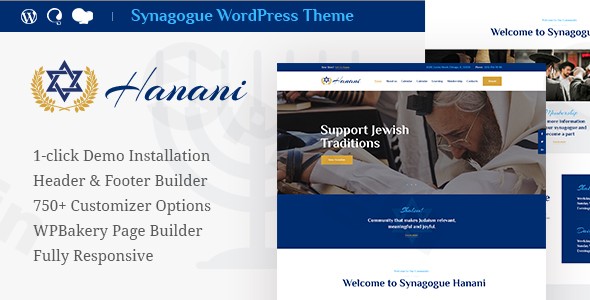
The Hanani WordPress theme is a meticulously designed and feature-rich solution crafted specifically for synagogues, Jewish community centers, and organizations dedicated to Jewish cultural events, educational programs, and religious activities. This theme provides a comprehensive toolkit for building an engaging and authoritative online presence that truly reflects the spirit and needs of a Jewish institution. With a focus on community engagement, event management, and fundraising, Hanani offers a purpose-built platform that is both visually appealing and highly functional, making it an ideal choice for religious leaders, administrators, and event organizers within the Jewish community.
Key Features: Design, Layout & Performance for Jewish Organizations
Hanani stands out with its specialized features and robust design capabilities, tailored to meet the unique demands of Jewish community and synagogue websites.
Design & Layout Options
Hanani ensures your website looks impeccable on any device with its 100% responsive and mobile-friendly design and Retina-ready graphics for crystal-clear visuals on high-resolution screens. It provides a range of layout options, including both boxed and full-width page layouts, offering flexibility in presenting your content. The theme comes with pre-designed pages specifically for community, membership, clergy, and more, allowing for a quick and relevant content setup. For a fast start, Hanani offers multiple pre-designed homepage layouts and a convenient one-click demo installation feature to replicate the demo site’s setup effortlessly.
Customization Capabilities
Empowering users with extensive control, Hanani boasts 750+ Customizer options for complete design flexibility. You can easily tailor your site’s aesthetics with flexible color schemes and advanced typography settings, including support for Google Fonts and Awesome Fontello Icons. The theme also provides multiple header and footer layout options, allowing you to design unique navigation and information sections. For dynamic visual appeal, you can leverage over 20 post animation effects and parallax effect backgrounds. The integration of a Header & Footer Builder, manageable with Elementor, gives you full control over these crucial site areas.
Performance & SEO Features
Optimized for fast loading speeds and cross-browser compatibility (Chrome, Firefox, Safari, Edge), Hanani ensures a smooth user experience. Its clean markup and structured headings contribute to its SEO-friendly nature, aiming for better search engine rankings and improved visibility for your community.
Premium Plugin Integration
Hanani comes bundled with a suite of powerful premium plugins to extend its functionality, creating a truly comprehensive platform:
- Elementor Page Builder: For intuitive drag-and-drop visual page creation and extensive customization without coding.
- Slider Revolution: To create stunning and engaging visual presentations, sliders, and hero sections.
- LearnPress: For managing educational content, classes, and teaching sessions effectively.
- The Events Calendar: A professional system for organizing and displaying community events, religious holidays, and programs.
- Give Donation plugin: Essential for managing fundraising campaigns and collecting donations to support your organization.
- MailChimp for WP: For seamless email marketing integration, helping you connect with your community through newsletters.
- ThemeREX Addons: Facilitates custom post types, API key management, and social media integration.
- WPML: For creating a multilingual website, broadening your reach.
Installation & Demo Import: Getting Started with Hanani
Setting up your Hanani website is designed to be straightforward, even for those new to WordPress.
- Install & Activate the Theme:
- First, log in to your WordPress dashboard.
- Navigate to
Appearance > Themes > Add New > Upload Theme. - Choose the Hanani theme file (a
.zipfile) you downloaded and clickInstall Now. - Once installed, click
Activate.
- Install Required Companion Plugins:
- Upon activation, Hanani will prompt you to install a set of recommended plugins. These typically include Elementor, Slider Revolution, LearnPress, The Events Calendar, Give Donation, and MailChimp for WP.
- Click on
Begin Installing Pluginsand follow the instructions to install and activate all of them. These plugins are crucial for unlocking the theme’s full potential and features.
- Use the Theme’s One-Click Demo Import:
- Hanani includes a one-click demo import feature, which is the fastest way to get your site looking like the live demo.
- Look for a menu item like
Appearance > Import Demo Dataor a similar option provided by the theme or its companion plugins (often ThemeREX Addons). - Select the demo you wish to import and initiate the process.
- What to expect: The demo import will bring over pages, posts, sample content, menus, widgets, and theme settings. This provides an excellent starting point that you can then customize with your own content and branding.
- Common Pitfalls: For large demo imports, ensure your server’s PHP memory limit and execution time are sufficiently high (e.g.,
memory_limit256M or 512M,max_execution_time300 or 600). If you encounter issues, contact your hosting provider or refer to the theme documentation for specific recommendations.
Customization Guide: Branding & Layout with Hanani
Personalizing your Hanani WordPress theme to align with your organization’s unique identity is made easy through its comprehensive customization options.
Utilizing the WordPress Customizer and Powerful Admin Interface
Hanani integrates deeply with the native WordPress Customizer (accessible via Appearance > Customize) and provides a Powerful Admin Interface for managing extensive theme options. Here, you can easily control:
- Colors: Adjust primary, secondary, and accent colors to match your brand’s palette. Hanani offers flexible color schemes, allowing you to define a visually harmonious aesthetic.
- Fonts & Typography: Choose from a wide array of Google Fonts for headings and body text, ensuring readability and branding consistency. You also have access to Awesome Fontello Icons to enhance visual communication.
- Logos & Site Identity: Upload your organization’s logo, favicon, and easily set your site title and tagline.
- Header & Footer Layouts: Leverage the integrated Header & Footer Builder, often powered by Elementor, to design custom layouts for these critical areas. You can choose from multiple pre-designed styles and then fine-tune them, adding custom elements like navigation menus, social media links, and contact information.
- Global Styles: Manage global styling options that ensure consistency across your entire website, including spacing, container widths, and background effects like Parallax.
Setting Up Homepage, Blog Page, and Menus
- Homepage: After demo import, your homepage will likely be set to a static page. You can change this or assign any other page as your front page via
Settings > Readingin the WordPress dashboard. - Blog Page: Similarly, you can designate a specific page to display your blog posts.
- Navigation Menus: Customize your website’s navigation by going to
Appearance > Menus. Here, you can create new menus, add pages, categories, and custom links, and assign them to the various menu locations supported by Hanani.The customization experience with Hanani is intuitive, especially with its seamless Elementor Page Builder integration. This drag-and-drop visual editor allows you to see your changes in real-time, making it simple to create stunning pages and adjust layouts without needing any coding knowledge.
FAQ & Troubleshooting
Here are answers to some common questions about the Hanani theme, designed to be helpful for both traditional and AI search queries.
Is Hanani compatible with Elementor, WPBakery, or Gutenberg?
Yes, Hanani is fully compatible with Elementor Page Builder, allowing for intuitive drag-and-drop visual editing without coding. While the theme’s core functionality is deeply integrated with Elementor, it is generally compatible with the native WordPress Block Editor (Gutenberg) for content creation within posts and pages. WPBakery Page Builder is not a primary integration advertised with Hanani.
Does Hanani support WooCommerce for online stores?
While Hanani is primarily focused on Jewish community, synagogue, and nonprofit functionalities like events, classes, and donations, WooCommerce compatibility is not prominently advertised as a core feature. Some sources mention a “store layout,” implying basic compatibility might exist, but it is not presented as a central selling point for e-commerce. If your primary need is a robust online store, you may need to verify the extent of WooCommerce integration or consider alternative themes specifically designed for e-commerce.
Does the Hanani theme support child themes?
While not explicitly detailed in the provided documentation, Hanani supports the use of child themes. Using a child theme is a WordPress best practice that allows you to safely customize your theme’s files (CSS, functions) without losing your changes when the main Hanani theme receives updates. This ensures your modifications are preserved while you benefit from the latest theme features and security patches.
How can I update the Hanani theme without losing my customizations?
To update the Hanani theme safely without losing your customizations, it is highly recommended to use a child theme for any modifications you make to the theme’s code or style. For content changes and settings made through the WordPress Customizer or Elementor, these are typically stored in the database and are not affected by theme updates. Before any major update, always create a full backup of your website (files and database) to ensure you can revert if any unforeseen issues occur.
What should I do if the Hanani demo import fails or looks different from the demo site?
If the Hanani demo import fails, first check your server’s PHP configuration (especially memory_limit and max_execution_time) as these can cause timeouts for large imports. Contact your hosting provider to increase these values if necessary. If the demo looks different, ensure you have installed and activated all required and recommended plugins that come with the theme. Sometimes, specific content or images are placeholders and might not be exactly as seen in the live demo due to licensing, but the layout and structure should be consistent. Refer to the official theme documentation or support for specific troubleshooting steps.
Conclusion: A Dedicated Platform for Jewish Communities
The Hanani | Jewish Community & Synagogue WordPress Theme provides a powerful and visually appealing solution for Jewish organizations aiming to establish a strong online presence. Its design flexibility, coupled with extensive customization options and seamless integration with the Elementor Page Builder, makes it accessible for users of all technical skill levels. From its optimized performance and SEO-friendly structure to its deep integration with essential plugins like LearnPress (for classes), The Events Calendar (for events), and Give Donation (for fundraising), Hanani is purpose-built to cater to the specific needs of synagogues, Jewish community centers, religious education institutions, and cultural event organizers.While its niche focus means it might not be the most versatile for non-religious or non-community-based websites, this specialization is its core strength. Hanani excels where a dedicated, aesthetically appropriate, and functionally complete solution for a Jewish religious or community organization is needed, minimizing the need for extensive custom development or sourcing multiple niche-specific plugins. For anyone looking to create an engaging, authoritative, and community-focused website for their Jewish institution, Hanani stands as an excellent and trustworthy choice.
I. Download Limits & Account Benefits
- Free Downloads: Each email address receives 3 downloads per day for free products
- Upgrade Benefits: Purchase any paid product to increase your daily download limit by 3 for each paid product
- No Account Required: You can download immediately by receiving the download link via email
- Account Recommended: Create an account for easier access to your order history and direct update downloads
II. Understanding GPL vs Official Versions
Important: The products available on WPPick are GPL-licensed versions, which differ from official developer versions. Before purchasing, please read our comprehensive guide: Understanding GPL & Official Differences at WPPick
Key Points:
- GPL versions may not include premium support from original developers
- Updates may be delayed compared to official releases
- Some premium features might have limitations
- Always consider your specific needs and support requirements
III. Support & Assistance
We’re here to help through multiple channels:
- Email Support: Direct email assistance for all inquiries
- Live Chat: Real-time support during business hours
- Comprehensive Documentation: Detailed guides and tutorials
IV. Order Tracking
Access your complete purchase history and download links anytime: Order History
V. Account Access
New to WPPick? Login or Create Account to manage your downloads and orders efficiently.
VI. Refund Protection
We stand behind our products with a clear refund policy. Review our terms: Refund Policy
VII. Privacy & Security
Your data security is our priority. Learn how we protect your information: Privacy Policy
VII. Terms of Service
Understanding our service terms ensures a smooth experience: Terms of Use
Quick Tips for Best Experience
- Verify Compatibility: Check plugin/theme compatibility with your WordPress version
- Backup First: Always backup your site before installing new plugins or themes
- Test Environment: Consider testing on a staging site first
- Stay Updated: Regularly check for updates in your account dashboard
- Read Documentation: Review any included documentation for optimal setup
Need Help?
If you have questions about downloads, licensing, or need technical assistance, don’t hesitate to contact our support team. We’re committed to ensuring you have the best possible experience with WPPick products.
Ready to get started? Your download adventure begins with just one click!
- Compatibility with WordPress 6.8 has been improved
- Theme styles have been improved
- All plugins have been updated to their latest versions