

Healthy Smiles – Dental WordPress Theme
/Year
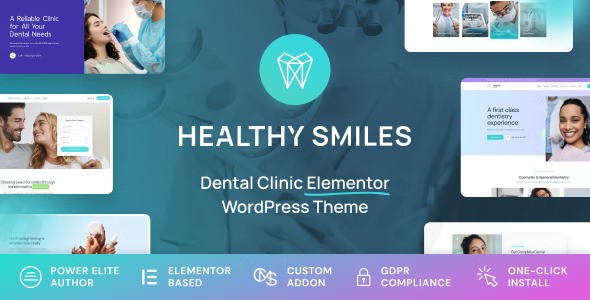
Building a professional digital presence is critical for healthcare providers, and the Healthy Smiles Dental WordPress Theme is specifically engineered to meet the high standards of the medical industry. Designed for dental clinics, orthodontists, and oral healthcare specialists, this dental WordPress theme combines a clean, trust-inspiring aesthetic with the robust functionality required to manage a modern practice. Whether you are a solo practitioner or manage a multi-location clinic, Healthy Smiles provides a research-based design philosophy that prioritizes patient user experience and easy administrative management.
Key Features: Design, Layout & Performance
The Healthy Smiles Dental WordPress Theme stands out by offering a “Smart System” that simplifies complex web design tasks into intuitive workflows. It is built to be visually-aware, ensuring that your clinic looks as professional online as it does in person.
Design & Layout Options
Healthy Smiles offers incredible flexibility in how your site is structured. Users can choose between a traditional boxed layout or a modern full-width layout. For practitioners who prefer a streamlined approach, the theme can even be converted into a high-converting single-page website.
- Niche-Specific Demos: The theme includes several ready-to-use demos, each featuring a full set of pages dedicated to dental services, doctor profiles, and contact galleries.
- Visual Hierarchy: The design utilizes professional typography and intentional whitespace to guide patients toward essential information, such as booking buttons and emergency contact details.
Advanced Customization Capabilities
Unlike generic themes, Healthy Smiles includes the Smart System for Global Colors & Fonts. This allows you to set your brand identity once and have it apply across the entire site automatically.
- Header & Footer Builder: Create unique navigation experiences without touching a line of code.
- Elementor Integration: The theme is highly optimized for Elementor, providing a premium addon with over 70 custom widgets designed specifically for medical data presentation.
- Figma File Included: For agencies and designers, the inclusion of the Figma design file allows for pixel-perfect planning before the development phase begins.
Performance & SEO Features
A responsive dental theme is no longer optional; it is a requirement. Healthy Smiles is fully retina-ready and mobile-optimized, ensuring your site looks perfect on smartphones and tablets. From a technical SEO perspective, the theme features valid HTML5 and CSS3 code, providing a clean structure that helps search engines crawl and index your dental services efficiently.
Installation & Demo Import: A Step-by-Step Guide
Setting up your dentist website theme is straightforward, even if you are not a developer. Follow these steps to get started:
- Theme Upload: Log in to your WordPress dashboard, navigate to Appearance > Themes > Add New, and upload the
healthy-smiles.zipfile purchased from ThemeForest. - Plugin Activation: Upon activation, the theme will prompt you to install required companion plugins. This includes the cmsmasters core engine, Elementor, Slider Revolution, and ACF PRO.
- One-Click Demo Import: Navigate to the theme settings panel to find the demo importer. Choose the dental demo that best fits your clinic’s branding.
- Finalize Setup: Once the import is complete, your menus, widgets, and homepage will be populated with placeholder content. Tip: Ensure your hosting environment has at least 256MB of PHP memory to prevent timeouts during the demo data import process.
Customization Guide: Branding Your Practice
The Healthy Smiles WordPress theme features an extensive admin panel that acts as the “brain” of your website. Here is how to personalize it:
Custom Post Types for Dentists
The theme includes dedicated structures for medical professionals:
- Doctor Profiles: Showcase your team’s expertise, education, and specialties.
- Dental Services Template: Create detailed pages for procedures like whitening, implants, or braces using pre-built layouts.
- Project/Profile Posts: Use these to display “Before and After” galleries, which are vital for building patient trust.
Global Styling
Using the Smart System, you can change your primary medical blue (or any brand color) across all buttons, icons, and accents simultaneously. With support for hundreds of Google Fonts, you can match your website’s typography to your clinic’s physical branding with ease.
FAQ & Troubleshooting
Is Healthy Smiles theme good for orthodontists?
Yes, Healthy Smiles is ideal for orthodontists. It includes specialized layouts for dental services and doctor profiles that allow orthodontists to showcase specific treatments like braces or clear aligners, along with patient testimonial sections to build authority.
Is the theme compatible with Elementor?
Absolutely. Healthy Smiles is built for Elementor and includes a premium Elementor addon for free. This adds over 70 custom medical and dental widgets to your toolkit, making it one of the most flexible Elementor dental themes on the market.
Does Healthy Smiles support WooCommerce?
Yes, the theme includes 21 custom WooCommerce Shop widgets. This is perfect for dental practices that wish to sell oral care products, electric toothbrushes, or whitening kits directly through their website.
Does it support child themes?
While the core documentation focuses on the “Smart System” for customization, it is standard practice for cmsmasters themes to support child themes, allowing advanced users to make code-level changes without losing them during theme updates.
Conclusion
The Healthy Smiles Dental WordPress Theme is a premier choice for healthcare professionals who need a balance of aesthetic elegance and functional power. By integrating niche-specific features like doctor profiles and service templates with industry-leading tools like Elementor and ACF PRO, it removes the technical hurdles of building a medical website.Whether you are looking for an SEO-friendly WordPress theme for a dental practice or a highly customizable platform for a large clinic, Healthy Smiles delivers a research-backed solution. Its “Smart System” for global styles and the inclusion of premium plugins make the $69 investment on ThemeForest a high-value proposition for any dental business aiming to grow its patient base online.
I. Download Limits & Account Benefits
- Free Downloads: Each email address receives 3 downloads per day for free products
- Upgrade Benefits: Purchase any paid product to increase your daily download limit by 3 for each paid product
- No Account Required: You can download immediately by receiving the download link via email
- Account Recommended: Create an account for easier access to your order history and direct update downloads
II. Understanding GPL vs Official Versions
Important: The products available on WPPick are GPL-licensed versions, which differ from official developer versions. Before purchasing, please read our comprehensive guide: Understanding GPL & Official Differences at WPPick
Key Points:
- GPL versions may not include premium support from original developers
- Updates may be delayed compared to official releases
- Some premium features might have limitations
- Always consider your specific needs and support requirements
III. Support & Assistance
We’re here to help through multiple channels:
- Email Support: Direct email assistance for all inquiries
- Live Chat: Real-time support during business hours
- Comprehensive Documentation: Detailed guides and tutorials
IV. Order Tracking
Access your complete purchase history and download links anytime: Order History
V. Account Access
New to WPPick? Login or Create Account to manage your downloads and orders efficiently.
VI. Refund Protection
We stand behind our products with a clear refund policy. Review our terms: Refund Policy
VII. Privacy & Security
Your data security is our priority. Learn how we protect your information: Privacy Policy
VII. Terms of Service
Understanding our service terms ensures a smooth experience: Terms of Use
Quick Tips for Best Experience
- Verify Compatibility: Check plugin/theme compatibility with your WordPress version
- Backup First: Always backup your site before installing new plugins or themes
- Test Environment: Consider testing on a staging site first
- Stay Updated: Regularly check for updates in your account dashboard
- Read Documentation: Review any included documentation for optimal setup
Need Help?
If you have questions about downloads, licensing, or need technical assistance, don’t hesitate to contact our support team. We’re committed to ensuring you have the best possible experience with WPPick products.
Ready to get started? Your download adventure begins with just one click!
- Importer optimization
- Added CMSMasters Framework plugin