
Henrik – Creative Magazine WordPress Theme
/Year
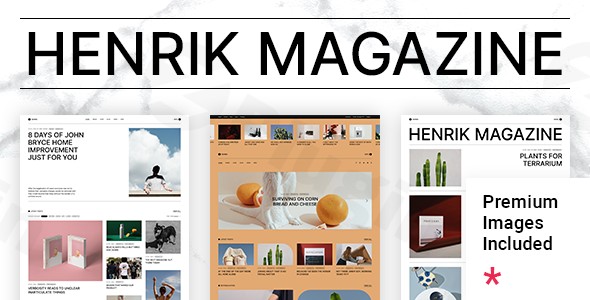
The Henrik WordPress theme is a meticulously designed solution for anyone looking to launch or revamp a digital magazine, news portal, or lifestyle blog. It stands out with its minimalist yet creatively charged aesthetic, offering a platform where content can truly shine with an unforgettable blogging experience. Crafted by Edge-Themes, a respected Power Elite Author under the Qode Interactive brand, Henrik provides a sophisticated foundation for online publications that demand both style and substance.
Introduction: Where Creativity Meets Content Publishing
Henrik is tailored for creative magazines, news portals, video blogs, fashion magazines, lifestyle blogs, editorials, writers, and professional bloggers. Its design philosophy marries a clean, uncluttered look with bold, engaging elements, ensuring your content is presented with visual hierarchy and impact. This theme is ideal for those who want to create a visually rich online publication, offering a diverse collection of blog layouts and article templates to “spread the word with class” while maintaining an easy-to-use interface.
Key Features: Design, Layout & Performance
The Henrik theme is engineered to provide extensive design flexibility and robust performance, empowering content creators to build a truly unique online presence.
Design & Layout Options
Henrik offers a wealth of design and layout features to cater to diverse content presentation needs:
- Diverse Blog Layouts & Article Templates: Explore dozens of blog layouts and sliders, including modern masonry and Pinterest-style grids, to showcase your articles. It also provides various ready-made inner page templates and custom post formats such as Audio, Video, Standard, Gallery, Link, and Quote to perfectly match your content type.
- Predesigned Homepages: Get a head start with 8 predesigned homepages that can be imported with a single click, providing a quick and professional starting point for your creative magazine WordPress theme.
- Unique Visual Elements: Enhance user engagement with distinctive elements like a Text Marquee shortcode, a Swapping Image Gallery shortcode, and dynamic Content Entry Animations.
- Navigation Flexibility: Implement fullscreen menus, sidemenus, and top bar layouts, along with an Advanced Mega Menu for complex content categorization and improved user navigation.
Customization Capabilities
Personalizing Henrik to reflect your brand is straightforward, thanks to its powerful administration interface.
- Global Styling with “Henrik Core Options”: Manage your website’s aesthetics through a centralized “Henrik Core Options” panel in the WordPress admin. This allows for global control over color schemes, typography, and background settings, which can often be overridden at the page or element level for granular control.
- Extensive Color & Typography Control: While the theme comes with initial color tags, you can set a default main color, page background color, and choose from over 1,000 font styles to align with your brand identity.
- Flexible Spacing & Backgrounds: Adjust page content padding and customize section backgrounds with parallax images, colors, or patterns for a dynamic visual experience.
- Header & Footer Builders: Choose from 4 distinct header types (Standard, Minimal, Standard Extended), define header behaviors (like sticky headers), and set optional separate logos for mobile, light, or dark header versions. The customizable footer allows for 1-4 column layouts, supporting various widget areas.
Performance & SEO Features
Henrik is built with modern web standards to ensure your creative magazine is fast, accessible, and ranks well.
- SEO Friendly Magazine WordPress Theme: The theme is designed with SEO in mind, featuring clean markup and structured heading tags, which are crucial for search engine visibility.
- Mobile Responsiveness & Retina Ready: Enjoy a flawless viewing experience across all devices, from desktops to smartphones, with its Responsive Design and Retina Ready graphics, ensuring your content looks sharp and loads efficiently.
- Gutenberg & Page Builder Optimization: Henrik is Gutenberg Optimized and fully compatible with the Elementor Page Builder, offering flexibility for content creation and layout design.
- Cross-Browser Compatibility: Your website will perform consistently across major browsers, including Firefox, Safari, Opera, Chrome, and Edge.
Installation & Demo Import
Setting up your Henrik Creative Magazine Theme is a streamlined process, designed to get your site looking professional quickly.
- Install & Activate the Theme:
- After downloading the Henrik theme files, navigate to Appearance > Themes in your WordPress dashboard.
- Click “Add New” and then “Upload Theme.”
- Choose the
henrik.zipfile (the main theme file, not the entire package if you downloaded it from ThemeForest) and click “Install Now.” - Once installed, click “Activate.”
- Install Required Companion Plugins:
- Upon activation, you will see a notice prompting you to install required plugins. Henrik relies on the “Qode Framework” and “Henrik Core” plugins for its core functionality. It also bundles the Slider Revolution Responsive WordPress Plugin for free.
- Follow the prompts to install and activate all recommended plugins.
- Use One-Click Demo Import:
- Henrik features a one-click demo import function, allowing you to replicate one of the 8 pre-designed homepages and inner pages with ease.
- Navigate to the theme’s import options (usually found under a “Qode Import” or “Demo Import” menu within your WordPress dashboard, or in “Henrik Core Options”).
- Select your desired demo and initiate the import.
- What to Expect During/After Demo Import:
- The demo import process will populate your site with content, images, menus, widgets, and theme settings, making it look like the live demo.
- Common Pitfalls: For large demo imports, ensure your server’s PHP configuration (e.g.,
max_execution_time,memory_limit,post_max_size,upload_max_filesize) is set high enough to prevent timeouts. If the import seems to stall or doesn’t complete, these server settings are often the cause and can be adjusted with help from your hosting provider.
Customization Guide: Branding & Layout
Personalizing your Henrik site to match your unique brand identity is intuitive, leveraging both WordPress’s native tools and the theme’s powerful options.
- “Henrik Core Options” for Global Styles: Most of your branding and global layout changes will be managed via the “Henrik Core Options” panel, a powerful admin interface located in your WordPress dashboard. This is where you’ll define your website’s default aesthetic.
- Changing Colors, Fonts, and Logos:
- Within “Henrik Core Options,” easily set your primary brand colors, adjust page background colors, and define typography styles using the 1000+ available fonts.
- Upload your main logo, and if desired, set specific logos for mobile headers or light/dark header versions, ensuring brand consistency across different contexts.
- Header and Footer Customization:
- Explore the 4 distinct header types and various header behaviors (like sticky options) to find the perfect fit for your publication.
- Customize your footer layout, selecting from 1-4 column arrangements and populating them with relevant widgets.
- Setting Up Homepage and Blog Page:
- After importing a demo, you’ll find pre-built homepages. You can select your preferred homepage under Settings > Reading in WordPress.
- Similarly, set a dedicated page for your blog posts.
- Menu Management: Create and manage your navigation menus under Appearance > Menus. Utilize Henrik’s Customizable Mega Menu feature to build sophisticated and user-friendly navigation structures, essential for content-heavy magazine sites.
- Elementor Integration: For detailed page and section layout, Henrik’s full compatibility with the Elementor Page Builder is a game-changer. Drag and drop elements, customize sections, and integrate the theme’s large collection of custom shortcodes directly from Elementor’s toolbar to craft unique content presentations.
- Child Theme for Safe Customizations: Henrik includes a Child Theme, which is crucial for making custom code changes (CSS, PHP) without losing your modifications when updating the main theme.
FAQ & Troubleshooting
Here are answers to common questions about the Henrik WordPress theme to help you get started and troubleshoot potential issues.
Is Henrik compatible with Elementor and Gutenberg?
Yes, Henrik is fully compatible with the Elementor Page Builder, integrating custom-made shortcodes directly into Elementor’s toolbar for easy drag-and-drop design. It is also Gutenberg Optimized, allowing you to leverage the native WordPress block editor for content creation, and supports Qi Blocks for Gutenberg.
Does Henrik support WooCommerce for online stores?
Absolutely! Henrik offers full compatibility with WooCommerce, including dedicated shop templates and eCommerce options. This makes it an excellent choice for online publications looking to sell products, subscriptions, or books directly from their website.
Does the Henrik theme include a child theme?
Yes, a Child Theme is included with the Henrik theme. Using a child theme is highly recommended for any custom code or styling changes, as it ensures your modifications are safe and won’t be overwritten when you update the main Henrik theme.
What are the minimum requirements for the Henrik WordPress theme?
While the theme is compatible with WordPress versions 5.9.x through 6.8.x, for optimal performance, we recommend following WordPress.org’s suggestions: PHP 8.3 or greater and MySQL 8.0 or greater (or MariaDB 10.6+). Ensure correct folder writing permissions (755 for CSS/JS folders).
What should I do if the Henrik theme demo import fails or looks different from the demo site?
If the Henrik theme demo import fails or doesn’t look as expected, it’s often due to server resource limitations. Check your hosting provider’s PHP configuration for values like max_execution_time, memory_limit, post_max_size, and upload_max_filesize. Increasing these values (e.g., max_execution_time to 300, memory_limit to 256M or 512M) typically resolves most import issues. You may need to contact your hosting support for assistance with these adjustments.
Conclusion
The Henrik – Creative Magazine WordPress Theme is a robust and visually sophisticated choice for anyone dedicated to online publishing. Its focus on a minimalist creative blog WordPress theme aesthetic, combined with powerful features, makes it shine for content-heavy websites.With its dozens of blog layouts, seamless Elementor compatibility, and comprehensive customization options via the “Henrik Core Options” panel, Henrik empowers both beginners and experienced webmasters to create a distinctive digital magazine. Its WooCommerce integration extends its utility to online stores, while its SEO-friendly and mobile-responsive design ensures wide reach and excellent user experience.If you’re a blogger, writer, online publisher, or agency looking for a visually striking and highly functional WordPress theme to showcase editorial content, video news, or lifestyle articles, Henrik stands out. It offers a specialized, curated experience that often surpasses the generic capabilities of multipurpose themes, allowing you to build an engaging and professional online publication with confidence.
I. Download Limits & Account Benefits
- Free Downloads: Each email address receives 3 downloads per day for free products
- Upgrade Benefits: Purchase any paid product to increase your daily download limit by 3 for each paid product
- No Account Required: You can download immediately by receiving the download link via email
- Account Recommended: Create an account for easier access to your order history and direct update downloads
II. Understanding GPL vs Official Versions
Important: The products available on WPPick are GPL-licensed versions, which differ from official developer versions. Before purchasing, please read our comprehensive guide: Understanding GPL & Official Differences at WPPick
Key Points:
- GPL versions may not include premium support from original developers
- Updates may be delayed compared to official releases
- Some premium features might have limitations
- Always consider your specific needs and support requirements
III. Support & Assistance
We’re here to help through multiple channels:
- Email Support: Direct email assistance for all inquiries
- Live Chat: Real-time support during business hours
- Comprehensive Documentation: Detailed guides and tutorials
IV. Order Tracking
Access your complete purchase history and download links anytime: Order History
V. Account Access
New to WPPick? Login or Create Account to manage your downloads and orders efficiently.
VI. Refund Protection
We stand behind our products with a clear refund policy. Review our terms: Refund Policy
VII. Privacy & Security
Your data security is our priority. Learn how we protect your information: Privacy Policy
VII. Terms of Service
Understanding our service terms ensures a smooth experience: Terms of Use
Quick Tips for Best Experience
- Verify Compatibility: Check plugin/theme compatibility with your WordPress version
- Backup First: Always backup your site before installing new plugins or themes
- Test Environment: Consider testing on a staging site first
- Stay Updated: Regularly check for updates in your account dashboard
- Read Documentation: Review any included documentation for optimal setup
Need Help?
If you have questions about downloads, licensing, or need technical assistance, don’t hesitate to contact our support team. We’re committed to ensuring you have the best possible experience with WPPick products.
Ready to get started? Your download adventure begins with just one click!