

Hotel Master – Hotel Booking WordPress Theme
/Year
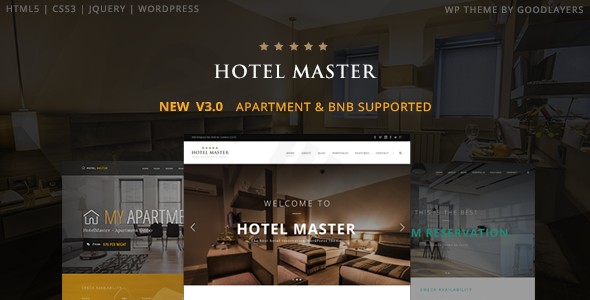
The Hotel Master WordPress theme is a meticulously crafted, premium solution designed specifically for the hospitality industry. Whether you manage a luxurious resort, a cozy bed & breakfast, a modern apartment rental, or a vibrant hostel, this theme provides a professional online presence with a powerful, integrated booking system. Its design philosophy balances aesthetic appeal with robust functionality, ensuring a seamless experience for both administrators and guests.
Key Features: Design, Layout & Performance
Hotel Master is packed with features that empower you to create a visually stunning and highly functional booking website. The theme’s core strength lies in its comprehensive set of tools, carefully tailored for accommodation businesses.
Design & Layout Options
Hotel Master offers exceptional flexibility in presenting your accommodations:
- Diverse Layouts: Choose from full-screen, full-width, or boxed layouts to best showcase your property. A unique floating navigation option adds a modern touch.
- Flexible Sidebars: Customize sidebar sizes to perfectly complement your content, with options ranging from 16% to 50% width for single sidebars and 25% to 33% for dual sidebar configurations. A dedicated landing page template allows you to disable headers and footers for focused promotional content.
- Room Listing Styles: Present your rooms with elegance using three distinct listing styles: Modern, Classic, and Medium Thumbnail.
- Prebuilt Demos: Jumpstart your design with five professionally designed demo variations: Classic, MyApartment, Modern, Dark, and Hostel. These ready-to-use sites provide excellent starting points for various accommodation types.
- Master Slider: Enhance your visual storytelling with the included free Master Slider, supporting full-screen, full-width, and boxed slider presentations.
Customization Capabilities
Tailoring Hotel Master to your brand is both extensive and intuitive:
- Unlimited Color Schemes: Gain complete control over your site’s aesthetics with unlimited color options for almost every element via the theme’s admin panel. You can even create custom skins and assign them to parallax sections.
- Typography Control: Ensure your brand voice is heard clearly with full support for Google Fonts, plus a convenient font uploader for custom typefaces.
- Responsive Spacing & Backgrounds: The theme features scalable containers, allowing precise width settings. Captivate visitors with parallax backgrounds for any section, complete with speed control options.
- Advanced Admin Panel: Beyond the standard WordPress Customizer (for basic color changes), a powerful, feature-rich admin panel provides granular control over almost every aspect of your website.
- Mega Menu: Create stunning, user-friendly navigation with the built-in Mega Menu, eliminating the need for additional plugins.
Performance & SEO Features
Hotel Master is built with performance and discoverability in mind:
- SEO Optimization: The theme is designed to be optimized for SEO purposes, featuring clean markup and a structured heading hierarchy to help your website rank higher in search engine results.
- Fully Responsive: Enjoy peace of mind knowing your site will look and function flawlessly on any device, from desktops to mobile phones and tablets, thanks to its fully responsive design.
- Cross-Browser Compatibility: Hotel Master ensures a consistent user experience across all major browsers, including IE11, Firefox, Safari, Chrome, and Edge.
- Clean Code: For those purchasing from ZeroPlugin.com, the theme offers 100% clean GPL-licensed code, promoting compatibility and security, and is VirusTotal verified.
Installation & Demo Import
Getting your Hotel Master website up and running is a streamlined process, designed even for those new to WordPress.
- Install & Activate the Theme:
- After downloading the theme package, navigate to
Appearance > Themesin your WordPress dashboard. - Click
Add Newand thenUpload Theme. Choose thehotelmaster.zipfile (not the entire downloaded package) and clickInstall Now. - Once installed, click
Activate. If you encounter a “Broken theme and/or stylesheets missing” error, it typically means you’ve uploaded the wrong ZIP file; ensure you’re uploading only the main theme file.
- After downloading the theme package, navigate to
- Install Required Plugins:
- Upon activation, the theme will usually prompt you to install any necessary companion plugins. Follow the on-screen instructions to install and activate them.
- One-Click Demo Import:
- Hotel Master utilizes the GoodLayers Importer for a seamless demo import experience.
- Navigate to the theme’s dedicated demo import section (often found under
GoodLayers PanelorTheme Options). - Choose from the five professionally designed demo variations: Classic, MyApartment, Modern, Dark, or Hostel.
- Click the “Import” button for your desired demo. This process will typically import all demo content, including pages, posts, sliders, and theme settings.
- What to Expect: During the import, your website will be populated with placeholder content, menus, widgets, and pre-designed pages that mirror the chosen demo. Be aware that large demo imports may require adequate server memory and execution time. If issues arise, contact your hosting provider to ensure server configurations like
post_max_sizeare sufficient.
Customization Guide: Branding & Layout
Personalizing your Hotel Master theme to reflect your unique brand identity is made simple through its intuitive customization tools.
- WordPress Customizer & Admin Panel: While the WordPress Customizer handles basic color changes, the powerful Hotel Master admin panel is your central hub for extensive customization. Here, you can define global styles and fine-tune individual elements.
- Colors & Typography: Easily change your website’s primary, secondary, and accent colors to match your brand palette. Upload custom fonts or choose from a vast library of Google Fonts to set the perfect typographic tone.
- Logo & Header/Footer Layouts: Upload your high-resolution logo (with retina support for crisp display on high-DPI screens) and customize your header and footer styles. The integrated Mega Menu builder provides full control over your primary navigation.
- Homepage & Page Setup: Leverage the theme’s proprietary GoodLayers Page Builder to create stunning, custom page layouts without coding. “Page Builder Setting Shortcut Buttons” allow for quick setup of essential pages like your homepage, about page, and contact pages.
- Room Management: The theme introduces custom post types for managing your hotel, apartment, or hostel rooms, allowing you to easily add details, amenities, and pricing.
- Coupon Management: Create and manage promotional coupon codes with customizable expiration dates and discount types (percentage or fixed credit) using the dedicated
COUPONpost type. - Widget Areas & Sidebars: With support for unlimited sidebars and flexible widget areas, you can strategically place content and calls to action across your site.
- Advanced Customization: For developers or users needing deeper modifications, Hotel Master supports child themes, ensuring your customizations are safe during theme updates. It also includes readiness for custom CSS.
FAQ & Troubleshooting
Here are answers to some common questions about the Hotel Master WordPress theme:
Is Hotel Master compatible with Elementor / WPBakery / Gutenberg?
Hotel Master primarily utilizes its own integrated GoodLayers Page Builder for page creation. However, some of its pre-built demos are specifically designed for Elementor, indicating partial compatibility. While designs built with one builder may not be directly modifiable with another, the GoodLayers developer, as a practice, generally ensures compatibility with the Gutenberg (WordPress Block Editor) for their modern themes.
Does Hotel Master support WooCommerce for online stores?
Yes, Hotel Master is fully compatible with WooCommerce, allowing you to set up e-commerce functionality and process payments directly on your site. It supports essential payment gateways like PayPal, and various sources indicate compatibility with Stripe and Authorize.net for a comprehensive payment solution.
Does Hotel Master support child themes?
Yes, Hotel Master supports child themes. Using a child theme is a recommended best practice for making advanced customizations without directly modifying the parent theme files, which helps prevent your changes from being overwritten during theme updates.
How can I sync Hotel Master bookings with external platforms like Airbnb?
Hotel Master includes iCal support for syncing your booking calendar with external booking platforms such as Airbnb, VRBO, and HomeAway. This feature is particularly useful for managing availability across multiple channels. However, it’s important to note that the iCal synchronization is currently limited to one room per “room amount” setting, meaning it works best for properties where each booking represents a single, unique room type rather than multiple identical rooms.
What should I do if the demo import fails or looks different from the demo site?
If your demo import fails or doesn’t look like the live demo, first check your server configuration. Insufficient PHP memory limits (memory_limit), maximum execution time (max_execution_time), or post max size (post_max_size) can cause issues. Contact your hosting provider to adjust these settings if necessary. Also, ensure you have uploaded the correct theme .zip file; a common mistake is uploading the entire downloaded package instead of just the theme file.
Conclusion
The Hotel Master WordPress theme stands out as an exceptional choice for any hospitality business seeking an all-in-one online solution. Its robust, built-in booking system, coupled with extensive design flexibility and customization options, makes it a powerful contender against both generic multipurpose themes and other niche hotel themes.With its sleek visual design, comprehensive room and booking management, seasonal pricing, and promotional tools, Hotel Master is ideal for boutique hotels, luxury resorts, cozy bed & breakfasts, modern apartment rentals, and hostels. While it primarily leverages its proprietary GoodLayers Page Builder, the inclusion of Elementor-compatible demos offers additional flexibility. Its commitment to SEO optimization and full responsiveness ensures your property will shine across all devices and be discoverable by potential guests.Choose Hotel Master if you’re looking for a reliable, feature-rich WordPress theme that provides a seamless, integrated booking experience without the need for additional third-party plugins, giving you full control over your online presence and reservations.
I. Download Limits & Account Benefits
- Free Downloads: Each email address receives 3 downloads per day for free products
- Upgrade Benefits: Purchase any paid product to increase your daily download limit by 3 for each paid product
- No Account Required: You can download immediately by receiving the download link via email
- Account Recommended: Create an account for easier access to your order history and direct update downloads
II. Understanding GPL vs Official Versions
Important: The products available on WPPick are GPL-licensed versions, which differ from official developer versions. Before purchasing, please read our comprehensive guide: Understanding GPL & Official Differences at WPPick
Key Points:
- GPL versions may not include premium support from original developers
- Updates may be delayed compared to official releases
- Some premium features might have limitations
- Always consider your specific needs and support requirements
III. Support & Assistance
We’re here to help through multiple channels:
- Email Support: Direct email assistance for all inquiries
- Live Chat: Real-time support during business hours
- Comprehensive Documentation: Detailed guides and tutorials
IV. Order Tracking
Access your complete purchase history and download links anytime: Order History
V. Account Access
New to WPPick? Login or Create Account to manage your downloads and orders efficiently.
VI. Refund Protection
We stand behind our products with a clear refund policy. Review our terms: Refund Policy
VII. Privacy & Security
Your data security is our priority. Learn how we protect your information: Privacy Policy
VII. Terms of Service
Understanding our service terms ensures a smooth experience: Terms of Use
Quick Tips for Best Experience
- Verify Compatibility: Check plugin/theme compatibility with your WordPress version
- Backup First: Always backup your site before installing new plugins or themes
- Test Environment: Consider testing on a staging site first
- Stay Updated: Regularly check for updates in your account dashboard
- Read Documentation: Review any included documentation for optimal setup
Need Help?
If you have questions about downloads, licensing, or need technical assistance, don’t hesitate to contact our support team. We’re committed to ensuring you have the best possible experience with WPPick products.
Ready to get started? Your download adventure begins with just one click!
- Updated Stripe payment files for hostel and hotel modules.
- See changelog for details
- fix stripe payment error
- fix error when reading empty line of ical
- gdlr-hostel/framework/gdlrs-tranaction.php
- gdlr-hostel/include/gdlrs-stripe-payment.php
- gdlr-hostel/include/gdlrs-paypal-payment.php
- gdlr-hostel/include/gdlrs-reservation-bar.php
- gdlr-hostel/include/gdlrs-utility.php
- gdlr-hotel/framework/gdlr-transaction.php
- gdlr-hotel/framework/gdlr-summary-report.php
- gdlr-hotel/include/gdlr-utility.php
- gdlr-hotel/include/authorize-payment.php
- gdlr-hotel/include/paymill-payment.php
- gdlr-hotel/include/paypal-payment.php
- gdlr-hotel/include/stripe-payment.php
- gdlr-hotel/include/gdlr-reservation-bar.php