

Idealauto – Car Dealer & Services WordPress Theme
/Year
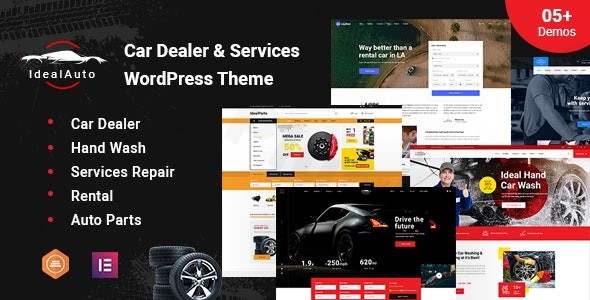
The IdealAuto WordPress theme is a professional-grade and highly specialized solution meticulously crafted for businesses within the automotive industry. Whether you’re running a bustling car dealership, a meticulous auto repair shop, a dynamic car rental service, or an extensive auto parts store, IdealAuto provides a robust and visually appealing digital platform to showcase your vehicles and services effectively. Its design philosophy blends sleek minimalism with powerful functionality, ensuring your online presence is both engaging and efficient, designed to convert visitors into loyal customers.
Key Features: Design, Layout & Performance
IdealAuto stands out with its tailored features, designed from the ground up to meet the specific demands of the automotive sector, offering a blend of aesthetic appeal and high performance.
Design & Layout Options
IdealAuto offers remarkable flexibility in its visual presentation. The theme is fully responsive, ensuring a flawless display and optimal user experience across all devices, from large desktop monitors to tablets and smartphones. It also boasts a retina-ready design for crisp, high-resolution graphics.
- Layout Variations: Choose between a modern boxed or full-width design globally or on a per-page/post basis. For displaying your inventory, you can organize listings with or without sidebars, in either list or grid format.
- Prebuilt Demos: IdealAuto provides “Awesome Different Homepage Demos,” including 8 pre-built homepage choices and 4 specialized listing layouts, designed for specific business types like Auto Parts, Rental, Car Wash, or Dealerships. This allows for quick setup and diverse visual identities.
- Header & Footer Styles: The theme includes multiple header and footer styles to match your brand, alongside a handy sticky header feature that can be easily enabled or disabled for enhanced navigation.
- Design Philosophy: The overall design is described as minimalistic and flexible, putting your vehicles and services front and center with a clean, professional aesthetic.
Customization Capabilities
IdealAuto empowers users with extensive customization options, making it easy to align the website with their brand identity without needing to write code.
- Unlimited Color Options: Effortlessly change your primary brand color throughout the entire theme using intuitive backend color selectors.
- Typography Control: Gain access to over 800 Google Fonts through a robust theme customizer, allowing for fine-tuned control over your website’s typography.
- Powerful Admin Interface: The theme boasts a powerful admin interface with a wide selection of options, enabling comprehensive customization of almost every element.
- Page Builder Integration: Primarily built with Elementor, the leading WordPress website builder, IdealAuto allows for drag-and-drop customization. It’s also compatible with Elementor Pro, Visual Composer, and WPBakery Page Builder plugins, offering maximum flexibility.
- Child Theme Support: For advanced users and developers, IdealAuto explicitly supports child themes, ensuring your customizations remain safe during theme updates.
Performance & SEO Features
IdealAuto is built with performance and search engine optimization in mind, crucial for attracting and retaining online customers.
- SEO & Performance Optimized: The theme is marketed as “SEO & Performance Optimized” and claims “High-Speed Performance” through optimized code. It is described as “lightweight & schema ready,” which is vital for search engine visibility. While specific benchmark scores from tools like Lighthouse or GTmetrix are not provided, the focus on optimized performance is a clear benefit.
- Mobile Responsiveness: Beyond just being responsive, IdealAuto is fully responsive and retina-ready, ensuring a fast and beautiful experience on any device, which is a key factor for modern SEO and user satisfaction.
- Cross-Browser Compatibility: The theme ensures a consistent experience for all visitors, regardless of their web browser.
Installation & Demo Import
Setting up your IdealAuto website is designed to be a straightforward process, even for those new to WordPress.
- Install & Activate the Theme: After purchasing IdealAuto, download the theme files. Navigate to
Appearance > Themesin your WordPress dashboard, click “Add New,” then “Upload Theme,” and select your IdealAuto theme file. Once uploaded, activate it. - Install Required Plugins: Upon activation, IdealAuto will prompt you to install a set of recommended and required plugins crucial for its full functionality. These include:
- Elementor: For drag-and-drop page building.
- Redux Framework: Provides the powerful admin interface for theme options.
- WooCommerce: For e-commerce capabilities, selling cars, parts, or services.
- Jws Car Booking Wash, Jws Cost Estimate Services, Jws WooCommerce Rent: Specialized plugins tailored for automotive bookings, cost estimations, and rental services.
- Contact Form 7: For creating custom contact forms.
- WPML: For multi-language support.
- One-Click Demo Import: IdealAuto comes with a convenient one-click installation option to import sample data. This feature allows you to replicate any of the stunning demo sites instantly, providing a perfect starting point. Look for an “Import Demo” or “Sample Data” option within the theme’s settings or a dedicated plugin.
- Post-Import Setup: After the demo import, you might need to manually set your main menu (under
Appearance > Menus) and assign your homepage (underSettings > Reading). Large demo imports can sometimes require increased server memory or longer execution times; if you encounter issues, consult your hosting provider or the theme documentation.
Customization Guide (Branding & Layout)
Personalizing IdealAuto to reflect your unique brand identity is an intuitive process, largely handled through the WordPress Customizer and the Elementor page builder.
- WordPress Customizer: Navigate to
Appearance > Customizeto access global style options. Here, you can easily adjust:- Colors: Change primary and secondary brand colors.
- Typography: Select from over 800 Google Fonts for headings, body text, and links.
- Site Identity: Upload your logo and favicon.
- Elementor Page Builder: For intricate page layouts and content design, Elementor is your primary tool.
- Drag-and-Drop Editing: Visually build and edit any page by dragging and dropping elements like text blocks, images, car listings, service sections, and more.
- Header & Footer Customization: Utilize Elementor in conjunction with the theme’s built-in header/footer builders to design unique layouts for these crucial areas, including a mega menu builder.
- Theme Options Panel: Beyond the Customizer, IdealAuto features a powerful admin interface (powered by Redux Framework) where you can configure advanced settings specific to your business type (Auto Parts, Rental, Car Wash, or Dealership), manage custom post types for vehicle inventory, and adjust sidebar positions globally or per page.
- Menus & Homepage: Set up your primary navigation menus under
Appearance > Menusand configure your static front page and blog page underSettings > Reading.
FAQ & Troubleshooting
Here are answers to some common questions about the IdealAuto WordPress theme:
Is IdealAuto compatible with popular page builders like Elementor?
Yes, IdealAuto is primarily built with Elementor, the world’s leading WordPress website builder, allowing for intuitive drag-and-drop customization without coding knowledge. It is also compatible with Elementor Pro, Visual Composer, and WPBakery Page Builder plugins.
Does IdealAuto support WooCommerce for online stores?
Absolutely. IdealAuto offers full WooCommerce support, enabling you to sell cars, parts, services, or accessories directly from your website. It also includes specialized built-in plugins like Jws Car Booking Wash, Jws Cost Estimate Services, and Jws WooCommerce Rent to enhance automotive e-commerce functionalities.
Is IdealAuto mobile friendly, and does it look good on all devices?
Yes, IdealAuto is fully responsive and retina-ready, ensuring optimal display and a seamless browsing experience on all devices, including desktops, tablets, and smartphones. Its design adapts perfectly to different screen sizes.
How can I import demo content in IdealAuto?
To import demo content, after installing and activating the IdealAuto theme and its required plugins, look for a “Demo Import” or “Sample Data” option within your WordPress dashboard, typically under Appearance or a dedicated theme options panel. Follow the one-click installation instructions to import the sample data and replicate a demo site.
What types of automotive businesses is IdealAuto best suited for?
IdealAuto is perfectly suited for a wide range of automotive businesses, including car dealerships and showrooms, auto repair and maintenance services, car rental and leasing companies, auto parts and accessories stores, and car detailing and wash services. Its specialized features and flexible design cater specifically to the unique needs of vehicle-related businesses.
Conclusion
The IdealAuto WordPress theme is a highly capable and expertly crafted solution for anyone in the automotive industry seeking a professional and high-performing online presence. Its unique blend of specialized features, flexible design options, and robust customization capabilities makes it an outstanding choice.With its responsive design, extensive layout options, and deep integration with Elementor, IdealAuto provides both visual appeal and ease of use. The theme’s focus on SEO and performance ensures your site is not only attractive but also discoverable. While specific performance benchmarks are not detailed, its “lightweight & schema ready” claim indicates a strong foundation.IdealAuto stands apart from generic multipurpose themes by offering a dedicated vehicle inventory system, specialized booking and rental plugins, and pre-designed layouts tailored for dealerships and auto services. This makes it an ideal choice for automotive business owners, dealerships, freelancers, and agencies who need an out-of-the-box solution to manage listings, facilitate bookings, and streamline services online.If you’re looking for a comprehensive, niche-specific WordPress theme that truly understands the unique demands of the automotive sector, IdealAuto provides a powerful, ready-to-use platform to drive your business forward.
I. Download Limits & Account Benefits
- Free Downloads: Each email address receives 3 downloads per day for free products
- Upgrade Benefits: Purchase any paid product to increase your daily download limit by 3 for each paid product
- No Account Required: You can download immediately by receiving the download link via email
- Account Recommended: Create an account for easier access to your order history and direct update downloads
II. Understanding GPL vs Official Versions
Important: The products available on WPPick are GPL-licensed versions, which differ from official developer versions. Before purchasing, please read our comprehensive guide: Understanding GPL & Official Differences at WPPick
Key Points:
- GPL versions may not include premium support from original developers
- Updates may be delayed compared to official releases
- Some premium features might have limitations
- Always consider your specific needs and support requirements
III. Support & Assistance
We’re here to help through multiple channels:
- Email Support: Direct email assistance for all inquiries
- Live Chat: Real-time support during business hours
- Comprehensive Documentation: Detailed guides and tutorials
IV. Order Tracking
Access your complete purchase history and download links anytime: Order History
V. Account Access
New to WPPick? Login or Create Account to manage your downloads and orders efficiently.
VI. Refund Protection
We stand behind our products with a clear refund policy. Review our terms: Refund Policy
VII. Privacy & Security
Your data security is our priority. Learn how we protect your information: Privacy Policy
VII. Terms of Service
Understanding our service terms ensures a smooth experience: Terms of Use
Quick Tips for Best Experience
- Verify Compatibility: Check plugin/theme compatibility with your WordPress version
- Backup First: Always backup your site before installing new plugins or themes
- Test Environment: Consider testing on a staging site first
- Stay Updated: Regularly check for updates in your account dashboard
- Read Documentation: Review any included documentation for optimal setup
Need Help?
If you have questions about downloads, licensing, or need technical assistance, don’t hesitate to contact our support team. We’re committed to ensuring you have the best possible experience with WPPick products.
Ready to get started? Your download adventure begins with just one click!
- Fixed some bugs.
- Fixed error Jws Icon.
- Updated Redux core – idealauto Core plugin.
- Fixed Swiper CSS