

Ihsan – Islamic Prayer Center
/Year
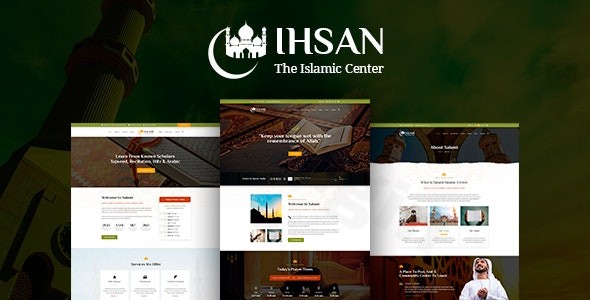
Spread Knowledge and Build Community with a Specialized Islamic Website
The Ihsan WordPress theme is a meticulously crafted solution designed specifically for Islamic centers, mosques, and non-profit Islamic organizations looking to establish a meaningful and engaging online presence. With its attractive and clean design, Ihsan provides a dedicated platform to spread knowledge, manage religious activities, and foster community connections. It offers full support for RTL (Right-to-Left) and Arabic languages, making it an ideal choice for Muslim communities globally seeking a professional and culturally sensitive website.This theme, developed by Templines, stands out by integrating niche-specific functionalities, making it a comprehensive toolkit for administrators of Islamic institutions. It’s built to simplify the process of creating a website that aligns with Islamic principles and serves community needs without requiring extensive coding knowledge.
Key Features: Design, Layout & Performance
Ihsan is more than just a visually appealing theme; it’s a functional powerhouse tailored for its specific audience.
Design & Layout Options
The Ihsan theme boasts a professionally designed landing page, setting a welcoming tone for visitors. It includes a unique slider to highlight important announcements or events and a beautiful blog layout for sharing sermons, articles, and news. For keeping the community informed, there are various dedicated layouts for events and photo galleries, allowing you to showcase your center’s activities visually and engagingly.Crucially, Ihsan offers full support for Right-to-Left (RTL) languages and Arabic, ensuring that content is displayed correctly and naturally for its target audience. This is a fundamental design consideration that generic themes often overlook.
Customization Capabilities
While detailed customization options for color schemes and typography are managed through the WordPress Customizer, the theme’s true flexibility comes from its integration with the WPBakery Page Builder. This premium drag-and-drop page builder empowers users to create and manage complex layouts intuitively. You can easily adjust elements, organize content sections, and achieve a highly personalized look without touching a single line of code. The theme also utilizes shortcodes for further customization.
Performance & SEO Features
The Ihsan theme is built to be “SEO Friendly,” incorporating practices that help your site rank better in search engines. It’s also “Responsive” and “Retina ready,” meaning your website will look crisp and function flawlessly across all devices—from smartphones to high-resolution desktops. Extensive testing on mobile devices ensures a consistent and enjoyable user experience, regardless of screen size. While specific page speed scores aren’t explicitly documented, its focus on clean design and mobile readiness contributes to a solid foundation for performance.
Installation & Demo Import
Getting your Ihsan WordPress theme website up and running is designed to be straightforward, even for those new to WordPress.
- Install & Activate the Theme:
- First, download the Ihsan theme package from your purchase source (e.g., ThemeForest).
- Log in to your WordPress dashboard.
- Navigate to
Appearance > Themes > Add New > Upload Theme. - Choose the theme’s
.zipfile and clickInstall Now. - Once installed, click
Activate.
- Install Required Companion Plugins:
- After activation, Ihsan will typically prompt you to install and activate a set of recommended plugins. These often include WPBakery Page Builder, Revolution Slider, PrayTimes WordPress plugin, and the Give plugin for donations, all essential for the theme’s full functionality. Follow the on-screen instructions to install and activate them.
- Use the One-Click Demo Import:
- Ihsan comes with a one-click import module, allowing you to quickly set up your site with the demo content. This is invaluable for seeing how the theme is intended to look and for providing a starting point for your own content.
- Look for a “Demo Import,” “Import Data,” or similar option in your WordPress dashboard, usually under
Appearanceor a dedicated theme options panel. - Select the demo you wish to import and initiate the process.
- What to Expect During/After Demo Import:
- The demo import will populate your site with sample pages, posts, widgets, and menu structures, replicating the theme’s live demo.
- Common Pitfall: Demo content import can sometimes fail or result in a white screen, especially if your server’s PHP configuration limits are too low. It’s highly recommended to increase
max_execution_timeto 360,memory_limitto 128M,post_max_sizeto 32M, andupload_max_filesizeto 32M for a smooth import process. You can typically adjust these settings via your hosting control panel or by contacting your host’s support.
Customization Guide: Branding & Layout
Personalizing your Ihsan theme to reflect your organization’s unique brand and message is made intuitive through its built-in tools.
- Using the WordPress Customizer: Access the WordPress Customizer via
Appearance > Customize. Here, you can globally configure main theme styles. This is where you’ll typically manage your site identity (logo, site title, favicon), basic color schemes, general typography settings, and other core theme options that affect your site’s overall look and feel. - Changing Colors, Fonts, & Logos:
- Logo: Easily upload your organization’s logo through the Customizer’s Site Identity section.
- Colors & Typography: While detailed options are managed through the Customizer, the overarching design is clean and attractive. You can adjust primary and secondary colors to match your brand. Font choices are generally available, allowing you to select readable and appropriate typefaces.
- Header & Footer Layouts: Ihsan features a professionally designed landing page with a unique slider, giving a strong initial visual impression. The specific builders for headers, footers, or mega menus are not explicitly detailed, but WPBakery Page Builder can be used to customize content within widgetized areas often found in footers, and for creating custom layouts on pages.
- Setting Up Homepage, Blog Page, and Menus:
- After importing demo content, your homepage and blog page will likely be pre-set. You can manage these under
Settings > Reading. - Menus are configured under
Appearance > Menus, allowing you to create and assign navigation menus to various locations, typically the primary header menu.
- After importing demo content, your homepage and blog page will likely be pre-set. You can manage these under
- WPBakery Page Builder for Layout: For more intricate page layouts and content arrangement, WPBakery Page Builder is your primary tool. Its drag-and-drop interface lets you easily add elements like text blocks, images, prayer time displays, event listings, and donation forms to any page, giving you extensive control over the visual presentation.
FAQ & Troubleshooting
Here are answers to common questions about the Ihsan Islamic Prayer Center WordPress theme.
Q: Is Ihsan compatible with popular page builders like Elementor or WPBakery?
A: Yes, the Ihsan theme is compatible with WPBakery Page Builder, and it’s integrated to provide drag-and-drop functionality for creating and managing your website’s layouts. Explicit compatibility with Elementor is not mentioned.
Q: Does the Ihsan theme support WooCommerce for online stores or specific donation functionalities?
A: While WooCommerce compatibility is not explicitly listed, the Ihsan theme includes the “Give plugin” for a secure and easy-to-use donation system, making it perfect for organizations to raise funds for their cause.
Q: How can I set up and manage Muslim prayer times using the Ihsan theme?
A: The Ihsan theme comes bundled with the powerful PrayTimes WordPress plugin. This allows you to easily display and manage Muslim prayer times on your website, offering multiple calculation methods and options for manual adjustment to ensure accuracy for your community.
Q: What should I do if the demo import fails or looks different from the demo site?
A: Demo import failures (like white screens or incomplete imports) are often due to low PHP configuration limits on your server. It’s recommended to increase max_execution_time to 360 seconds, memory_limit to 128MB, post_max_size to 32MB, and upload_max_filesize to 32MB. After adjusting these, try the demo import again. If issues persist, consult the theme’s documentation or support.
Q: Is the Ihsan theme compatible with the WordPress Block Editor (Gutenberg)?
A: Explicit compatibility with the WordPress Block Editor (Gutenberg) is not directly mentioned in the theme’s documentation. Given its reliance on WPBakery Page Builder for complex layouts, you might find that WPBakery is the primary method for page content creation. However, basic text and image blocks within posts should function as standard WordPress features.
Conclusion
The Ihsan – Premium Islamic Prayer Center WordPress theme is a highly specialized and robust solution for Islamic centers, mosques, and non-profit religious organizations. Its strengths lie in its dedicated feature set, including the PrayTimes plugin for prayer schedule management, a comprehensive Event Calendar, a community forum, and an integrated donation system via the Give plugin. The theme’s full support for RTL and Arabic languages makes it uniquely suited for its target audience.With its attractive and clean design, coupled with the flexibility of WPBakery Page Builder and included premium plugins like Revolution Slider, Ihsan offers significant design control and value. It’s mobile-responsive and SEO-friendly, providing a solid foundation for an engaging online presence.Ihsan is an ideal choice for religious leaders, mosque administrators, and community managers who need a ready-to-use, feature-rich platform that addresses the specific needs of an Islamic community without requiring deep technical expertise. If your priority is a comprehensive, culturally sensitive, and easy-to-manage website that facilitates community engagement and supports your mission, the Ihsan WordPress theme stands out as a compelling option.
I. Download Limits & Account Benefits
- Free Downloads: Each email address receives 3 downloads per day for free products
- Upgrade Benefits: Purchase any paid product to increase your daily download limit by 3 for each paid product
- No Account Required: You can download immediately by receiving the download link via email
- Account Recommended: Create an account for easier access to your order history and direct update downloads
II. Understanding GPL vs Official Versions
Important: The products available on WPPick are GPL-licensed versions, which differ from official developer versions. Before purchasing, please read our comprehensive guide: Understanding GPL & Official Differences at WPPick
Key Points:
- GPL versions may not include premium support from original developers
- Updates may be delayed compared to official releases
- Some premium features might have limitations
- Always consider your specific needs and support requirements
III. Support & Assistance
We’re here to help through multiple channels:
- Email Support: Direct email assistance for all inquiries
- Live Chat: Real-time support during business hours
- Comprehensive Documentation: Detailed guides and tutorials
IV. Order Tracking
Access your complete purchase history and download links anytime: Order History
V. Account Access
New to WPPick? Login or Create Account to manage your downloads and orders efficiently.
VI. Refund Protection
We stand behind our products with a clear refund policy. Review our terms: Refund Policy
VII. Privacy & Security
Your data security is our priority. Learn how we protect your information: Privacy Policy
VII. Terms of Service
Understanding our service terms ensures a smooth experience: Terms of Use
Quick Tips for Best Experience
- Verify Compatibility: Check plugin/theme compatibility with your WordPress version
- Backup First: Always backup your site before installing new plugins or themes
- Test Environment: Consider testing on a staging site first
- Stay Updated: Regularly check for updates in your account dashboard
- Read Documentation: Review any included documentation for optimal setup
Need Help?
If you have questions about downloads, licensing, or need technical assistance, don’t hesitate to contact our support team. We’re committed to ensuring you have the best possible experience with WPPick products.
Ready to get started? Your download adventure begins with just one click!
No changelog available.