

Innové Couture – Clothing Ecommerce WordPress Theme
/Year
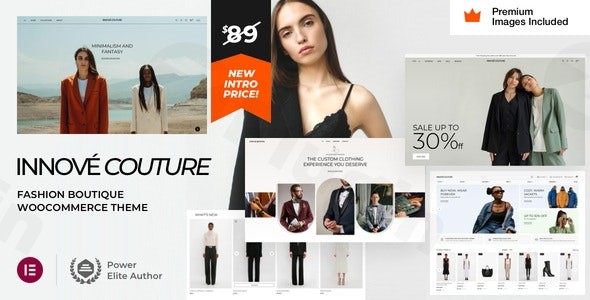
Innové Couture is a sophisticated and modern clothing eCommerce WordPress theme meticulously crafted for online fashion retailers and boutique owners. Designed to combine elegant aesthetics with robust functionality, it provides a seamless shopping experience for your customers and an intuitive backend for you. This theme is ideal for those looking to launch a new fashion store or refresh an existing one, offering a powerful platform to showcase apparel and accessories with style and efficiency.Developed by VamTam themes, a recognized “power elite author” on Envato, Innové Couture focuses on delivering a high-converting, visually stunning online presence for fashion entrepreneurs. Its deep integration with Elementor Pro and WooCommerce makes it a standout choice for creating a professional, stylish, and user-friendly fashion boutique website.
Key Features: Design, Layout & Performance
Innové Couture offers a rich array of features that cater specifically to the fashion industry, ensuring your products are presented beautifully while maintaining optimal site performance and search engine visibility.
Design & Layout Options
The theme provides diverse, customizable layouts to ensure your fashion boutique has a unique and polished look. It boasts a fully responsive design, guaranteeing a flawless appearance and user experience across all devices—desktops, tablets, and smartphones. Key design elements include:
- Sleek Mega Menus: For intuitive and visually appealing navigation, crucial for extensive product categories.
- Lookbook-Style Product Showcases: Present your collections with magazine-quality layouts.
- Beautiful Product Galleries with Zoom: Allow customers to examine products in exquisite detail.
- Flexible Blog and Magazine Layouts: Enhance engagement by sharing fashion tips, trends, and brand stories.
- Customizable Header and Footer Layouts: Built entirely with Elementor Pro, offering complete control over these critical site areas.
Unrivaled Customization with Elementor Pro
Innové Couture leverages Elementor Pro as its primary customization interface, eliminating the need to learn a new, proprietary theme options panel. This integration empowers users with extensive control over every design element:
- Global Styles Panel: Manage your Innové Couture customization options for global colors, typography, spacing, containers, sections, and backgrounds, ensuring consistent branding throughout your site.
- Dynamic Content Layouts: Create custom templates for various content types, including individual products, blog posts, archives, 404 pages, maintenance mode pages, coming soon pages, and search results, all through Elementor Pro.
- Drag-and-Drop Building: The theme’s reliance on Elementor Pro means you can easily customize virtually every aspect of your site with intuitive drag-and-drop functionality, no coding required.
Performance & SEO Excellence
Recognizing the importance of speed and visibility, Innové Couture is built with performance and SEO in mind:
- Lightweight Foundation: Described as a “very lightweight theme” with a small file size of just 2.8 MB, contributing to faster loading times.
- Speed Optimization: Includes support for compression of JavaScript and CSS scripts to accelerate website speed, a critical factor for user experience and SEO.
- Mobile-First & Retina-Ready: Ensures a seamless and crisp display on all devices and high-resolution screens.
- SEO-Friendly Structure: Designed with clean code and a logical heading structure, helping search engines understand your content better for improved visibility.
- RTL Language Support: Ready for right-to-left languages, broadening its global reach.
Value-Added: Premium Demo Content & Stock Images
To help you get started quickly, Innové Couture includes comprehensive demo content. A significant benefit for fashion businesses is the inclusion of $270 worth of premium Getty Images stock (with appropriate usage rights) as part of the demo, providing high-quality visuals right out of the box.
Installation & Demo Import Guide
Getting your Innové Couture clothing eCommerce theme up and running is a straightforward process, primarily leveraging the familiar WordPress and Elementor interfaces.
- Get Innové Couture:First, purchase and download the Innové Couture theme package from a trusted source like ZeroPlugin.com or ThemeForest. If you download from ZeroPlugin.com, you benefit from a 100% GPL licensed, VirusTotal verified safe download with regular updates.
- Install & Activate the Theme:
- Log in to your WordPress dashboard.
- Navigate to Appearance > Themes.
- Click on Add New at the top, then Upload Theme.
- Choose the
innov_couture.zipfile you downloaded and click Install Now. - Once installed, click Activate.
- Install Required Plugins:Upon activation, Innové Couture will prompt you to install several plugins essential for its full functionality. Elementor Pro is a crucial requirement for the theme’s design capabilities and demo import.
- Follow the on-screen prompts to install and activate Elementor, Elementor Pro, and WooCommerce. You will need to purchase and license Elementor Pro separately if you don’t already have it.
- Import Demo Content:Importing the demo content is the fastest way to get your site looking like the theme’s live preview, complete with layouts, settings, and the valuable Getty Images stock.
- The theme uses Elementor Pro for demo import and setup. Navigate to the relevant section within your WordPress dashboard (often found under Appearance > Import Demo Data or a dedicated theme panel, which for Innové Couture is integrated with Elementor Pro’s workflow).
- Follow the instructions to import the demo content. This process will populate your site with pages, posts, products, menus, and widgets.
- What to Expect: After a successful import, your site will largely mirror the Innové Couture demo. You will then need to customize the content, images (beyond the included Getty stock), and branding to match your specific fashion store. Ensure your server has sufficient memory and execution time to prevent timeouts during the import of potentially large demo files.
Customization Guide: Branding Your Fashion Store
Innové Couture provides extensive flexibility for branding and layout customization, primarily through its tight integration with Elementor Pro. You won’t need to learn a complex, custom theme options panel.
Global Styling with Elementor Pro
The Elementor Pro Global Styles panel acts as your central hub for site-wide design.
- Colors: Easily define your brand’s color palette, applying changes globally to backgrounds, text, links, and buttons.
- Typography: Set your primary and secondary fonts, control sizes, weights, line heights, and letter spacing for headings, body text, and other elements, ensuring typographic consistency.
- Spacing & Layout: Adjust default container widths, column gaps, and section padding to refine your site’s visual hierarchy and balance.
Crafting Unique Headers, Footers, and Menus
Innové Couture empowers you to design custom headers, footers, and mega menus using Elementor Pro’s drag-and-drop builder.
- Header Builder: Create custom header layouts, including your logo, navigation menus, search bars, and account icons, tailored to your brand’s aesthetic.
- Footer Builder: Design a custom footer with copyright information, social media links, contact details, and secondary navigation.
- Mega Menu Builder: Build visually rich and user-friendly mega menus for easy navigation through extensive product categories.
Personalizing Product & Shop Pages
With its robust WooCommerce integration, Innové Couture offers specialized customization options for your online store.
- Product Showcases: Design unique layouts for individual product pages and shop archives using Elementor Pro’s dynamic content features.
- Extended WooCommerce Features: Utilize built-in enhancements like Wishlist functionality, Ajax Search, and Gift Card options to enrich the shopping experience.
Content Creation
While Innové Couture provides pre-designed layouts, adding your unique content is simple.
- Page Building: Use Elementor Pro to create new pages or edit existing ones, dragging and dropping widgets to build sophisticated layouts for lookbooks, about us pages, contact pages, and more.
- Blog Posts: Leverage Elementor or the standard WordPress Block Editor (Gutenberg) to write engaging blog posts that drive traffic and connect with your audience.
FAQ & Troubleshooting
Here are answers to common questions about the Innové Couture WordPress theme:
Is Innové Couture compatible with Elementor and WooCommerce?
Yes, Innové Couture is fully compatible with and requires Elementor and Elementor Pro for its full functionality, including demo import and core design capabilities. It also features seamless and robust integration with WooCommerce, offering specialized customization options and extended e-commerce features like Wishlist and Ajax Search.
How can I import the Innové Couture demo content?
To import the demo content for Innové Couture, you must first install and activate the theme, along with the required plugins, including Elementor Pro. The demo import process is integrated with Elementor Pro’s workflow and can typically be initiated from your WordPress dashboard, often under an “Import Demo Data” or similar theme option. Follow the on-screen instructions to load the pre-built layouts and starter content.
Is Innové Couture a lightweight and SEO-friendly theme?
Yes, Innové Couture is described as a “very lightweight theme” with a small file size (2.8 MB), contributing to potentially fast website performance. It includes support for JavaScript and CSS compression to further optimize speed. Additionally, it features an SEO-friendly structure designed for better visibility in search engines.
What is the required PHP version for Innové Couture?
While Innové Couture is compatible with WordPress 6.8 and 6.9, specific minimum or recommended PHP versions are not explicitly documented in the provided information. It is generally best practice to use a modern PHP version (e.g., PHP 7.4 or 8.0+) for optimal performance and security with any WordPress theme.
Can I use Innové Couture for a multilingual fashion store?
Yes, Innové Couture is translation-ready (including .po and .mo files) and has been tested for compatibility with the WPML plugin, making it suitable for creating multilingual fashion e-commerce websites. It also supports RTL (Right-to-Left) languages.
Conclusion
Innové Couture stands out as an exceptional fashion e-commerce WordPress theme for those serious about building a visually stunning and highly functional online store. Its elegant design, combined with powerful features and deep integration with Elementor Pro and WooCommerce, provides a comprehensive solution for fashion entrepreneurs, boutique owners, and online retailers.With its extensive customization options managed through the familiar Elementor Pro interface, users gain complete control over their site’s branding and layout without needing coding expertise. The theme’s focus on performance and SEO readiness ensures your store not only looks good but also loads fast and ranks well. Factor in the valuable inclusion of premium stock images and the reputable backing of VamTam themes, and Innové Couture emerges as a robust and beginner-friendly choice for creating a professional and high-converting fashion website. If you’re looking to create a visually compelling clothing store WordPress theme with Elementor, Innové Couture is an excellent and reliable option.
I. Download Limits & Account Benefits
- Free Downloads: Each email address receives 3 downloads per day for free products
- Upgrade Benefits: Purchase any paid product to increase your daily download limit by 3 for each paid product
- No Account Required: You can download immediately by receiving the download link via email
- Account Recommended: Create an account for easier access to your order history and direct update downloads
II. Understanding GPL vs Official Versions
Important: The products available on WPPick are GPL-licensed versions, which differ from official developer versions. Before purchasing, please read our comprehensive guide: Understanding GPL & Official Differences at WPPick
Key Points:
- GPL versions may not include premium support from original developers
- Updates may be delayed compared to official releases
- Some premium features might have limitations
- Always consider your specific needs and support requirements
III. Support & Assistance
We’re here to help through multiple channels:
- Email Support: Direct email assistance for all inquiries
- Live Chat: Real-time support during business hours
- Comprehensive Documentation: Detailed guides and tutorials
IV. Order Tracking
Access your complete purchase history and download links anytime: Order History
V. Account Access
New to WPPick? Login or Create Account to manage your downloads and orders efficiently.
VI. Refund Protection
We stand behind our products with a clear refund policy. Review our terms: Refund Policy
VII. Privacy & Security
Your data security is our priority. Learn how we protect your information: Privacy Policy
VII. Terms of Service
Understanding our service terms ensures a smooth experience: Terms of Use
Quick Tips for Best Experience
- Verify Compatibility: Check plugin/theme compatibility with your WordPress version
- Backup First: Always backup your site before installing new plugins or themes
- Test Environment: Consider testing on a staging site first
- Stay Updated: Regularly check for updates in your account dashboard
- Read Documentation: Review any included documentation for optimal setup
Need Help?
If you have questions about downloads, licensing, or need technical assistance, don’t hesitate to contact our support team. We’re committed to ensuring you have the best possible experience with WPPick products.
Ready to get started? Your download adventure begins with just one click!
- style.css
- vamtam/admin/helpers/updates/version-checker.php
- vamtam/classes/framework.php
- vamtam/plugins/vamtam-elementor-integration-innovecouture/
- Updated style.css
- Updated vamtam/admin/assets/js/check-license.js
- Updated vamtam/admin/helpers/updates/version-checker.php
- Updated vamtam/classes/enqueues.php
- Gruntfile.js
- package-lock.json
- package.json
- style.css
- utils/grunt/init.js
- utils/grunt/packaging.js
- vamtam/admin/assets/js/admin-all.min.js
- vamtam/admin/classes/diagnostics.php
- vamtam/assets/css/dist/elementor/elementor-all.css
- vamtam/assets/css/dist/elementor/elementor-all.css.map
- vamtam/assets/css/dist/elementor/responsive/elementor-below-max.css
- vamtam/assets/css/dist/elementor/responsive/elementor-below-max.css.map
- vamtam/assets/css/dist/elementor/responsive/elementor-small.css
- vamtam/assets/css/dist/elementor/responsive/elementor-small.css.map
- vamtam/assets/css/src/elementor/elementor-general.less
- vamtam/assets/css/src/elementor/widgets/wocommerce-product-add-to-cart/wocommerce-product-add-to-cart.less
- vamtam/assets/css/src/elementor/widgets/wocommerce-product-add-to-cart/wocommerce-product-add-to-cart.mobile.less
- vamtam/assets/js/all.js
- vamtam/assets/js/all.min.js
- vamtam/assets/js/general.js
- vamtam/assets/js/wc-gallery.min.js
- vamtam/classes/elementor-bridge.php
- vamtam/classes/enqueues.php
- Gruntfile.js
- package.json
- samples/dependencies.php
- style.css
- utils/grunt/packaging.js
- vamtam/admin/classes/diagnostics.php
- vamtam/assets/css/dist/elementor/elementor-all.css
- vamtam/assets/css/dist/elementor/elementor-all.css.map
- vamtam/assets/css/dist/elementor/responsive/elementor-small.css
- vamtam/assets/css/dist/elementor/responsive/elementor-small.css.map