
Instive – Insurance WordPress Theme
/Year
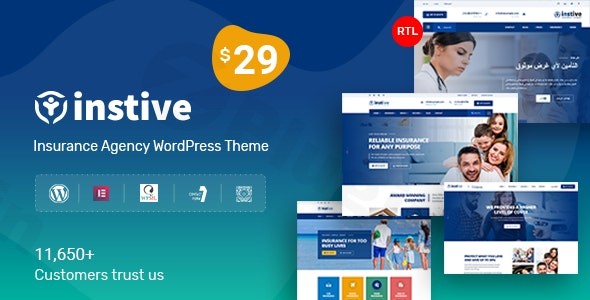
In today’s digital-first world, an impactful online presence is non-negotiable for insurance businesses. The Instive – Insurance WordPress Theme is a meticulously crafted premium solution designed to empower insurance companies, agencies, brokers, and financial advisors with a sophisticated, high-performing website. This theme goes beyond mere aesthetics, offering a robust platform built for lead generation, client engagement, and seamless business operations.
Instive’s Core Design Philosophy: Professionalism Meets Performance
Instive’s design philosophy centers on creating a trustworthy and modern online environment that resonates with the insurance sector. It presents a clean aesthetic, characterized by bright colors and ample white space, ensuring a professional and approachable user experience. This visual clarity is crucial for conveying complex information simply and effectively, making it easier for potential clients to understand services and take action.The theme’s commitment to design excellence is evident in its retina-ready graphics, ensuring crisp, high-resolution visuals on any screen, from desktops to the latest mobile devices. Furthermore, Instive boasts a fully responsive design, dynamically adapting its layout to look impeccable across all devices, guaranteeing an optimal browsing experience for every visitor.
Key Features That Elevate Your Insurance Website
Instive is packed with features meticulously tailored to meet the unique demands of the insurance industry.
Industry-Specific Design & Layout Variations
Understanding that one size doesn’t fit all, Instive offers multiple home variations (up to seven unique demos) and several distinct header layouts (six or seven options). These pre-designed starting points provide immense flexibility, allowing businesses to select a foundation that perfectly aligns with their brand and specific insurance offerings, whether it’s life, auto, health, or property insurance.
Intuitive Customization Without Coding
One of Instive’s standout features is its unparalleled ease of customization. Even without any coding knowledge, users can effortlessly personalize their website. The integrated live customizer allows for real-time tweaking of layouts, colors, and fonts, providing instant visual feedback. This is further enhanced by its full optimization for Elementor Page Builder, a leading drag-and-drop interface that simplifies the creation of complex page layouts. For those familiar with other tools, compatibility with WP Bakery is also noted, offering broader flexibility. The theme further empowers customization with 40 custom addons and over 200 preset blocks, allowing for rich, dynamic content creation.
Dedicated Content Management for Insurance Services
Instive includes a comprehensive insurance post type, a custom content structure specifically designed to highlight and categorize various insurance services efficiently. This feature ensures that each service, from policy details to coverage options, can be presented clearly and professionally, improving user navigation and information accessibility.
Technical Excellence and Seamless Integrations
Beyond its compelling design, Instive is engineered for performance, compatibility, and expandability, adhering to modern web development standards.
Robust Framework and SEO Optimization
Built on the stable Twitter Bootstrap 4 framework and featuring HTML5 validated code, Instive provides a solid, secure, and future-proof foundation for your website. Crucially, the theme is developed with SEO best practices in mind, optimizing its structure to help your insurance website rank higher in search engine results, thereby attracting more organic traffic. Its focus on clean code also contributes to fast loading performance, a critical factor for user experience and SEO.
Essential Plugin Compatibility
Instive ensures your website is ready for global reach and diverse functionalities through key plugin integrations:
- WPML Compatibility: For insurance companies operating in diverse linguistic markets, WPML integration enables effortless multi-language support, expanding your reach to a global audience.
- WooCommerce Compatibility: If you plan to offer online consultations, policy quotes, or digital products, WooCommerce integration allows for robust e-commerce capabilities.
- Contact Form 7 Compatibility: Essential for lead generation and client inquiries, Contact Form 7 integration makes it easy to create custom, professional contact forms.
- Revolution Slider (Premium Included): Instive includes the premium Revolution Slider plugin, allowing you to create captivating, dynamic presentations of your services, testimonials, or promotional banners.
Advanced Technical Features
For comprehensive website development, Instive also supports RTL (Right-to-Left) languages, comes with a child theme included for safe customizations, and offers custom widgets for enhanced functionality, including dedicated options for recent posts, social media, and service hours. The Header & Footer Builder provides even deeper control over these crucial website areas.
Who Is Instive For? Target Audience and Use Cases
Instive is specifically crafted for a broad spectrum of professionals within the insurance and financial sectors:
- Insurance Agencies & Brokers: Showcase multiple insurance products, team profiles, and client testimonials with sections designed to highlight expertise and build trust.
- Large Insurance Companies: Corporate-level features support large providers with various departments, service categories, and regional offices, offering a scalable solution.
- Financial Advisors: Seamlessly integrate insurance offerings as part of a comprehensive financial planning strategy, using integrated service pages and consultation booking systems.
- Small Business Houses in the Insurance Sector: Provides a professional, affordable, and easy-to-manage online presence that competes with larger entities.Whether you’re looking to establish a new brand, refresh an existing site, or expand your online services, Instive provides the tools to create a credible, engaging, and conversion-focused platform.
Setting Up Your Instive-Powered Insurance Website
Getting started with Instive is a streamlined process designed for efficiency:
- Installation: Download the Instive theme package and install it like any standard WordPress theme via your WordPress dashboard (Appearance > Themes > Add New > Upload Theme).
- Demo Import (Optional): To quickly kickstart your design, utilize the one-click demo import feature (if available, which is common for themes with multiple home variations). This will populate your site with content similar to the live demo, which you can then customize.
- Customization with the Live Customizer: Navigate to Appearance > Customize to access the live customizer. Here, you can visually adjust global settings like colors, typography, header styles, and more.
- Building Pages with Elementor: For crafting bespoke page layouts, use Elementor. Simply open any page or post with Elementor and drag-and-drop elements, utilizing Instive’s custom addons and preset blocks to build rich, interactive content.
- Adding Insurance Services: Leverage the dedicated insurance post type to add and manage your insurance offerings, providing detailed information and clear calls to action.
- Configuring Forms and E-commerce: Set up your contact forms using Contact Form 7 and integrate WooCommerce if you plan to sell services or products directly from your site.
Conclusion: Invest in a Professional Online Presence with Instive
The Instive – Insurance WordPress Theme is more than just a template; it’s a complete online solution engineered for the modern insurance industry. Its blend of professional design, powerful customization options, technical robustness, and industry-specific features makes it an invaluable asset for any insurance professional seeking to build a strong, credible, and conversion-optimized web presence. By choosing Instive, you’re investing in a premium WordPress theme that delivers professional design results, enhances user experience, and ultimately, helps your insurance business thrive.
I. Download Limits & Account Benefits
- Free Downloads: Each email address receives 3 downloads per day for free products
- Upgrade Benefits: Purchase any paid product to increase your daily download limit by 3 for each paid product
- No Account Required: You can download immediately by receiving the download link via email
- Account Recommended: Create an account for easier access to your order history and direct update downloads
II. Understanding GPL vs Official Versions
Important: The products available on WPPick are GPL-licensed versions, which differ from official developer versions. Before purchasing, please read our comprehensive guide: Understanding GPL & Official Differences at WPPick
Key Points:
- GPL versions may not include premium support from original developers
- Updates may be delayed compared to official releases
- Some premium features might have limitations
- Always consider your specific needs and support requirements
III. Support & Assistance
We’re here to help through multiple channels:
- Email Support: Direct email assistance for all inquiries
- Live Chat: Real-time support during business hours
- Comprehensive Documentation: Detailed guides and tutorials
IV. Order Tracking
Access your complete purchase history and download links anytime: Order History
V. Account Access
New to WPPick? Login or Create Account to manage your downloads and orders efficiently.
VI. Refund Protection
We stand behind our products with a clear refund policy. Review our terms: Refund Policy
VII. Privacy & Security
Your data security is our priority. Learn how we protect your information: Privacy Policy
VII. Terms of Service
Understanding our service terms ensures a smooth experience: Terms of Use
Quick Tips for Best Experience
- Verify Compatibility: Check plugin/theme compatibility with your WordPress version
- Backup First: Always backup your site before installing new plugins or themes
- Test Environment: Consider testing on a staging site first
- Stay Updated: Regularly check for updates in your account dashboard
- Read Documentation: Review any included documentation for optimal setup
Need Help?
If you have questions about downloads, licensing, or need technical assistance, don’t hesitate to contact our support team. We’re committed to ensuring you have the best possible experience with WPPick products.
Ready to get started? Your download adventure begins with just one click!
- License Activation Issue Fixed
- stdClass Missing Issue Fixed
- Demo Content Updated