
Iva – Beauty Store, Cosmetics Shop
/Year
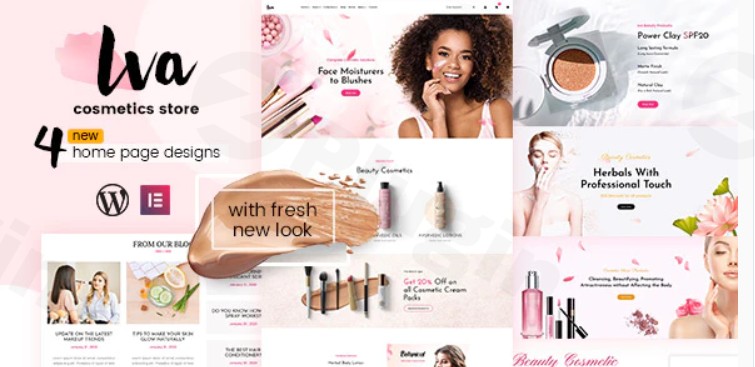
Elevate your online presence and create a stunning e-commerce destination with the Iva Beauty Store Cosmetics Shop WordPress theme. Designed specifically for the vibrant beauty and wellness industry, Iva offers a sleek, modern, and highly functional platform for businesses ranging from makeup kit shops and perfume retailers to organic skincare brands and beauty spa centers. This theme is your comprehensive solution for launching an aesthetically pleasing and high-converting online store.
Key Features: Design, Layout & Performance
The Iva WordPress theme is engineered to provide a seamless user and administrative experience, blending captivating design with robust functionality crucial for any successful online beauty business.
Design & Layout Options
Iva puts visual appeal and flexibility at the forefront. Its responsive design ensures your beauty store looks impeccable and functions flawlessly across all devices—desktops, tablets, and smartphones—delivering an optimal shopping experience.
- Homepage Layouts: The theme offers four distinct homepage layouts, providing diverse starting points to match your brand’s unique aesthetic. These pre-designed layouts are a huge time-saver, allowing you to quickly establish a professional look.
- Multiple Header Styles: Customize your site’s first impression with various header styles, adding character and functionality to your navigation.
- Inner Pages: Beyond the homepage, Iva includes essential inner pages like About Us, FAQ, Collections, Shop, Brand, News, and Contact, ensuring you have all the necessary components for a complete website.
- Visual Elements: Emphasizing a clean, minimalist, and modern design, Iva is perfect for showcasing beauty and cosmetics products visually. It includes built-in product sliders and gallery options to highlight your catalog effectively.
Customization Capabilities
Personalizing your Iva theme is made straightforward through its intuitive customization options, especially with its compatibility with the Elementor page builder.
- Easy-to-Use Theme Options: Access global styling controls and fundamental settings directly from the theme options panel.
- Elementor Compatibility: The theme’s full compatibility with the Elementor beauty WordPress theme allows for unparalleled drag-and-drop design flexibility. You can visually craft and fine-tune every aspect of your pages, from spacing and containers to sections and backgrounds, without touching a single line of code.
- Slider Revolution Included: To create truly dynamic product presentations and promotional banners, Iva bundles the premium Slider Revolution plugin. This powerful tool enables advanced transition effects and animations, turning your static content into engaging visual stories.
- DesignThemes Core Features Plugin: This exclusive plugin integrates essential shortcodes and custom post types, compatible with Elementor, to extend your design possibilities and content management.
Performance & SEO Features
While specific performance metrics (like Lighthouse scores) are not explicitly detailed, Iva is built with foundational elements that contribute to a solid online presence.
- Responsive Design: As mentioned, its responsive nature is key for modern SEO, as Google prioritizes mobile-friendliness.
- Clean Markup (Implied): Themes from reputable developers like Designthemes typically adhere to WordPress coding standards, which generally leads to cleaner, more SEO-friendly markup.
- WooCommerce Integration: Deep integration with WooCommerce means your product pages are structured for e-commerce, which includes elements crucial for product SEO.
Installation & Demo Import
Setting up your Iva WordPress theme is designed to be a smooth process, even for users without extensive technical experience.
- Install & Activate the Theme: Begin by uploading the Iva theme zip file via your WordPress dashboard (
Appearance > Themes > Add New > Upload Theme) and then activating it. - Install Required Plugins: Upon activation, Iva will prompt you to install any necessary companion plugins. This typically includes the “DesignThemes Core Features Plugin” and other essential tools like WooCommerce and Slider Revolution. Ensure all recommended plugins are installed and activated.
- One-Click Demo Import: To replicate the stunning demo content, Iva leverages the Unyson importer. Navigate to the demo import section (often found under
Appearanceor a dedicated theme options panel) and initiate the Iva theme demo import steps with a single click. - Post-Import Setup: After the demo import completes, you can expect your site to resemble the live demo. You’ll then need to assign your primary menu (
Appearance > Menus) and set your desired homepage (Settings > Reading > Your homepage displays). Be aware that for themes with extensive demo content, sufficient server memory and PHP execution time are beneficial for a smooth import process.
Customization Guide: Branding & Layout
Personalizing Iva to perfectly reflect your brand identity is intuitive, thanks to its integrated tools.
- WordPress Customizer: For real-time visual adjustments, the WordPress Customizer (
Appearance > Customize) is your go-to. Here, you can typically manage global options such as:- Colors: Define your brand’s color palette for backgrounds, text, links, and accents.
- Typography: Select desired fonts for headings and body text, including options for Google Fonts, to establish your visual tone.
- Logo & Favicon: Easily upload your brand logo and favicon to ensure consistent branding.
- Elementor Page Builder: For intricate layout design and content customization, Elementor is indispensable. You can:
- Design Your Homepage: Use Elementor’s drag-and-drop interface to modify existing demo sections or build entirely new layouts.
- Header & Footer Layouts: While Iva offers multiple pre-defined header styles, Elementor compatibility often extends to advanced header and footer customization, allowing you to create unique designs for these crucial areas.
- Product Showcases: Leverage Elementor widgets to highlight specific products, categories, or promotions with custom styling.
- Setting Up Menus: Create and organize your navigation menus under
Appearance > Menus, ensuring customers can easily find their way around your cosmetics shop. - Blog Page: Set up a dedicated blog page (
Settings > Reading) to share beauty tips, product updates, or company news, fostering a community around your brand.
FAQ & Troubleshooting
Here are answers to common questions about the Iva WordPress theme for beauty and cosmetics stores:
Is Iva compatible with Elementor for page building?
Yes, the Iva Beauty Store Cosmetics Shop WordPress theme is fully compatible with the Elementor drag-and-drop page builder. This allows for extensive visual customization and easy creation of unique page layouts without coding.
Does the Iva theme support WooCommerce for online stores?
Absolutely. Iva theme WooCommerce compatibility is a core feature, enabling you to set up a fully functional online store to sell makeup kits, skincare products, perfumes, and other beauty items seamlessly. It also supports WooCommerce-specific features like multiple currencies and wishlist functionality.
How can I customize the Iva theme header?
You can customize the Iva theme header through the theme’s dedicated options panel, which typically provides controls for different header styles. Additionally, its compatibility with Elementor often allows for even more granular control and design flexibility for header elements.
Does the Iva theme support child themes?
While not explicitly detailed in all source documentation, professional WordPress themes like Iva generally support child themes. Using a child theme is highly recommended for making customizations, as it prevents your changes from being overwritten during theme updates. If you plan extensive code modifications, it’s wise to verify child theme support with the developer.
What should I do if the demo import fails or looks different from the demo site?
If the demo import fails, first ensure your server meets the recommended WordPress and PHP requirements (e.g., sufficient PHP memory limit, execution time). If it looks different, it might be due to missing demo images (which are for demonstration only and not included) or unassigned menus/widgets. Recheck the post-import setup steps, including menu assignments and homepage settings.
Conclusion
The Iva – Beauty Store & Cosmetics Shop WordPress theme stands out as a robust and visually appealing choice for anyone looking to launch or revamp an online beauty business. Its dedicated niche focus, combined with powerful features like responsive design, Elementor compatibility, and deep WooCommerce integration, makes it an excellent platform for showcasing beauty products and driving sales.Iva is ideal for store owners, small businesses, and even freelancers or agencies building e-commerce sites for clients in the beauty industry. With its one-click demo import and intuitive customization options, it simplifies the complex process of building a professional online store, ensuring a beautiful and functional outcome. While specific performance benchmarks weren’t highlighted, its foundational features promise a solid, user-friendly experience for both administrators and customers. Choose Iva for a premium, specialized solution that truly understands the aesthetics and demands of the beauty and cosmetics market.
I. Download Limits & Account Benefits
- Free Downloads: Each email address receives 3 downloads per day for free products
- Upgrade Benefits: Purchase any paid product to increase your daily download limit by 3 for each paid product
- No Account Required: You can download immediately by receiving the download link via email
- Account Recommended: Create an account for easier access to your order history and direct update downloads
II. Understanding GPL vs Official Versions
Important: The products available on WPPick are GPL-licensed versions, which differ from official developer versions. Before purchasing, please read our comprehensive guide: Understanding GPL & Official Differences at WPPick
Key Points:
- GPL versions may not include premium support from original developers
- Updates may be delayed compared to official releases
- Some premium features might have limitations
- Always consider your specific needs and support requirements
III. Support & Assistance
We’re here to help through multiple channels:
- Email Support: Direct email assistance for all inquiries
- Live Chat: Real-time support during business hours
- Comprehensive Documentation: Detailed guides and tutorials
IV. Order Tracking
Access your complete purchase history and download links anytime: Order History
V. Account Access
New to WPPick? Login or Create Account to manage your downloads and orders efficiently.
VI. Refund Protection
We stand behind our products with a clear refund policy. Review our terms: Refund Policy
VII. Privacy & Security
Your data security is our priority. Learn how we protect your information: Privacy Policy
VII. Terms of Service
Understanding our service terms ensures a smooth experience: Terms of Use
Quick Tips for Best Experience
- Verify Compatibility: Check plugin/theme compatibility with your WordPress version
- Backup First: Always backup your site before installing new plugins or themes
- Test Environment: Consider testing on a staging site first
- Stay Updated: Regularly check for updates in your account dashboard
- Read Documentation: Review any included documentation for optimal setup
Need Help?
If you have questions about downloads, licensing, or need technical assistance, don’t hesitate to contact our support team. We’re committed to ensuring you have the best possible experience with WPPick products.
Ready to get started? Your download adventure begins with just one click!
- Premium plugins source updated