

Jacqueline | Spa & Massage Salon Beauty WordPress Theme
/Year
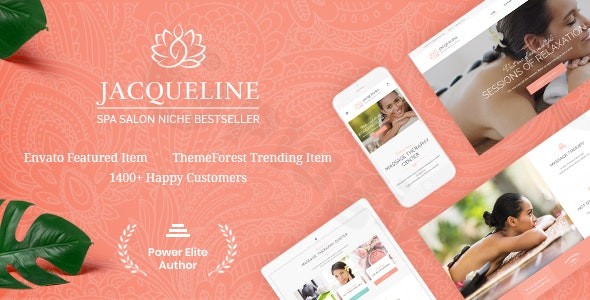
Elevate your online presence in the wellness industry with the Jacqueline WordPress theme, a sophisticated and feature-rich solution specifically designed for spa salons, massage therapists, beauty centers, and holistic health practitioners. This comprehensive Jacqueline Spa WordPress theme review and setup guide will delve into its elegant design, powerful functionalities, and how it can transform your business’s digital footprint into a serene and high-converting experience.
Introduction: Elegant Design Meets Wellness Functionality
The Jacqueline WordPress theme is a premium choice for anyone in the health and beauty sector seeking a luxurious, feminine, and fully responsive website. Its design philosophy centers around soft tones, elegant typography, and layouts that evoke peace and luxury, making it an ideal canvas for showcasing spa services, massage therapies, and beauty treatments. This theme is crafted for small business owners, freelancers, and agencies who need a professional online presence that combines visually appealing aesthetics with essential business functionalities like appointment scheduling and e-commerce.
Key Features: Design, Layout & Performance for a Serene Experience
Jacqueline stands out with a blend of elegant design capabilities and robust technical features, ensuring your wellness business not only looks professional but also performs flawlessly.
Design & Layout Options
Jacqueline provides a rich set of design and layout features to create a captivating and soothing user experience.
- Responsive & Retina-Ready Design: Ensures your website looks stunning and functions perfectly on any device, from desktops to smartphones, with crystal-clear graphics.
- Flexible Layouts: Offers both boxed and full-width page layouts and multiple blog styles with over 20 post animation effects to keep your content engaging.
- Prebuilt Demos & Inner Pages: Accelerate your website development with more than 8 professionally designed homepage layouts and a one-click demo import feature. Dedicated inner pages include service listings, treatment menus, pricing tables, team profiles, galleries, and testimonials.
- Header & Footer Options: Customize your website’s header and footer with multiple pre-designed styles to match your brand’s aesthetic.
Customization Capabilities
Personalizing your Jacqueline WordPress theme is intuitive, thanks to its powerful integration with popular page builders and extensive theme options.
- WPBakery Page Builder & Elementor Integration: Enjoy the flexibility of drag-and-drop page building with WPBakery Page Builder (included) and robust compatibility with Elementor. This allows for easy customization of layouts, sections, and visual elements without any coding knowledge.
- Professional Color Schemes & Typography: Choose from multiple pre-made color schemes (like pale purplish pink, fern green, shiny purple, and jet black) or create your own custom brand palette. Integration with Google Fonts and Fontello & Image Icons offers vast typography options.
- Dynamic Visual Elements: Add flair with parallax backgrounds, video backgrounds, and animation effects to create an interactive and engaging user experience.
Performance & SEO Features
Jacqueline is engineered for peak performance and discoverability, crucial for any online business.
- Optimized for Speed & Performance: The theme is built with clean, fast code, ensuring your website loads quickly and provides a smooth browsing experience.
- SEO-Friendly Structure: Designed with an SEO-friendly structure to help your spa or beauty salon rank higher in search engine results.
- GDPR Compliant: Includes a GDPR-compliant framework to help you meet privacy regulations.
- Cross-Browser Compatibility: Your site will display beautifully across all major browsers, including Firefox, Safari, and Chrome.
Installation & Demo Import: Setting Up Your Spa Sanctuary
Getting your Jacqueline theme up and running is a streamlined process, even for beginners. Here’s how to install the theme and import its stunning demo content:
- Theme Installation:
- After purchasing Jacqueline, download the theme package from your source (e.g., ThemeForest).
- In your WordPress dashboard, navigate to Appearance > Themes > Add New > Upload Theme.
- Upload the
jacqueline.zipfile and click Install Now. - Once installed, click Activate.
- Install Required Plugins:
- Upon activation, Jacqueline will recommend installing several plugins crucial for its full functionality. These typically include ThemeREX Addons, Elementor (or WPBakery Page Builder), and Booked for appointments.
- Follow the on-screen prompts to install and activate all recommended plugins.
- One-Click Demo Import:
- Jacqueline features a convenient one-click demo import tool. Navigate to the theme’s setup wizard or the ThemeREX Addons dashboard.
- Select the demo layout you wish to import. This will populate your site with pages, posts, widgets, and settings that mirror the live demo.
- Important Note: Demo import, especially with extensive content, can be resource-intensive. Ensure your hosting environment meets the recommended PHP settings:
max_execution_time600,memory_limit256M (or up to 512M for custom color schemes),post_max_size32M, andupload_max_filesize32M. If your demo import fails or appears incomplete, these server limits are often the cause. It’s also recommended to activate the provided child theme before importing demo data to prevent losing options if you decide to customize.
- Post-Import Setup:
- After a successful import, go to Appearance > Menus and Appearance > Widgets to ensure your navigation and sidebar elements are set up correctly. You may need to assign your primary menu and adjust widget areas.
- Check Settings > Reading to set your desired homepage and blog page.
Customization Guide: Branding Your Wellness Experience
Jacqueline offers extensive customization options, allowing you to tailor every aspect of your site to reflect your unique brand identity without writing a single line of code.
- Theme Options Panel: Dive into Jacqueline’s powerful theme framework, which boasts over 750 customizing options within a dedicated theme options panel. Here, you can globally control:
- Color Schemes: Easily switch between pre-made palettes or define your brand’s specific colors.
- Typography: Select from a vast library of Google Fonts for headings, body text, and more.
- Header & Footer Layouts: Choose from multiple styles and customize their content, including contact information, social links, and logos.
- Layout Settings: Adjust global settings for boxed or full-width layouts, content width, and sidebar positions.
- Page Builder Customization: For granular control over individual page layouts, utilize the integrated WPBakery Page Builder or Elementor.
- Drag & Drop Editing: Visually design your service pages, team profiles, and about sections by dragging and dropping elements onto the canvas.
- Section & Column Management: Create sophisticated layouts with flexible sections, columns, and rows.
- Custom Post Types: Manage your services, team members, and testimonials efficiently through dedicated custom post types.
- WordPress Customizer: For real-time visual changes, the WordPress Customizer provides immediate feedback on adjustments to your site’s identity, menus, widgets, and basic design elements.
- Child Theme for Safe Customizations: Jacqueline includes a child theme in its package. Always activate the child theme if you plan to make any custom CSS, PHP, or template file modifications. This ensures your customizations are preserved when the parent theme receives updates.
FAQ & Troubleshooting
Here are answers to common questions about the Jacqueline WordPress theme:
Is Jacqueline compatible with Elementor, WPBakery, and Gutenberg?
Yes, Jacqueline offers robust compatibility. It comes integrated with WPBakery Page Builder and is fully compatible with Elementor for drag-and-drop page building. The theme is also compatible with the Gutenberg block editor for creating new pages and posts, though existing demo pages are typically built and should be customized with Elementor or WPBakery.
Does Jacqueline support WooCommerce for online stores and products?
Absolutely! Jacqueline offers full WooCommerce integration, allowing you to seamlessly set up an online store to sell spa products, beauty items, gift certificates, or even memberships.
Can I use a child theme with Jacqueline?
Yes, a child theme is included in the Jacqueline package. It is highly recommended to activate the child theme before making any customizations to ensure your changes are not overwritten during theme updates.
What should I do if the demo import fails or looks different from the demo site?
Demo import issues are often related to server resource limitations. Ensure your hosting environment meets the recommended PHP settings (e.g., max_execution_time 600, memory_limit 256M). Also, confirm all required plugins, especially ThemeREX Addons and your chosen page builder (Elementor or WPBakery), are installed and activated before importing. If the appearance differs, check that you imported the correct demo and that all images and media transferred successfully.
How do I customize the header of my Jacqueline theme?
The Jacqueline theme allows for extensive header customization. You can modify header styles and layouts through the theme’s powerful Theme Options Panel. Additionally, with Elementor Page Builder, you have even greater flexibility to alter header and footer layouts visually, enabling you to create unique and branded header designs.
Conclusion: Your Premier Choice for a Wellness Website
The Jacqueline – Premium Spa & Massage Salon WordPress Theme offers an exquisite blend of elegant design and powerful functionality, making it an outstanding choice for any business in the health and beauty sector. Its focus on a calming aesthetic, coupled with integrated appointment booking, full WooCommerce support, and seamless compatibility with leading page builders like Elementor and WPBakery, provides a comprehensive solution for creating a high-converting online presence.From its responsive, retina-ready design to its SEO-friendly structure and commitment to regular updates, Jacqueline demonstrates a strong commitment to technical excellence. It’s an ideal theme for spa owners, massage therapists, beauty salon proprietors, and wellness centers who seek a professional, visually stunning, and functionally robust website without the need for extensive coding. If you’re looking to establish a sophisticated digital sanctuary that effectively attracts and converts clients, Jacqueline is a truly strong contender.
I. Download Limits & Account Benefits
- Free Downloads: Each email address receives 3 downloads per day for free products
- Upgrade Benefits: Purchase any paid product to increase your daily download limit by 3 for each paid product
- No Account Required: You can download immediately by receiving the download link via email
- Account Recommended: Create an account for easier access to your order history and direct update downloads
II. Understanding GPL vs Official Versions
Important: The products available on WPPick are GPL-licensed versions, which differ from official developer versions. Before purchasing, please read our comprehensive guide: Understanding GPL & Official Differences at WPPick
Key Points:
- GPL versions may not include premium support from original developers
- Updates may be delayed compared to official releases
- Some premium features might have limitations
- Always consider your specific needs and support requirements
III. Support & Assistance
We’re here to help through multiple channels:
- Email Support: Direct email assistance for all inquiries
- Live Chat: Real-time support during business hours
- Comprehensive Documentation: Detailed guides and tutorials
IV. Order Tracking
Access your complete purchase history and download links anytime: Order History
V. Account Access
New to WPPick? Login or Create Account to manage your downloads and orders efficiently.
VI. Refund Protection
We stand behind our products with a clear refund policy. Review our terms: Refund Policy
VII. Privacy & Security
Your data security is our priority. Learn how we protect your information: Privacy Policy
VII. Terms of Service
Understanding our service terms ensures a smooth experience: Terms of Use
Quick Tips for Best Experience
- Verify Compatibility: Check plugin/theme compatibility with your WordPress version
- Backup First: Always backup your site before installing new plugins or themes
- Test Environment: Consider testing on a staging site first
- Stay Updated: Regularly check for updates in your account dashboard
- Read Documentation: Review any included documentation for optimal setup
Need Help?
If you have questions about downloads, licensing, or need technical assistance, don’t hesitate to contact our support team. We’re committed to ensuring you have the best possible experience with WPPick products.
Ready to get started? Your download adventure begins with just one click!
- Laser Dermatology Homepage
- QW Extension addon (to version 1.6.1)
- TrxAddons: WPML – added translation support for our Elementor Extensions like “Background Text”
- theme_filter_page_title_selector filters in JS and PHP to allow replacement of the page title selector in Elementor skins and clones
- In the woocommerce.js script, added updating of the total number of products on the page after loading the next batch via load_more or infinite
- a forced check for addon and skin updates via the “Check again” link
- support for skin filtering keywords in the Theme Dashboard
- Optimized all image files stored in the plugin and theme folders
- SEO attributes now respect the “SEO snippets” option to avoid validation issues
- in the WooCommerce page processing script – Cart: after changing the shipping address on touch devices (mobiles, tablets), the product table disappeared
- in the markup and styles of sub-tabs in theme and plugin options to align the spacing from the last sub-tab to the next tab’s heading
- In theme options, added a selector to display a divider if a hidden option (type=hidden) precedes it. Previously, the divider (border) was missing in this case
- Disabled initialization of the mediaelements script for videos inside the Revolution Slider
- Moved loading of translation domains and theme plugins to priority -1 on the after_setup_theme action
- ‘medium’ from external thumbnail sizes to prevent conflicts with the custom trx-addons-thumb-medium size
- the Twenty20 Image Before-After plugin is no longer recommended for installation (compatibility is retained), please use the Images Compare widget instead
- Documentation available at https://jacqueline.themerex.net/doc/