

Kalles – Versatile Woocommerce Theme
/Year
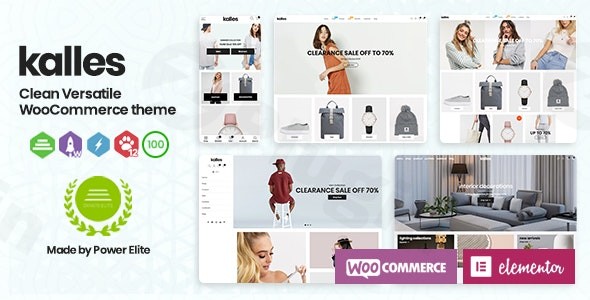
Choosing the right foundation for your online store is the most critical decision an e-commerce entrepreneur can make. The Kalles WordPress theme has emerged as a powerhouse for those seeking a versatile WooCommerce theme that blends high-end minimalist design with technical performance. Originally born in the Shopify ecosystem and now fully optimized for WordPress, Kalles is designed specifically for startups and growing brands in the fashion, electronics, and home decor niches who want a professional storefront without the overhead of custom development.
A Modern Aesthetic Built for Conversion
Kalles is defined by its clean, sleek, and intuitive UI/UX. The design philosophy centers on removing friction from the buyer’s journey, using generous whitespace, crisp typography, and high-quality product imagery to create a premium shopping experience.
Key Layout & Design Options
- 50+ Pre-designed Demos: Whether you are running a high-end boutique or a tech shop, Kalles offers over 50 homepage layouts that can be imported instantly.
- 150+ Modular Sections: The theme uses a “mix-and-match” system, allowing you to drag and drop sections from different demos to create a truly unique layout.
- Advanced Visual Merchandising: Kalles goes beyond standard galleries by offering 360-degree product views, video thumbnails, and 3D product displays, which significantly boost customer confidence and conversion rates.
- Header & Footer Builder: You are not locked into a single style. Kalles provides multiple header and footer configurations, including an Advanced Mega Menu builder to organize large product catalogs.
Performance & SEO Readiness
In the world of e-commerce, speed equals revenue. The Kalles WordPress theme is built on a lightweight framework designed for rapid loading times.
- Clean Markup: Optimized code ensures that search engine crawlers can easily index your store.
- Mobile-First Design: The theme is fully responsive and “Retina Ready,” ensuring your store looks stunning on smartphones, where the majority of e-commerce traffic now originates.
- AJAX Functionality: Built-in AJAX filtering and searching allow customers to find products without refreshing the page, creating a seamless app-like experience.
How to Install and Set Up the Kalles Theme
Setting up this versatile WooCommerce theme is straightforward, even for beginners. Follow these steps to get your store live:
- Theme Installation: From your WordPress dashboard, navigate to Appearance > Themes > Add New. Upload the Kalles zip file and click Activate.
- Required Plugins: Upon activation, Kalles will prompt you to install a few essential companion plugins (typically including the “The4” Core plugin and WooCommerce). Follow the bulk installer to set these up.
- One-Click Demo Import: Navigate to the Kalles Theme Options and find the Demo Importer. Browse the 50+ available designs and select the one that matches your niche.
- Note: Ensure your hosting environment has sufficient memory (at least 256MB) to handle the import of high-resolution images and settings.
- Finalize Menus & Widgets: Once the import is complete, go to Appearance > Menus to assign your primary navigation and Appearance > Widgets to configure your footer and sidebar areas.
Deep Customization: Branding Your Store
The Kalles WordPress theme is highly flexible, making it easy to match your store to your brand identity without writing a single line of code.
- Global Styles & Typography: Use the built-in theme options panel to choose from over 800 Google Fonts and unlimited color schemes.
- Product Page Customization: Kalles offers numerous single-product page layouts. You can toggle features like sticky “Add to Cart” buttons, countdown timers for urgency, and interactive product swatches.
- Mobile Bottom Navigation: One of the theme’s standout features is the mobile-optimized bottom navigation bar. This mimics a native mobile app experience, making it much easier for users to browse and checkout on handheld devices.
- Page Builder Compatibility: While Kalles features its own robust drag-and-drop sections, it is also designed to work harmoniously with popular builders like Elementor, providing even more granular control over custom landing pages.
FAQ & Troubleshooting
Is Kalles theme good for WooCommerce?
Yes, Kalles is an excellent choice for WooCommerce. While it started as a Shopify theme, the WordPress version is specifically engineered to handle WooCommerce’s complex database structures while maintaining the high performance and sleek design the “The4” developer team is known for.
Does Kalles support Elementor?
Yes, the WordPress version of Kalles is compatible with Elementor. This allows users to leverage the theme’s professional sections while using the Elementor interface for detailed layout adjustments and custom page designs.
How do I update the Kalles theme without losing my changes?
Always use a Child Theme (often included in the Kalles download package) for any custom code modifications. For CSS and general settings, use the built-in Theme Options panel. When a new version is released, you can update the parent theme safely via the WordPress dashboard or Envato Market plugin.
What should I do if the demo import fails?
If a demo import hangs, it is usually due to server “Execution Time” or “Memory Limit” settings. Contact your host to increase these limits or check the Kalles documentation provided by The4 for specific server requirements.
Verdict: Is Kalles the Right Theme for You?
The Kalles WordPress theme is a premier choice for merchants who prioritize aesthetics and conversion optimization. It successfully bridges the gap between the ease of use found in Shopify and the infinite flexibility of WordPress. Ideal for:
- Startups wanting a high-end look on a budget.
- Fashion and Lifestyle brands that need visually rich lookbooks.
- DTC (Direct-to-Consumer) brands looking to reduce app dependency through built-in features like swatches and countdown timers.While the sheer number of features may have a slight learning curve for absolute beginners, its performance, mobile-first UI, and “mix-and-match” flexibility make it one of the most competitive WooCommerce themes on the market today. If you want a store that looks expensive but remains lightning-fast, Kalles is a top-tier contender.Explore more theme reviews and WordPress tutorials at wppick.com.
I. Download Limits & Account Benefits
- Free Downloads: Each email address receives 3 downloads per day for free products
- Upgrade Benefits: Purchase any paid product to increase your daily download limit by 3 for each paid product
- No Account Required: You can download immediately by receiving the download link via email
- Account Recommended: Create an account for easier access to your order history and direct update downloads
II. Understanding GPL vs Official Versions
Important: The products available on WPPick are GPL-licensed versions, which differ from official developer versions. Before purchasing, please read our comprehensive guide: Understanding GPL & Official Differences at WPPick
Key Points:
- GPL versions may not include premium support from original developers
- Updates may be delayed compared to official releases
- Some premium features might have limitations
- Always consider your specific needs and support requirements
III. Support & Assistance
We’re here to help through multiple channels:
- Email Support: Direct email assistance for all inquiries
- Live Chat: Real-time support during business hours
- Comprehensive Documentation: Detailed guides and tutorials
IV. Order Tracking
Access your complete purchase history and download links anytime: Order History
V. Account Access
New to WPPick? Login or Create Account to manage your downloads and orders efficiently.
VI. Refund Protection
We stand behind our products with a clear refund policy. Review our terms: Refund Policy
VII. Privacy & Security
Your data security is our priority. Learn how we protect your information: Privacy Policy
VII. Terms of Service
Understanding our service terms ensures a smooth experience: Terms of Use
Quick Tips for Best Experience
- Verify Compatibility: Check plugin/theme compatibility with your WordPress version
- Backup First: Always backup your site before installing new plugins or themes
- Test Environment: Consider testing on a staging site first
- Stay Updated: Regularly check for updates in your account dashboard
- Read Documentation: Review any included documentation for optimal setup
Need Help?
If you have questions about downloads, licensing, or need technical assistance, don’t hesitate to contact our support team. We’re committed to ensuring you have the best possible experience with WPPick products.
Ready to get started? Your download adventure begins with just one click!