
Kanni – Home Automation, Cctv Security WordPress Theme
/Year
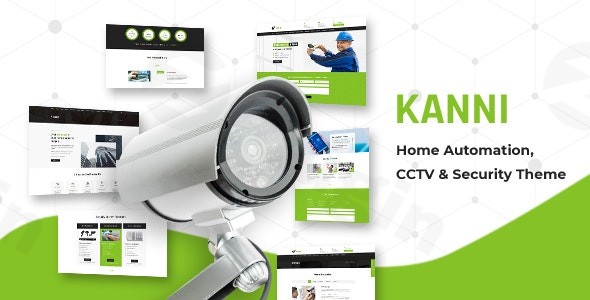
In today’s interconnected world, a strong online presence is paramount for businesses in the home automation and security sectors. The Kanni – Home Automation, CCTV Security WordPress Theme stands out as a sophisticated, feature-rich solution designed to empower security professionals, CCTV providers, and smart home specialists with a professional, visually engaging, and highly functional website. Developed by “elite authors” Design Themes, Kanni is crafted to reflect expertise, trustworthiness, and advanced technological capabilities, making it an ideal choice for businesses committed to excellence.
Designed for Impact: Kanni’s Core Design Philosophy
Kanni’s design philosophy centers on creating a website that is not only aesthetically pleasing but also intuitively functional for your target audience. It boasts a stylish and visually appealing design, often incorporating a clean green color scheme that conveys clarity and professionalism. This theme is built from the ground up to ensure your services and products are presented with impact.
Visually Engaging & Fully Responsive
A hallmark of premium web design, Kanni is both retina-ready and fully responsive. This means your website will look crisp and stunning on all devices, from the largest desktop monitors to the smallest smartphones, ensuring an optimal user experience regardless of how your clients access your site. The use of Google Web Fonts and Font Awesome icons further enhances visual appeal, providing extensive typographic and iconographic options to maintain a consistent and modern brand identity.
Unlocking Creativity: Extensive Customization & Page Building
Kanni delivers unparalleled flexibility, allowing businesses to tailor their online presence to their exact brand specifications without requiring extensive coding knowledge. This empowers business owners, marketers, and designers to create a truly unique website.
Intuitive Customization with the WordPress Customizer
At its core, Kanni extends the native WordPress Customizer with the Kirki framework. This powerful integration provides a flexible and user-friendly interface for modifying virtually every aspect of your website’s presentation. You can adjust colors, typography, layout structures, and more, all with live preview capabilities. This real-time feedback loop ensures that every design change is precisely as intended before it goes live.
Drag-and-Drop Page Building with WPBakery Page Builder
Kanni’s seamless integration with Visual Composer (now WPBakery Page Builder) is a game-changer for content creation. This renowned drag-and-drop page builder allows you to construct complex page layouts with ease, eliminating the need for coding expertise. The theme also supports Ultimate Addons for Visual Composer, providing access to premium elements like advanced animation blocks, dual action buttons, interactive banners, and hover effects, allowing for highly sophisticated and interactive page designs.
Specialized Design Elements for Security Businesses
Beyond general customization, Kanni includes specific features tailored for the security industry:
- Banner Slider: Create captivating introductory sections to highlight key services or promotions.
- Custom Innerpage Banner: Maintain brand consistency across all internal pages with unique banner designs.
- Custom Colors and Typography: Fine-tune your site’s aesthetics to perfectly match your brand guidelines.
- Hide/Show Sections: Easily manage content visibility, allowing for dynamic and flexible page layouts.
- Custom Read More Link: Personalize how users navigate through your content.
Technical Excellence for Robust Performance
Built with a commitment to modern web standards, Kanni is coded with HTML5 and CSS3, ensuring a lightweight, efficient, and future-proof foundation for your website. This robust technical backbone contributes to a smooth user experience and better search engine visibility.
Broad Compatibility & Essential Plugin Support
Kanni is designed for broad compatibility, working effectively with WordPress versions up to 5.4.2 (as of older updates; always check for the latest compatibility upon purchase). It offers crucial support for industry-leading plugins that enhance functionality and business operations:
- WooCommerce Compatibility: For businesses looking to sell security equipment, smart home devices, or services online, Kanni’s WooCommerce integration provides a robust e-commerce platform.
- Contact Form 7: Easily create customizable contact forms for inquiries, service requests, or client support.
- Slider Revolution: Craft engaging and dynamic slide presentations to showcase your portfolio, testimonials, or promotional content.
- Design Themes Core Features Plugin: This specialized plugin from the theme developers (Buddhathemes) includes essential shortcodes and custom post types, specifically designed to extend Kanni’s capabilities for security businesses.
SEO Optimized for Discoverability
Understanding the importance of online visibility, Kanni is designed to be SEO-friendly. Its clean code structure, responsive design, and organized content presentation contribute to better search engine rankings, helping potential clients find your security services more easily. With a moderate theme file size of approximately 11 MB, Kanni is engineered for good performance, which is a critical factor for both user experience and SEO.
Setting Up Your Professional Kanni Website: A Step-by-Step Guide
Getting started with Kanni is designed to be straightforward, even for those new to WordPress.
- Theme Installation:
- Once you’ve purchased Kanni, download the theme files from your vendor account.
- Log in to your WordPress dashboard.
- Navigate to Appearance > Themes > Add New > Upload Theme.
- Upload the Kanni theme
.zipfile and click “Install Now.” - After installation, click “Activate.”
- Required Plugin Installation: Upon activation, Kanni will prompt you to install and activate essential plugins such as WPBakery Page Builder, Slider Revolution, and the Design Themes Core Features Plugin. Follow the on-screen instructions to install and activate all recommended plugins.
- Demo Content Import (Optional but Recommended): Kanni supports one-click demo content import, often through the Unyson framework. This allows you to quickly establish a website that mirrors the professional demo presentation, providing a solid starting point for your customizations. Look for “Demo Import” or “Install Demo Data” options under Appearance or a dedicated Kanni menu item.
- Initial Customization with WordPress Customizer:
- Go to Appearance > Customize.
- Here, leveraging the Kirki framework, you can adjust your site’s branding (logo, favicon), header and footer layouts, color schemes, typography, and global settings. Utilize the live preview to see your changes instantly.
- Building Pages with WPBakery Page Builder:
- Create a new page (Pages > Add New).
- Switch to the “Backend Editor” mode in WPBakery Page Builder.
- Use the drag-and-drop interface to add rows, columns, and various elements (text blocks, images, service lists, contact forms, sliders) to construct your page layouts. Leverage the Ultimate Addons for even more sophisticated elements.
- Configuring Contact Forms:
- Navigate to Contact > Contact Forms.
- Edit the default contact form or create a new one using Contact Form 7. Embed the shortcode of your form into any page where you want it to appear.
- Setting Up Sliders:
- Go to Slider Revolution in your WordPress dashboard.
- Import a demo slider or create new ones to showcase your services, projects, or promotions. You can then embed these sliders into your pages using WPBakery Page Builder elements or shortcodes.
Kanni’s Target Audience & Ideal Use Cases
Kanni is specifically crafted for a diverse range of businesses within the security and automation industries, offering tailored solutions for distinct needs.
Who Benefits Most from Kanni?
- CCTV & Surveillance Camera Installation Services: Showcase your expertise in system design, installation, and maintenance.
- Security Systems & Equipment Providers: Feature your product range, technical specifications, and client testimonials for alarm systems, access control, and smart locks.
- Smart Home Technology Services: Highlight your solutions for integrated home automation, energy management, and smart device installations.
- Security Guard & Bodyguard Services: Present your professional services, team profiles, and commitment to safety.
- Vigilance & Monitoring Service Providers: Detail your 24/7 monitoring capabilities and rapid response protocols.
Expertise, Authoritativeness, and Trustworthiness (EEAT)
When investing in a premium WordPress theme, the reputation and quality of the developer are paramount. Kanni is developed by Design Themes, who are recognized as “elite authors” within the WordPress community. This designation signifies a track record of producing high-quality, well-coded, and reliable themes. Kanni itself is described as well-optimized and well-sanitized, indicating adherence to coding best practices and a focus on security and performance. This developer expertise builds a foundation of trust for businesses adopting Kanni for their online presence.
Important Considerations for Your Investment
While Kanni offers significant advantages, it’s crucial to consider a few points for optimal utilization:
- Information Currency: Some historical information about the theme might be from 2020 or 2021. Always refer to the official theme page or marketplace listing for the most current details regarding compatibility, features, and pricing.
- WPBakery Page Builder Performance: While powerful, heavy reliance on WPBakery Page Builder can sometimes impact site performance if not used efficiently. It’s best practice to optimize images and avoid excessive elements on a single page to maintain speed.
- Plugin Licensing: While Kanni bundles premium plugins like Slider Revolution, always verify the licensing details upon purchase. Typically, direct theme purchases include a license for these bundled plugins for use with the theme, but individual updates or standalone use might require separate licenses.
Conclusion: A Trusted Partner for Your Digital Security Presence
The Kanni – Home Automation, CCTV Security WordPress Theme is more than just a template; it’s a comprehensive digital solution for businesses seeking to establish a commanding and trustworthy online presence. With its visually engaging design, extensive customization options powered by WordPress Customizer and WPBakery Page Builder, robust technical foundation, and specialized features for the security industry, Kanni empowers you to effectively showcase your services, connect with clients, and grow your business. By choosing Kanni, you’re not just building a website; you’re investing in a professional, high-performance platform that reflects your commitment to security and technological excellence.
I. Download Limits & Account Benefits
- Free Downloads: Each email address receives 3 downloads per day for free products
- Upgrade Benefits: Purchase any paid product to increase your daily download limit by 3 for each paid product
- No Account Required: You can download immediately by receiving the download link via email
- Account Recommended: Create an account for easier access to your order history and direct update downloads
II. Understanding GPL vs Official Versions
Important: The products available on WPPick are GPL-licensed versions, which differ from official developer versions. Before purchasing, please read our comprehensive guide: Understanding GPL & Official Differences at WPPick
Key Points:
- GPL versions may not include premium support from original developers
- Updates may be delayed compared to official releases
- Some premium features might have limitations
- Always consider your specific needs and support requirements
III. Support & Assistance
We’re here to help through multiple channels:
- Email Support: Direct email assistance for all inquiries
- Live Chat: Real-time support during business hours
- Comprehensive Documentation: Detailed guides and tutorials
IV. Order Tracking
Access your complete purchase history and download links anytime: Order History
V. Account Access
New to WPPick? Login or Create Account to manage your downloads and orders efficiently.
VI. Refund Protection
We stand behind our products with a clear refund policy. Review our terms: Refund Policy
VII. Privacy & Security
Your data security is our priority. Learn how we protect your information: Privacy Policy
VII. Terms of Service
Understanding our service terms ensures a smooth experience: Terms of Use
Quick Tips for Best Experience
- Verify Compatibility: Check plugin/theme compatibility with your WordPress version
- Backup First: Always backup your site before installing new plugins or themes
- Test Environment: Consider testing on a staging site first
- Stay Updated: Regularly check for updates in your account dashboard
- Read Documentation: Review any included documentation for optimal setup
Need Help?
If you have questions about downloads, licensing, or need technical assistance, don’t hesitate to contact our support team. We’re committed to ensuring you have the best possible experience with WPPick products.
Ready to get started? Your download adventure begins with just one click!
- Security Improvements