

Kera – Fashion Elementor Woocommerce Theme
/Year
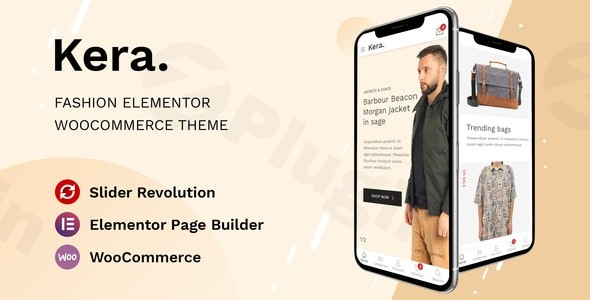
Building a high-converting online boutique requires more than just great products; it requires a digital storefront that reflects the elegance and trendiness of the fashion industry. The Kera WordPress theme is a premium, fashion-forward solution designed specifically for apparel e-commerce businesses. By blending a modern minimalist aesthetic with the power of the Elementor page builder, this Fashion Elementor WooCommerce Theme empowers store owners to create professional, high-performance websites without writing a single line of code.
Key Features: Design, Layout & Performance
Kera is engineered to make products the star of the show. Whether you are launching a luxury jewelry brand or a fast-fashion outlet, the theme provides a robust framework that balances visual appeal with technical excellence.
Modern Minimalist Design & Layout Options
Kera follows a “less is more” design philosophy, utilizing generous whitespace and clean typography to create a high-end feel.
- Multiple Homepage Concepts: Choose from several unique homepage designs tailored for different niches, such as clothing, shoes, or accessories.
- Advanced Shop Layouts: Showcase your inventory using various grid and list views. The theme includes specific templates for product categories that help shoppers find what they need quickly.
- Header & Footer Builder: Unlike many themes that lock you into a single header style, Kera offers a dedicated Elementor Header and Footer builder, along with support for complex Mega Menus and vertical navigation.
Customization Capabilities
The integration with Elementor is seamless, providing a true drag-and-drop experience.
- Visual Editing: Every element on the page can be tweaked in real-time.
- Typography & Color Control: Effortlessly align the site’s color palette and font pairings with your brand identity via the Kera Options panel.
- E-commerce Enhancements: The theme comes packed with essential retail features like Quick View, Wishlists, and Product Comparisons (via YITH plugins), reducing the need for expensive third-party subscriptions.
High-Speed Performance & SEO Readiness
In the world of e-commerce, speed equals conversions. The Kera theme for apparel stores is remarkably lightweight—with a core file size of approximately 4.08MB—ensuring fast loading times across all devices.
- SEO Optimized: Built with clean markup and structured headings, Kera is designed to help your products rank higher in Google and AI-based search engines.
- Fully Responsive: The “handy mobile menu” and fluid layouts ensure that your store looks flawless on smartphones, which is critical since the majority of fashion shopping now happens on mobile.
How to Install and Import the Kera Demo
Setting up your store with Kera is straightforward, even for beginners. Follow these steps to get your site looking like the professional demo in minutes.
- Upload & Activate: Navigate to your WordPress Dashboard, go to Appearance > Themes > Add New, and upload the
kera.zipfile. Once uploaded, click Activate. - Plugin Installation: Upon activation, a notification will prompt you to install required plugins, including Elementor, WooCommerce, and Revolution Slider. Click “Begin installing plugins” and then “Activate” them all.
- One-Click Demo Import: Go to the theme settings (usually labeled “Kera Options” or “Import Demo Content”). Select your preferred homepage design and click Import.
- Wait for Completion: The process will import pages, menus, and sample products. Ensure your server has adequate memory settings to prevent timeouts during this stage.
- Final Checks: Once finished, visit your site’s frontend. You may need to assign your menus under Appearance > Menus to ensure the navigation displays correctly.
Customization Guide: Personalizing Your Brand
Once the demo is imported, it’s time to make the site yours. Kera provides two primary avenues for customization:
Using the Kera Options Panel
The theme settings allow you to control global elements. Here you can upload your logo, set your primary brand colors, and configure site-wide layouts for the blog and portfolio sections. This is also where you can add Custom CSS or JS if you have specific design requirements that go beyond the standard settings.
Building with Elementor
For page-specific layouts, simply click “Edit with Elementor.” You can move sections, change background images, and adjust spacing with ease. Because Kera supports WooCommerce Product Filters (WOOF/HUSKY) and Variation Swatches, you can customize how customers interact with product sizes and colors directly within the visual editor.
FAQ & Troubleshooting
Is the Kera theme compatible with Elementor?Yes, the Kera WordPress theme is fully compatible with Elementor. It uses Elementor as its primary page builder, allowing for complete drag-and-drop customization of pages, headers, and footers.Does Kera support WooCommerce for online stores?Absolutely. Kera is a dedicated Fashion Elementor WooCommerce Theme with deep integration for shop pages, checkout flows, and advanced e-commerce features like wishlists and product comparisons.Does it support child themes?Yes, the Kera theme package includes a child theme file. It is highly recommended to install and activate the child theme if you plan on making code-level customizations to ensure your changes are not lost during theme updates.Is Kera good for SEO?Kera is designed with SEO best practices in mind, featuring clean code, fast loading speeds, and a mobile-first responsive design. These factors are essential for ranking well in both traditional search engines like Google and AI-driven answer engines.What should I do if the demo import fails?If the demo import hangs, it is often due to server limitations. Ensure your PHP version is 8.1 or higher and increase your max_execution_time and memory_limit in your hosting settings.
Verdict: Is Kera Right for You?
The Kera WordPress theme is an exceptional choice for anyone looking to launch a sophisticated online presence in the fashion niche. Its combination of minimalist design and robust WooCommerce functionality makes it a powerful tool for boutique owners and established apparel brands alike.While it is easy enough for beginners to use thanks to the one-click demo import, it offers enough flexibility and performance optimization to satisfy professional web agencies. If you want a lightweight, SEO-ready, and visually stunning store that prioritizes the user experience, Kera is a top-tier contender for your next project.Ready to build your store? Visit wppick.com for more WordPress insights and theme guides.
I. Download Limits & Account Benefits
- Free Downloads: Each email address receives 3 downloads per day for free products
- Upgrade Benefits: Purchase any paid product to increase your daily download limit by 3 for each paid product
- No Account Required: You can download immediately by receiving the download link via email
- Account Recommended: Create an account for easier access to your order history and direct update downloads
II. Understanding GPL vs Official Versions
Important: The products available on WPPick are GPL-licensed versions, which differ from official developer versions. Before purchasing, please read our comprehensive guide: Understanding GPL & Official Differences at WPPick
Key Points:
- GPL versions may not include premium support from original developers
- Updates may be delayed compared to official releases
- Some premium features might have limitations
- Always consider your specific needs and support requirements
III. Support & Assistance
We’re here to help through multiple channels:
- Email Support: Direct email assistance for all inquiries
- Live Chat: Real-time support during business hours
- Comprehensive Documentation: Detailed guides and tutorials
IV. Order Tracking
Access your complete purchase history and download links anytime: Order History
V. Account Access
New to WPPick? Login or Create Account to manage your downloads and orders efficiently.
VI. Refund Protection
We stand behind our products with a clear refund policy. Review our terms: Refund Policy
VII. Privacy & Security
Your data security is our priority. Learn how we protect your information: Privacy Policy
VII. Terms of Service
Understanding our service terms ensures a smooth experience: Terms of Use
Quick Tips for Best Experience
- Verify Compatibility: Check plugin/theme compatibility with your WordPress version
- Backup First: Always backup your site before installing new plugins or themes
- Test Environment: Consider testing on a staging site first
- Stay Updated: Regularly check for updates in your account dashboard
- Read Documentation: Review any included documentation for optimal setup
Need Help?
If you have questions about downloads, licensing, or need technical assistance, don’t hesitate to contact our support team. We’re committed to ensuring you have the best possible experience with WPPick products.
Ready to get started? Your download adventure begins with just one click!
- Fixed LFI vulnerability in Elementor Widget "Kera Posts Grid"
- Fixed a Local File Inclusion (LFI) vulnerability found in the parameter header_mobile