
Kerge – Resume WordPress Theme
/Year
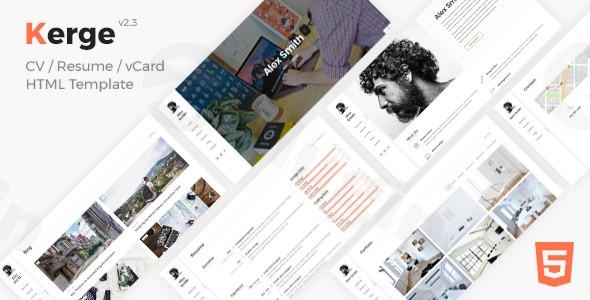
In today’s competitive landscape, a powerful online presence is no longer an option—it’s a necessity. For professionals, freelancers, and job seekers aiming to make an unforgettable impression, the Kerge – Resume WordPress Theme offers an unparalleled solution. This premium, responsive CV and portfolio theme is meticulously crafted to showcase your skills, experience, and accomplishments with a level of sophistication and functionality designed to captivate your audience and elevate your personal brand.Kerge is more than just a theme; it’s a comprehensive toolkit for building a visually stunning and highly effective professional website. From its sleek design to its robust customization options, Kerge empowers you to articulate your professional narrative precisely and compellingly.
The Kerge Design Philosophy: Elegance Meets Efficiency
At its core, Kerge is built on a philosophy that prioritizes both aesthetic appeal and practical functionality. It understands that your online resume or portfolio needs to be modern, intuitive, and engaging, effortlessly guiding visitors through your professional journey. Designed to be fully responsive and retina-ready, Kerge ensures your site looks impeccable on any device, from widescreen desktops to the latest mobile phones. Its foundation in HTML5, CSS3, and jQuery guarantees a fast, fluid, and dynamic user experience, making your content shine across all browsers.
Key Features & Benefits: Crafting Your Professional Showcase
Kerge stands out with a suite of features engineered to provide a professional, polished, and highly functional online presence.
Modern & Clean Aesthetics
Kerge’s modern and clean design provides a sleek, professional backdrop for your content. It comes with multiple unique demos, offering versatile starting points, including animated, one-page, multi-page, and distinct light and dark versions. This flexibility allows you to choose a layout that perfectly aligns with your personal brand. Visual flair is added through 60+ page animation effects, offering a dynamic browsing experience that keeps visitors engaged.
Unrivaled Customization Options
Personalization is paramount, and Kerge delivers with extensive customization capabilities.
- Unlimited Color Schemes: Tailor your site’s appearance with an array of customizable color options, allowing you to match your brand identity effortlessly.
- Advanced Typography: With Google Fonts integration and customizable typography for headings, menus, and body text, you have complete control over your site’s readability and aesthetic.
- Flexible Layouts: Choose between one-page or multi-page layouts to best structure your professional narrative.
- Customizable Header and Footer: Design unique headers and footers that reinforce your brand.
- Intuitive Theme Options Panel: An advanced theme options panel makes global style and layout changes straightforward, even for non-developers.
- Custom Widgets & Shortcodes: Enhance your site’s functionality and content presentation with custom widgets and a rich library of 35-37 shortcodes.
Powerful Portfolio & Content Presentation
Showcasing your work is effortless with Kerge’s advanced portfolio features:
- Interactive Timeline: Present your career history and achievements chronologically in an engaging, interactive format.
- Skills Charts and Graphs: Visualize your proficiencies with dynamic, easy-to-understand charts and graphs.
- Robust Portfolio System: Display your projects with advanced filters, seamless AJAX portfolio details, and a mobile-optimized lightbox. Supports a wide array of media, including images, videos (YouTube, Vimeo), and audio (SoundCloud).
- vCard Approach: Kerge expertly uses a vCard approach, presenting your skills and experience in a concise, impactful layout, ideal for a professional profile.
- Icon Integration: Access a vast collection of 800+ font icons to visually enhance your content and highlight key information.
Technical Excellence & Performance
Kerge is built for optimal performance and broad compatibility:
- Fully Responsive & Retina-Ready: Ensures your site looks stunning and functions perfectly on all devices and screen resolutions.
- SEO Optimized: Engineered with best SEO practices, Kerge helps your professional profile rank higher in search engine results, increasing your visibility.
- Bootstrap v4.0.0 Framework: Built on a robust and widely used framework, ensuring stability and a solid foundation.
- WordPress Compatibility: Fully compatible with WordPress 6.0+ (and older versions), guaranteeing smooth integration with the latest WordPress features.
- Clean, W3C Valid Code: Emphasizes premium quality, ensuring optimal performance and adherence to web standards.
Seamless Integration & Functionality
Beyond its core design, Kerge offers practical integrations that enhance its utility:
- Drag-and-Drop Page Builder Compatibility: Compatible with popular page builders like Elementor, allowing for intuitive, visual layout creation without coding.
- Contact Form 7 & Google reCAPTCHA: Includes a fully functional contact form with validation and spam protection, making it easy for potential employers or clients to reach you.
- Social Media Integration: Easily link to your professional networks like LinkedIn and other platforms with 30+ social media icons.
- MailChimp Support: Integrate with MailChimp for email list building and professional outreach.
- Downloadable & Printable Resume Options: Offer visitors the convenience of downloading or printing your resume directly from your site.
- Analytics Integration: Monitor your site’s performance and visitor engagement to refine your online strategy.
- Maintenance Mode: Easily put your site into maintenance mode when making updates, ensuring a professional user experience.
Setting Up Your Professional Presence with Kerge: A Step-by-Step Guide
Getting your Kerge-powered professional website up and running is designed to be straightforward, even for those new to WordPress.
- Installation & Activation: After purchasing, download the Kerge theme files. Navigate to
Appearance > Themes > Add New > Upload Themein your WordPress dashboard. Upload the Kerge.zipfile and click “Install Now,” then “Activate.” - Import Demo Content: To kickstart your design, import one of Kerge’s pre-built demo layouts. This will provide a foundation that you can customize. Look for an “Import Demo” option within the Kerge Theme Options panel or follow the specific instructions in the theme’s documentation.
- Customize Your Design: Access the “Theme Options” panel (usually found under
Appearanceor a dedicated Kerge menu item) to begin personalizing. Adjust colors, fonts, header/footer layouts, and enable desired page animations. - Populate Your Content: Replace the demo content with your own professional details. This includes:
- Biography/About Me: Craft a compelling introduction.
- Experience & Education: Utilize the interactive timeline feature to present your career history and academic background.
- Skills: Fill out the skills sections, leveraging the built-in charts and graphs for visual representation.
- Portfolio: Upload your projects, add descriptions, and categorize them using Kerge’s robust portfolio system.
- Contact Information: Ensure your contact form is correctly configured and your contact details are up-to-date.
- Configure Integrations: Set up your social media links, integrate with Contact Form 7 or MailChimp if needed, and configure analytics to track your site’s performance.
- Review and Launch: Thoroughly review your entire website on various devices to ensure responsiveness and functionality. Once satisfied, your professional online presence is ready to launch!
Who is Kerge For? Target Audience & Use Cases
Kerge is the ideal solution for a diverse range of professionals seeking a distinguished online platform:
- Job Seekers: Create a dynamic, interactive resume that stands out from traditional paper CVs.
- Freelancers: Showcase your services, portfolio, and testimonials to attract new clients.
- Designers & Developers: Present your creative projects and technical expertise in a visually striking manner.
- Consultants & Business Professionals: Build a credible online profile that highlights your thought leadership and experience.
- Photographers & Artists: Display your visual work through Kerge’s robust portfolio system.
- Students: Establish an early professional online presence to attract internships or first career opportunities.Whether you’re a programmer, marketer, CEO, medical professional, or artist, Kerge provides the tools to build a compelling online identity.
Why Kerge Stands Out: An EEAT Perspective
Choosing a premium WordPress theme requires confidence in its quality, reliability, and ongoing support. Kerge earns its reputation through several key indicators:
- Expert Endorsement: Kerge is consistently recognized as a popular and highly-regarded resume theme, often mentioned alongside industry leaders.
- High User Satisfaction: With a high rating on platforms like ThemeForest (reportedly 4.95 stars based on over 110 reviews), Kerge demonstrates a strong track record of user satisfaction and effective performance.
- Authoritative Development: Built on established web technologies (HTML5, CSS3, jQuery, Bootstrap v4.0.0) and compatible with modern WordPress versions, Kerge reflects a commitment to current web standards.
- Trustworthy Licensing & Support: When acquired from reputable sources, Kerge often comes with a genuine GPL license, ensuring flexibility and freedom. Furthermore, lifetime updates, comprehensive documentation, and tutorials are typically included, providing long-term value and support. For example, sources like ZeroPlugin.com provide genuine GPL-licensed products with regular updates and rigorous third-party scanning (VirusTotal), ensuring both security and currency for your professional website.
Conclusion: Your Professional Edge with Kerge
The Kerge – Resume WordPress Theme is more than just a template; it’s an investment in your professional future. Its blend of modern design, extensive customization, powerful portfolio features, and robust technical foundation makes it the ultimate choice for creating a premium online resume, CV, or personal portfolio. By choosing Kerge, you’re not just building a website; you’re crafting a professional narrative that commands attention, builds trust, and opens doors to new opportunities. Elevate your online presence with Kerge and make your professional mark today.
I. Download Limits & Account Benefits
- Free Downloads: Each email address receives 3 downloads per day for free products
- Upgrade Benefits: Purchase any paid product to increase your daily download limit by 3 for each paid product
- No Account Required: You can download immediately by receiving the download link via email
- Account Recommended: Create an account for easier access to your order history and direct update downloads
II. Understanding GPL vs Official Versions
Important: The products available on WPPick are GPL-licensed versions, which differ from official developer versions. Before purchasing, please read our comprehensive guide: Understanding GPL & Official Differences at WPPick
Key Points:
- GPL versions may not include premium support from original developers
- Updates may be delayed compared to official releases
- Some premium features might have limitations
- Always consider your specific needs and support requirements
III. Support & Assistance
We’re here to help through multiple channels:
- Email Support: Direct email assistance for all inquiries
- Live Chat: Real-time support during business hours
- Comprehensive Documentation: Detailed guides and tutorials
IV. Order Tracking
Access your complete purchase history and download links anytime: Order History
V. Account Access
New to WPPick? Login or Create Account to manage your downloads and orders efficiently.
VI. Refund Protection
We stand behind our products with a clear refund policy. Review our terms: Refund Policy
VII. Privacy & Security
Your data security is our priority. Learn how we protect your information: Privacy Policy
VII. Terms of Service
Understanding our service terms ensures a smooth experience: Terms of Use
Quick Tips for Best Experience
- Verify Compatibility: Check plugin/theme compatibility with your WordPress version
- Backup First: Always backup your site before installing new plugins or themes
- Test Environment: Consider testing on a staging site first
- Stay Updated: Regularly check for updates in your account dashboard
- Read Documentation: Review any included documentation for optimal setup
Need Help?
If you have questions about downloads, licensing, or need technical assistance, don’t hesitate to contact our support team. We’re committed to ensuring you have the best possible experience with WPPick products.
Ready to get started? Your download adventure begins with just one click!
- Elementor: Timeline Element: Added a new field - Location.
- LMPixels Framework Plugin: PHP Code