

Khadija – Fashion Woocommerce Theme
/Year
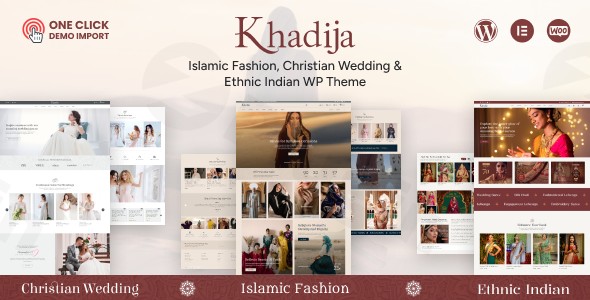
Introduction to Khadija Fashion WooCommerce Theme
Khadija is a specialized WooCommerce theme designed specifically to meet the needs of the fashion and apparel sector. It provides the foundational architecture required to build dynamic, visually appealing online storefronts. By focusing heavily on the presentation of clothing, luxury goods, and accessories, this theme allows merchants to display their collections in a structured, accessible format. The integration with WooCommerce ensures that all essential backend operations, from inventory management to checkout processing, are handled securely and efficiently within the WordPress ecosystem.
Latest Version 1.0.7 Changes
The 1.0.7 release of the Khadija Fashion WooCommerce Theme by BuddhaThemes focuses on maintenance and compatibility, introducing minor bug fixes and ensuring the theme works smoothly with the latest versions of WordPress and Elementor.
- Minor bugs fixed
- Compatible with latest WordPress Version
- Compatible with latest Elementor Version
Core Functionality and Operation
At its core, this theme operates as a comprehensive framework for electronic commerce. It transforms a standard WordPress installation into a specialized retail environment. The theme includes pre-designed page templates for shop archives, single product displays, shopping carts, and customer account areas. These layouts prioritize high-resolution product imagery and clear typography, minimizing visual clutter so that the merchandise remains the focal point. Furthermore, it leverages the Elementor page builder, enabling users to construct and modify page structures through a visual interface without requiring direct code manipulation.
Intended Audience
This product is engineered for a distinct group of retail operators and digital agency professionals. Independent boutique owners looking to establish their first online presence will find the layout options suited for small to medium inventories. Established clothing brands seeking to refresh their digital storefronts can utilize the advanced catalog features. Additionally, freelance web developers and design agencies frequently deploy this theme when building tailored solutions for clients in the jewelry, cosmetics, footwear, and luxury goods markets.
Key Capabilities and Features
The feature set is calibrated for modern eCommerce performance and visual merchandising.
- Elementor Integration: Allows for extensive visual modification of headers, footers, and page content.
- Product Display Variations: Offers multiple structural variations for presenting single products and catalog grids.
- Responsive Framework: Ensures that the store layout adapts fluidly to mobile devices, tablets, and desktop monitors.
- WooCommerce Optimization: Deeply integrated with WooCommerce core functions for stable cart, checkout, and user account management.
- Filtering Mechanisms: Provides structured sidebar and canvas filtering options for sorting products by size, color, or price.
- Typography Controls: Includes integrated options for selecting and pairing web fonts to match specific brand identities.
Practical WordPress Use Cases
Merchants utilize this theme in various operational contexts to achieve specific business objectives.
- Direct-to-Consumer Brands: A newly launched streetwear label can use the theme to create an immersive visual catalog that highlights collection drops and lookbooks.
- Traditional Retail Migration: A physical brick-and-mortar clothing boutique can replicate its in-store aesthetic online, managing both local pickup and global shipping through the WooCommerce infrastructure.
- Multi-Category Fashion Stores: A department-style apparel store can organize a massive inventory using the theme’s sophisticated navigation menus and categorical filtering systems, helping shoppers find specific items efficiently.
Setup and Compatibility Context
Deploying the theme requires an active WordPress installation running the WooCommerce plugin. The visual design system relies heavily on the Elementor page builder, which must be installed and activated for the templates to render properly. Users should also ensure their hosting environment meets standard WordPress requirements for memory allocation and PHP versions, particularly given the image-heavy nature of fashion retail sites. The installation process typically involves importing demo data to establish a baseline structure, which the site administrator can then populate with actual product information and branding assets.
Reasons to Consider This Theme on WPPick
Procuring this theme through the WPPick platform provides developers and store owners with a reliable resource for their eCommerce projects. WPPick maintains a strict review process to ensure files are provided in their original, unmodified state, free from unauthorized code alterations. This allows developers to test the theme in staging environments, evaluate its compatibility with existing server configurations, and verify its feature set before deploying it to a live production server.
Latest Version Context
The latest iteration, version 1.0.7, focuses primarily on structural maintenance and operational compatibility rather than visual overhauls. This release resolves several minor backend bugs that were identified in previous builds, resulting in smoother site performance. More importantly, the 1.0.7 update ensures that the theme remains fully compatible with the most recent versions of both WordPress and the Elementor page builder, preventing rendering errors and securing the visual editing workflow for site administrators.
Frequently Asked Questions
What is the primary page builder used with this theme?
This theme is built to integrate seamlessly with the Elementor page builder, allowing users to modify layouts using a visual, drag-and-drop interface.
Does this theme include eCommerce functionality out of the box?
The theme provides the visual styling and structural templates for eCommerce, but it requires the free WooCommerce plugin to handle the actual transactional functionality.
Can the theme handle variable products like different clothing sizes and colors?
Yes, because it relies on WooCommerce, the theme fully supports variable products, displaying different size and color options clearly on the single product pages.
Is the design optimized for mobile shoppers?
The underlying framework is responsive, meaning the grid layouts, product images, and navigation menus will automatically adjust to fit the screens of mobile phones and tablets.
Will the theme work with my existing WordPress plugins?
The theme follows standard WordPress coding practices and should operate smoothly with most mainstream plugins, though performance always depends on the specific combination of tools used.
I. Download Limits & Account Benefits
- Free Downloads: Each email address receives 3 downloads per day for free products
- Upgrade Benefits: Purchase any paid product to increase your daily download limit by 3 for each paid product
- No Account Required: You can download immediately by receiving the download link via email
- Account Recommended: Create an account for easier access to your order history and direct update downloads
II. Understanding GPL vs Official Versions
Important: The products available on WPPick are GPL-licensed versions, which differ from official developer versions. Before purchasing, please read our comprehensive guide: Understanding GPL & Official Differences at WPPick
Key Points:
- GPL versions may not include premium support from original developers
- Updates may be delayed compared to official releases
- Some premium features might have limitations
- Always consider your specific needs and support requirements
III. Support & Assistance
We’re here to help through multiple channels:
- Email Support: Direct email assistance for all inquiries
- Live Chat: Real-time support during business hours
- Comprehensive Documentation: Detailed guides and tutorials
IV. Order Tracking
Access your complete purchase history and download links anytime: Order History
V. Account Access
New to WPPick? Login or Create Account to manage your downloads and orders efficiently.
VI. Refund Protection
We stand behind our products with a clear refund policy. Review our terms: Refund Policy
VII. Privacy & Security
Your data security is our priority. Learn how we protect your information: Privacy Policy
VII. Terms of Service
Understanding our service terms ensures a smooth experience: Terms of Use
Quick Tips for Best Experience
- Verify Compatibility: Check plugin/theme compatibility with your WordPress version
- Backup First: Always backup your site before installing new plugins or themes
- Test Environment: Consider testing on a staging site first
- Stay Updated: Regularly check for updates in your account dashboard
- Read Documentation: Review any included documentation for optimal setup
Need Help?
If you have questions about downloads, licensing, or need technical assistance, don’t hesitate to contact our support team. We’re committed to ensuring you have the best possible experience with WPPick products.
Ready to get started? Your download adventure begins with just one click!
- Minor bugs fixed
- Compatible with latest WordPress Version
- Compatible with latest Elementor Version
- Compatible with latest Elementor Version
- Compatible with latest WordPress Version
- Mailchimp related issue
- Warnings and Deprecated errors