

Kids Life | Children School Theme For WordPress
/Year
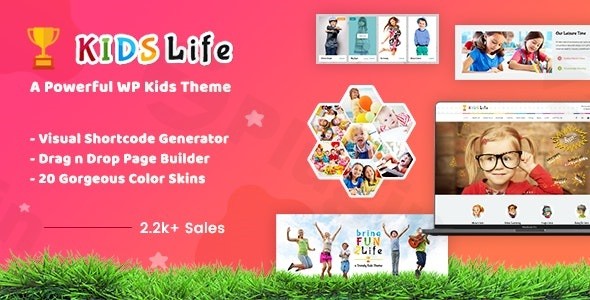
Choosing the right visual identity for an educational institution requires a delicate balance between professional trust and youthful energy. The Kids Life WordPress theme is a premium, feature-rich solution specifically crafted for nurseries, kindergartens, preschools, and daycare centers. As a children school WordPress theme, it moves away from generic corporate layouts in favor of a “colorful & crafted” aesthetic that immediately resonates with parents and educators alike.Whether you are a school administrator looking to showcase your academic programs or a freelancer building a site for a local nursery, Kids Life provides a specialized toolkit that simplifies the web design process while ensuring a high-performance, mobile-responsive result.
Key Features: Design, Layout & Performance
The Kids Life theme is built on a foundation of flexibility and visual storytelling. It isn’t just a skin; it is a comprehensive system designed to handle the unique content needs of early childhood education.
Vibrant Design & Layout Options
The theme’s design philosophy is centered on being “fun yet functional.” It offers:
- Unlimited Layout Possibilities: With a powerful Sidebar Manager, you can choose left, right, or full-width layouts for any page or post.
- 20 Preset Skins: For those who want to launch quickly, the theme includes 20 high-quality color schemes that can be swapped with a single click.
- Retina Ready & Responsive: As a responsive education WordPress theme, Kids Life ensures your school’s gallery and staff profiles look stunning on everything from high-end MacBooks to standard smartphones.
Advanced Customization Capabilities
Branding a school requires specific colors and typography to match the institution’s physical identity. Kids Life makes this easy through:
- Typography: Support for over 600 Google Fonts, allowing you to choose playful fonts for headers and legible serifs for body text.
- Mega Menu: Organize complex school hierarchies (Classes, Admissions, Gallery, News) into a clean, easy-to-navigate Mega Menu.
- Custom Post Types: Dedicated templates for Staff, Services, and Galleries allow you to present teacher bios and classroom activities professionally without extra plugins.
Performance & SEO Readiness
Search engine visibility is crucial for local schools. This theme is built with clean HTML5 and CSS3 code, ensuring it is SEO friendly right out of the box. Its lightweight structure helps with loading speeds, which is a critical ranking factor for both Google and AI-based search engines.
Installation & Demo Import: Getting Started
Setting up the Kids Life WordPress theme is a straightforward process, even for beginners. The theme utilizes the Unyson framework to handle the heavy lifting of demo content.
- Install & Activate: Upload the theme files through your WordPress Dashboard (Appearance > Themes > Add New).
- Plugin Setup: Upon activation, the theme will prompt you to install required companion plugins, including the Unyson framework, Contact Form 7, and the bundled sliders (Layer Slider/Revolution Slider).
- One-Click Demo Import: Navigate to the theme options and use the One-Click Demo Import feature. This will populate your site with pre-designed pages, widgets, and menus that mirror the official demo.
- Final Checks: Once the import is complete, verify your menus and homepage settings in the Customizer.Note: Ensure your hosting environment has sufficient memory (at least 256MB) to handle the demo import and high-resolution images.
Customization Guide: Personalizing Your School Site
Once the demo is imported, you can begin tailoring the site to your specific needs. The Kids Life theme customization process is handled through a combination of the WordPress Customizer and a proprietary Page Builder.
Branding and Visuals
Using the Theme Options Panel, you can adjust the global color palette. If the 20 preset skins don’t match your school’s branding, you can use the unlimited color variations to find the perfect shade. The Visual Shortcode Generator allows you to drop complex elements—like pricing tables for tuition or progress bars for school milestones—into any page without writing code.
Setting Up the Store
If you plan to sell school supplies or uniforms, this is a WooCommerce compatible kids theme. Simply install the WooCommerce plugin, and the theme will automatically style your shop pages to match the playful, child-friendly design of the rest of the site.
FAQ & Troubleshooting
What page builder does Kids Life theme use?
Kids Life includes its own proprietary page builder and a Visual Shortcode Generator. It also leverages the Unyson framework for layout management and demo imports, providing a drag-and-drop experience that doesn’t require third-party builders like Elementor for its core functions.
Is the Kids Life WordPress theme good for daycare centers?
Yes, Kids Life is an ideal kindergarten WordPress theme and is perfectly suited for daycare centers. Its design focuses on “colorful & crafted” aesthetics, which builds an emotional connection with parents while providing the technical tools to list services, staff, and contact forms.
Does it support child themes?
Absolutely. The theme package includes a pre-configured child theme. Using a child theme is highly recommended, as it allows you to make custom code changes that won’t be overwritten when you update the parent theme.
Does Kids Life support WooCommerce for online stores?
Yes, the theme is fully integrated with WooCommerce. This makes it an excellent choice for businesses looking to sell educational toys, baby products, or school merchandise directly from their website.
Conclusion
The Kids Life WordPress theme stands out as a top-tier choice for the education niche. While multipurpose themes offer broad flexibility, Kids Life provides a “ready-to-go” aesthetic that is specifically tailored to the emotions and expectations of parents and educators.With its 4.75-star rating and backing from designthemes (a Power Elite Author), it offers a reliable, SEO-ready, and highly customizable platform. If you need a site that is as engaging as a classroom and as professional as a school board, Kids Life is a premier investment for your online presence.Ready to build your school’s website? Visit wppick.com for more WordPress theme insights and optimization tips.
I. Download Limits & Account Benefits
- Free Downloads: Each email address receives 3 downloads per day for free products
- Upgrade Benefits: Purchase any paid product to increase your daily download limit by 3 for each paid product
- No Account Required: You can download immediately by receiving the download link via email
- Account Recommended: Create an account for easier access to your order history and direct update downloads
II. Understanding GPL vs Official Versions
Important: The products available on WPPick are GPL-licensed versions, which differ from official developer versions. Before purchasing, please read our comprehensive guide: Understanding GPL & Official Differences at WPPick
Key Points:
- GPL versions may not include premium support from original developers
- Updates may be delayed compared to official releases
- Some premium features might have limitations
- Always consider your specific needs and support requirements
III. Support & Assistance
We’re here to help through multiple channels:
- Email Support: Direct email assistance for all inquiries
- Live Chat: Real-time support during business hours
- Comprehensive Documentation: Detailed guides and tutorials
IV. Order Tracking
Access your complete purchase history and download links anytime: Order History
V. Account Access
New to WPPick? Login or Create Account to manage your downloads and orders efficiently.
VI. Refund Protection
We stand behind our products with a clear refund policy. Review our terms: Refund Policy
VII. Privacy & Security
Your data security is our priority. Learn how we protect your information: Privacy Policy
VII. Terms of Service
Understanding our service terms ensures a smooth experience: Terms of Use
Quick Tips for Best Experience
- Verify Compatibility: Check plugin/theme compatibility with your WordPress version
- Backup First: Always backup your site before installing new plugins or themes
- Test Environment: Consider testing on a staging site first
- Stay Updated: Regularly check for updates in your account dashboard
- Read Documentation: Review any included documentation for optimal setup
Need Help?
If you have questions about downloads, licensing, or need technical assistance, don’t hesitate to contact our support team. We’re committed to ensuring you have the best possible experience with WPPick products.
Ready to get started? Your download adventure begins with just one click!
- Security Improvements