
Kids Planet – A Multipurpose Children WordPress Theme For Kindergarten And Playgroup
/Year
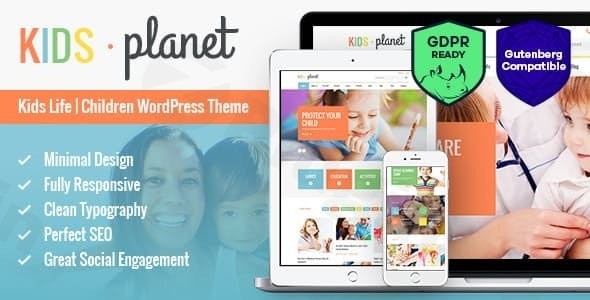
Building an online presence for a children-focused organization requires a special touch—something vibrant, engaging, and utterly professional. The Kids Planet WordPress theme steps into this role as a multipurpose children WordPress theme designed to create captivating websites for kindergartens, playgroups, childcare centers, preschools, pediatric services, and kids’ activity hubs. With its playful aesthetic and powerful features, Kids Planet provides an ideal foundation for attracting parents and delighting young audiences.
Introduction: Visual Appeal & Target Audience
Kids Planet is a brilliantly conceived WordPress theme tailored specifically for the diverse world of child-related services. It is an excellent choice for anyone looking to launch a website for a kindergarten WordPress theme, playgroup WordPress theme, nursery, children’s art school, or even an online kids’ toy shop. Its design philosophy centers on a clean, colorful, and child-friendly layout that immediately communicates warmth, professionalism, and fun. The theme’s vibrant visuals and intuitive structure ensure that visitors, particularly busy parents, can easily find information while being immersed in an engaging digital experience.Developed by AncoraThemes, Kids Planet is engineered to be visually appealing, highly functional, and easy to customize, making it accessible for users regardless of their technical expertise. It provides a robust platform for educators, caregivers, and businesses to showcase their services, facilities, events, and team members with clarity and charm.
Key Features: Design, Layout & Performance
Kids Planet is packed with features that empower users to craft a beautiful and high-performing website for their children’s organization.
Design & Layout Options
The theme’s aesthetic is its standout feature, offering a clean, colorful, and genuinely child-friendly design. It ensures your content shines with:
- Fully Responsive Layout: Automatically adapts to any screen size, from desktops to smartphones, ensuring a seamless experience for all users.
- Boxed and Wide Page Layouts: Provides flexibility to choose the overall container width, allowing for diverse visual presentations.
- Retina-Ready Display: Guarantees sharp, crisp images and graphics on high-resolution screens, essential for showcasing engaging visuals.
- Multiple Hover Effects: Adds interactive flair to elements, enhancing user engagement.
- Three Pre-Designed Homepage Variations: Get a head start with professional layouts, with the option to create unlimited custom variations using the integrated page builder.
- Specialized Pre-Made Topics: Includes ready-to-use content for “kids care,” “kids health,” and “kids store,” alongside dedicated pages for services, events, and colorful blog and gallery layouts, streamlining content creation.
Customization Capabilities
Kids Planet offers extensive customization options, allowing you to perfectly align your website with your brand identity:
- Powerful Page Building with WPBakery: The theme includes the premium WPBakery Page Builder (formerly Visual Composer), providing a intuitive drag-and-drop interface to create complex layouts without touching a line of code.
- Dozens of Customizable Shortcodes: Enhance your content with pre-built functional elements like tabs, accordions, team member displays, buttons, and more.
- Unlimited Color Options: Tailor every aspect of your site’s color palette to match your branding.
- Advanced Typography: Integrates with Google Web Fonts for a vast selection of clean, fresh typefaces, complemented by Fontello Icon set and Images Icons for expressive visual communication.
- Custom Theme Options Panel: A dedicated panel allows granular control over global settings, layout choices, and design elements, supported by a “Setting Inheritance and Override System” for precise customization.
- Custom Widgets Set: Display social media feeds, popular posts, content sliders, and more with specialized widgets for your sidebar and footer areas.
Performance & SEO Features
Beyond its captivating design, Kids Planet is built with performance and search engine optimization in mind:
- Optimized for Best Performance: The theme is engineered for fast load times, providing a smooth browsing experience crucial for user retention and search engine rankings.
- SEO-Friendly Structure: Features clean, well-structured code and proper heading hierarchy, helping search engines understand and rank your content effectively.
- Mobile Responsiveness and Cross-Browser Compatibility: Its fully responsive layout ensures excellent usability across all devices, while cross-browser compatibility (Firefox, Safari, Chrome, IE11+) guarantees consistent display.
Installation & Demo Import Guide
Getting your Kids Planet website up and running is a straightforward process, even for beginners. Here’s a step-by-step guide:
- Install & Activate the Theme:
- First, download the Kids Planet theme package from your purchase source.
- Log in to your WordPress dashboard.
- Navigate to
Appearance > Themes > Add New > Upload Theme. - Choose the theme’s
.zipfile (make sure it’s the installable theme file, not the full downloaded package) and clickInstall Now. - Once installed, click
Activate.
- Install Required Companion Plugins:
- After activation, you’ll see a notification prompting you to install required plugins. Kids Planet comes bundled with several premium plugins crucial for its full functionality, including WPBakery Page Builder, Revolution Slider, Essential Grid, and PO Composer.
- Install and activate all recommended plugins. This step is vital for the demo import and core features to work correctly.
- Use the Theme’s One-Click Demo Import:
- Kids Planet features a one-click demo import function, allowing you to replicate one of the pre-designed demo sites quickly.
- Look for a menu item like
Kids Planet > Demo DataorAppearance > Import Demo Datain your WordPress dashboard. - Select the demo you wish to import (e.g., “kids care,” “kids health,” “kids store”) and initiate the import process.
- What to Expect During/After Demo Import:
- The demo import will populate your site with pre-designed pages, posts, sample images, menus, and widgets, making your site look just like the live demo.
- Common Pitfalls: For a smooth import, ensure your server meets WordPress’s basic requirements for PHP memory limit and execution time. Large demo imports can sometimes time out on underpowered hosting. If the import fails or appears incomplete, consult the theme documentation or your host for server configuration adjustments.After a successful import, you’ll have a fully functional starting point, complete with stylish layouts for your homepage, services, events, blog, and galleries.
Customization Guide: Branding & Layout
Personalizing Kids Planet to reflect your organization’s unique brand is intuitive, thanks to its powerful theme options and integrated page builder.
- Custom Theme Options Panel: This central hub allows you to manage global styles, layout settings, and various theme-specific features. You can effortlessly adjust header and footer layouts, enable/disable the multi-functional user panel, and control display options like retina support.
- Branding with Colors and Typography: Utilize the unlimited color options to select a palette that resonates with your brand. Choose from a wide array of Google Web Fonts to define your site’s typographic hierarchy and readability. You can also upload your custom logo via the theme options.
- Designing Pages with WPBakery Page Builder: For specific page layouts, the included WPBakery Page Builder is your go-to tool. Its drag-and-drop interface lets you easily arrange sections, add shortcodes, and populate content. This visual builder empowers you to create custom landing pages, service descriptions, and detailed event pages quickly.
- Setting Up Homepage, Blog Page, and Menus:
- Navigate to
Settings > Readingto designate your static homepage and blog posts page (e.g., a “News” or “Blog” page you create). - Under
Appearance > Menus, you can build and assign your main navigation menu, user menu, and footer menus. Kids Planet also supports a “Main menu slider” with elegant CSS3/jQuery animation effects.
- Navigate to
- Intuitive Design Patterns: The theme’s design prioritizes clarity with features like short blocks, big headings, and card-based sections, making content digestible for busy families. This structural approach simplifies content arrangement and ensures a professional, organized look.
FAQ & Troubleshooting
Here are answers to some common questions about the Kids Planet WordPress theme:
Is Kids Planet compatible with Elementor / WPBakery / Gutenberg?
Kids Planet is primarily integrated with and includes WPBakery Page Builder for comprehensive drag-and-drop page creation. It is also Gutenberg Compatible and optimized, meaning you can comfortably use WordPress’s native block editor for content. The theme does not explicitly mention direct integration or support for Elementor.
Does Kids Planet support WooCommerce for online stores?
Yes, Kids Planet is WooCommerce ready. This means you can seamlessly integrate an online store into your website to sell children’s products, educational materials, or event tickets, leveraging WooCommerce’s full suite of e-commerce functionalities.
Does Kids Planet theme support child themes?
While not explicitly detailed in the provided content, supporting child themes is a standard best practice in WordPress theme development. Most reputable themes, including those from established developers like AncoraThemes, allow for child themes, which are crucial for making customizations without losing them during theme updates. We recommend using a child theme for any custom code or style changes.
How can I update Kids Planet theme without losing my customizations?
To update the Kids Planet theme safely, always use a child theme for your customizations. This way, when you update the main parent theme, your modifications in the child theme remain intact. For settings configured through the theme options panel and content built with WPBakery Page Builder, these are generally stored in your database and are safe during updates. Always back up your site before performing any major updates.
What should I do if the demo import fails or looks different from the demo site?
If the demo import fails or doesn’t look like the live demo, it’s often due to server resource limitations (e.g., low PHP memory limit, max execution time).
- Increase Server Resources: Contact your hosting provider to increase
PHP memory_limitto at least 256MB (preferably 512MB) andmax_execution_timeto 300 seconds. - Check Documentation: Consult the official Kids Planet documentation for specific requirements and troubleshooting steps.
- Re-import: After adjusting server settings, try the one-click demo import again.
- Plugin Conflicts: Temporarily deactivate other non-essential plugins before importing the demo to rule out conflicts.
Conclusion
The Kids Planet WordPress theme is an outstanding choice for any individual or organization dedicated to children’s services, education, or products. Its unique blend of a vibrant, child-friendly design and robust functionality makes it a high-converting and engaging platform. From its multipurpose children WordPress theme appeal to its specialized features for kindergartens and playgroups, Kids Planet excels in delivering a tailored user experience.With its flexible design options, extensive customization capabilities through the included WPBakery Page Builder, and commitment to performance and SEO, Kids Planet stands out in a crowded market. The theme is ideal for educators and caregivers needing a professional online presence, small businesses like toy shops leveraging WooCommerce, and even freelancers and agencies building sites for clients in the children’s niche. Its ease of use, bolstered by a one-click demo import and intuitive customization panel, makes it suitable for both beginners and intermediate WordPress users.If you’re seeking a theme that combines visual charm with practical features and strong support, Kids Planet offers genuine value, ensuring your website truly shines for the families you serve.
I. Download Limits & Account Benefits
- Free Downloads: Each email address receives 3 downloads per day for free products
- Upgrade Benefits: Purchase any paid product to increase your daily download limit by 3 for each paid product
- No Account Required: You can download immediately by receiving the download link via email
- Account Recommended: Create an account for easier access to your order history and direct update downloads
II. Understanding GPL vs Official Versions
Important: The products available on WPPick are GPL-licensed versions, which differ from official developer versions. Before purchasing, please read our comprehensive guide: Understanding GPL & Official Differences at WPPick
Key Points:
- GPL versions may not include premium support from original developers
- Updates may be delayed compared to official releases
- Some premium features might have limitations
- Always consider your specific needs and support requirements
III. Support & Assistance
We’re here to help through multiple channels:
- Email Support: Direct email assistance for all inquiries
- Live Chat: Real-time support during business hours
- Comprehensive Documentation: Detailed guides and tutorials
IV. Order Tracking
Access your complete purchase history and download links anytime: Order History
V. Account Access
New to WPPick? Login or Create Account to manage your downloads and orders efficiently.
VI. Refund Protection
We stand behind our products with a clear refund policy. Review our terms: Refund Policy
VII. Privacy & Security
Your data security is our priority. Learn how we protect your information: Privacy Policy
VII. Terms of Service
Understanding our service terms ensures a smooth experience: Terms of Use
Quick Tips for Best Experience
- Verify Compatibility: Check plugin/theme compatibility with your WordPress version
- Backup First: Always backup your site before installing new plugins or themes
- Test Environment: Consider testing on a staging site first
- Stay Updated: Regularly check for updates in your account dashboard
- Read Documentation: Review any included documentation for optimal setup
Need Help?
If you have questions about downloads, licensing, or need technical assistance, don’t hesitate to contact our support team. We’re committed to ensuring you have the best possible experience with WPPick products.
Ready to get started? Your download adventure begins with just one click!
- Compatibility with WordPress 6.8.1 has been improved.
- Theme styles have been improved.
- Plugins have been updated to their latest versions.
- Update plugins to their latest versions