

Kinsley – Hotel WordPress Theme
/Year
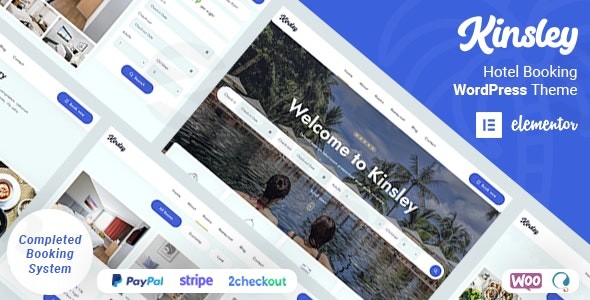
Introduction: Modern Elegance for the Hospitality Sector
The Kinsley WordPress theme is a sophisticated and powerful solution specifically crafted for the diverse needs of the hospitality industry. Designed with a modern and elegant aesthetic, Kinsley is ideal for hotels, resorts, rental properties, apartments, bed and breakfasts, villas, guest houses, and chalets that aim to establish a strong, visually appealing, and fully functional online presence. This theme combines a sleek user interface with robust booking functionalities, making it the perfect choice for accommodation businesses looking to streamline reservations and captivate potential guests.
Key Features: Design, Layout & Performance
Kinsley stands out with a comprehensive suite of features that prioritize both stunning visuals and crucial functionality, all while ensuring excellent performance and SEO readiness.
Design & Layout Options
Kinsley’s design philosophy centers on a trendy and minimalistic aesthetic with detailed UI elements, ensuring your property is showcased in the most attractive light.
- Responsive Design: The theme offers a mobile-responsive design that adapts seamlessly to all devices, from desktops to smartphones, guaranteeing an optimal viewing and booking experience for every guest. It’s built mobile-first and is retina-ready for crystal-clear displays.
- Prebuilt Demos & Pages: Jumpstart your website with more than 6 unique pre-built demos and over 50 pre-built pages. These starter sites allow for quick setup and provide diverse design choices, saving valuable development time.
- Visual Elements: Engage your visitors with modern animations, subtle parallax effects, and an awesome lightbox gallery with filters to display property photos. Fullscreen and horizontal slideshows further enhance the visual storytelling of your accommodations.
Customization Capabilities
With Kinsley, personalizing your website to match your brand’s unique identity is intuitive and extensive, largely powered by its deep integration with Elementor.
- Unlimited Color Schemes & Typography: Gain complete control over your site’s appearance with unlimited color schemes and access to over 1,000 Google Fonts. This allows for precise branding and readability across your site.
- Advanced Customization Options: Beyond basic colors and fonts, Kinsley provides advanced options for customizing accommodation lists, services, booking popups, blog sections, social elements, preloader, and 404 pages. This detailed control ensures every aspect of your site aligns with your vision.
- Elementor Integration: Kinsley is built with Elementor, the leading drag-and-drop page builder, offering an incredibly easy and visual customization experience. It includes over 55 custom Elementor widgets specifically designed for the theme, extending Elementor’s capabilities to perfectly suit hotel and accommodation websites.
- Header & Footer Builders: Customize header and footer templates with ease using the Elementor Editor, allowing you to tailor these crucial navigational elements to your specific needs.
Performance & SEO Features
In today’s competitive online landscape, speed and search visibility are paramount. Kinsley is engineered with both in mind.
- Fast Performance: The theme is noted for its fast performance, partly due to a small theme file size (reportedly 2.32 MB), which contributes to quicker loading times and a better user experience. It is described as fully optimized.
- SEO-Optimized Structure: Kinsley boasts an SEO-optimized structure for better search visibility, helping your property rank higher in search engine results and attract more potential guests. This includes clean markup and well-structured headings.
- Mobile-First & Cross-Browser Compatibility: Ensuring maximum flexibility and adaptability, Kinsley is not only fully responsive but also works perfectly across all devices and web browsers.
Installation & Demo Import Guide
Setting up your hotel website with the Kinsley theme is designed to be straightforward, even for those new to WordPress.
- Install & Activate the Kinsley Theme:
- First, download the Kinsley theme package from your purchase source (e.g., ThemeForest).
- Log in to your WordPress dashboard.
- Navigate to Appearance > Themes > Add New > Upload Theme.
- Choose the
kinsley.zipfile (or the main theme file within the downloaded package) and click Install Now. - Once installed, click Activate.
- Install Required Plugins: Upon activation, Kinsley will prompt you to install a set of recommended and required plugins. Crucially, this includes the MotoPress Hotel Booking PRO plugin (which powers the comprehensive booking system) and ACF Pro Plugin. Install and activate all suggested plugins to unlock the theme’s full functionality.
- Import Demo Data (One-Click Demo Import):
- Kinsley includes a one-click demo import feature, allowing you to quickly set up your site with content identical to the live demos. This is highly recommended for a fast start.
- Look for an option like “Demo Importer” or “Import Demo Data” within your WordPress dashboard, typically under Appearance or a dedicated theme options panel.
- Select your preferred demo layout and initiate the import.
- What to Expect: The demo import will populate your site with pages, posts, sample accommodations, menus, widgets, and theme options settings from the chosen demo. Be patient, as this process can take a few minutes depending on your server’s speed and the amount of demo content.
- Potential Pitfalls: For large demo imports, ensure your server has sufficient PHP memory limit and execution time to prevent timeouts. If issues arise, check your hosting’s PHP settings or consult the theme’s documentation.
- Post-Import Setup: After a successful demo import, you may need to:
- Navigate to Appearance > Menus to ensure your main navigation is correctly assigned.
- Go to Settings > Reading to set your homepage and blog page.
- Review Appearance > Widgets to customize sidebar or footer widget areas.
Customization Guide: Branding & Layout
Personalizing Kinsley to reflect your brand is a seamless experience, primarily leveraging Elementor and the theme’s advanced options.
- Accessing Theme Options: Kinsley provides “Advanced Theme Options” (often found under Appearance > Customize or a dedicated theme panel) where you can manage global settings like layout, header/footer basics, and general styling.
- Global Styling: Use the theme options and the WordPress Customizer to establish your brand’s color palette, typography (choosing from over 1,000 Google Fonts), and general site-wide styling. These global settings ensure consistency across your website.
- Elementor for Page Building: For granular control over individual page layouts and content, the Elementor page builder is your primary tool.
- Drag-and-Drop Editing: Open any page with Elementor and use its intuitive drag-and-drop interface to add, remove, or rearrange sections, columns, and widgets.
- Custom Kinsley Widgets: Utilize the 55+ custom Elementor widgets provided by Kinsley. These are specially designed for accommodation businesses, allowing you to easily display room types, booking forms, testimonials, services, and more with a consistent design.
- Header & Footer Customization: Edit your header and footer directly with Elementor. This allows for dynamic and branded layouts that go beyond simple logo and menu changes, letting you include contact info, social icons, and more.
- Accommodation Management: The integrated MotoPress Hotel Booking PRO plugin offers a dedicated interface in your WordPress dashboard for managing rooms, accommodation types, seasons, rates, amenities, and extra services. This system is crucial for a fully functional booking website.
- Child Theme for Safe Customizations: Kinsley includes a child theme, which is essential for developers or power users who wish to make extensive code modifications. Using a child theme ensures that your customizations are not overwritten when the main Kinsley theme is updated.
FAQ & Troubleshooting
Here are answers to common questions about the Kinsley WordPress theme:
Is Kinsley compatible with Elementor / WPBakery / Gutenberg?
Kinsley is built with and heavily relies on Elementor for its page building and customization. It includes over 55 custom Elementor widgets. While it is compatible with the latest WordPress versions (implying a degree of Gutenberg compatibility), Elementor is its primary and recommended page builder. Support for WPBakery is not explicitly mentioned as a primary integration.
Does Kinsley support WooCommerce for online stores?
Yes, Kinsley is fully compatible with WooCommerce. This allows you to integrate online payment gateways and e-commerce functionalities directly into your hotel booking system, facilitating seamless transactions for reservations and other services.
Does Kinsley support child themes?
Yes, a child theme is included with Kinsley. It is highly recommended to use the child theme for any custom code modifications, as this protects your changes from being overwritten during theme updates.
How can I update the Kinsley theme without losing my customizations?
If you have made custom code changes, you should always use the included child theme to preserve them during updates. For standard theme options and content, updates typically do not affect your settings. Always make a full backup of your website before performing any theme updates.
What should I do if the demo import fails or looks different from the demo site?
If the demo import fails, check your server’s PHP memory limit and execution time (often found in your hosting control panel). Increase these values if they are too low. If the imported demo looks different, ensure all required plugins are installed and activated. Sometimes, permalink settings (found under Settings > Permalinks) may need to be refreshed by simply saving them again. Consult the official Kinsley documentation or support channels if issues persist.
Conclusion
The Kinsley hotel theme is a robust and elegant solution that delivers exceptional value for any accommodation business. Its modern design, coupled with powerful Elementor integration and a comprehensive, full-cycle hotel booking system (powered by the bundled MotoPress Hotel Booking PRO plugin), makes it a standout choice.From its stunning visual appeal and extensive customization options to its focus on fast performance and SEO-optimized structure, Kinsley is engineered to attract guests and simplify your reservation process. It is ideally suited for hotels, resorts, B&Bs, villas, guest houses, and rental properties that require a professional online presence with seamless booking capabilities, including automatic OTA synchronization. For businesses seeking a specialized, feature-rich WordPress theme that truly understands the nuances of the hospitality industry, Kinsley offers a powerful and effective platform.
I. Download Limits & Account Benefits
- Free Downloads: Each email address receives 3 downloads per day for free products
- Upgrade Benefits: Purchase any paid product to increase your daily download limit by 3 for each paid product
- No Account Required: You can download immediately by receiving the download link via email
- Account Recommended: Create an account for easier access to your order history and direct update downloads
II. Understanding GPL vs Official Versions
Important: The products available on WPPick are GPL-licensed versions, which differ from official developer versions. Before purchasing, please read our comprehensive guide: Understanding GPL & Official Differences at WPPick
Key Points:
- GPL versions may not include premium support from original developers
- Updates may be delayed compared to official releases
- Some premium features might have limitations
- Always consider your specific needs and support requirements
III. Support & Assistance
We’re here to help through multiple channels:
- Email Support: Direct email assistance for all inquiries
- Live Chat: Real-time support during business hours
- Comprehensive Documentation: Detailed guides and tutorials
IV. Order Tracking
Access your complete purchase history and download links anytime: Order History
V. Account Access
New to WPPick? Login or Create Account to manage your downloads and orders efficiently.
VI. Refund Protection
We stand behind our products with a clear refund policy. Review our terms: Refund Policy
VII. Privacy & Security
Your data security is our priority. Learn how we protect your information: Privacy Policy
VII. Terms of Service
Understanding our service terms ensures a smooth experience: Terms of Use
Quick Tips for Best Experience
- Verify Compatibility: Check plugin/theme compatibility with your WordPress version
- Backup First: Always backup your site before installing new plugins or themes
- Test Environment: Consider testing on a staging site first
- Stay Updated: Regularly check for updates in your account dashboard
- Read Documentation: Review any included documentation for optimal setup
Need Help?
If you have questions about downloads, licensing, or need technical assistance, don’t hesitate to contact our support team. We’re committed to ensuring you have the best possible experience with WPPick products.
Ready to get started? Your download adventure begins with just one click!
- Bundled plugins to the latest version.
- Minor improvements and fixes.