
Kiranime – Anime Streaming WordPress Theme
/Year
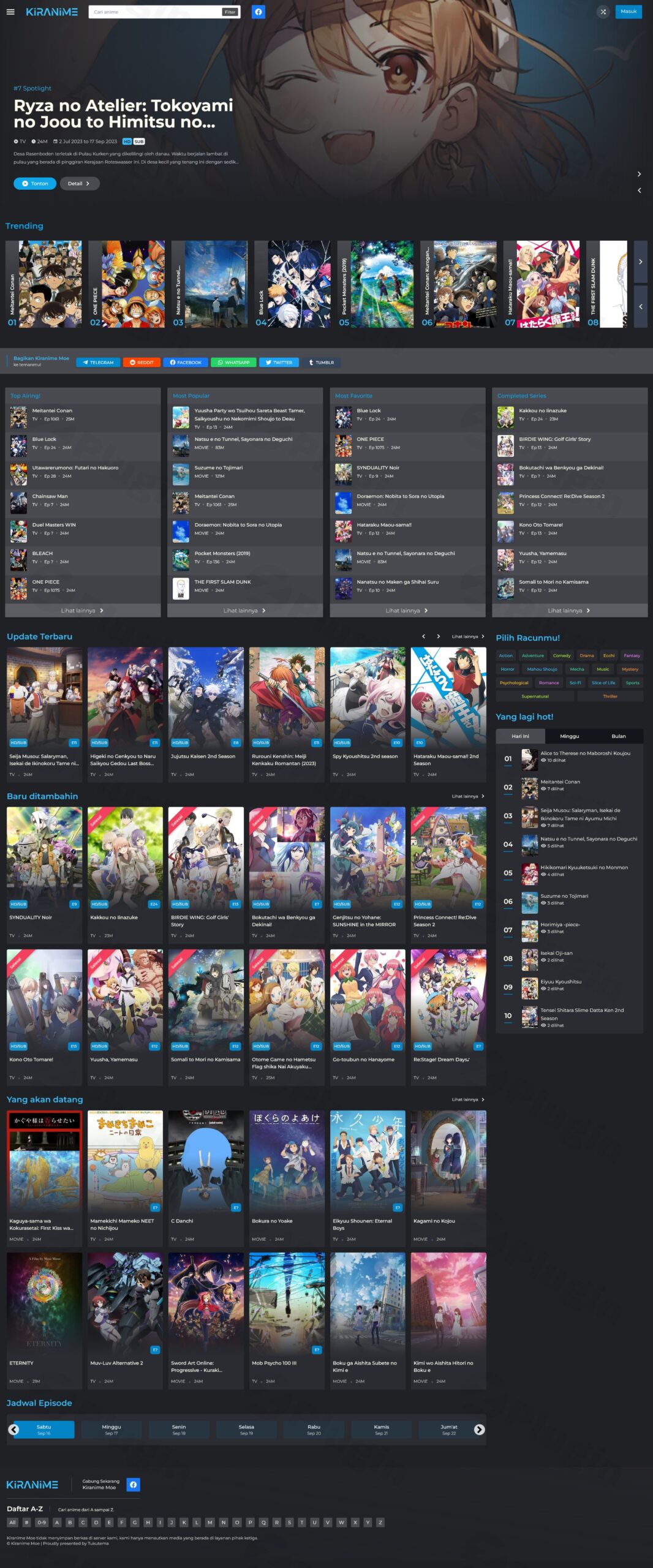
Creating a professional and engaging anime streaming website requires specialized tools, and the Kiranime WordPress theme is built precisely for this purpose. Designed for anime enthusiasts, content creators, and entrepreneurs, Kiranime provides a modern, responsive platform to showcase, stream, and manage your anime content with unparalleled efficiency and style.
Introduction: Crafting Immersive Anime Experiences
Kiranime is a premium WordPress theme meticulously engineered for the unique demands of anime streaming websites and video blogs. Its design philosophy centers on delivering a visually rich and highly functional user experience, making it the best WordPress theme for anime site builders aiming for a dedicated online presence. Built with cutting-edge technologies like Tailwind CSS and VUEJS, Kiranime offers a sleek, modern aesthetic combined with robust backend capabilities for content management and user engagement. Whether you’re building a personal anime blog or a large-scale community platform, Kiranime equips you with the tools to captivate your audience.
Key Features: Design, Layout & Performance for Anime Streaming
Kiranime goes beyond a typical WordPress theme by integrating niche-specific features with a high-performance framework.
Design & Layout Options: Visually Engaging Anime Displays
The theme provides extensive control over how your anime content is presented:
- Customizable Landing Pages and Homepage: Tailor your site’s entry points to highlight specific series or promotions. Kiranime offers dynamic homepage anime lists, including eye-catching spotlight, trending, and featured anime sections, allowing for flexible layout arrangements.
- Comprehensive Content Organization: Showcase your library with a detailed A-Z anime list and seasonal anime organization, ensuring easy browsing for users.
- Detailed Content Pages: Each anime features dedicated info pages with episode lists, character listings, and voice actor details, providing a rich content experience.
- Responsive and Modern Aesthetics: Leveraging Tailwind CSS and VUEJS, Kiranime ensures your website looks stunning and functions flawlessly on all devices, from desktops to smartphones, providing smooth playback and navigation.
Customization Capabilities: Branding Your Anime Hub
Kiranime empowers you to personalize your site without needing to write code:
- Intuitive Settings Panel: Customize color schemes and typography to match your brand or create a unique visual style, all facilitated through a dedicated settings page with live preview capabilities, thanks to the Kirki framework.
- Flexible Layout Elements: While specific header/footer builders aren’t detailed, the ability to enable/disable homepage sections offers significant control over your site’s layout.
Performance & SEO Features: Speed and Visibility
Optimized for speed and search engine visibility, Kiranime ensures your site performs well for both users and search engines:
- Built-in Caching: Experience faster page loads and improved user satisfaction with the theme’s integrated caching mechanism.
- SEO-Friendly Architecture: Kiranime is built with an SEO-friendly structure, including schema markup, to enhance site visibility and ranking in traditional search engines and AI answer engines.
- Mobile Responsiveness: The theme is fully responsive and mobile-friendly, crucial for delivering a seamless streaming experience across all devices.
Advanced Content Management & User Engagement
What truly sets Kiranime apart are its powerful features for content creators and community building:
- Automated Content Grabbing: Save countless hours with the Anime Info Grabber and Episode Info Grabber, which automatically fetch data from popular databases like MyAnimeList (MAL), Anilist, and TheMovieDB. This makes building a content-rich site significantly more efficient.
- Simplified Episode Management: Use an advanced anime importer with batch processing and CSV import capability for episodes.
- Versatile Streaming Options: Integrate content seamlessly with multiple streaming options, including embed, HTML, and shortcode support. The auto-embed functionality from popular sources like Gogoanime streamlines content integration.
- Robust User Engagement: Foster a vibrant community with personal user accounts, watchlists, watch progress tracking, and an episode notification system to keep fans updated on new releases. Integrated Google Recaptcha provides essential spam protection.
- Custom Post Types: Manage your content efficiently with specialized custom post types for anime series, episodes, genres, characters, and voice actors.
Installation & Demo Import: Getting Started with Kiranime
Setting up your Kiranime anime streaming theme is designed to be straightforward, even for those new to WordPress.
- Install & Activate the Theme:
- From your WordPress dashboard, navigate to
Appearance > Themes > Add New. - Click
Upload Theme, choose thekiranime.zipfile you downloaded from ZeroPlugin.com, and clickInstall Now. - Once installed, click
Activate.
- From your WordPress dashboard, navigate to
- Install Required Companion Plugins (If Any): While Kiranime boasts many built-in features, if any specific companion plugins are recommended or required, you’ll typically see a notification at the top of your dashboard after activation. Follow the prompts to install and activate them. (Note: Kiranime states essential features are “inbuilt” and doesn’t require external plugins to function, aside from using the Kirki Framework for customization, which is usually bundled or handled automatically).
- Utilize One-Click Demo Import: Many premium themes, including Kiranime (as indicated by resellers), offer demo content for easy one-click import. Look for a menu item like
Appearance > Import Demo DataorTheme Options > Demo Import.- Select the demo you wish to import.
- Click
Import.
- What to Expect: The demo import process will populate your site with pre-designed pages, menus, widgets, and placeholder content, making your site look like the theme’s demo. This provides an excellent starting point for customization. Be aware that larger demo imports might require sufficient server memory and execution time; if issues arise, consult your hosting provider or the theme’s documentation.
Customization Guide: Personalizing Your Anime Hub
Kiranime offers an intuitive path to personalize your website and match your brand’s unique identity.
- Accessing Customization Options:
- Navigate to your WordPress dashboard. Most of Kiranime’s customization options will be found within a dedicated
Theme Settingspage orAppearance > Customize(leveraging the Kirki framework).
- Navigate to your WordPress dashboard. Most of Kiranime’s customization options will be found within a dedicated
- Changing Colors and Typography:
- Within the theme settings or customizer, locate sections for
ColorsandTypography. Here you can easily adjust primary and secondary color palettes, font families, sizes, and weights to create a consistent visual style.
- Within the theme settings or customizer, locate sections for
- Setting Up Your Homepage:
- Go to
Settings > Reading. Under “Your homepage displays,” choose “A static page” and select one of your imported demo pages (or a custom page you create) as your homepage.
- Go to
- Managing Menus:
- Navigate to
Appearance > Menus. Create new menus or assign existing ones to Kiranime’s designated menu locations (e.g., “Primary Menu,” “Footer Menu”).
- Navigate to
- Utilizing Custom Post Types:
- Kiranime’s strength lies in its specialized custom post types (Anime, Episodes, Characters, Genres). Use these dedicated sections in your WordPress dashboard to efficiently add, organize, and manage your anime content, rather than relying on standard WordPress posts. This structured approach simplifies content population and display.The customization experience in Kiranime is designed for ease of use, allowing content creators to focus on their anime library rather than complex web development.
FAQ & Troubleshooting
Here are answers to some common questions about the Kiranime WordPress theme:
Is Kiranime compatible with Elementor / WPBakery / Gutenberg?
Kiranime is built with Tailwind CSS and VUEJS and features a dedicated settings page for customization. There is no explicit mention of compatibility with major page builders like Elementor or WPBakery. While all WordPress themes generally work with the default Gutenberg block editor for content areas, Kiranime’s core layout and specialized features are primarily managed through its own framework and custom post types, rather than relying on third-party page builders.
Does Kiranime support WooCommerce for online stores?
The Kiranime theme is purpose-built for anime streaming and video blogs and focuses on content management and user engagement features specific to that niche. There is no explicit mention of WooCommerce compatibility, nor are there features indicating native support for e-commerce functionalities for selling products or subscriptions directly.
What are the technical requirements for the Kiranime theme?
To run Kiranime optimally, your hosting environment should meet the following technical requirements: PHP 8.0 or higher and WordPress 6.0 or newer. Ensuring these versions are met will provide the best performance and security for your anime streaming website.
How does Kiranime help with content management for anime series?
Kiranime significantly streamlines anime content management through its unique Anime Info Grabber and Episode Info Grabber, which automatically pull data from databases like MyAnimeList, Anilist, and TheMovieDB. It also provides specialized custom post types for anime series, episodes, genres, and characters, making content organization intuitive. Additionally, features like batch processing for importing anime and episodes via CSV, and auto-embed functionality from sources like Gogoanime, further simplify populating your site.
Is Kiranime an SEO-friendly WordPress theme?
Yes, Kiranime is designed with SEO in mind. It features an SEO-friendly architecture, including schema markup, to help search engines better understand your content and improve your site’s visibility. Its performance optimizations, such as built-in caching and responsive design, also contribute positively to search engine rankings and user experience.
Conclusion
The Kiranime WordPress theme stands out as a powerful and highly specialized solution for anyone looking to create a professional anime streaming WordPress website. Its blend of modern design, robust content management features (especially the automated content grabbers), and user engagement tools makes it an ideal choice for anime enthusiasts, content creators, and entrepreneurs.While its focus on the anime niche means it might not offer the broad page builder compatibility of multipurpose themes, its dedicated functionalities for importing, managing, and showcasing anime content are unparalleled. With its performance optimizations and SEO-friendly structure, Kiranime provides a solid foundation for a successful and engaging online anime platform. If your vision is to build a vibrant anime community or a comprehensive anime video blog, Kiranime offers the specialized tools you need to bring that vision to life effectively.
I. Download Limits & Account Benefits
- Free Downloads: Each email address receives 3 downloads per day for free products
- Upgrade Benefits: Purchase any paid product to increase your daily download limit by 3 for each paid product
- No Account Required: You can download immediately by receiving the download link via email
- Account Recommended: Create an account for easier access to your order history and direct update downloads
II. Understanding GPL vs Official Versions
Important: The products available on WPPick are GPL-licensed versions, which differ from official developer versions. Before purchasing, please read our comprehensive guide: Understanding GPL & Official Differences at WPPick
Key Points:
- GPL versions may not include premium support from original developers
- Updates may be delayed compared to official releases
- Some premium features might have limitations
- Always consider your specific needs and support requirements
III. Support & Assistance
We’re here to help through multiple channels:
- Email Support: Direct email assistance for all inquiries
- Live Chat: Real-time support during business hours
- Comprehensive Documentation: Detailed guides and tutorials
IV. Order Tracking
Access your complete purchase history and download links anytime: Order History
V. Account Access
New to WPPick? Login or Create Account to manage your downloads and orders efficiently.
VI. Refund Protection
We stand behind our products with a clear refund policy. Review our terms: Refund Policy
VII. Privacy & Security
Your data security is our priority. Learn how we protect your information: Privacy Policy
VII. Terms of Service
Understanding our service terms ensures a smooth experience: Terms of Use
Quick Tips for Best Experience
- Verify Compatibility: Check plugin/theme compatibility with your WordPress version
- Backup First: Always backup your site before installing new plugins or themes
- Test Environment: Consider testing on a staging site first
- Stay Updated: Regularly check for updates in your account dashboard
- Read Documentation: Review any included documentation for optimal setup
Need Help?
If you have questions about downloads, licensing, or need technical assistance, don’t hesitate to contact our support team. We’re committed to ensuring you have the best possible experience with WPPick products.
Ready to get started? Your download adventure begins with just one click!
- Empty space below the recommendation widget (on mobile) if no widget assigned to the sidebar
- Overflow anime description
- Error on customization preview when kirki customizer framework plugin not active
- Added search icon on search bar (tablet+)
- Added filter icon
- Only 'publish' episode will trigger "anime is updated"
- Episode notification will only trigger on episode "publish"
- Saving new episode not updating the anime.
- Removed debug statement.
- Episode parent anime not updated upon saving.
- Reduced javascript listeners.
- image not saved for TMDB
- Child theme cannot load the parent stylesheet
- Auto embed plugin notices always displayed
- Removed debugging script on javascript files
- Auto embed plugin will no longer receive update