

Knor – Digital Agency WordPress Theme
/Year
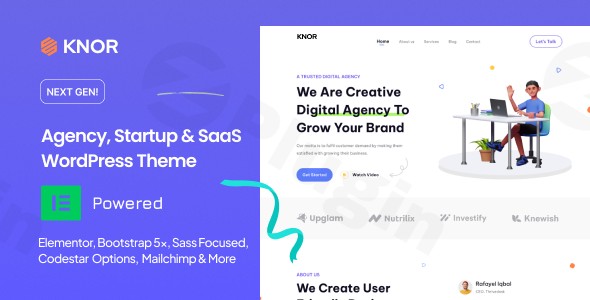
The Knor WordPress Theme is a sleek and robust solution specifically crafted for modern digital agencies, innovative startups, and Software as a Service (SaaS) businesses. Designed with a clean aesthetic and a focus on effective online presentation, Knor provides a professional foundation for showcasing services, projects, and products with ease. It aims to empower users, from freelancers to growing companies, to build high-converting websites without requiring deep coding knowledge.
Key Features: Design, Layout & Performance
Knor stands out with its thoughtfully designed features that blend visual appeal with technical efficiency, making it an excellent digital agency WordPress theme.
Design & Layout Options
Knor embraces a clean, modern design philosophy, prioritizing user experience and visual hierarchy. It offers versatile layout options supporting both immersive one-page experiences and comprehensive multi-page websites. The theme comes with 4 Home Demo Variations, enabling a quick start, and features “Multiple Homepage Blocks” that provide countless content arrangement possibilities. This modular approach allows for significant flexibility in crafting unique page designs suitable for diverse digital services or SaaS offerings. Visual elements are further enhanced by a rich selection of icons from FontAwesome, Icofont, and Remix Icons, adding a refined touch to your site.
Customization Capabilities
Branding is central to any digital business, and Knor provides extensive customization options to ensure your website truly reflects your identity. You can effortlessly change color schemes to align with your brand guidelines and choose from over 1200 Google Web Fonts to establish a distinct typographic voice. Beyond global styles, Knor allows for precise control over spacing, containers, sections, and backgrounds, offering a “vast of custom skins” to apply unique visual treatments. The Smart Sticky Header with scroll-top intent detection not only improves navigation but also adds a professional, dynamic feel to the user experience.
Performance & SEO Features
In today’s competitive digital landscape, a fast and SEO-friendly website is non-negotiable. Knor is engineered as a super fast and lightweight WordPress theme, specifically designed for quick load times. This focus on performance contributes directly to better user engagement and improved search engine rankings. It’s built with SEO best practices in mind, ensuring clean code and a structured markup that search engines love. Furthermore, the theme is fully responsive, guaranteeing an optimal viewing experience across all devices, from desktops to smartphones, and is cross-browser compatible with popular browsers like Edge, Chrome, Safari, and Firefox.
Installation & Demo Import Guide
Setting up your website with Knor is streamlined, especially with its integrated demo content. Here’s a simple, step-by-step guide:
- Install & Activate the Theme:
- Log in to your WordPress dashboard.
- Navigate to
Appearance > Themes > Add New > Upload Theme. - Choose the Knor theme
.zipfile from your computer and clickInstall Now. - Once installed, click
Activate.
- Install Required Plugins:
- Upon activation, Knor will likely prompt you to install recommended plugins, most notably the Elementor page builder. Install and activate all suggested plugins to ensure full theme functionality.
- One-Click Demo Content Import:
- Knor features a One-Click Demo Content Import tool. Locate this option, typically under
Appearance > Import Demo Dataor a dedicated theme options panel. - Select the demo variation you wish to import (e.g., one of the “4 Home Demo Variations”).
- Initiate the import process.
- What to Expect: The demo import will populate your site with pages, posts, sample content, images, menus, and widgets, making your site look identical to the chosen demo. This process can take several minutes, depending on your server’s speed and the amount of demo content. Ensure your server resources (like PHP memory limit and execution time) are sufficient to prevent timeouts.
- Knor features a One-Click Demo Content Import tool. Locate this option, typically under
- Initial Setup:
- After the import, navigate to
Appearance > Menusto verify your navigation and assign it to the appropriate menu locations. - Go to
Settings > Readingand set your preferred static homepage (usually the imported “Home” page) and posts page (for your blog).
- After the import, navigate to
Customization Guide: Branding & Layout
Personalizing your Knor theme to match your brand and specific needs is intuitive, primarily leveraging its tight integration with Elementor and its dedicated options panel.Knor integrates a “lightweight minimal theme options panel – Codestar Framework.” This panel, usually found under Knor Options or Theme Options in your WordPress admin menu, allows you to manage global settings for your site. Here, you can control layouts, apply custom skins, and define overall color schemes and typography settings. This centralized control ensures brand consistency across your entire website.For detailed page and section customization, Knor is supercharged with Elementor. This drag-and-drop page builder provides an unparalleled level of control over your page layouts. Simply edit any page with Elementor, and you can visually construct complex designs, arrange content blocks, and fine-tune every element. Knor further enhances this experience by offering “30+ Elementor News Blocks” and other unique custom widgets, allowing you to create dynamic and engaging content sections tailored for digital agencies and SaaS product showcases.For developers or users requiring more advanced modifications, a Child Theme is Included. This best practice allows you to make custom code changes (CSS, PHP, JS) without modifying the core theme files, ensuring your customizations are safe during theme updates.
FAQ & Troubleshooting
Here are answers to some common questions about the Knor – Digital Agency WordPress Theme:
Is Knor WordPress Theme compatible with Elementor?
Yes, the Knor WordPress Theme is supercharged with Elementor and integrates seamlessly with this popular drag-and-drop page builder. This allows users to easily create and customize page layouts with an intuitive visual interface.
Does Knor WordPress Theme support WooCommerce for online stores?
Yes, Knor is fully compatible with WooCommerce. This means you can easily set up and manage an online store within your digital agency or SaaS website, selling products, services, or digital downloads.
Does the Knor theme include a child theme?
Yes, a Child Theme is included with Knor. Using a child theme is highly recommended for any custom modifications, as it ensures your changes are preserved when the main theme receives updates.
How can I customize the header in Knor Theme?
The Knor theme features a Smart Sticky Header that can be configured through its theme options panel (Codestar Framework). For more granular control over the header’s layout and content, you can leverage the theme’s Elementor integration to design custom header sections.
Is Knor a lightweight and fast WordPress theme?
Yes, Knor is explicitly described as a “Super Fast and Lightweight Theme”. It’s built with performance optimization in mind, contributing to fast load times and an excellent user experience.
Conclusion
The Knor – Digital Agency WordPress Theme emerges as a compelling choice for businesses and freelancers in the digital space. Its clean, modern design, coupled with powerful customization options via Elementor and the Codestar Framework, makes it a highly flexible and user-friendly platform.With its strong focus on performance and SEO, Knor ensures that your website not only looks good but also performs optimally in search engines. Its dedicated features for showcasing portfolios and services, alongside robust WooCommerce compatibility, position it as a versatile tool for building startup websites, dynamic digital agency portals, engaging SaaS landing pages, and even e-commerce stores.If you’re a digital marketing agency, a SaaS company, a freelancer, or a startup looking for a fast, modern, and easily customizable WordPress theme for digital marketing agency or any related digital venture, Knor offers an excellent blend of aesthetic appeal and functional power to establish a strong online presence.
I. Download Limits & Account Benefits
- Free Downloads: Each email address receives 3 downloads per day for free products
- Upgrade Benefits: Purchase any paid product to increase your daily download limit by 3 for each paid product
- No Account Required: You can download immediately by receiving the download link via email
- Account Recommended: Create an account for easier access to your order history and direct update downloads
II. Understanding GPL vs Official Versions
Important: The products available on WPPick are GPL-licensed versions, which differ from official developer versions. Before purchasing, please read our comprehensive guide: Understanding GPL & Official Differences at WPPick
Key Points:
- GPL versions may not include premium support from original developers
- Updates may be delayed compared to official releases
- Some premium features might have limitations
- Always consider your specific needs and support requirements
III. Support & Assistance
We’re here to help through multiple channels:
- Email Support: Direct email assistance for all inquiries
- Live Chat: Real-time support during business hours
- Comprehensive Documentation: Detailed guides and tutorials
IV. Order Tracking
Access your complete purchase history and download links anytime: Order History
V. Account Access
New to WPPick? Login or Create Account to manage your downloads and orders efficiently.
VI. Refund Protection
We stand behind our products with a clear refund policy. Review our terms: Refund Policy
VII. Privacy & Security
Your data security is our priority. Learn how we protect your information: Privacy Policy
VII. Terms of Service
Understanding our service terms ensures a smooth experience: Terms of Use
Quick Tips for Best Experience
- Verify Compatibility: Check plugin/theme compatibility with your WordPress version
- Backup First: Always backup your site before installing new plugins or themes
- Test Environment: Consider testing on a staging site first
- Stay Updated: Regularly check for updates in your account dashboard
- Read Documentation: Review any included documentation for optimal setup
Need Help?
If you have questions about downloads, licensing, or need technical assistance, don’t hesitate to contact our support team. We’re committed to ensuring you have the best possible experience with WPPick products.
Ready to get started? Your download adventure begins with just one click!