
Koga – Blog & Magazine WordPress Theme
/Year
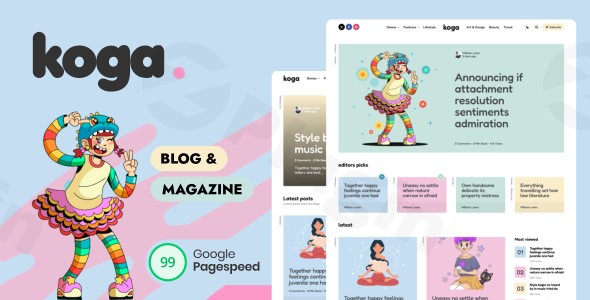
The Koga WordPress theme is meticulously designed for bloggers, content creators, and digital magazine publishers aiming for a powerful, aesthetically pleasing, and high-performing online presence. This review and setup guide will delve into Koga’s standout features, walk you through the installation process, and help you customize it to truly reflect your brand and engage your audience.
Introduction: Visual Appeal & Target Audience
Koga stands as a premium solution for anyone looking to build a professional blog or magazine website on WordPress. Its design philosophy marries elegant aesthetics with robust functionality, creating a visually compelling experience that keeps readers captivated. Ideal for professional bloggers, digital magazine publishers, and content marketing professionals, the Koga blog theme is crafted to enhance readability, optimize performance, and provide extensive customization without requiring any coding knowledge.
Key Features: Design, Layout & Performance
Koga is packed with features designed to give content creators unparalleled control over their site’s look, feel, and functionality.
Design & Layout Options
Koga offers an impressive array of layout choices, ensuring your content is presented beautifully across various formats.
- Extensive Blog & Post Layouts: Choose from over 30 blog layouts, including flexible masonry (2, 3, & 4 columns) and grid (2, 3, & 4 columns) options, allowing for diverse content presentation. Additionally, Koga provides 20 single post layouts and supports standard, video, audio, gallery, and image post formats.
- Header & Footer Flexibility: Define your site’s first and last impressions with 3 distinct header layouts and 9 footer layout combinations, giving you significant control over navigation and branding elements.
- Homepage Post Blocks: A standout feature, these blocks allow you to construct stunning, multi-column magazine-style content displays directly within the WordPress Customizer, complete with live previews. Configure post settings, integrate widgets, and combine block sidebars with theme sidebars for dynamic layouts.
- Thumbnail Aspect Ratio Control: Optimize your visual storytelling with options for various thumbnail aspect ratios like landscape, wide, portrait, square, uncropped, and a hero aspect ratio for single posts. Koga intelligently works with existing images, saving you time on regeneration.
Customization Capabilities
Unleash your creativity with Koga’s comprehensive customization options, primarily through the intuitive WordPress Customizer.
- Fully Customizable Color Schemes: Tailor your brand identity with a dedicated dark mode, allowing for separate light and dark color scheme settings. Readers can dynamically switch modes, or you can set a permanent preference, with pre-configured light and dark schemes included.
- Typography Control: Integrate your brand’s voice with support for Google Fonts and Fontello Icons, giving you fine-tuned control over your site’s readability and aesthetic.
- Granular Element Control: Koga empowers you to “toggle everything”—from post elements (globally or per post) and theme elements to sidebars and plugin elements—providing exceptional flexibility to achieve your desired design without touching code.
Performance & SEO Features
Koga is engineered for speed and search engine visibility, crucial for any successful blog or magazine.
- Lightning-Fast Performance: Optimized for Google PageSpeed and Core Web Vitals, Koga ensures your content loads rapidly, leading to a seamless user experience, reduced bounce rates, and improved search engine rankings. It boasts the potential for up to 99 Google PageSpeed scores.
- SEO-Optimized Structure: Built with clean code and proper heading structure, this Koga magazine theme helps your content rank higher, driving organic growth and visibility.
- Responsive Design Excellence: Your content will look stunning on any device. Koga automatically adapts to desktops, tablets, and mobile screens, with dedicated mobile settings allowing for optimized viewing experiences and even different layouts on desktop and mobile.
Monetization-Ready Design
Koga integrates monetization seamlessly, helping you maximize your revenue potential.
- Strategically Placed Advertising Areas: The theme features dedicated, intelligent advertising zones designed to blend with your content, ensuring optimal ad visibility without detracting from the user experience. Each homepage post block can include its own advertising area.
- Widgets Between Posts: Easily integrate ads (like Google AdSense) or other widgets between posts in home, blog, and archive displays for additional revenue opportunities.
Social Media Integration
Amplify your content’s reach and foster community engagement with Koga’s built-in social sharing features and seamless integration with popular social platforms.
Installation & Demo Import
Getting started with Koga is designed to be straightforward, even for those new to WordPress.
1. Install & Activate the Theme
- Download Koga: Obtain the Koga theme files from your purchase source (e.g., ThemeForest).
- Upload to WordPress: Log in to your WordPress dashboard. Navigate to Appearance > Themes > Add New > Upload Theme. Choose the Koga theme
.zipfile and click Install Now. - Activate: Once installed, click Activate to make Koga your active theme.
2. Install Required Companion Plugins
Upon activation, Koga may prompt you to install recommended plugins essential for certain features or demo content. Follow the on-screen instructions to install and activate these plugins.
3. Use the One-Click Demo Import
Koga includes 12 one-click install demos that allow you to set up your site rapidly.
- Navigate to Demo Importer: After theme activation, you’ll typically find a “Demo Import” or “Import Demo Data” option in your WordPress dashboard, often under Appearance > Import Demo Data or within the theme options panel.
- Choose Your Demo: Browse the available demos and select the one that best suits your vision.
- Import: Click the “Import” button. This process will typically import pages, posts, sample images (placeholders), widgets, and theme settings.
- Expectations: The demo import can take a few minutes depending on your server’s speed and the size of the demo. After completion, your site will largely resemble the chosen demo. You may need to manually set your main menu (under Appearance > Menus) and configure your homepage and blog page (under Settings > Reading).
Common Pitfalls
For large demo imports, ensure your server meets WordPress’s minimum requirements for PHP memory limit and execution time to prevent timeouts. If you encounter issues, consult Koga’s documentation or your hosting provider.
Customization Guide: Branding & Layout
Personalizing Koga to match your unique brand identity is intuitive, primarily through the WordPress Customizer.
Using the WordPress Customizer
- Access the Customizer: Go to Appearance > Customize in your WordPress dashboard. This live preview interface allows you to make changes and see them in real-time before publishing.
- Changing Colors: Under the color options, you can adjust your site’s primary, secondary, accent colors, and background colors. Experiment with Koga’s extensive color scheme options, including the dark mode settings, to create a consistent brand palette.
- Fonts & Typography: Access typography settings to select Google Fonts for headings, body text, and other elements. Control font sizes, weights, and line heights for optimal readability.
- Logo & Site Identity: Upload your custom logo and favicon, and adjust site title and tagline within the Site Identity section.
- Header & Footer Layouts: Explore the dedicated sections for header and footer settings. You can choose from 3 header layouts and 9 footer layout combinations, arrange elements like navigation, social icons, and copyright information.
- Homepage and Blog Page Setup:
- Homepage: If you imported a demo, your homepage is likely already set. If starting fresh, you can create a new page, design it using Koga’s post blocks or Gutenberg, and then set it as your static front page under Settings > Reading.
- Blog Page: Create another new page (e.g., “Blog”) and assign it as your “Posts page” under Settings > Reading. This will be where all your blog posts are listed.
- Menus: Navigate to Appearance > Menus to create and assign menus to your chosen header and footer locations.
Intuitive Design & Presets
Koga’s “toggle everything” approach in the Customizer, combined with live previews, makes the customization experience highly intuitive. You can experiment with different layouts for post elements, sidebars, and entire theme sections, allowing you to fine-tune every detail without code. A child theme is included, which is best practice for advanced customizations, ensuring your changes are safe during theme updates.
FAQ & Troubleshooting
Here are answers to some common questions about the Koga WordPress theme:
Is Koga compatible with Elementor / WPBakery / Gutenberg?
Koga is optimized for Gutenberg and supports all standard WordPress blocks and widgets. While the provided documentation focuses on Gutenberg and its own “Homepage Post Blocks,” explicit compatibility with major third-party page builders like Elementor or WPBakery is not explicitly detailed in the source data.
Does Koga support WooCommerce for online stores?
Specific compatibility with WooCommerce is not explicitly mentioned in the provided source data. Koga is primarily designed as a blog and magazine theme, focusing on content publishing and monetization through advertising areas. If eCommerce functionality is a primary requirement, further verification would be needed.
Does it support child themes?
Yes, a child theme is included with Koga. Using a child theme is highly recommended for any custom code or styling changes, as it ensures your modifications are preserved when the main theme receives updates.
How can I update the theme without losing my customizations?
To update the Koga theme safely while preserving your customizations, always use the provided child theme for any custom code or CSS. When an update is available, you can usually update the parent theme directly through your WordPress dashboard. If you’ve made direct modifications to the parent theme files, they will be overwritten.
What should I do if the demo import fails or looks different from the demo site?
If the demo import fails, check your server’s PHP settings for sufficient memory limits and execution time. You might need to increase these values. If the imported demo looks different, ensure all recommended plugins were installed and activated, and that you’ve correctly set your menus and static front page after the import. Consult the Koga theme documentation for specific troubleshooting steps.
Conclusion
The Koga WordPress theme is an excellent choice for anyone serious about creating a fast, visually stunning, and highly engaging blog or digital magazine. Its comprehensive design and layout options, including 30+ blog layouts and 20 single post layouts, offer unparalleled flexibility for content presentation. With a strong emphasis on lightning-fast performance (Google PageSpeed and Core Web Vitals optimized) and SEO-friendly structure, Koga is built to get your content seen.The intuitive WordPress Customizer, complete with a powerful dark mode and “toggle everything” flexibility, makes branding and customization a breeze, even for beginners. Furthermore, its strategically placed advertising areas provide robust monetization opportunities.Whether you’re a professional blogger, a digital magazine publisher, or a content marketing professional, Koga provides the tools, performance, and aesthetic appeal needed to succeed in today’s competitive digital landscape. If content is king for your website, and you prioritize a sophisticated design with top-tier performance and integrated monetization, Koga is a highly recommended solution.
I. Download Limits & Account Benefits
- Free Downloads: Each email address receives 3 downloads per day for free products
- Upgrade Benefits: Purchase any paid product to increase your daily download limit by 3 for each paid product
- No Account Required: You can download immediately by receiving the download link via email
- Account Recommended: Create an account for easier access to your order history and direct update downloads
II. Understanding GPL vs Official Versions
Important: The products available on WPPick are GPL-licensed versions, which differ from official developer versions. Before purchasing, please read our comprehensive guide: Understanding GPL & Official Differences at WPPick
Key Points:
- GPL versions may not include premium support from original developers
- Updates may be delayed compared to official releases
- Some premium features might have limitations
- Always consider your specific needs and support requirements
III. Support & Assistance
We’re here to help through multiple channels:
- Email Support: Direct email assistance for all inquiries
- Live Chat: Real-time support during business hours
- Comprehensive Documentation: Detailed guides and tutorials
IV. Order Tracking
Access your complete purchase history and download links anytime: Order History
V. Account Access
New to WPPick? Login or Create Account to manage your downloads and orders efficiently.
VI. Refund Protection
We stand behind our products with a clear refund policy. Review our terms: Refund Policy
VII. Privacy & Security
Your data security is our priority. Learn how we protect your information: Privacy Policy
VII. Terms of Service
Understanding our service terms ensures a smooth experience: Terms of Use
Quick Tips for Best Experience
- Verify Compatibility: Check plugin/theme compatibility with your WordPress version
- Backup First: Always backup your site before installing new plugins or themes
- Test Environment: Consider testing on a staging site first
- Stay Updated: Regularly check for updates in your account dashboard
- Read Documentation: Review any included documentation for optimal setup
Need Help?
If you have questions about downloads, licensing, or need technical assistance, don’t hesitate to contact our support team. We’re committed to ensuring you have the best possible experience with WPPick products.
Ready to get started? Your download adventure begins with just one click!