

Koka – Multipurpose Woocommerce Theme
/Year
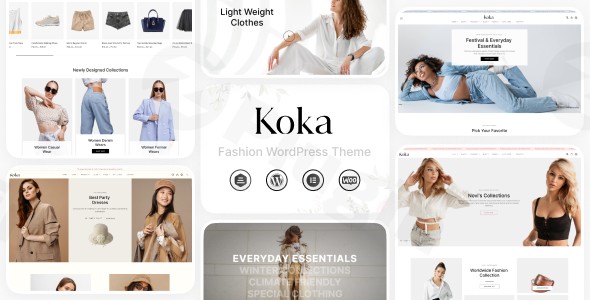
The digital marketplace demands not just a storefront, but an experience. The KoKa Multipurpose WooCommerce Theme steps up to this challenge, offering a robust and visually stunning foundation for any online business. Designed for store owners, entrepreneurs, and agencies alike, KoKa provides a powerful platform to build elegant, high-converting eCommerce websites across various niches, from fashion and electronics to groceries and home decor. With its focus on intuitive customization and performance, KoKa empowers you to create a professional online presence without needing to write a single line of code.
Key Features: Design, Layout & Performance for eCommerce Success
KoKa is engineered to provide a comprehensive solution for online retailers, blending aesthetic appeal with crucial functional capabilities.
Flexible Design & Layout Options
KoKa comes equipped with an array of pre-designed layouts for both homepages and product pages, meticulously crafted to suit diverse industries. This means whether you’re showcasing the latest fashion trends or the freshest organic produce, you have a solid, professional starting point. The theme’s versatility extends beyond just shop pages, offering layouts for essential inner pages like About Us, Contact, and Blog, ensuring a complete website structure. With multiple demo layouts, including options for casual fashion, luxury brands, and denim, you can quickly find a design that resonates with your brand’s identity.
Intuitive Customization Capabilities
Personalizing your store to reflect your brand’s unique identity is effortless with KoKa. The theme features a user-friendly interface and a comprehensive theme options panel that puts control over layouts, colors, and fonts directly into your hands.
- Color Schemes & Typography: Easily adjust your store’s color palette and choose from advanced typography options, including extensive Google Fonts integration and Font Awesome Icons, to match your branding perfectly.
- Elementor Compatibility: KoKa is fully compatible with Elementor and Elementor Pro, offering a powerful drag-and-drop page-building experience. This integration provides granular control over spacing, containers, sections, and backgrounds, enabling you to craft unique page designs without any coding knowledge.
- One-Click Demo Import: Get your store up and running quickly with the one-click demo import feature, powered by the Unyson Importer. This allows you to replicate the demo content with ease, providing a robust foundation that you can then tailor to your specific needs.
Optimized Performance & SEO Readiness
In the competitive world of eCommerce, speed and visibility are paramount. KoKa is built with fast loading speed in mind, featuring optimized code that contributes to a smooth and enjoyable shopping experience for your customers. While specific performance scores aren’t provided, the theme is described as “super fast and highly flexible,” using SEO and speed optimization strategies. Furthermore, KoKa boasts a responsive design, ensuring your store looks and performs flawlessly across all devices—desktops, tablets, and mobile phones—and is cross-browser compatible for a consistent user experience.
Installation & Demo Import: Get Your KoKa Store Online
Setting up your KoKa-powered online store is a straightforward process, even for those new to WordPress.
- Download and Install the Theme:
- First, download the KoKa theme package from your purchase source (e.g., ZeroPlugin.com or ThemeForest).
- Log in to your WordPress dashboard.
- Navigate to Appearance > Themes > Add New > Upload Theme.
- Choose the
koka.zipfile from your downloaded package and click “Install Now.” - Once installed, click “Activate.”
- Install Required Plugins:
- Upon activation, KoKa will prompt you to install several essential companion plugins to unlock its full potential. These typically include WooCommerce (the core eCommerce engine), Contact Form 7, YITH WooCommerce Wishlist, Slider Revolution, Unyson (for demo import), and WPML (for multi-language support).
- Follow the on-screen prompts to install and activate all recommended plugins.
- Import Demo Content:
- With the theme and required plugins active, you can now import a pre-designed demo layout.
- Navigate to Appearance > Demo Importer (or a similar menu item introduced by the Unyson Importer plugin).
- Select your preferred demo from the available options (e.g., Casual Fashion, Luxury Fashion, Denim, etc.).
- Click “Import” or “Install Demo.”
- Important Note: Demo import can take a few minutes, especially if your server resources (like PHP memory limit and execution time) are low. Ensure your hosting environment meets the standard WordPress requirements to prevent timeouts. A large demo import will typically set up all the necessary pages, posts, widgets, and menus, providing a complete replica of the demo site.
- After Import:
- After a successful import, check your site. You’ll likely find your pages, products (dummy ones if provided), menus, and widgets already configured.
- You may need to manually set your homepage by going to Settings > Reading and choosing your newly imported homepage from the “A static page” option.
Customization Guide: Branding & Layout with KoKa
KoKa offers extensive options to personalize your store and align it with your brand’s unique style.
Using the Theme Options Panel and WordPress Customizer
The primary hub for customization is KoKa’s dedicated theme options panel. This panel allows you to manage global settings for layouts, colors, typography, and more, all from one intuitive interface. For basic site identity, colors, and menu settings, the native WordPress Customizer (Appearance > Customize) also provides a live preview as you make changes.
Crafting Your Visual Identity
- Colors & Typography: Easily define your brand’s color palette, including primary, secondary, and accent colors. Dive into the typography settings to choose fonts for headings and body text from a vast selection of Google Fonts, ensuring readability and brand consistency.
- Logo & Site Identity: Upload your brand logo and favicon through the Customizer to establish a strong brand presence across your site and in browser tabs.
- Header & Footer Layouts: KoKa provides multiple Mega Menu styles and customizable header options. You can configure contact information, login links, social media icons, and even a prominent search bar within your header. The theme’s WooCommerce integration ensures standard footer widget areas are available for essential information like contact details, payment methods, and navigation.
Building Pages with Elementor
Given KoKa’s deep integration with Elementor, customizing page layouts is a drag-and-drop affair.
- Homepage Order: For instance, you can easily change the order of sections on your homepage by simply dragging and dropping Elementor widgets or template parts.
- Custom Page Designs: Leverage Elementor’s powerful visual builder to create unique landing pages, product showcases, and marketing sections, giving you full creative freedom without touching any code.
Advanced Customization with Child Themes
For users who require more in-depth modifications or plan to add custom code, KoKa includes a child theme in its package. Using a child theme ensures that any customizations you make are preserved when the parent KoKa theme receives updates, protecting your hard work and maintaining site integrity.
FAQ & Troubleshooting
Is KoKa compatible with Elementor / WPBakery / Gutenberg?
KoKa is fully compatible with Elementor and Elementor Pro, providing an excellent drag-and-drop page-building experience. However, it is explicitly listed as not optimized for the WordPress Block Editor (Gutenberg), meaning it relies on traditional page builders like Elementor for layout design rather than the native WordPress block editor. There is no explicit mention of WPBakery Page Builder compatibility.
Does KoKa support WooCommerce for online stores?
Yes, KoKa is a premium WooCommerce WordPress theme meticulously designed for online stores. It boasts seamless and powerful integration with WooCommerce, the leading eCommerce platform for WordPress, and supports enhanced features like YITH WooCommerce Wishlist and multi-currency options.
Does KoKa support child themes?
Yes, KoKa includes a child theme in its theme package. This allows for safe and easy modifications, ensuring that any custom code or styling remains intact when the main theme is updated, which is crucial for power users and developers.
How can I update the KoKa theme without losing my customizations?
To update the KoKa theme safely, it is highly recommended to use the included child theme for any custom code or styling changes. For updates to the parent theme itself, always back up your site first. Then, you can typically update KoKa through your WordPress dashboard (Appearance > Themes) if the theme was purchased from a source that provides direct updates, or by uploading the new theme files via FTP.
What should I do if the KoKa demo import fails or looks different from the demo site?
If the KoKa demo import fails or doesn’t look as expected, first check your server’s PHP limits (e.g., memory_limit, max_execution_time, post_max_size, upload_max_filesize). Low limits can cause timeouts for large imports. You can usually increase these via your hosting control panel or by contacting your host. Also, ensure all required plugins are installed and activated before attempting the import. If issues persist, refer to the theme’s documentation or contact BuddhaThemes support (if you have an official license).
Conclusion
The KoKa Multipurpose WooCommerce Theme from ZeroPlugin.com stands out as a formidable choice for anyone looking to build a professional, visually appealing, and high-performing online store. Its extensive collection of pre-designed layouts, coupled with deep integration with Elementor, provides unparalleled design flexibility and a truly intuitive customization experience, making it accessible even for beginners with no coding knowledge.Optimized for fast loading and mobile responsiveness, KoKa ensures your customers enjoy a seamless shopping journey on any device. While its reliance on Elementor means it’s not optimized for Gutenberg, its comprehensive feature set, robust WooCommerce compatibility, and the backing of a Power Elite Author like BuddhaThemes make it an excellent investment.KoKa is ideally suited for store owners, freelancers, and agencies aiming to create modern eCommerce websites, especially those in the fashion, electronics, and grocery sectors, who prioritize creative freedom, performance, and dedicated e-commerce functionalities. If you seek a powerful, customizable, and reliable platform to elevate your online business, KoKa offers a compelling solution.
I. Download Limits & Account Benefits
- Free Downloads: Each email address receives 3 downloads per day for free products
- Upgrade Benefits: Purchase any paid product to increase your daily download limit by 3 for each paid product
- No Account Required: You can download immediately by receiving the download link via email
- Account Recommended: Create an account for easier access to your order history and direct update downloads
II. Understanding GPL vs Official Versions
Important: The products available on WPPick are GPL-licensed versions, which differ from official developer versions. Before purchasing, please read our comprehensive guide: Understanding GPL & Official Differences at WPPick
Key Points:
- GPL versions may not include premium support from original developers
- Updates may be delayed compared to official releases
- Some premium features might have limitations
- Always consider your specific needs and support requirements
III. Support & Assistance
We’re here to help through multiple channels:
- Email Support: Direct email assistance for all inquiries
- Live Chat: Real-time support during business hours
- Comprehensive Documentation: Detailed guides and tutorials
IV. Order Tracking
Access your complete purchase history and download links anytime: Order History
V. Account Access
New to WPPick? Login or Create Account to manage your downloads and orders efficiently.
VI. Refund Protection
We stand behind our products with a clear refund policy. Review our terms: Refund Policy
VII. Privacy & Security
Your data security is our priority. Learn how we protect your information: Privacy Policy
VII. Terms of Service
Understanding our service terms ensures a smooth experience: Terms of Use
Quick Tips for Best Experience
- Verify Compatibility: Check plugin/theme compatibility with your WordPress version
- Backup First: Always backup your site before installing new plugins or themes
- Test Environment: Consider testing on a staging site first
- Stay Updated: Regularly check for updates in your account dashboard
- Read Documentation: Review any included documentation for optimal setup
Need Help?
If you have questions about downloads, licensing, or need technical assistance, don’t hesitate to contact our support team. We’re committed to ensuring you have the best possible experience with WPPick products.
Ready to get started? Your download adventure begins with just one click!
- Global Single Product Template feature
- warnings errors