

Kriya – Yoga WordPress Theme
/Year
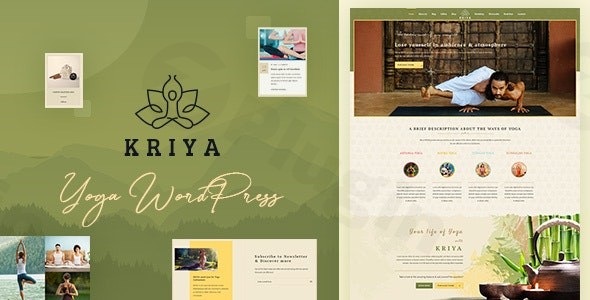
Transform Your Yoga Business with the Kriya Yoga WordPress Theme
The Kriya Yoga WordPress theme is a meticulously designed solution for yoga studios, meditation centers, and wellness practitioners aiming to establish a serene and highly functional online presence. Crafted by DesignThemes, a developer with extensive experience in the WordPress ecosystem, Kriya helps yoga instructors, asana experts, mental wellness coaches, and spiritual retreat centers create stunning websites with remarkable ease and a tranquil aesthetic.This theme is ideal for those who value both visual harmony and robust functionality, making it perfect for promoting various wellness practices, from traditional yoga and mindfulness to Ayurveda and holistic health. Its core design philosophy emphasizes peace and reflection, providing a calming digital platform that truly resonates with the spiritual and wellness community.
Key Features: Design, Layout & Performance
Kriya offers a comprehensive suite of features engineered to build visually appealing and highly effective wellness websites. Its strength lies in combining an intuitive user experience with deep customization capabilities, all while maintaining excellent performance.
Design & Layout Options
Kriya ensures your website looks impeccable on any device with its 100% responsive and mobile-friendly design. It provides a wealth of pre-designed templates and layout variations, including:
- Diverse Blog Styles: Choose from elegant list, grid, or masonry layouts to showcase your articles and insights.
- Flexible Product Views: Utilize grid and list views for your online store.
- Rich Header Options: Implement full-width, boxed, split, two-color, left-aligned, creative, or overlay headers, with full control over position and transparency. The sticky header feature ensures your navigation remains accessible as visitors scroll.
- Mega Menus: Create expansive, organized navigation menus to guide users through extensive content.
- Pre-built Templates: Jumpstart your site with professionally designed yoga and meditation templates and dozens of pre-made inner pages, all available through a convenient one-click demo import feature.
Customization Capabilities
Personalizing Kriya to match your unique brand identity is straightforward and intuitive.
- Serene Color Schemes: Kriya features a palette of calming colors, complemented by “infinite colors” options for limitless personalization.
- Spiritually Aligned Typography: Customize fonts and layouts to reflect your brand’s essence, ensuring readability and a peaceful visual flow.
- Strategic Spacing and Backgrounds: The design emphasizes ample white space, allowing your content and calls to action to breathe. Enhance sections with custom background overlays using images, gradients, or even video.
Specialized Modules & Unique Elements
What truly sets Kriya apart are its specialized modules tailored for the yoga and wellness niche:
- Poses Module: Showcase various yoga postures with detailed descriptions, imagery, and difficulty levels (beginner, intermediate, advanced). This is a game-changer for instructional content.
- Trainer Profiles: Introduce your instructors with professional photos, detailed biographies, and specialties.
- Course Management: Display your courses and workshops with organized pricing tables, dates, times, durations, prices, and ratings, often integrating a “Book Now” feature.
- Events Management: A robust system for scheduling and managing yoga classes, workshops, and retreats, complete with search and filter options for visitors.
- Services with Timeline: Visually present your services and their progression.
- Animated Sliders and Hover Effects: Engage visitors with dynamic visual elements that enhance the browsing experience.
Performance & SEO Readiness
Beyond aesthetics, Kriya is built for speed and visibility. It is designed with responsiveness and performance in mind, ensuring fast loading times and a seamless browsing experience across all devices. Kriya is also fully SEO optimized, helping to improve your website’s visibility and search engine ranking through clean code and a structured, fast-loading design. This commitment to performance ensures your peaceful online sanctuary is also easily discoverable by your target audience.
Installation & Demo Import Guide
Getting started with your Kriya Yoga WordPress theme is a straightforward process, even for beginners. Here’s a step-by-step guide:
- Install & Activate the Theme:
- First, ensure your WordPress installation meets the minimum requirements: WordPress 5.6 or higher (compatible with WordPress 6.5+), and PHP 7.2 or higher.
- From your WordPress dashboard, navigate to Appearance > Themes > Add New > Upload Theme.
- Choose the
kriya.zipfile (or the theme file provided by your vendor) and click Install Now. - Once installed, click Activate.
- Self-Correction: Ensure you’re installing the main theme, not a child theme, first. The child theme can be activated later for safe customizations.
- Install Required Companion Plugins:
- After activation, Kriya will likely prompt you to install a set of recommended and required plugins. These typically include popular page builders like Elementor or WPBakery Page Builder, Revolution Slider, LayerSlider WP, Contact Form 7, and the DesignThemes Core Features Plugin.
- Follow the on-screen prompts to install and activate these plugins. It’s crucial to install them for the theme’s full functionality.
- Use the One-Click Demo Import:
- Kriya features a one-click demo import to quickly set up your site with pre-built content and layouts.
- Navigate to the theme’s specific demo import section in your WordPress dashboard (often found under Appearance > Import Demo Data or a dedicated “DesignThemes” menu item).
- Select the demo you wish to import and initiate the process.
- Important Note: Demo imports can be resource-intensive. Ensure your server has sufficient memory (at least 128MB
memory_limit) and a reasonableupload_max_filesize(at least 64MB) to prevent timeouts or failed imports.
- What to Expect During/After Demo Import:
- The import process may take several minutes, depending on your hosting and the size of the demo content. Do not close your browser during this time.
- Upon successful completion, your website will resemble the chosen demo. This includes pre-built pages, posts, sample images, menu structures, and widget content.
- You may need to manually set your Homepage (Settings > Reading) and Menus (Appearance > Menus) to reflect the imported content, though the demo import usually handles this automatically.
Customization Guide: Branding & Layout
The Kriya theme offers extensive and intuitive customization options, empowering you to tailor your website to your unique brand without needing any coding knowledge.
- Utilizing the Theme Options Panel and WordPress Customizer:
- Kriya provides an advanced Theme Options Panel (often found under Appearance > Theme Options or a dedicated menu in your dashboard) and integrates seamlessly with the native WordPress Customizer (Appearance > Customize).
- These tools allow you to effortlessly adjust global styles, colors, typography, and layout settings.
- Explore the “infinite colors” options to precisely match your brand palette.
- Experiment with different header and footer styles, choosing from pre-set designs or leveraging Elementor’s Theme Builder for comprehensive visual design.
- Changing Colors, Fonts, and Logos:
- Within the Theme Options Panel or Customizer, you’ll find dedicated sections for Colors, Typography, and Logo/Favicon.
- Easily upload your brand logo, adjust font families, sizes, and weights to create a consistent visual identity.
- The theme’s design prioritizes a calming aesthetic, so consider serene and spiritual fonts and color combinations.
- Setting Up Homepage, Blog Page, and Menus:
- Homepage: After demo import, you might need to specify your homepage. Go to Settings > Reading and set your static front page.
- Blog Page: Similarly, designate a page for your blog posts under Settings > Reading.
- Menus: Navigate to Appearance > Menus to customize your primary navigation, footer menus, or any other menu locations supported by the theme. Kriya’s Mega Menus provide advanced capabilities for structuring complex navigation.
- Leveraging Page Builders (Elementor, WPBakery):
- Kriya integrates seamlessly with popular drag-and-drop page builders like Elementor and WPBakery Page Builder. This is where true layout flexibility shines.
- For any page, you can open it with Elementor or WPBakery to visually drag and drop elements, customize sections, and build complex layouts without touching a line of code.
- The theme comes packed with shortcodes (35+ for Elementor compatibility) for adding various elements like buttons, columns, call-to-action blocks, carousels, progress bars, and more, significantly speeding up content creation.
- For advanced users, Elementor’s Theme Builder allows for extensive customization of headers and footers, offering dynamic options for different pages or devices.
- Child Theme for Safe Customizations:
- The Kriya theme package typically includes a child theme. It is highly recommended to install and activate the child theme if you plan on making any custom CSS, PHP, or JavaScript modifications. This ensures your customizations are safe and won’t be overwritten when you update the parent theme.
FAQ & Troubleshooting
Here are answers to common questions about the Kriya Yoga WordPress theme:
Is Kriya compatible with Elementor / WPBakery / Gutenberg?
Yes, the Kriya Yoga WordPress theme integrates seamlessly with popular drag-and-drop page builders, including Elementor and WPBakery Page Builder (formerly Visual Composer). While its primary page-building integration is with these traditional builders, its general compatibility with recent WordPress versions (6.5+) implies basic support for the Block Editor (Gutenberg). You can leverage Elementor or WPBakery for advanced layout design.
Does Kriya support WooCommerce for online stores?
Absolutely! Kriya is fully compatible with WooCommerce, making it an excellent choice for selling yoga-related products, digital courses, class packages, memberships, or even booking services directly from your website. This integration allows you to establish a powerful e-commerce platform within your tranquil wellness site.
Does Kriya support child themes?
Yes, the Kriya theme package typically includes a child theme. Using a child theme is highly recommended for any custom modifications to your site’s code (CSS, functions, templates). This ensures that your customizations are preserved even when you update the main Kriya theme, preventing loss of work and ensuring a smooth update process.
How can I update the Kriya theme without losing my customizations?
If you’ve made customizations directly to the theme’s core files, they will be lost during an update. To safely update the Kriya theme, always ensure you are using a child theme for all your modifications. When an update is available, you can simply update the parent Kriya theme through your WordPress dashboard, and your child theme’s customizations will remain intact.
What should I do if the demo import fails or looks different from the demo site?
If the Kriya demo import fails, often indicated by a blank page or an error message, it’s usually due to server resource limitations. Check your server’s PHP memory limit (recommended at least 128MB) and maximum file upload size (at least 64MB). You might also need to increase the max_execution_time in your php.ini file. If the imported demo looks incomplete, ensure all required companion plugins were installed and activated before running the import. If issues persist, consult the theme’s official documentation or support channels.
Conclusion
The Kriya Yoga WordPress theme stands out as a premier choice for anyone in the yoga, meditation, or wellness industry seeking a website that truly embodies their values. Its meticulously crafted design exudes serenity and tranquility, creating an inviting online space for visitors.With an abundance of design flexibility, from responsive layouts and diverse header styles to infinite color options and spiritual typography, Kriya empowers users to build a visually captivating site. The theme’s specialized modules for yoga poses, trainer profiles, and robust event management make it exceptionally functional for its niche, reducing the need for custom development. Furthermore, Kriya’s seamless integration with Elementor and WPBakery Page Builder, coupled with full WooCommerce compatibility, ensures powerful content creation and e-commerce capabilities. Its dedication to performance and SEO readiness means your tranquil website will also be fast, visible, and easily discoverable.Kriya is an ideal choice for yoga studio owners, meditation coaches, wellness practitioners, and individual instructors who prioritize a professional, aesthetically pleasing, and highly functional online presence. Beginners will appreciate its intuitive customization tools and one-click demo import, while seasoned users will value its deep integration with popular WordPress plugins. If you’re looking to create an inspiring digital sanctuary for your wellness business, the Kriya Yoga WordPress theme offers a balanced and confident solution.
I. Download Limits & Account Benefits
- Free Downloads: Each email address receives 3 downloads per day for free products
- Upgrade Benefits: Purchase any paid product to increase your daily download limit by 3 for each paid product
- No Account Required: You can download immediately by receiving the download link via email
- Account Recommended: Create an account for easier access to your order history and direct update downloads
II. Understanding GPL vs Official Versions
Important: The products available on WPPick are GPL-licensed versions, which differ from official developer versions. Before purchasing, please read our comprehensive guide: Understanding GPL & Official Differences at WPPick
Key Points:
- GPL versions may not include premium support from original developers
- Updates may be delayed compared to official releases
- Some premium features might have limitations
- Always consider your specific needs and support requirements
III. Support & Assistance
We’re here to help through multiple channels:
- Email Support: Direct email assistance for all inquiries
- Live Chat: Real-time support during business hours
- Comprehensive Documentation: Detailed guides and tutorials
IV. Order Tracking
Access your complete purchase history and download links anytime: Order History
V. Account Access
New to WPPick? Login or Create Account to manage your downloads and orders efficiently.
VI. Refund Protection
We stand behind our products with a clear refund policy. Review our terms: Refund Policy
VII. Privacy & Security
Your data security is our priority. Learn how we protect your information: Privacy Policy
VII. Terms of Service
Understanding our service terms ensures a smooth experience: Terms of Use
Quick Tips for Best Experience
- Verify Compatibility: Check plugin/theme compatibility with your WordPress version
- Backup First: Always backup your site before installing new plugins or themes
- Test Environment: Consider testing on a staging site first
- Stay Updated: Regularly check for updates in your account dashboard
- Read Documentation: Review any included documentation for optimal setup
Need Help?
If you have questions about downloads, licensing, or need technical assistance, don’t hesitate to contact our support team. We’re committed to ensuring you have the best possible experience with WPPick products.
Ready to get started? Your download adventure begins with just one click!
- Security Issues Fixed
- Text Domains Warnings issue