

Leedo – Modern, Colorful & Creative Portfolio WordPress Theme
/Year
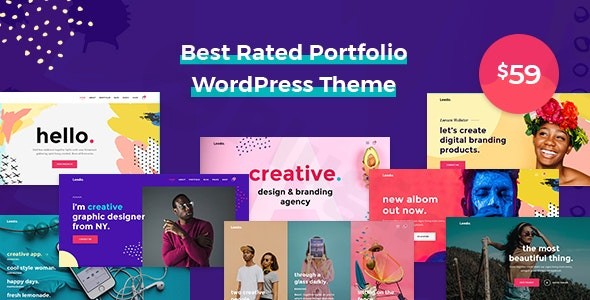
In the crowded landscape of web design, standing out requires more than just a functional website; it demands a visual identity that captures attention instantly. The Leedo WordPress theme is a premier choice for creative professionals who want to move away from muted, corporate layouts and embrace a vibrant, high-energy aesthetic. As a modern colorful portfolio WordPress theme, Leedo is engineered specifically for artists, design agencies, and freelancers who need their work to be the center of attention.Whether you are building a personal brand or a full-scale creative studio, Leedo provides a sophisticated toolkit that balances bold design philosophy with the technical robustness required for high-performance SEO and user experience.
Key Features: Design, Layout & Performance
Leedo isn’t just a theme; it is a comprehensive design system. It is built on a foundation of modern frameworks like HTML5, CSS3, and jQuery, ensuring that your site remains fast and fluid despite its rich visual elements.
1. Diverse Layout Options
Leedo offers an impressive variety of starting points to jumpstart your project:
- 12 Unique Homepage Layouts: From minimalist grids to interactive parallax showcases.
- 25+ Complete Website Demos: Ready-to-use templates for various niches including galleries, video portfolios, and creative blogs.
- Portfolio Versatility: Multiple portfolio layouts allow you to showcase projects using different grid styles, masonry layouts, or full-screen sliders.
2. Deep Customization Capabilities
The theme empowers users to maintain full brand consistency without touching a single line of code:
- Unlimited Color Options: You aren’t tied to a specific palette. The Live Customizer allows you to tweak every hue to match your brand’s personality.
- Advanced Typography: With integration for Google Fonts and access to over 2,000 premium fonts, your site’s typography will be as unique as your portfolio.
- Responsive & Retina-Ready: Your work will look razor-sharp on everything from 5K monitors to the latest mobile devices, ensuring a flawless user experience (UX) across all screens.
3. Performance and SEO Readiness
Is Leedo theme SEO friendly? Yes. Beyond its looks, Leedo is coded with “extreme functionality and speed” in mind. The clean markup and structured heading hierarchy provide a solid foundation for search engines. It is fully compatible with popular SEO plugins, ensuring your creative work is discoverable by potential clients and AI search engines alike.
Installation & Demo Import: A Step-by-Step Guide
Getting your site up and running with Leedo is straightforward, thanks to the included Theme Setup Wizard.
- Install & Activate: Upload the
leedo.zipfile via your WordPress Dashboard (Appearance > Themes > Add New).- Pro Tip: Ensure you are uploading only the installable theme file and not the entire “All files and documentation” package to avoid the common “Missing Stylesheet” error.
- Required Plugins: Upon activation, the theme will prompt you to install companion plugins, including WPBakery Page Builder and VLThemes Requirements.
- One-Click Demo Import: Navigate to the theme’s setup wizard. Here, you can select your preferred demo. The importer will bring in menus, widgets, and sample pages to give you a perfect replica of the live demo.
- Final Checks: After the import, check your menus and permalinks to ensure everything is routing correctly.
Customization Guide: Personalizing Your Brand
Once the demo is imported, the real fun begins. Personalizing the creative portfolio theme for WordPress is handled through two primary interfaces:
The WordPress Live Customizer
For global changes—such as logos, primary brand colors, and typography settings—the Live Customizer is your best friend. It provides a real-time preview, so you can see exactly how a new font or header style affects your layout before hitting “Publish.”
Drag-and-Drop Building
Leedo is built to be flexible. It comes bundled with WPBakery Page Builder and features over 200 custom shortcodes. This allows you to build complex, multi-column layouts simply by dragging elements into place. Additionally, Leedo is Gutenberg-ready, meaning it works perfectly with the native WordPress block editor and enhanced block styles for those who prefer a more modern, lightweight editing experience.
FAQ & Troubleshooting
What page builders are compatible with Leedo theme?
Leedo is primarily optimized for WPBakery Page Builder and includes over 200 specific shortcodes for it. However, it also offers Elementor widgets and is fully compatible with the Gutenberg (Block) Editor, giving you multiple ways to build your pages.
Does Leedo theme support WooCommerce compatibility?
Absolutely. Leedo is WooCommerce-ready, making it an excellent choice for artists who want to sell digital prints, physical products, or design services directly through their portfolio site.
Does it support child themes?
Yes, Leedo is child-theme ready. We highly recommend using a child theme for any custom CSS or PHP modifications to ensure your changes aren’t lost during future theme updates.
How do I handle plugin updates?
Leedo bundles premium plugins like WPBakery. While these are included for free, they are updated through theme updates. If you require automatic, standalone updates for those plugins, you would need to purchase individual licenses from the plugin developers.
Conclusion: Is Leedo Right for You?
The Leedo WordPress theme is a standout choice for anyone in the creative industry. Its blend of high-energy design, extensive customization, and technical SEO optimization makes it more than just a template—it’s a powerful marketing tool.Ideal for:
- Creative Agencies wanting a vibrant, modern look.
- Freelance Designers and Artists who need a retina-ready portfolio.
- Photographers looking for unique gallery layouts.
- Small businesses that want to differentiate themselves through bold color and typography.While it has a slight learning curve for those unfamiliar with WPBakery, its One-Click Demo Import and intuitive Theme Setup Wizard make it accessible for beginners. If you want a portfolio that is as creative as the work it holds, Leedo is a top-tier contender. Ready to build your masterpiece? Explore more theme guides and WordPress tips at wppick.com.
I. Download Limits & Account Benefits
- Free Downloads: Each email address receives 3 downloads per day for free products
- Upgrade Benefits: Purchase any paid product to increase your daily download limit by 3 for each paid product
- No Account Required: You can download immediately by receiving the download link via email
- Account Recommended: Create an account for easier access to your order history and direct update downloads
II. Understanding GPL vs Official Versions
Important: The products available on WPPick are GPL-licensed versions, which differ from official developer versions. Before purchasing, please read our comprehensive guide: Understanding GPL & Official Differences at WPPick
Key Points:
- GPL versions may not include premium support from original developers
- Updates may be delayed compared to official releases
- Some premium features might have limitations
- Always consider your specific needs and support requirements
III. Support & Assistance
We’re here to help through multiple channels:
- Email Support: Direct email assistance for all inquiries
- Live Chat: Real-time support during business hours
- Comprehensive Documentation: Detailed guides and tutorials
IV. Order Tracking
Access your complete purchase history and download links anytime: Order History
V. Account Access
New to WPPick? Login or Create Account to manage your downloads and orders efficiently.
VI. Refund Protection
We stand behind our products with a clear refund policy. Review our terms: Refund Policy
VII. Privacy & Security
Your data security is our priority. Learn how we protect your information: Privacy Policy
VII. Terms of Service
Understanding our service terms ensures a smooth experience: Terms of Use
Quick Tips for Best Experience
- Verify Compatibility: Check plugin/theme compatibility with your WordPress version
- Backup First: Always backup your site before installing new plugins or themes
- Test Environment: Consider testing on a staging site first
- Stay Updated: Regularly check for updates in your account dashboard
- Read Documentation: Review any included documentation for optimal setup
Need Help?
If you have questions about downloads, licensing, or need technical assistance, don’t hesitate to contact our support team. We’re committed to ensuring you have the best possible experience with WPPick products.
Ready to get started? Your download adventure begins with just one click!
- This is major update. Do not upload or install the leedo-3.0.0.zip file directly into your current Leedo 2 website.
- Added Elementor page builder
- Added Powerful Framework
- Added Theme Dashboard
- Updated Demo Content
- Changed Refactor all core code
- Changed Reduce and optimize asset size.
- Removed Unnecessary dependencies
- Updated All Vendors
- Updated All Premium Plugins