

Lonyo – Software, Saas & Startup WordPress Theme
/Year
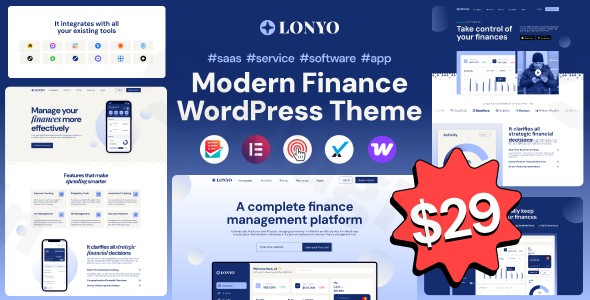
In the competitive world of technology, your website is often the first interaction a potential customer has with your brand. The Lonyo WordPress theme is a professionally designed, high-performance solution specifically crafted for software companies, SaaS providers, and tech startups. With its focus on clean aesthetics and conversion-driven layouts, Lonyo helps small teams appear established and authoritative from day one.Whether you are launching a new mobile app or scaling a B2B platform, this SaaS WordPress theme provides the visual hierarchy and technical foundation needed to turn visitors into trial users.
Key Features: Design, Layout & Performance
Lonyo isn’t just a generic template; it is a specialized toolkit for the tech sector. Its design philosophy centers on “guided reading”—using whitespace and bold typography to lead users through the narrative of your product.
Sophisticated Design & Layout Options
The theme offers a 100% fluid responsive design, ensuring your site looks “pixel-perfect” on everything from 4K monitors to the latest smartphones.
- 5 Complete Homepage Designs: Choose from distinct layouts tailored for different tech niches (e.g., App Landing, SaaS Dashboard, Startup Corporate).
- 20+ Inner Pages: Pre-built templates for “About Us,” “Pricing,” “Features,” and “Contact” mean you don’t have to build from scratch.
- Visual Hierarchy: The theme uses calm color blocks and generous spacing to highlight your Call-to-Action (CTA) buttons and key value propositions.
Advanced Customization Capabilities
While Lonyo looks great out of the box, it is highly flexible for brand alignment:
- Elementor Integration: As an Elementor compatible SaaS theme, Lonyo allows for real-time, drag-and-drop editing without touching a single line of code.
- Header & Footer Builders: You aren’t stuck with a single layout. Use the dedicated builders to create custom navigation menus and information-rich footers.
- Typography & Colors: With support for over 600 Google Fonts and an Advanced Admin Panel, you can match your brand’s style guide with a few clicks.
Performance & SEO Optimization
Search engines and AI answer engines value speed and structure. Lonyo is built with clean code that promotes “rocket fast” installation and rapid page load times. Its mobile-first approach and optimized markup provide a strong foundation for your SEO strategy, helping you rank for competitive keywords in the tech space.
Installation & Demo Import
Setting up your software WordPress theme is designed to be a frictionless experience. Follow these steps to get started:
- Install & Activate: Upload the Lonyo theme files via
Appearance > Themesin your WordPress dashboard and activate it. - Install Required Plugins: Upon activation, Lonyo will prompt you to install essential companion plugins, including Elementor and MetForm (for custom contact forms).
- One-Click Demo Import: Navigate to the theme options and use the One-Click Demo Import feature. This will populate your site with the demo’s images, menus, and page layouts.
- Verification: After the import, check your menus and widgets to ensure they match your preferred homepage style. Pro Tip: Ensure your hosting environment has sufficient memory (at least 256MB) to avoid timeouts during the demo data import process.
Customization Guide: Branding & Layout
Once the demo is imported, personalizing Lonyo to fit your startup’s identity is intuitive.
Setting Up Your Brand Identity
Head to the Advanced Admin Panel to upload your logo and set your global color palette. Because Lonyo uses a “calm block” design philosophy, changing the primary accent color will instantly transform the “feel” of the entire site—from a professional corporate blue to a high-energy startup orange.
Building Pages with Elementor
Since Lonyo is fully optimized for Elementor, you can edit any section by clicking “Edit with Elementor.” You can easily swap out the premium demo images for your own product screenshots. The theme also includes support for MetForm, allowing you to create complex lead-generation forms that look seamless within your design.
Expanding into eCommerce
As of version 1.0.1 (released July 12, 2025), Lonyo theme WooCommerce compatibility is fully supported. This means you can sell digital subscriptions, software licenses, or physical merchandise directly from your SaaS website.
FAQ & Troubleshooting
Is Lonyo compatible with Elementor?
Yes, Lonyo is a fully Elementor compatible SaaS theme. It uses Elementor as its primary drag-and-drop frontend editor, making it easy for users with no coding skills to build and customize pages.
Does Lonyo support WooCommerce?
Yes. Starting from version 1.0.1, Lonyo includes full support for WooCommerce, allowing you to integrate an online store or subscription billing directly into your tech site.
Can I use a child theme with Lonyo?
Absolutely. A child theme is included in the package. We recommend activating the child theme before making any CSS or functional changes to ensure your customizations are preserved during future theme updates.
What should I do if the demo import fails?
Most demo import issues are related to server limits. Ensure your PHP max_execution_time is set to at least 300 and your memory_limit is 256M or higher. If the problem persists, check the documentation provided by AEThemes.
Conclusion
The Lonyo WordPress theme is a top-tier choice for any tech-focused business looking for a balance between high-end design and ease of use. Its focus on visual hierarchy and clean, modern blocks makes it arguably the best WordPress theme for tech startups that need to look professional immediately.With its Elementor integration, WooCommerce support, and “rocket fast” performance, Lonyo provides the flexibility that agencies need and the simplicity that beginners crave. If you want a website that communicates confidence and drives conversions, Lonyo is a powerful investment for your SaaS or software brand.For more WordPress theme reviews and tutorials, visit wppick.com.
I. Download Limits & Account Benefits
- Free Downloads: Each email address receives 3 downloads per day for free products
- Upgrade Benefits: Purchase any paid product to increase your daily download limit by 3 for each paid product
- No Account Required: You can download immediately by receiving the download link via email
- Account Recommended: Create an account for easier access to your order history and direct update downloads
II. Understanding GPL vs Official Versions
Important: The products available on WPPick are GPL-licensed versions, which differ from official developer versions. Before purchasing, please read our comprehensive guide: Understanding GPL & Official Differences at WPPick
Key Points:
- GPL versions may not include premium support from original developers
- Updates may be delayed compared to official releases
- Some premium features might have limitations
- Always consider your specific needs and support requirements
III. Support & Assistance
We’re here to help through multiple channels:
- Email Support: Direct email assistance for all inquiries
- Live Chat: Real-time support during business hours
- Comprehensive Documentation: Detailed guides and tutorials
IV. Order Tracking
Access your complete purchase history and download links anytime: Order History
V. Account Access
New to WPPick? Login or Create Account to manage your downloads and orders efficiently.
VI. Refund Protection
We stand behind our products with a clear refund policy. Review our terms: Refund Policy
VII. Privacy & Security
Your data security is our priority. Learn how we protect your information: Privacy Policy
VII. Terms of Service
Understanding our service terms ensures a smooth experience: Terms of Use
Quick Tips for Best Experience
- Verify Compatibility: Check plugin/theme compatibility with your WordPress version
- Backup First: Always backup your site before installing new plugins or themes
- Test Environment: Consider testing on a staging site first
- Stay Updated: Regularly check for updates in your account dashboard
- Read Documentation: Review any included documentation for optimal setup
Need Help?
If you have questions about downloads, licensing, or need technical assistance, don’t hesitate to contact our support team. We’re committed to ensuring you have the best possible experience with WPPick products.
Ready to get started? Your download adventure begins with just one click!