

Lumi – Tech Startup WordPress Theme
/Year
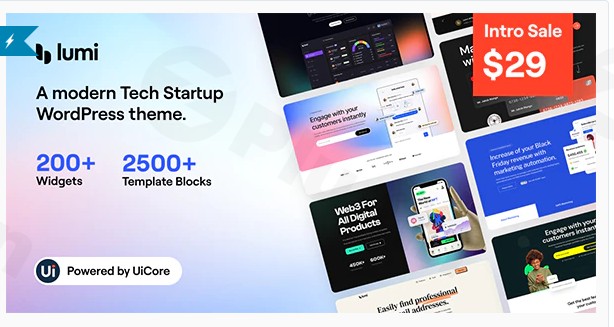
Building a digital presence for a high-growth company requires a website that balances technical sophistication with user-centric design. The Lumi Tech Startup WordPress Theme is a premium solution specifically engineered for SaaS companies, software developers, and digital agencies that need to project authority and innovation. With its clean aesthetic and robust feature set, Lumi streamlines the path from installation to a fully functional, high-conversion website.
In this guide, we will explore the design capabilities, performance metrics, and step-by-step setup process for the Lumi Tech Startup WordPress Theme to help you decide if it’s the right fit for your next project.
Key Features: Design, Layout & Performance
The Lumi Tech Startup WordPress Theme is built on the philosophy that a tech website should be as fast and efficient as the software it promotes. It moves away from “bloated” multipurpose frameworks, focusing instead on the specific needs of the tech industry.
Modern Design & Layout Options
Lumi offers a variety of layout configurations designed to showcase complex technical information in an easy-to-digest format.
- Niche-Specific Demos: The theme includes several pre-built starter sites tailored for SaaS, App Landings, IT Services, and AI startups.
- Visual Hierarchy: The design utilizes generous whitespace, bold typography, and a strategic color system to guide users toward call-to-action (CTA) buttons.
- Flexible Grids: Whether you need a full-width landing page or a structured grid for service listings, Lumi’s layout engine handles it with pixel-perfect precision.
Customization Capabilities
Personalizing Lumi to match your corporate branding is intuitive, even for those without deep coding knowledge.
- Header & Footer Builder: Most versions of Lumi come with a drag-and-drop builder, allowing you to create sticky headers, mega menus, and information-rich footers.
- Global Style Settings: Change your entire site’s primary color, font family, and button styling from a single central panel.
- Elementor Integration: As an Elementor-optimized theme, Lumi provides custom-built widgets specifically designed for tech showcases, such as pricing tables, feature lists with icons, and testimonial carousels.
Performance & SEO Readiness
In the competitive tech space, speed is a ranking factor. Lumi is optimized for high performance:
- Clean Markup: The theme follows WordPress coding standards, ensuring it is lightweight and compatible with caching plugins like WP Rocket.
- Mobile-First Responsive Design: Every element scales perfectly across desktops, tablets, and smartphones.
* SEO Optimized: With built-in support for schema markup and breadcrumbs, the Lumi Tech Startup WordPress Theme provides a solid foundation for your search engine rankings.
Installation & Demo Import
Setting up Lumi is a straightforward process designed to get your site live in minutes rather than hours.
- Install & Activate: Upload the
lumi.zipfile via Appearance > Themes > Add New in your WordPress dashboard. Once uploaded, click Activate. - Install Required Plugins: Upon activation, a prompt will appear asking you to install necessary companion plugins (typically Elementor, a Demo Importer, and Contact Form 7). Install and activate these in bulk.
- One-Click Demo Import: Navigate to the theme options or the “Import Demo Data” section. Choose your preferred startup layout and click Import.
- Pro Tip: Ensure your hosting environment has a PHP memory limit of at least 256M to prevent timeouts during the import of high-resolution images.
4. Final Review: Once the process is complete, check your menus, widgets, and homepage settings to ensure everything looks like the preview.
Customization Guide: Branding & Layout
Once the demo is imported, you can begin tailoring the Lumi Tech Startup WordPress Theme to your brand’s unique identity.
Customizing the Header & Logo
Navigate to Appearance > Customize. Here, you can upload your SVG or PNG logo. You can also toggle between different header styles—such as transparent headers for hero sections or solid headers for blog posts—ensuring your navigation is always visible and functional.
Typography and Colors
Lumi provides deep integration with Google Fonts. You can set different font weights and sizes for H1-H6 tags to create a strong visual hierarchy. Use the global color palette to apply your brand colors to buttons, links, and background overlays instantly.
Building Pages with Elementor
Since Lumi is built for Elementor, you can edit any page by clicking “Edit with Elementor.” You will find a library of “Lumi Elements” which are pre-styled blocks like “Process Steps,” “Tech Stack Icons,” and “Case Study Sliders.” Simply drag these onto your canvas to build custom layouts without writing a single line of CSS.
FAQ & Troubleshooting
Is the Lumi Tech Startup WordPress Theme compatible with Elementor?
Yes, Lumi is fully optimized for the Elementor Page Builder. It includes a custom set of Elementor addons specifically designed for tech and SaaS websites, making it easy to create complex layouts visually.
Does Lumi support WooCommerce for selling digital products?
Lumi is WooCommerce-ready. You can easily set up an online storefront to sell software licenses, digital downloads, or subscription-based services directly through your website.
Does it support child themes?
Yes, the Lumi theme package typically includes a child theme. It is highly recommended to install and activate the child theme before making any code-level customizations to ensure your changes are not lost during theme updates.
What should I do if the demo import fails?
Most demo import issues are caused by server limitations. Ensure your max_execution_time is set to 300 and your memory_limit is at least 256M. If the import still fails, check the “System Status” tab in the theme options to identify missing requirements.
Conclusion
The Lumi Tech Startup WordPress Theme stands out as a top-tier choice for any modern tech entity. Its blend of aesthetic minimalism and functional power makes it ideal for agencies and SaaS founders who need a professional site that doesn’t sacrifice performance for beauty.By leveraging its Elementor integration and one-click demo import, you can drastically reduce your development time. Whether you are launching a new app or rebranding an established IT firm, Lumi provides the design flexibility and SEO-ready structure needed to succeed in a digital-first market.For more WordPress theme reviews and tutorials, visit wppick.com.
I. Download Limits & Account Benefits
- Free Downloads: Each email address receives 3 downloads per day for free products
- Upgrade Benefits: Purchase any paid product to increase your daily download limit by 3 for each paid product
- No Account Required: You can download immediately by receiving the download link via email
- Account Recommended: Create an account for easier access to your order history and direct update downloads
II. Understanding GPL vs Official Versions
Important: The products available on WPPick are GPL-licensed versions, which differ from official developer versions. Before purchasing, please read our comprehensive guide: Understanding GPL & Official Differences at WPPick
Key Points:
- GPL versions may not include premium support from original developers
- Updates may be delayed compared to official releases
- Some premium features might have limitations
- Always consider your specific needs and support requirements
III. Support & Assistance
We’re here to help through multiple channels:
- Email Support: Direct email assistance for all inquiries
- Live Chat: Real-time support during business hours
- Comprehensive Documentation: Detailed guides and tutorials
IV. Order Tracking
Access your complete purchase history and download links anytime: Order History
V. Account Access
New to WPPick? Login or Create Account to manage your downloads and orders efficiently.
VI. Refund Protection
We stand behind our products with a clear refund policy. Review our terms: Refund Policy
VII. Privacy & Security
Your data security is our priority. Learn how we protect your information: Privacy Policy
VII. Terms of Service
Understanding our service terms ensures a smooth experience: Terms of Use
Quick Tips for Best Experience
- Verify Compatibility: Check plugin/theme compatibility with your WordPress version
- Backup First: Always backup your site before installing new plugins or themes
- Test Environment: Consider testing on a staging site first
- Stay Updated: Regularly check for updates in your account dashboard
- Read Documentation: Review any included documentation for optimal setup
Need Help?
If you have questions about downloads, licensing, or need technical assistance, don’t hesitate to contact our support team. We’re committed to ensuring you have the best possible experience with WPPick products.
Ready to get started? Your download adventure begins with just one click!
- Fixed top spacing issue on first options in theme option pages
- Sidecart and Ajax add to cart now work properly with limited stock and related products
- Resolved multiple Sticky header issues across various header layouts and settings
- Corrected pill style layout issues with different header combinations
- Fixed Submenu Dropdown Animation Scale BG style problems in certain header layouts
- Dropdown Menu Trigger click now works correctly with Scale BG animation
- Menu Hover Interaction magnet button now functions properly across all header layouts and conditions
- White Label themes now download child theme correctly
- Blog post list typography now styled properly in single post content
- Category meta font size on mobile devices now displays correctly
- Single blog post meta separators no longer missing or duplicated
- Product categories now properly assigned when importing demos with products
- WooCommerce styles no longer override theme styles for add to cart buttons in Uicore Elements product widgets
- Theme blog post color style no longer affects Elementor text widget styles in single post editing
- Blog Post Typography responsive issues with line-height and letter-spacing resolved
- Mega Menu width now displays correctly in all pill style and header layout combinations
- Demo import process now properly installs required plugins on fresh sites
- Product License no longer disconnects during demo import
- Reduced remove button interaction area for Global Colors to prevent accidental clicks
- Disabled simultaneous use of Button/Magnet Button hover interaction and Highlight Current page
- Removed unwanted bottom spacing on Elementor icons
- Redesigned widget carousels. Navigation is now disabled when slides are fewer than the slides-per-view setting, creating a grid layout
- Added editor warning when using loop and centered slides with an even number of slides, as this particular combination requires more slides to work correctly
- Resolved a security vulnerability in the Accordion widget
- Corrected APG widget hover color appearing in normal states
- Fixed errors from Highlighted Text widget when SVG stroke was missing
- Entrance animation on Icon Box readmore button no longer removes hover transitions
- Fixed Advanced Product Grid query issue where Item Limit was being ignored
- Added Terms Filter
- Added Post Terms ACF, Post Terms Meta, and Post Terms Description blocks
- Added drag-and-drop support for Repeater items
- Added Invert option for Shape Divider
- Added notice when a form action is not set
- Fixed Shape Divider adding extra space in Container when nested containers are used
- Fixed Composed Icon Grid / Carousel behavior when a Button link is used
- Fixed Product Price extra class issue
- Fixed Post Terms special character rendering
- Fixed Tutor LMS custom field used in Post Field not showing in Query Loop
- Fixed Custom Mask image not showing in Mask Controller
- Fixed Gallery Image transition opacity issue on image wrapper
- Fixed Button target Lightbox selection not being preserved
- Fixed Input Select background color
- Fixed textarea rows setting not working correctly
- Removed default placeholder value and added Placeholder attribute
- Display select option label in email notifications
- Added default ID for form fields
- Fixed saving styles/fonts/assets (Product Title & Product Price fonts not applied in frontend)
- Fixed Advanced Form Columns when adding a new form (template attributes syncParent issue)
- Animated Backgrounds were overflowing the container spaces for Uicore Blocks
- The default Animation Style was not working
- New custom global colors sync both ways with Elementor
- Footer styling issues on non-Elementor pages