
Lusion – Multipurpose Ecommerce WordPress Theme
/Year
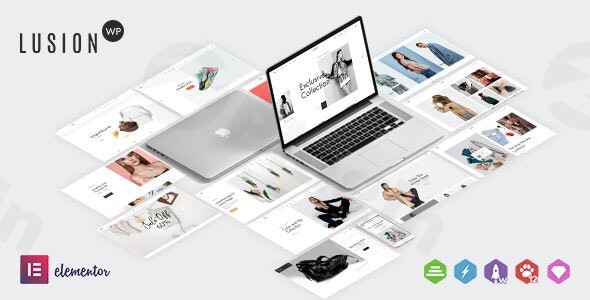
The digital storefront is your business’s most crucial asset, and choosing the right foundation is paramount. The Lusion Multipurpose eCommerce WordPress Theme emerges as a powerful and flexible solution for anyone looking to create a stunning and high-converting online store. Designed with a clean, modern aesthetic and a mobile-first approach, Lusion is ideal for budding entrepreneurs, established businesses, and agencies who demand extensive customization without writing a single line of code.
Key Features: Design, Layout & Performance for a Seamless Online Experience
Lusion is engineered to provide a professional and visually captivating online presence. It seamlessly blends robust design capabilities with essential performance and SEO features, ensuring your store looks great and performs optimally.
Design & Layout Options: Crafting a Unique Visual Identity
Lusion prioritizes visual appeal and user experience, offering a wealth of design and layout options to make your products shine.
- Responsive and Retina-Ready Design: Your store will look flawless on any device, from the latest high-resolution desktops to smartphones and tablets. Lusion’s responsive design guarantees a perfect shopping experience regardless of screen size.
- Multiple Pre-Built Demos: Kickstart your project with ease using Lusion’s pre-built demos tailored for various niches. These quick-start templates include full-page designs, an elements library, and pre-made sections for homepages, product pages, service pages, blogs, portfolios, and contact pages. The one-click demo import feature allows you to replicate these layouts, pages, posts, sliders, widgets, and theme options effortlessly.
- Flexible Header & Footer Layouts: Lusion provides over 9 pre-configured header layouts and customizable footer options, allowing you to fine-tune your store’s aesthetics and navigation.
- Beautiful Blog Layouts: Beyond eCommerce, Lusion offers appealing listing and grid layouts for blogging, perfect for content marketing and connecting with your audience.
Customization Capabilities: Unleash Your Brand’s Creativity
The strength of the Elementor Lusion theme lies in its deep integration with the Elementor Page Builder, providing an intuitive drag-and-drop interface for comprehensive customization.
- Elementor Page Builder Integration: Effortlessly design and customize any section of your site from the front-end, seeing your changes in real-time. This visual builder empowers users to create complex layouts and engaging content without coding.
- Unlimited Color Options & Pre-Defined Schemes: Match your brand’s identity perfectly with an extensive color picker and over 20 pre-defined color schemes.
- Typography Control with Google Fonts: Personalize your store’s look with access to over 800 Google Fonts, ensuring a unique and readable typography style.
- Granular Spacing and Background Settings: While global styles are managed through the powerful options panel, Elementor’s advanced options allow for precise control over margins, padding, and background settings (classic or gradient).
- Powerful Options Panel: Beyond Elementor, the theme features a comprehensive options panel for effortless global customization.
Performance & SEO Features: Built for Speed and Visibility
In the competitive online landscape, speed and search engine visibility are crucial. Lusion is built with performance and Lusion theme SEO friendly practices in mind.
- Fast-Loading Pages: The theme is designed to be lightweight and high-performing, ensuring a smooth user experience and reducing bounce rates. This focus on speed contributes positively to search engine rankings.
- SEO-Friendly Structure: Lusion incorporates semantic HTML/CSS, which helps search engines understand your content better, improving your potential for higher rankings.
- Mobile-Optimized: A fully responsive design is a key SEO factor, ensuring your site is accessible and user-friendly across all devices.
Installation & Demo Import: Get Your Store Up and Running Fast
Getting started with the Lusion theme is designed to be straightforward, even for those new to WordPress. The Lusion theme installation guide outlines a clear path to setting up your new online store.
- Install & Activate the Theme:
- Once you’ve downloaded the Lusion theme package, log in to your WordPress dashboard.
- Navigate to
Appearance > Themes > Add New > Upload Theme. - Choose the
lusion.zipfile (or the theme file within the main download package) and clickInstall Now. - After installation, click
Activateto make Lusion your active theme.
- Install Required Companion Plugins:
- Upon activation, Lusion will likely prompt you to install a set of recommended plugins. These typically include the Elementor Page Builder and WooCommerce, which are essential for the theme’s full functionality and eCommerce capabilities. Install and activate all suggested plugins.
- Use the One-Click Demo Import:
- This is where the magic happens for replicating the stunning demo sites. Look for an option like
Appearance > Import Demo DataorLusion Options > Demo Importin your WordPress dashboard. - Select the demo that best fits your vision and initiate the one-click import process.
- This is where the magic happens for replicating the stunning demo sites. Look for an option like
- What to Expect During/After Demo Import:
- The Lusion theme demo import will populate your site with pre-designed pages, posts, sliders, widgets, menus, and theme options, closely replicating the chosen demo.
- Important Tip: Demo imports can be resource-intensive. Ensure your hosting environment meets the recommended PHP configuration limits (
max_execution_time 180,memory_limit 128M,post_max_size 32M,upload_max_filesize 32M) to prevent timeouts or incomplete imports. If you encounter issues, contact your host to adjust these settings.After a successful import, you’ll have a fully structured website, ready for you to personalize with your own content and products.
Customization Guide: Branding Your Lusion eCommerce Store
How to customize Lusion WordPress theme is where your brand truly comes to life. With Elementor and Lusion’s powerful options, personalization is intuitive and flexible.
- Harnessing the Power of Elementor:
- For page-specific layouts and content, navigate to the page you want to edit and click
Edit with Elementor. - Use Elementor’s drag-and-drop interface to add sections, columns, and widgets. You can customize element colors, typography, spacing, and backgrounds directly within the Elementor panel.
- For page-specific layouts and content, navigate to the page you want to edit and click
- Global Styling with the Theme Options Panel:
- Lusion features a powerful theme options panel (often found under
Appearance > Customizeor a dedicatedLusion Optionsmenu item in your dashboard). - Here, you can control global settings such as:
- Colors: Easily change primary, secondary, and accent colors with a color picker, or switch between the 20+ pre-defined color schemes.
- Typography: Set your global font styles, sizes, and line heights, utilizing the vast Google Fonts library.
- Logo & Favicon: Upload your brand logo and favicon to maintain consistent branding across your site.
- Header & Footer Layouts: Select from the multiple pre-configured header and footer layouts and customize their elements.
- Lusion features a powerful theme options panel (often found under
- Setting Up Your Homepage and Blog Page:
- After demo import, your homepage should be pre-set. If not, go to
Settings > Readingand select your desired page as the “Homepage.” Do the same for your “Posts page” if you plan to have a blog.
- After demo import, your homepage should be pre-set. If not, go to
- Configuring Menus:
- Navigate to
Appearance > Menus. Here you can create and manage your navigation menus, assigning them to the various menu locations provided by Lusion (e.g., primary menu, footer menu).
- Navigate to
- Adding Custom CSS:
- For advanced styling, Lusion (via Elementor’s Custom CSS tab or the WordPress Customizer’s Additional CSS section) allows you to add your own CSS code without modifying core theme files, ensuring your customizations are safe during updates.
FAQ & Troubleshooting
Here are answers to some common questions about the Lusion Multipurpose eCommerce WordPress Theme:
Is Lusion compatible with Elementor / Gutenberg?
Yes, Lusion is fully compatible with Elementor Page Builder, offering deep integration for drag-and-drop customization. While its primary focus is Elementor, it adheres to WordPress standards, so basic content editing using the Gutenberg block editor should also function without issues.
Does Lusion support WooCommerce for online stores?
Absolutely. Lusion theme for WooCommerce is fully optimized and integrated, providing all the necessary tools and design elements to create a powerful online store, manage products, process orders, and convert visitors into customers.
What are the minimum requirements for Lusion?
To ensure Lusion runs smoothly, you’ll need WordPress 5.0 or higher, PHP 7.0 or higher, and MySQL 5.7 or higher. Recommended PHP configuration limits include max_execution_time 180, memory_limit 128M, post_max_size 32M, and upload_max_filesize 32M.
How can I import a demo in Lusion?
To import a demo in Lusion, navigate to your WordPress dashboard, typically under Appearance > Import Demo Data or a dedicated Lusion Options > Demo Import menu. Select your desired demo and click to initiate the one-click demo import process. Ensure your server resources meet the recommended specifications for a successful import.
Does Lusion support child themes?
While not explicitly detailed in the provided documentation, Lusion is a premium WordPress theme by a reputable author, making child theme compatibility a standard practice for well-developed themes. Using a child theme is highly recommended for making custom code modifications to ensure they are not overwritten during theme updates.
How does Lusion support multilingual websites?
Lusion boasts seamless compatibility with WPML (WordPress Multilingual Plugin), making it an excellent choice for creating multilingual websites. It also offers excellent RTL (Right-to-Left) support for languages written from right to left.
Conclusion: Is Lusion the Right Choice for Your eCommerce Venture?
The Lusion Multipurpose eCommerce WordPress Theme stands out as a robust, flexible, and visually appealing solution for anyone serious about building a successful online store. Its deep integration with Elementor, comprehensive customization options, and full Lusion theme for WooCommerce support make it incredibly powerful for shop owners, online retailers, and even agencies building client sites.From its responsive, Retina-ready design and pre-built demos to its focus on performance and SEO, Lusion provides an excellent foundation. While its powerful features mean there might be a slight learning curve for complete beginners, the intuitive Elementor interface significantly flattens this. For businesses of all sizes looking for a modern, high-converting, and customizable eCommerce presence, Lusion is a confident and capable choice that helps you focus on growth, not technical hurdles.
I. Download Limits & Account Benefits
- Free Downloads: Each email address receives 3 downloads per day for free products
- Upgrade Benefits: Purchase any paid product to increase your daily download limit by 3 for each paid product
- No Account Required: You can download immediately by receiving the download link via email
- Account Recommended: Create an account for easier access to your order history and direct update downloads
II. Understanding GPL vs Official Versions
Important: The products available on WPPick are GPL-licensed versions, which differ from official developer versions. Before purchasing, please read our comprehensive guide: Understanding GPL & Official Differences at WPPick
Key Points:
- GPL versions may not include premium support from original developers
- Updates may be delayed compared to official releases
- Some premium features might have limitations
- Always consider your specific needs and support requirements
III. Support & Assistance
We’re here to help through multiple channels:
- Email Support: Direct email assistance for all inquiries
- Live Chat: Real-time support during business hours
- Comprehensive Documentation: Detailed guides and tutorials
IV. Order Tracking
Access your complete purchase history and download links anytime: Order History
V. Account Access
New to WPPick? Login or Create Account to manage your downloads and orders efficiently.
VI. Refund Protection
We stand behind our products with a clear refund policy. Review our terms: Refund Policy
VII. Privacy & Security
Your data security is our priority. Learn how we protect your information: Privacy Policy
VII. Terms of Service
Understanding our service terms ensures a smooth experience: Terms of Use
Quick Tips for Best Experience
- Verify Compatibility: Check plugin/theme compatibility with your WordPress version
- Backup First: Always backup your site before installing new plugins or themes
- Test Environment: Consider testing on a staging site first
- Stay Updated: Regularly check for updates in your account dashboard
- Read Documentation: Review any included documentation for optimal setup
Need Help?
If you have questions about downloads, licensing, or need technical assistance, don’t hesitate to contact our support team. We’re committed to ensuring you have the best possible experience with WPPick products.
Ready to get started? Your download adventure begins with just one click!
- Updated: out of date file of WooCommerce
- Fixed: some minor bugs CSS
- Updated: out of date file of WooCommerce
- Fixed: some minor bugs CSS
- Updated: out of date file of WooCommerce
- Fixed: some minor bugs CSS