

Luviana – Hotel Booking WordPress Theme
/Year
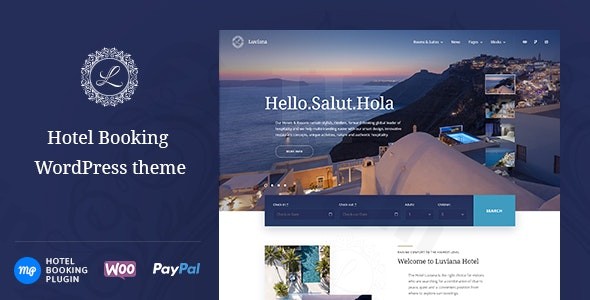
Luviana is a premium Hotel Booking WordPress Theme meticulously crafted for the hospitality sector. Its clean, elegant, and modern design makes it an ideal choice for a diverse range of accommodations, including boutique hotels, charming guest houses, cozy bed and breakfast establishments, lively hostels, luxurious resorts, and private inns. This theme empowers property owners to establish a sophisticated online presence with an integrated booking system, making it perfect for anyone looking to streamline their reservation process without extensive coding knowledge.
Key Features: Design, Layout & Performance
Luviana stands out with a design philosophy that marries classic luxury with modern usability, ensuring your property looks dandy, slick, and pixel-perfect online.
Design & Layout Options
The visual appeal of Luviana is built on a foundation of elegant contrasts and clear content hierarchy. It offers:
- Two Website Layout Modes: Choose between a full width and a wide width layout to best showcase your property and content.
- Flexible Blog Layouts: Present your updates with either a classic one-column or a modern grid blog layout, catering to different content presentation needs.
- Ready-to-Go Restaurant Layout: A unique inclusion for hospitality businesses that also feature dining, allowing you to elegantly present your culinary offerings.
- Header Customization: Control your header’s appearance, including the option to display or remove a prominent header image and implement a sticky menu for enhanced navigation.
- Dynamic Front Page Slider: The front page features an engaging slider that can display child pages of the home page, and even supports video as the first slide, offering a dynamic first impression.
Customization Capabilities
Luviana provides extensive customization options through the WordPress Customizer and its Gutenberg-first approach, allowing you to tailor your site to your brand’s aesthetics.
- Color Schemes: Beyond default and secondary colors, you can easily update header text color, background color, and accent colors for elements like buttons. The theme comes with several hand-picked color schemes, alongside the flexibility to create your own custom palettes.
- Typography: With support for Google Fonts and advanced typography settings, you have granular control over your site’s text, ensuring readability and consistent branding.
- Spacing, Containers, Sections, and Backgrounds: Adjust site width and add background images to pages, though a solid background is often preferred for a clean, luxurious look.
- Gutenberg Blocks with Getwid: Built from the ground up for the WordPress Block Editor, Luviana leverages the free Getwid plugin, providing a rich library of additional blocks like Testimonials, Team, Galleries, Image Slider, and Instagram Feed, enabling intuitive drag-and-drop page building without code.
Performance & SEO Features
Performance and search engine visibility are paramount for any successful online business. Luviana is engineered with these considerations in mind:
- Responsive and Mobile-Friendly: Your website will look stunning and function flawlessly on all devices, from desktops to smartphones, thanks to its fully responsive and Retina-ready design.
- SEO Optimized Markup: The theme comes with clean, semantic code that is optimized for search engines, helping your property rank higher and attract more organic traffic.
- Cross-Browser Compatibility: Luviana performs consistently across all major web browsers, ensuring a wide reach for your audience.
- Speed Optimization: Supports compression of JavaScript and CSS to enhance website loading speeds, contributing to a better user experience and improved SEO.
Installation & Demo Import
Getting your Luviana-powered hospitality website up and running is a straightforward process, even for beginners. Here’s a step-by-step guide:
- Install & Activate the Theme:
- First, download the Luviana theme package from ThemeForest.
- Log in to your WordPress dashboard.
- Navigate to
Appearance > Themes > Add New > Upload Theme. - Choose the downloaded Luviana
.zipfile and clickInstall Now. - Once installed, click
Activate.
- Install Required Companion Plugins:
- Upon theme activation, you will likely see a notification prompting you to install required plugins. Luviana’s core functionality relies on the MotoPress Hotel Booking plugin (which is included for free) and the Getwid plugin.
- Follow the on-screen instructions to install and activate these plugins. The MotoPress Hotel Booking plugin is crucial as it powers the entire reservation system.
- Use the One-Click Demo Import:
- Luviana includes a one-click demo import feature, allowing you to quickly set up a fully functioning booking website with pre-designed content, matching the theme’s demo site.
- Typically, you’ll find this option under
Appearance > Import Demo Dataor a similar menu item provided by the theme. - Click the import button and wait for the process to complete.
- What to Expect During/After Demo Import:
- The demo import will populate your site with sample pages (like Home, Rooms, About Us, Contact), posts, menus, widgets, and theme options.
- You can then easily customize this content with your own text, images, and branding.
- Note: While the demo import is robust, ensure your hosting environment meets standard WordPress requirements for memory and execution time to prevent potential timeouts during the import of larger demo content.
Customization Guide: Branding & Layout
Personalizing Luviana to reflect your brand’s unique identity is intuitive, thanks to its deep integration with the WordPress Customizer and Gutenberg Editor.
- Using the WordPress Customizer:
- Navigate to
Appearance > Customizefrom your WordPress dashboard. - Here, you can access global settings:
- Site Identity: Upload your logo, set your site title, tagline, and favicon.
- Colors: Fine-tune your header text, background, accent, and secondary colors to match your brand palette. Luviana offers pre-made schemes and custom options.
- Header Image / Background Image: Upload specific images for your header or as a general background.
- Menus: Configure your primary, social, and footer menus.
- Theme Options: Control various aspects of your site including footer text, header options (like the sticky menu), accommodation layout, blog layouts (classic or grid), site width, and activate the handy back-to-top button.
- Navigate to
- Changing Colors, Fonts, Logos:
- As mentioned, colors are easily managed via the Customizer.
- Typography settings, including Google Fonts, are also available in the Customizer, giving you control over headings and body text styles.
- Your logo is uploaded under Site Identity in the Customizer.
- Setting Up Homepage, Blog Page, and Menus:
- After demo import, your homepage will likely be set to a static page. You can change this under
Settings > Reading. - Similarly, specify your blog posts page there.
- Menus can be assigned to different locations (primary, social, footer) via
Appearance > Menus.
- After demo import, your homepage will likely be set to a static page. You can change this under
- Leveraging Gutenberg and Getwid for Content:
- Luviana is built with a Gutenberg-first approach, meaning you’ll use the native WordPress Block Editor for most page and post content.
- The Getwid plugin extends Gutenberg with powerful, ready-to-use blocks like Image Slider, Advanced Heading, Testimonial, Team, Galleries, Instagram Feed, and a Restaurant Menu. These blocks allow you to visually construct intricate layouts and add rich content without writing a single line of code.
- For advanced stylistic tweaks, you can add custom CSS via
Appearance > Customize > Additional CSS.
FAQ & Troubleshooting
Here are answers to some common questions about the Luviana WordPress theme:
Is Luviana compatible with Elementor / WPBakery / Gutenberg?
Luviana is a Gutenberg-first theme, built specifically to leverage the native WordPress Block Editor. It enhances this experience with the free Getwid plugin, which provides a suite of advanced blocks for visual page building. While you could theoretically use other page builders, Luviana is optimized for Gutenberg, and its core design and functionality seamlessly integrate with the block editor, making it the recommended and most efficient way to build with this theme.
Does Luviana support WooCommerce for online stores?
Luviana’s primary booking functionality is powered by the included MotoPress Hotel Booking plugin. While the theme itself isn’t a direct WooCommerce storefront, the MotoPress Hotel Booking plugin offers a WooCommerce Payments addon. This allows you to integrate WooCommerce for payment processing, enabling a wider range of payment gateways for your booking system.
Does Luviana support child themes?
Yes, Luviana is a professional WordPress theme and fully supports child themes. Using a child theme is the recommended practice for making custom code modifications (CSS, PHP) to ensure your changes are not overwritten during theme updates. You can find general guides on creating a WordPress child theme online.
How can I update the Luviana theme without losing my customizations?
To update the Luviana theme safely, always use a child theme for any custom code changes. For theme file updates, you would typically download the latest version from ThemeForest and then either update via the WordPress dashboard (if available through the marketplace’s update mechanism) or manually replace the theme files via FTP, ensuring you replace the parent theme while your child theme preserves your modifications. Always backup your website before performing any updates.
What should I do if the demo import fails or looks different from the demo site?
If the Luviana demo import fails, check your server’s resources (PHP memory limit, execution time). You might need to increase these limits in your php.ini file or contact your hosting provider. If the imported demo looks different, ensure all required plugins (MotoPress Hotel Booking, Getwid) are installed and activated, and that your WordPress and theme versions are up to date. Sometimes, image sizes or content width differences can also cause minor layout variations, which can be adjusted in the Customizer.
Conclusion
Luviana stands as a premier vacation rental WordPress theme solution for anyone in the hospitality industry aiming for a polished online presence with robust booking capabilities. Its elegant, responsive design ensures a visually engaging experience across all devices, while its SEO-optimized markup helps attract more guests.The theme’s deep integration with the included MotoPress Hotel Booking plugin is its most compelling feature, transforming your site into an all-in-one reservation system complete with real-time availability, payment processing, and OTA synchronization. Coupled with its Gutenberg-first approach and the extended block library from Getwid, Luviana offers an intuitive and powerful customization experience without the need for complex coding.Whether you’re a small bed and breakfast, a growing hostel, or a luxury resort, Luviana provides the tools to manage your property, automate bookings, and elevate your online brand. It’s an ideal choice for hotel owners, beginners, freelancers, and agencies who prioritize a specialized, elegant, and highly functional website for the hospitality sector.
I. Download Limits & Account Benefits
- Free Downloads: Each email address receives 3 downloads per day for free products
- Upgrade Benefits: Purchase any paid product to increase your daily download limit by 3 for each paid product
- No Account Required: You can download immediately by receiving the download link via email
- Account Recommended: Create an account for easier access to your order history and direct update downloads
II. Understanding GPL vs Official Versions
Important: The products available on WPPick are GPL-licensed versions, which differ from official developer versions. Before purchasing, please read our comprehensive guide: Understanding GPL & Official Differences at WPPick
Key Points:
- GPL versions may not include premium support from original developers
- Updates may be delayed compared to official releases
- Some premium features might have limitations
- Always consider your specific needs and support requirements
III. Support & Assistance
We’re here to help through multiple channels:
- Email Support: Direct email assistance for all inquiries
- Live Chat: Real-time support during business hours
- Comprehensive Documentation: Detailed guides and tutorials
IV. Order Tracking
Access your complete purchase history and download links anytime: Order History
V. Account Access
New to WPPick? Login or Create Account to manage your downloads and orders efficiently.
VI. Refund Protection
We stand behind our products with a clear refund policy. Review our terms: Refund Policy
VII. Privacy & Security
Your data security is our priority. Learn how we protect your information: Privacy Policy
VII. Terms of Service
Understanding our service terms ensures a smooth experience: Terms of Use
Quick Tips for Best Experience
- Verify Compatibility: Check plugin/theme compatibility with your WordPress version
- Backup First: Always backup your site before installing new plugins or themes
- Test Environment: Consider testing on a staging site first
- Stay Updated: Regularly check for updates in your account dashboard
- Read Documentation: Review any included documentation for optimal setup
Need Help?
If you have questions about downloads, licensing, or need technical assistance, don’t hesitate to contact our support team. We’re committed to ensuring you have the best possible experience with WPPick products.
Ready to get started? Your download adventure begins with just one click!
- Hotel Booking plugin updated to version 5.2.3
- Added support for the Hotel Booking Accommodation-Based Payments add-on
- Added the ability to limit search results based on the requested number of guests
- Added the ability to create discount coupons specifically for services and fees. Note new and updated columns in CSV reports
- Extended the list of countries that can accept payments via Klarna (Stripe)
- Added the "DTSTAMP" property to calendar export of blocking rules
- Added the ability to sync bookings with buffer times included
- Added the ability to remember the chosen guest count until checkout page
- Added more options for the price format
- Added the ability to create annually repeated seasons
- Added the ability to export bookings imported from external platforms to CSV reports
- Added a user-friendly option to select accommodation types in the WordPress block editor
- Added the ability to sort seasons by the start and end date. Now they are sorted by date by default
- Added the ability to easily change the order of the rates to set their priority
- Improved the Booking Details page to show all associated payments, not just the last one
- Improved compatibility with WordPress 6.8, addressing the _load_textdomain_just_in_time notice
- Improved calendar synchronization to accurately reflect the entire blocking duration
- Improved tooltips in the calendar date picker
- Improved the import of ongoing bookings from external channels
- Improved the way to customize rates based on the number of extra guests
- Improved the display of the season dates in the table of rates
- Improved the display of booking rules in different calendar themes
- Optimized an admin booking calendar URL for easier sharing
- Fixed an issue with annual season rules overriding the minimum stay setting
- Resolved several issues related to site timezone settings
- Fixed an issue where coupons were not applied correctly in languages other than English on the checkout page
- Fixed an issue with the extra guest fee calculation in search results for entries exceeding accommodation capacity
- Minor bugfixes and improvements