

Macchina – Auto Repair WordPress Theme
/Year
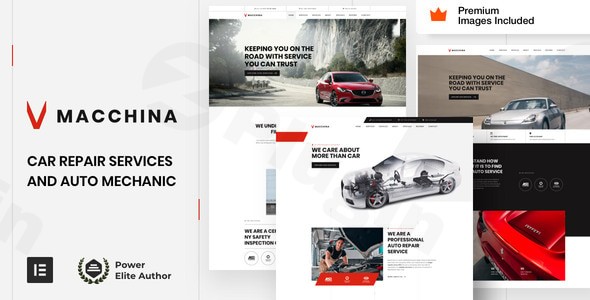
The Macchina WordPress theme is a premium, high-performance solution specifically engineered for the automotive industry. Designed for auto repair shops, car mechanics, garages, and parts stores, Macchina blends a bold, modern aesthetic with the technical robustness required to build a professional service website. Developed by VamTam, an elite author with over 100,000 clients, this Auto Repair WordPress Theme provides a specialized framework that moves beyond generic designs to offer industry-specific functionality.
1. Overview: Who is Macchina For?
Macchina is built for businesses that need a “heavy-duty” online presence. It targets:
- Auto Repair Shops & Mechanics: Showcasing diagnostics, repair services, and maintenance packages.
- Car Dealerships & Parts Stores: Leveraging full WooCommerce integration to sell automotive components or vehicles.
- Service Centers: Businesses requiring streamlined appointment booking and clear service lists.The design philosophy is centered on being “clean, modern, and user-friendly.” It avoids the cluttered look of older themes, opting for high-impact typography and a “stacked feature” layout that guides users toward a call to action (like booking a service).
2. Key Features: Design, Layout & Performance
Niche-Specific Design & Layouts
Macchina doesn’t just give you a blank canvas; it provides 3 niche-specific homepage layouts and a suite of pre-designed inner pages (About Us, Services, FAQ, Contact). These layouts are tailored to the exact nature of the mechanical industry, using visual hierarchy to highlight trust factors like certifications, warranties, and customer testimonials.
Powerful Customization with Elementor
Unlike themes that force you into a proprietary options panel, Macchina extends Elementor and Elementor Pro. This is a significant advantage for UI/UX designers:
- Global Styles Panel: Manage your site’s typography and color palette from a single location using Elementor Pro’s Global Styles.
- Visual Header & Footer Builder: Design complex navigation menus and informational footers without touching a line of code.
- Custom Animations: The theme adds its own unique styles and animations to standard Elementor widgets, giving your site a premium, custom-coded feel.
Performance & SEO Readiness
Speed is a critical ranking factor for local SEO. Macchina is marketed as having exceptional page-load performance straight out of the box. The codebase is optimized to be lean, reducing the “bloat” often found in multipurpose themes.
- SEO-Friendly: Clean markup and structured headings ensure that search engines like Google can easily crawl your car repair services.
- Mobile-First Design: The theme is fully responsive, ensuring your site looks stunning on smartphones—where most emergency car repair searches happen.
3. Installation & Demo Import Guide
Setting up a Car Mechanic WordPress theme should be straightforward. Macchina uses a streamlined process to get your site looking like the demo in minutes.
- Install & Activate: Upload the Macchina theme files via
Appearance > Themes > Add New. - Required Plugins: Upon activation, you will be prompted to install required plugins. Note: Macchina requires Elementor Pro for its demo content and advanced theme-building features.
- One-Click Demo Import: Navigate to the theme’s setup wizard. You can choose from the available demo layouts to import pages, posts, menus, and the $240 worth of included premium stock images.
- Verification: After the import, check your “Pages” section. You should see the Home, Services, and Contact pages ready for editing.Tip: Ensure your hosting environment has sufficient memory (at least 256MB) to avoid timeouts during the demo content import.
4. Customization Guide: Branding Your Shop
Personalizing the Macchina WordPress theme to match your garage’s branding is done primarily through the visual interface.
- Setting the Color Palette: Use the Elementor Global Colors setting to apply your brand’s primary and secondary colors across all buttons, icons, and accents simultaneously.
- Typography: The theme supports high-readability fonts ideal for technical service descriptions. You can adjust these globally to ensure consistency.
- WooCommerce Setup: If you are selling parts, the theme extends WooCommerce with Ajax Search and Wishlist functionality. You can customize product archives and single product pages using Elementor’s dynamic tags.
- Booking Integration: While the theme provides the UI for booking, it is compatible with popular booking plugins to help you manage your workshop’s schedule effectively.
5. FAQ & Troubleshooting
Is Macchina WordPress theme good for beginners?
Yes. Because Macchina relies on Elementor’s drag-and-drop interface and replaces the traditional, complex theme options panel with the intuitive WordPress Customizer and Global Styles, it is very accessible for those with limited coding experience.
Does Macchina support WooCommerce for online stores?
Absolutely. Macchina is fully compatible with WooCommerce. It includes pre-designed layouts for product pages, cart, and checkout, making it an excellent choice for auto parts stores looking to sell online.
Why do I need Elementor Pro for this theme?
Macchina is built to extend the capabilities of Elementor Pro (the paid version). It uses Pro features for the Header/Footer builder and demo content import. If you do not have Elementor Pro, you may lose access to these advanced layout controls.
Does it support child themes?
Yes, Macchina is child-theme ready. It is highly recommended to use a child theme for any custom CSS or PHP modifications to ensure your changes are not lost during theme updates.
What should I do if the demo import fails?
Most demo import issues are caused by server limitations. Ensure your max_execution_time is set to at least 300 and your memory_limit is 256M or higher. If issues persist, VamTam provides dedicated support with an average response time of 8 hours.
6. Conclusion: A High-Octane Choice for Automotive Pros
The Macchina WordPress theme stands out because it doesn’t try to be everything for everyone. It is a specialized, high-performance tool for the automotive niche. By combining Elementor Pro’s flexibility with VamTam’s refined design sensibilities, it allows shop owners to launch a site that looks like it cost thousands in custom development.Verdict: If you are looking for a fast, SEO-ready, and visually bold Car Mechanic WordPress theme, Macchina is a top-tier choice. Its reliance on Elementor Pro is a small price to pay for the level of design control and performance it offers.For more WordPress theme reviews and SEO strategies, visit wppick.com.
I. Download Limits & Account Benefits
- Free Downloads: Each email address receives 3 downloads per day for free products
- Upgrade Benefits: Purchase any paid product to increase your daily download limit by 3 for each paid product
- No Account Required: You can download immediately by receiving the download link via email
- Account Recommended: Create an account for easier access to your order history and direct update downloads
II. Understanding GPL vs Official Versions
Important: The products available on WPPick are GPL-licensed versions, which differ from official developer versions. Before purchasing, please read our comprehensive guide: Understanding GPL & Official Differences at WPPick
Key Points:
- GPL versions may not include premium support from original developers
- Updates may be delayed compared to official releases
- Some premium features might have limitations
- Always consider your specific needs and support requirements
III. Support & Assistance
We’re here to help through multiple channels:
- Email Support: Direct email assistance for all inquiries
- Live Chat: Real-time support during business hours
- Comprehensive Documentation: Detailed guides and tutorials
IV. Order Tracking
Access your complete purchase history and download links anytime: Order History
V. Account Access
New to WPPick? Login or Create Account to manage your downloads and orders efficiently.
VI. Refund Protection
We stand behind our products with a clear refund policy. Review our terms: Refund Policy
VII. Privacy & Security
Your data security is our priority. Learn how we protect your information: Privacy Policy
VII. Terms of Service
Understanding our service terms ensures a smooth experience: Terms of Use
Quick Tips for Best Experience
- Verify Compatibility: Check plugin/theme compatibility with your WordPress version
- Backup First: Always backup your site before installing new plugins or themes
- Test Environment: Consider testing on a staging site first
- Stay Updated: Regularly check for updates in your account dashboard
- Read Documentation: Review any included documentation for optimal setup
Need Help?
If you have questions about downloads, licensing, or need technical assistance, don’t hesitate to contact our support team. We’re committed to ensuring you have the best possible experience with WPPick products.
Ready to get started? Your download adventure begins with just one click!
- Updated style.css
- Updated vamtam/classes/elementor-bridge.php
- Updated vamtam/classes/framework.php
- Updated style.css
- Updated vamtam/admin/classes/diagnostics.php
- Updated vamtam/admin/classes/plugin-manager.php
- Updated vamtam/admin/classes/token-restoration.php
- Updated vamtam/admin/helpers/updates/version-checker.php
- Updated vamtam/assets/css/dist/elementor/elementor-all.css
- Updated vamtam/assets/css/dist/elementor/elementor-all.css.map
- Updated vamtam/assets/css/dist/elementor/responsive/elementor-below-max.css
- Updated vamtam/assets/css/dist/elementor/responsive/elementor-below-max.css.map
- Updated vamtam/classes/framework.php