
Madara – WordPress Theme For Manga By Mangabooth
/Year
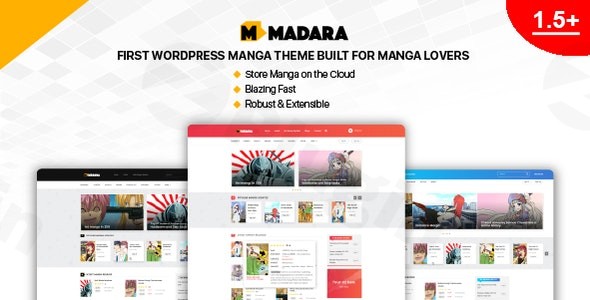
Creating a digital publishing hub for sequential art requires a specialized structure that standard blog themes simply cannot provide. The Madara WordPress theme is the industry-leading solution designed specifically for building professional manga, webtoon, and light novel websites. Developed by MangaBooth, this theme offers a modern, high-performance platform that streamlines content management for administrators while providing an immersive, distraction-free experience for readers.Whether you are an independent creator or managing a high-traffic publishing portal, Madara provides a cohesive package that eliminates the need for complex, multi-plugin setups. In this review, we will explore why it is considered the best WordPress theme for comics and serialized narrative content.
Key Features: Design, Layout & Performance
The Madara WordPress theme is built with a “reader-first” philosophy. Unlike multipurpose themes that try to do everything, Madara focuses exclusively on the unique hierarchy of manga series: titles, volumes, and chapters.
Specialized Manga Layouts
Madara offers a variety of manga listing layouts to suit your brand’s aesthetic. You can choose between Big and Small thumbnail displays, with flexible grid options ranging from 2 to 5 columns. This allows for a highly visual “discovery” phase where users can easily browse through your catalog.
Immersive Reader Experience
The core of any manga site is the reading page. Madara provides two distinct modes:
- Single-Page Layout: Ideal for a traditional “click-to-next” experience.
- All-Pages Layout: Perfect for webtoons and vertical-scroll comics, loading all images in a seamless flow.
Cloud Storage & Performance Optimization
High-resolution images can quickly bloat a server. Madara addresses this with advanced technical features:
- Cloud Integration: You can host your images on Amazon S3, Blogspot, or Imgur, reducing the load on your local server.
- Speed Features: The theme includes built-in Lazy Loading for images and chapter lists, as well as Ajax loading to ensure the site remains fast even with large image galleries.
- SEO Readiness: With clean markup and compatibility with Yoast SEO and Google AMP, your content is structured to rank effectively in search engines.
Step-by-Step Installation & Demo Import
Setting up a WordPress theme for manga can seem daunting due to the complex data structure, but Madara simplifies this with a guided process.
- Install & Activate: Upload the Madara theme files via your WordPress Dashboard (Appearance > Themes > Add New).
- Plugin Setup: Upon activation, the theme will prompt you to install required companion plugins. Ensure these are active to enable the custom “Manga” post types.
- One-Click Demo Import: Madara includes a “Sample Data” feature. Navigate to the import section in the dashboard to pull in pre-configured layouts, menus, and placeholder content.
- Check Server Requirements: Because demo imports for manga sites involve many custom fields, ensure your server’s PHP
max_execution_timeandmemory_limitare set to at least 300 and 256M respectively to avoid timeouts.
Customization Guide: Branding Your Reading Portal
Madara has transitioned to using the WordPress Customizer, allowing you to see visual changes in real-time. This makes it accessible for beginners while remaining powerful for advanced users.
Tailoring the Aesthetics
You can easily adjust the site’s typography and color schemes to match your brand identity. The theme emphasizes a modern, clean UI that lets the artwork take center stage. With 10 different sidebar locations and various custom widgets (like the “Manga Hero Slider”), you can control exactly where your top-rated or trending series appear.
Content Organization
The theme utilizes custom fields specifically for the niche. When adding a new “Manga” entry, you can define:
- Authors & Artists: Separate fields for creators.
- Genre & Tags: Essential for user filtering.
- Rank & Status: Display whether a series is “On-going” or “Completed.”
Child Theme Flexibility
For those looking for a specific “look,” MangaBooth offers several child themes such as Madara Child TV (for a video/drama feel) or NovelHub (optimized for text-heavy light novels). Using a child theme is highly recommended to ensure your customizations remain intact during core theme updates.
FAQ & Troubleshooting
Is the Madara theme compatible with Elementor?
Based on user reports and developer documentation, the Madara theme is not fully compatible with Elementor. It is a specialized theme that relies on its own internal layout builders and the WordPress Customizer to maintain the complex logic required for manga chapter navigation.
Does the Madara theme support WooCommerce?
Yes, the Madara WordPress theme includes full WooCommerce support. This allows site owners to sell physical merchandise, digital downloads, or premium access to specific chapters alongside their free content.
How do I upload manga chapters using the Madara theme?
Chapters are managed under the “Manga” custom post type. Once you create a Manga title, you can add “Volumes” and “Chapters.” Images can be uploaded directly to your WordPress media library or linked via supported cloud storage providers like Amazon S3 or Imgur for better performance.
Is the Madara theme SEO friendly?
Yes, Madara is built with SEO-optimized code and is compatible with major plugins like Yoast SEO. It also supports Google AMP (Accelerated Mobile Pages), which is crucial for ranking well in mobile search results where most manga consumption occurs.
Conclusion: Is Madara Right for You?
The Madara WordPress theme is a powerful, niche-specific tool that excels where multipurpose themes fail. It provides a robust architecture for managing thousands of images and chapters while maintaining high speeds and a modern user interface.Ideal for:
- Manga & Comic Publishers: Who need a professional platform to host serialized content.
- Webtoon Creators: Looking for a vertical-scroll-friendly reading experience.
- Light Novel Authors: Who want to organize their stories into volumes and chapters.While there is a slight learning curve due to the depth of its features—and its lack of Elementor support may be a drawback for some—its specialized tools for cloud storage and manga management make it the gold standard for digital reading portals. If you are serious about building a manga community on WordPress, Madara is the most comprehensive solution available on the market today.Visit wppick.com for more WordPress theme reviews and SEO strategies.
I. Download Limits & Account Benefits
- Free Downloads: Each email address receives 3 downloads per day for free products
- Upgrade Benefits: Purchase any paid product to increase your daily download limit by 3 for each paid product
- No Account Required: You can download immediately by receiving the download link via email
- Account Recommended: Create an account for easier access to your order history and direct update downloads
II. Understanding GPL vs Official Versions
Important: The products available on WPPick are GPL-licensed versions, which differ from official developer versions. Before purchasing, please read our comprehensive guide: Understanding GPL & Official Differences at WPPick
Key Points:
- GPL versions may not include premium support from original developers
- Updates may be delayed compared to official releases
- Some premium features might have limitations
- Always consider your specific needs and support requirements
III. Support & Assistance
We’re here to help through multiple channels:
- Email Support: Direct email assistance for all inquiries
- Live Chat: Real-time support during business hours
- Comprehensive Documentation: Detailed guides and tutorials
IV. Order Tracking
Access your complete purchase history and download links anytime: Order History
V. Account Access
New to WPPick? Login or Create Account to manage your downloads and orders efficiently.
VI. Refund Protection
We stand behind our products with a clear refund policy. Review our terms: Refund Policy
VII. Privacy & Security
Your data security is our priority. Learn how we protect your information: Privacy Policy
VII. Terms of Service
Understanding our service terms ensures a smooth experience: Terms of Use
Quick Tips for Best Experience
- Verify Compatibility: Check plugin/theme compatibility with your WordPress version
- Backup First: Always backup your site before installing new plugins or themes
- Test Environment: Consider testing on a staging site first
- Stay Updated: Regularly check for updates in your account dashboard
- Read Documentation: Review any included documentation for optimal setup
Need Help?
If you have questions about downloads, licensing, or need technical assistance, don’t hesitate to contact our support team. We’re committed to ensuring you have the best possible experience with WPPick products.
Ready to get started? Your download adventure begins with just one click!
- Option to change Sidebar size in Customize > General Layout
- Madara Shortcodes plugin security enhancements
- Remove found_posts filter
- Improve gphotos storage
- Fix user login off canvas issue
- Purge cache when bookmarking
- Fix Recent Comments widget (show avatar, show datetime options do not work)
- Fix caching issue
- Fix font family issue
- Fix missing Show Rating option in Customizer
- Fix minor bugs
- minor warning bugs
- allow to create Google Photos Album directly before uploading
- security vulnarability
- latest OneSignal compatibility (v3)
- minor issues